
Build a Strong Career in SQL Server Database Administration
Modern businesses depend on databases to store customer information, financial transactions, application data, reports, and business-critical information. Behind these databases are professionals who make sure that data remains available, secure, reliable, and performant.
This is where a SQL Database Administrator (SQL DBA) plays an important role.
SQL DBA Training helps learners understand how to install, configure, manage, secure, monitor, back up, restore, troubleshoot, and optimize Microsoft SQL Server databases.
Instead of focusing only on SQL queries, a DBA learning path focuses on what happens behind the database—from server configuration and user security to backup recovery and performance troubleshooting.
What Exactly Does a SQL DBA Do?
A SQL DBA is responsible for the day-to-day administration and health of SQL Server environments.
Typical responsibilities can include:
- Installing and configuring SQL Server
- Creating and managing databases
- Managing logins, users, roles, and permissions
- Monitoring database health
- Managing backups and restores
- Scheduling administrative jobs
- Troubleshooting database issues
- Monitoring CPU, memory, disk, and database activity
- Investigating blocking and deadlocks
- Performing database maintenance
- Working on performance tuning
- Supporting high-availability and disaster-recovery requirements
- Managing SQL Server environments in cloud platforms
A DBA therefore needs both technical database knowledge and practical troubleshooting skills.
Why SQL DBA Skills Matter in a Data-Driven World
Applications may change, cloud platforms may evolve, and data volumes may grow, but organizations still need reliable database administration.
A SQL DBA helps organizations answer critical questions:
Is the database available?
Is the data protected?
Are backups working?
Can the database be recovered after a failure?
Why is an application running slowly?
Who has access to sensitive data?
What is causing blocking or performance issues?
These questions make database administration an important part of enterprise IT operations.
Your SQL DBA Learning Journey Starts with SQL Server Fundamentals
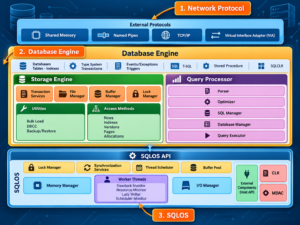
Before moving into advanced administration, learners should understand the fundamentals of SQL Server.
Important concepts include:
- SQL Server architecture
- Database Engine
- SQL Server instances
- System databases
- User databases
- Data files
- Transaction log files
- MDF, NDF, and LDF files
- SQL Server services
- SQL Server Agent
- SQL Server Management Studio (SSMS)
- T-SQL basics
Understanding these components makes advanced DBA concepts much easier to learn.
Installing SQL Server and Setting Up Your DBA Environment
Practical DBA training should begin with a working SQL Server environment.
Learners can practice:
- SQL Server installation
- SSMS installation
- Instance configuration
- Authentication configuration
- Server properties
- Database creation
- Database file configuration
- Connecting through SSMS
- Running administrative T-SQL commands
Once the environment is ready, learners can perform DBA exercises instead of only reading theoretical concepts.
Database Administration: Managing the Heart of the System
Database administration is one of the core responsibilities of a SQL DBA.
A DBA needs to understand how databases are created, configured, maintained, and monitored.
Important areas include:
- Creating databases
- Modifying database properties
- Managing database files
- Managing filegroups
- Understanding database states
- Managing transaction logs
- Database compatibility
- Database configuration
- Database maintenance
- Database integrity
These fundamentals provide the foundation for more advanced administration.
SQL Server Security: Protecting Data and Controlling Access
Database security is another major responsibility of a SQL DBA.
A DBA needs to understand who can access a database, what they can access, and what actions they are allowed to perform.
Training can cover:
- Logins
- Users
- Server roles
- Database roles
- Permissions
- GRANT
- DENY
- REVOKE
- Windows Authentication
- SQL Server Authentication
- Security best practices
- Auditing
- Encryption
Proper permission management helps organizations control database access according to business and security requirements.
Backup and Restore: The DBA’s Safety Net
Imagine an important production database suddenly becomes unavailable or critical data is accidentally deleted.
What happens next?
This is where a DBA’s backup and recovery strategy becomes essential.
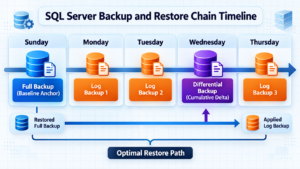
SQL Server supports different backup approaches, including:
- Full backup
- Differential backup
- Transaction log backup
- File and filegroup backups
Microsoft recommends not only creating backups but also testing restoration procedures so organizations know that their recovery strategy actually works.
A practical SQL DBA course should therefore include hands-on exercises for:
- Creating backups
- Scheduling backups
- Restoring databases
- Restoring differential backups
- Restoring transaction logs
- Point-in-time recovery
- Backup verification
- Recovery planning
Backup and restore should be treated as a complete process rather than simply creating .bak files.
SQL Server Agent: Turning Repetitive Tasks into Automation
A DBA may need to perform the same administrative tasks every day or every week.
Instead of performing everything manually, SQL Server Agent can be used for scheduled database administration tasks.
Examples include:
- Database backups
- Maintenance operations
- Index maintenance
- Data cleanup
- Monitoring jobs
- Alerts
- Scheduled T-SQL scripts
Learning SQL Server Agent helps DBAs move from manual administration toward automation and operational efficiency.
Performance Tuning: Finding Out Why SQL Server Is Slow
One of the most challenging areas of database administration is performance troubleshooting.
When users say:
“The application is slow.”
The DBA needs to investigate what is actually happening.
Possible areas of investigation include:
- CPU utilization
- Memory pressure
- Disk I/O
- Long-running queries
- Blocking
- Deadlocks
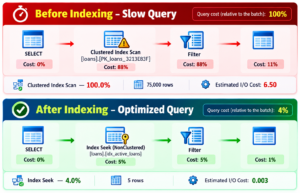
- Missing or inefficient indexes
- Execution plans
- Statistics
- Wait statistics
- Query performance
- Database configuration
Microsoft’s SQL Server performance guidance emphasizes monitoring resources such as CPU, disk I/O, and workload behavior while using tools such as Query Store, Extended Events, DMVs, and performance monitoring tools.
SQL Server also provides the Database Engine Tuning Advisor, which can analyze workloads and provide recommendations involving indexes, indexed views, and table partitions.
Blocking and Deadlocks: Essential Troubleshooting Skills
In production environments, database problems are not always caused by incorrect SQL syntax.
Sometimes transactions compete for resources.
This can result in:
- Blocking
- Locking
- Deadlocks
- Slow transactions
- Increased response time
A practical SQL DBA should learn how to identify these situations, investigate the underlying cause, and determine an appropriate resolution.
This is one reason scenario-based DBA training is valuable.
Database Maintenance: Keeping SQL Server Healthy
Regular maintenance helps DBAs manage database environments systematically.
Common maintenance activities include:
- Index maintenance
- Statistics maintenance
- Database integrity checks
- Transaction log management
- Backup management
- Storage monitoring
- SQL Agent job monitoring
- Database health checks
A DBA should understand not only how to perform maintenance but also when and why a particular maintenance activity is required.
High Availability and Disaster Recovery
For business-critical applications, database availability can be extremely important.
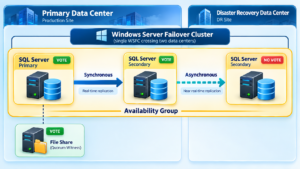
SQL DBA training can introduce concepts such as:
- High Availability
- Disaster Recovery
- Always On Availability Groups
- Failover
- Recovery objectives
- Business continuity
- Backup-based recovery
The objective is to understand how organizations plan for database failures and minimize disruption.
Taking SQL DBA Skills to Azure
Database administration is no longer limited to traditional on-premises servers.
Microsoft Azure provides several options for organizations working with SQL Server technologies.
A DBA can expand into areas such as:
- Azure SQL Database
- Azure SQL Managed Instance
- SQL Server on Azure Virtual Machines
- Azure database migration
- Cloud database security
- Azure SQL monitoring
- Cloud backup and recovery
This creates a natural learning path from SQL Server DBA → Azure SQL DBA.
Who Can Learn SQL DBA?
SQL DBA Training can be suitable for:
- Freshers interested in database technologies
- SQL Developers
- Database professionals
- Application support professionals
- System administrators
- Data professionals
- IT professionals
- Working professionals looking to expand their database skills
- Professionals interested in Azure SQL DBA roles
A learner does not need to master every advanced DBA topic on day one.
A structured learning path can take you from SQL fundamentals → SQL Server → DBA administration → performance → recovery → Azure.
Career Paths After SQL DBA Training
SQL Server administration knowledge can be relevant to several technology roles, depending on experience and organizational requirements.
Potential roles include:
- SQL DBA
- SQL Server Database Administrator
- Database Support Engineer
- SQL Production Support Engineer
- SQL Server Administrator
- Azure SQL DBA
- Database Engineer
- Database Operations Engineer
- Senior SQL DBA
- ETL Administrator
The responsibilities, required experience, and technology stack can vary between organizations.
Why Choose SQL School for SQL DBA Training?
SQL School provides a practical learning approach designed around SQL Server administration and real-world database scenarios.
The learning experience can include:
- 100% practical training
- Step-by-step learning
- SQL Server administration
- Real-time projects
- Scenario-based DBA exercises
- Backup and recovery practice
- Performance tuning concepts
- Database security
- Interview preparation
- Resume guidance
- Placement assistance
The learning path can also be extended toward Azure SQL DBA and related database technologies.
Frequently Asked Questions About SQL DBA Training
Is SQL DBA difficult to learn?
SQL DBA involves several areas, including databases, security, backup, recovery, monitoring, and troubleshooting. Learning these topics step by step with hands-on practice can make the learning process more structured.
Do I need SQL knowledge before learning SQL DBA?
Basic SQL knowledge is helpful because DBAs regularly work with T-SQL and database objects. Beginners can first learn SQL fundamentals and then progress into administration.
What should I learn first in SQL DBA?
Start with SQL fundamentals and SQL Server architecture. Then progress to installation, database administration, security, backup and restore, SQL Server Agent, monitoring, and performance tuning.
Is backup and restore important for a DBA?
Yes. Backup and restore are fundamental parts of database administration. Microsoft specifically recommends testing restore procedures to validate that backups can actually support recovery.
Conclusion
SQL DBA is not simply about writing SQL queries.
It is about understanding how databases are installed, configured, secured, monitored, backed up, restored, maintained, optimized, and supported.
A structured SQL DBA learning path can help you progress from SQL fundamentals to SQL Server Administration, Security, Backup & Recovery, Performance Tuning, High Availability, Disaster Recovery, and Azure SQL.
SQL DBA Training: https://sqlschool.com/sql-dba-training/
SQL DBA Course Curriculum: https://sqlschool.com/wp-content/uploads/2026/09/SQL-DBA-with-Azure-AI-1.pdf
Start your SQL DBA journey with SQL School — learn practically, work on real-time scenarios, and prepare for database administration careers.
📞 Call: +91 9666440801 / +91 9951440801
🌐 Website: sqlschool.com
🎓 Attend a FREE Demo Session and explore SQL DBA Training.
#SQLDBATraining #SQLDBACourse #SQLServerDBA #SQLServerTraining #DatabaseAdministrator #SQLServerAdministration #SQLDBA #DatabaseAdministration #SQLServerPerformanceTuning #SQLServerBackup #SQLServerRecovery #AzureSQL #AzureSQLDBA #DBACareer #SQLSchool

