
How to Identify and Delete Duplicate Rows in SQL Server Using ROW_NUMBER()
Duplicate records are a common challenge when working with SQL Server databases. They can occur because of repeated data imports, application issues, manual data entry, or missing unique constraints.
Duplicate data can affect reports, data analysis, database performance, ETL processes, and business decisions. Therefore, SQL developers and database administrators should know how to identify and safely remove duplicate records.
In this guide, we will learn how to find duplicate rows in SQL Server and delete them using the ROW_NUMBER() function, PARTITION BY, and a SQL Server view.
What Are Duplicate Rows in SQL Server?
Duplicate rows are records where the values in the columns used to identify a record are repeated.
For example, consider a table containing:
| ID | Value | Rank |
|---|---|---|
| 1 | 11 | 23 |
| 2 | 22 | 11 |
| 3 | 33 | 2 |
| 4 | 33 | 1 |
| 1 | 11 | 23 |
| 2 | 22 | 11 |
Here, the combinations:
ID = 1, Value = 11, Rank = 23ID = 2, Value = 22, Rank = 11
appear more than once.
These repeated records can be treated as duplicates depending on the business requirement.
Why Should You Remove Duplicate Data?
Duplicate records may create several problems in a database environment.
1. Incorrect Reports
Duplicate records can cause incorrect counts and calculations in reports.
2. Data Quality Issues
Repeated records reduce the overall quality and reliability of the database.
3. Incorrect Analytics
Data analysts may receive misleading results when duplicate rows are included in calculations.
4. ETL Problems
Duplicate data can affect data migration, data integration, and ETL pipelines.
5. Storage and Performance
Unnecessary records consume additional database storage and may increase the amount of data processed by queries.
Create a Sample SQL Server Database
Let’s create a sample database for demonstrating duplicate record handling.
CREATE DATABASE SQLSCHOOLDB;

USE SQLSCHOOLDB;
Next, create a sample table.
CREATE TABLE tbltest
(
    ID INT,
    Value INT,
    RANK INT
);
Insert Sample Data
Now insert some records into the table.
INSERT INTO tbltest VALUES (1,11,23);
INSERT INTO tbltest VALUES (2,22,11);
INSERT INTO tbltest VALUES (3,33,2);
INSERT INTO tbltest VALUES (4,33,1);
INSERT INTO tbltest VALUES (5,44,22);
INSERT INTO tbltest VALUES (6,44,2);
INSERT INTO tbltest VALUES (7,55,2);
INSERT INTO tbltest VALUES (8,55,11);
INSERT INTO tbltest VALUES (9,55,2);
INSERT INTO tbltest VALUES (10,55,11);
You can check the inserted records using:
SELECT *
FROM tbltest;
Add Duplicate Records
To demonstrate duplicate detection, insert some of the existing records again.
INSERT INTO tbltest VALUES (1,11,23);
INSERT INTO tbltest VALUES (2,22,11);
INSERT INTO tbltest VALUES (3,33,2);
INSERT INTO tbltest VALUES (4,33,1);
Now check the table:
SELECT *
FROM tbltest
ORDER BY ID ASC;
The result contains repeated combinations of ID, Value, and Rank.
How to Identify Duplicate Rows in SQL Server
One of the most useful approaches for identifying duplicates is the SQL Server ROW_NUMBER() window function.
The following query assigns a sequential number to rows belonging to the same combination of values:
SELECT *,
       ROW_NUMBER() OVER
       (
           PARTITION BY ID, Value, RANK
           ORDER BY ID, Value, RANK
       ) AS IsDup
FROM tbltest
ORDER BY ID ASC;
Understanding ROW_NUMBER()
ROW_NUMBER() assigns a unique sequential number to each row within a partition.
For example, if the same combination occurs twice:
| ID | Value | Rank | IsDup |
|---|---|---|---|
| 1 | 11 | 23 | 1 |
| 1 | 11 | 23 | 2 |
The first occurrence receives:
IsDup = 1
The second occurrence receives:
IsDup = 2
If the same record occurs three times, the values will be:
1, 2, 3
This makes it easy to distinguish the original record from additional duplicate occurrences.
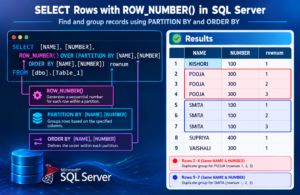
How PARTITION BY Identifies Duplicates
The important part of the query is:
PARTITION BY ID, Value, RANKThis tells SQL Server to group rows based on the combination of these three columns.
Therefore, records having the same:
IDValueRANK
are placed into the same partition.
The ROW_NUMBER() function then numbers the records within each partition.
Identifying Only Duplicate Records
If we want to display only the duplicate occurrences, we can use a Common Table Expression (CTE):
WITH DuplicateRows AS
(
    SELECT *,
           ROW_NUMBER() OVER
           (
               PARTITION BY ID, Value, RANK
               ORDER BY ID, Value, RANK
           ) AS IsDup
    FROM tbltest
)
SELECT *
FROM DuplicateRows
WHERE IsDup > 1;
The condition:
WHERE IsDup > 1returns only the additional occurrences.
The first occurrence is retained because it has:
IsDup = 1Creating a View for Duplicate Detection
The uploaded SQL example also demonstrates creating a view containing the duplicate-numbering logic.
CREATE VIEW vw_dup_row
AS
SELECT *,
       ROW_NUMBER() OVER
       (
           PARTITION BY ID, Value, RANK
           ORDER BY ID, Value, RANK
       ) AS IsDup
FROM tbltest;
Now the view can be queried like a table:
SELECT *
FROM vw_dup_row;
This allows you to inspect which rows are original records and which rows are duplicates.
Delete Duplicate Rows Using the View
Once duplicate rows have been identified, the duplicate occurrences can be removed:
DELETE FROM vw_dup_row
WHERE IsDup > 1;
The objective is to retain the first occurrence and delete subsequent duplicate rows.
After deletion, verify the table:
SELECT *
FROM tbltest
ORDER BY ID;
How the Duplicate Removal Process Works
The complete process can be understood in four simple steps:
Step 1: Find Repeated Data
Identify the columns that define a duplicate record.
In this example:
ID + Value + RANKStep 2: Assign Row Numbers
Use:
ROW_NUMBER()to number rows within each duplicate group.
Step 3: Identify Additional Occurrences
Rows where:
IsDup > 1are duplicate occurrences.
Step 4: Delete Duplicate Occurrences
Delete the rows where IsDup > 1, while retaining the first occurrence.
Important Consideration When Deleting Duplicates
Before deleting duplicate data from a production database, always verify what constitutes a duplicate from a business and data-model perspective.
Two rows that look identical may not necessarily be duplicates if they represent separate business transactions.
It is also recommended to:
- Take a database backup when appropriate.
- Run the duplicate-detection query before deleting.
- Review the rows returned by
IsDup > 1. - Use a transaction when performing critical cleanup.
- Test the deletion logic in a development or test environment first.
For example:
BEGIN TRANSACTION;

-- Duplicate deletion logic

-- Review the result

-- COMMIT or ROLLBACK based on validation
This provides an additional safety mechanism when performing database cleanup.
Alternative Method Using GROUP BY
Another common method for detecting duplicates is GROUP BY.
SELECT ID,
       Value,
       RANK,
       COUNT(*) AS DuplicateCount
FROM tbltest
GROUP BY ID, Value, RANK
HAVING COUNT(*) > 1;
This query identifies combinations that occur more than once.
However, GROUP BY primarily tells you which values are duplicated. ROW_NUMBER() is more useful when you need to identify the individual rows that should be retained or removed.
ROW_NUMBER() vs GROUP BY
| Feature | ROW_NUMBER() | GROUP BY |
|---|---|---|
| Find duplicate combinations | Yes | Yes |
| Number individual duplicate rows | Yes | No |
| Select the first occurrence | Yes | Not directly |
| Select duplicate occurrences | Yes | Not directly |
| Useful for duplicate deletion | Very useful | Usually requires additional logic |
| Window function | Yes | No |
Real-World Applications
Duplicate record handling is especially useful in:
- SQL Server database administration
- Data migration
- ETL development
- Data warehousing
- Data engineering
- Data cleaning
- Reporting systems
- Master data management
- Application databases
- Business intelligence projects
For example, during an ETL process, customer data may be loaded multiple times. A duplicate-removal process can help maintain cleaner target tables.
How SQL Developers Can Use This Technique
Understanding duplicate data management is an important skill for SQL Developers.
A SQL Developer should be comfortable working with:
SELECTINSERTUPDATEDELETEGROUP BYHAVINGROW_NUMBER()- Window Functions
- CTEs
- Views
- Transactions
- Constraints
- Indexes
Learning these concepts through practical database scenarios can make SQL development much easier.
Best Practices to Prevent Duplicate Records
Removing duplicates is useful, but preventing unnecessary duplicates is even better.
Consider using:
Unique Constraints
Unique constraints can prevent duplicate values in specific columns or combinations.
Primary Keys
Primary keys provide a unique identifier for each record.
Data Validation
Validate incoming data before inserting it into the database.
ETL Validation
During ETL processes, check whether a record already exists before inserting it.
Proper Database Design
A well-designed relational database can significantly reduce data duplication and integrity problems.
Frequently Asked Questions
What is the easiest way to identify duplicate rows in SQL Server?
ROW_NUMBER() with PARTITION BY is one of the most flexible methods for identifying individual duplicate occurrences.
What does ROW_NUMBER() do?
ROW_NUMBER() assigns a sequential number to rows within a specified partition.
Why use PARTITION BY when finding duplicates?
PARTITION BY groups records based on the columns that define a duplicate.
What does IsDup > 1 mean?
It identifies rows that occur after the first occurrence within the same duplicate group.
Can GROUP BY identify duplicate records?
Yes. GROUP BY combined with HAVING COUNT(*) > 1 can identify duplicate combinations.
Should duplicate records always be deleted?
No. Before deleting data, determine whether the repeated records are actually duplicates according to the application’s business rules.
Conclusion
Duplicate data is a common database-management challenge, but SQL Server provides powerful techniques for identifying and handling it.
Using ROW_NUMBER() with PARTITION BY allows SQL Developers and Database Administrators to identify individual duplicate occurrences and retain the required record. Combining this technique with views, CTEs, transactions, and proper database design provides a practical approach to data-quality management.
Mastering duplicate-record handling is an important step toward becoming more confident in SQL Server, SQL Development, Database Administration, Data Engineering, and ETL.
Start Learning Practical SQL
Build your SQL skills through real-world database scenarios, hands-on queries, assignments, and practical projects with SQL School Training Institute – Hyderabad.
Learn SQL concepts step by step and practice the techniques used in real database environments with guidance from Mr. Sai Phanindra – Founder & Trainer.
Contact Us: +91 9666440801 | +91 9951440801
Website: sqlschool.com
Trainer: Mr. Sai Phanindra – Founder & Trainer
#SQLServer #SQL #SQLDeveloper #SQLDBA #DatabaseManagement #DatabaseAdministration #SQLServerTraining #SQLTraining #SQLTutorial #SQLQueries #DuplicateRecords #DuplicateData #DeleteDuplicates #DataCleaning #DataQuality #ROWNUMBER

