

Data Analyst is a promising job role that deals with Data, Analysis, Derived Information and drive to Infographics of enterprise content. This role also involves Data collection, data processing, and data analysis to identify trends, patterns, and relationships that can be used to solve problems and make informed decisions with ease !
Training Highlights
✅ SQL for Data Analysis & Reporting
✅ Advanced Excel, Pivot Tables, Dashboards
✅ Power BI for Interactive Visualizations
✅ Data Cleaning with Power Query
✅ Python: Pandas, NumPy, Visualization
✅ Statistics, Exploratory Data Analysis (EDA)
✅ Business Intelligence & Storytelling
✅ Real-Time Projects with Case Studies
✅ Resume Building, Portfolio & GitHub Profile
✅ 1:1 Mentorship & Interview Preparation
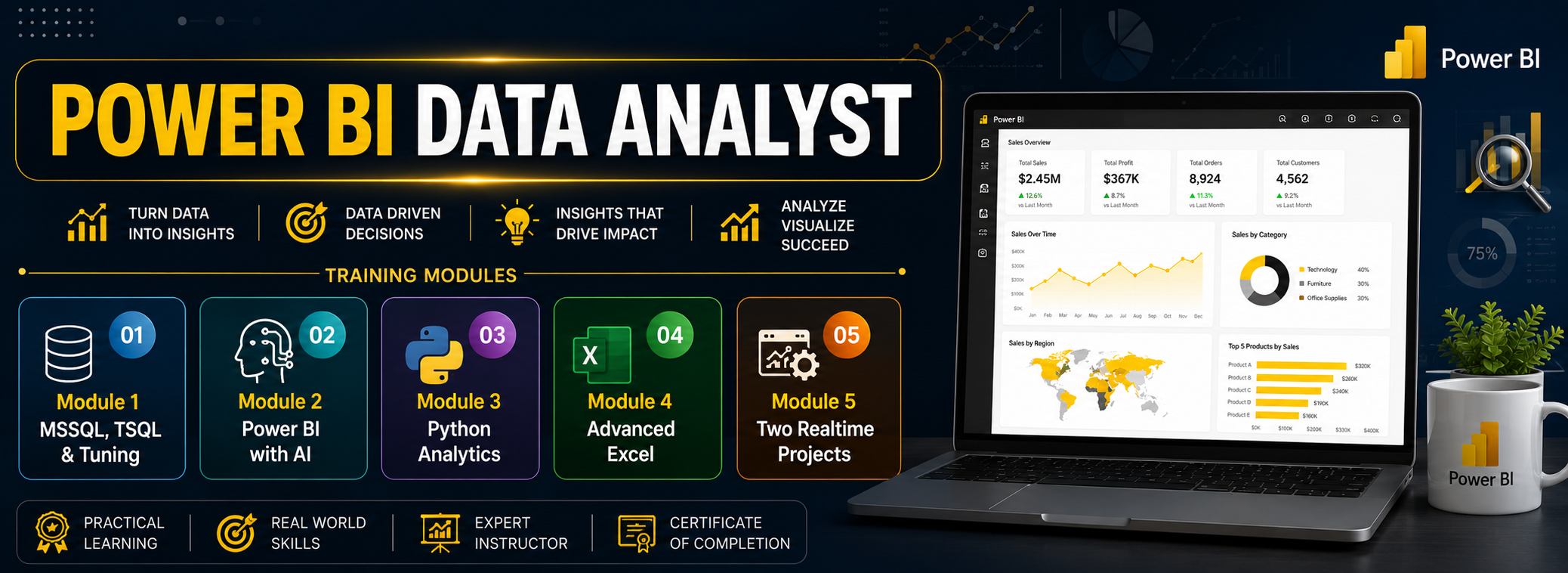
Modules We Learn
✅ Module 1: MSSQL, TSQL & Tuning
✅ Module 2: Power BI with AI
✅ Module 3: Python Analytics
✅ Module 4: Advanced Excel
✅ Module 5: Two Realtime Projects
Course Duration: 3 Months
Data Analyst
Course Contents:
Module 1: MSSQL & TSQL
Ch 1: SQL Database Job Roles
- Database Intro
- OLTP, DWH, OLAP
- DBMS Basics
- Data Analyst Job Roles
Ch 2: Database Intro & Installations
- SQL Server Installations
- Instance & Collations
- SSMS Tool Installation
- Connections, Authentications
Ch 3: SQL Basics V1 (Commands)
- SQL Basics (DDL, DML, etc..)
- Creating Databases, Tables
- Data Inserts (GUI, SQL)
- Basic SELECT Queries
Ch 4: SQL Basics V2 (Commands, Operators)
- DDL: Create, Alter, Drop
- DML: Insert, Update, Delete
- DQL: Select, Fetch
- Add, Truncate Statements
- SQL Operators
Ch 5: Data Types & Variables
- Integer Data Types
- Character, MAX Data Types
- Decimal & Boolean Data Types
- Date and Time Data Types
- SQL_Variant Type
Ch 6: Data Imports
- Data Imports with Excel
- Data Imports with CSV
- Data Types Detection
- OLE-DB Connections
- ORDER BY, TOP, OFFSET
Ch 7: Schemas & Batches
- Schemas & Table Grouping
- Real-world Banking Database
- 2 Part, 3 Part & 4 Part Naming
- Batch Concept & “Go” Command
Ch 8: Constraints, Keys & RDBMS
- Null, Not Null Constraints
- Unique Key & Check
- Primary Key Constraint
- Foreign Keys, Default
- DB Diagrams & ER Models
Ch 9: Normal Forms & RDBMS
- Normal Forms: 1 NF, 2 NF
- 3 NF, BCNF and 4 NF
- 1:1, 1:M, M:1 Cardinality
- Cascading Keys, Self Referencing Keys
Ch 10: Joins & Queries
- Joins: Table Comparisons
- Inner Joins & Matching Data
- Outer Joins: LEFT, RIGHT
- Full Outer Joins & Aliases
- Self Joins & Aliases
Ch 11: Sub Queries
- Basic Sub Queries
- Aggregations
- Combining Queries
- Correlated Sub Queries
- UNION, UNION ALL
Ch 12: Group By Queries
- Group By, Distinct
- GROUP BY, HAVING
- Cube( ) and Rollup( )
- Sub Totals & Grand Totals
- Grouping( ) & Usage
- ISNULL, COALESCE
Ch 13: Joins with Group By, Sub Queries
- 3 Table, 4 Table Joins
- Join Queries & WHERE
- Join & Group By, Sub Queries
- IIF(), CASE Statement
- EXISTS, NOT EXISTS
- Query Execution Order
Ch 14: Views & RLS
- Views: Realtime Usage
- DML, SELECT with Views
- WITH CHECK OPTION
- Row Level Security (RLS)
- Important System Views
Ch 15: Functions & Queries
- User Defined Functions
- Scalar, Table Value Functions
- Variables & Parameters
- Date & Time Functions
- String Functions
- Aggregated Functions
- Data Conversion Functions
Ch 16: Advanced SQL & Window Functions
- Window Functions (Rank)
- Row_Number, DenseRank
- Partition By & Order By
- Lag & Lead Functions
- Pivot, UnPivot
- Running Totals
- Moving Average
Ch 17: Stored Procedures – 1
- Stored Procedures: Realtime Use
- Parameters Concept with SPs
- Procedures with SELECT
- System Stored Procedures
- Stored Procedures, Tuning
Ch 18: Stored Procedures – 2
- Merge Statement (Upsert)
- Merge with OLTP & DWH
- Matched and Not Matched
- Merge & SP Recompilations
Ch 19: Triggers & Automations
- Need for Triggers in Real-world
- DDL & DML Triggers
- For / After Triggers
- Instead Of Triggers
- Disabling DMLs Triggers
Ch 20: Transactions & ACID
- Auto Commit Transaction
- Explicit Transactions
- COMMIT, ROLLBACK
- Checkpoint & Query Blocking
- READPAST, LOCKHINT
- TRY…CATCH & Error Handling
Ch 21: SQL Query Performance & Indexing
- Clustered vs Nonclustered Indexes
- Index Seek vs Scan
- Execution Plans
- SARGable Queries
- Tuning Queries
- Avoiding SELECT *
- Indexing JOIN/WHERE columns
- Statistics Basics
- Query Optimization Examples
Ch 22: CTEs & Tuning
- Common Table Expression
- CTEs for Data Retrieval
- CTEs for DML Operations
- Data Cleansing Techniques
- Duplicate Detection/Removal
Ch 23: Temp Tables & Query Techniques
- Local & Global Temp Tables
- SELECT..INTO Statement
- Cursor Basics – When to Use & Avoid
- NULLIF
- Basic Execution-Plan Reading
Ch 24: Bonus / Advanced Module: SQL Server Internals
- Database Engine Components
- Parser, Compiler & Optimizer
- Parsing and Compilation
- Memory Manager & IO Managers
Module 2: Power BI
Ch 1: Power BI Intro, Installation
- Power BI & Data Analysis
- Power BI Eco System
- Power BI Design Tools
- Power BI Installation
Ch 2: Report Design Concepts
- Basic Report Design (PBIX)
- Data Points, Spotlight
- Visual Interactions & Edits
- Focus Mode, PDF Exports
Ch 3: Grouping, Hierarchies
- Creating Groups: Lists
- Creating Groups: Bins
- Hierarchies & Drill-Downs
- Drill Up, Conditional DrillDown
Ch 4: Slicer & Visual Sync
- Slicer Visual in Power BI
- Slicer: Format Options
- Single Select, Multi Select
- Slicer: Select All On / Off
- Visual Sync with Slicers
Ch 5: Filters & Drill Thru
- Power BI Filters
- Basic, Top & Advanced
- Visual Filters, Page Filters
- Report Level Filters, Clear Filter
- Drill Thru Filters & Usage
Ch 6: Bookmarks, Buttons
- Power BI Bookmarks
- Images: Actions, Bookmarks
- Buttons: Actions, Bookmarks
- Page to Page Navigations
- Score Cards, Master Pages
Ch 7: SQL DB Access & Big Data
- SQL DB Access, Queries
- Storage Modes: Direct Query
- Formatting & Date Time
- Storage Modes in Power BI
- Data Modeling & Formatting
Ch 8: Power BI Visualizations
- Charts, Bars, Lines, Area
- Tree Maps & Axis Items
- Funnel, Card, Mult-Row Card
- Pie Charts & Waterfall
- Scatter Chart, Play Axis
- Infographics, Classifications
Ch 9: Power Query Transformations – 1
- Power Query (Mashup)
- ETL Transformations in PBI
- Table Combine Options
- Merge, Union All Options
- Missing Values, Duplicate Records
- Wrong Data Types, Outliers
- Close, Apply & Visualize
Ch 10: Power Query Transformations – 2
- Group By Transformation
- Aggregate, Pivot Operation
- Reverse Rows, Count Rows
- Data Cleaning, Null Handling
- Data Type Detection, Change
- Rename, Replace, Move
- Fill Up, Fil Down
Ch 11: Power Query Transformations – 3
- String / Text Transformations
- Split, Merge, Extract, Format
- Numeric and Date Time
- Add Column & Expressions
- Column From Examples
Ch 12: Power Query Transformations – 4
- Parameters in Power Query
- Static Parameters, Defaults
- Dynamic Dropdowns, Lists
- Linking with Table Queries
- Step Edits, Type Conversions
Ch 13: Power BI Cloud & Fabric
- Power BI Cloud, Microsoft Fabric
- Microsoft Fabric Concepts
- Fabric One Lake (DWH, LH, etc.)
- Microsoft Fabric Workspace
- Power BI Desktop Connections
- Report Uploads (PBIX)
- Report Edits, Semantic Models
Ch 14: Power BI Cloud Dashboards
- Power BI Dashboards
- Dashboard Creation, Usage
- Pin Visuals, Pin LIVE Pages
- Add Image, Video Tiles
- Q&A & Pin Tiles
Ch 15: Power BI Cloud Operations
- Report Shares, Alerts
- Subscriptions, Exploration
- Downloads & Edits
- Report Cloning in Cloud
- QR Codes, Web Publish
- Lineage & Metrics
Ch 16: Power BI Cloud Gateways
- Data Gateways, Data Refresh
- Install, Configure Gateways
- Data Refresh & Scheduling
- Gateway Optimizations
- Incremental Refresh
- Large Dataset Optimization
Ch 17: Power BI Cloud Apps
- Power BI Apps: Creation
- App Sections & Content
- Audience & App Security
- App Updates, Favorites
- App URL, End User Access
Ch 18: Power BI Report Server, RDL
- Power BI Report Server
- RS Config Tool Options
- Report Database, TempDB
- Web Service & Server URL
- Report Builder Tool
- Paginated Report (RDL)
- RDL Report Publish
Ch 19: DAX Concepts & Calculations
- DAX Concepts: Intro & Realtime Need
- DAX Columns: Creation, Use
- DAX Measures: Creation, Use
- DAX Functions: IIF, ISBLANK
- SUM, CALCULATE Functions
Ch 20: DAX Quick Measures
- Quick Measures in Power BI
- Running Totals
- Star Rating Calculations
- DAX Measures in Data View
- DAX in Cloud Reports
Ch 21: Data Modelling
- Dimensions Tables
- Fact Tables & DAX Measures
- Data Models & DDAX Joins
- Star & Snowflake Schemas
- Many-to-Many Relationships
- Calculation Groups
Ch 22: DAX Joins, Variables
- CALCULATEX & Variables
- COUNT, COUNTA, etc..
- SUM, SUMX, etc..
- SELECTED MEMEBER
- Filter Context, RETURN
Ch 23: DAX Models & Calculations
- VAR, SWITCH, SUMMARIZE
- TREATAS, USERELATIONSHIP
- CROSSFILTER, GENERATE
- RANKX, TOPN, WINDOW
- OFFSET, INDEX
Ch 24: DAX Time Intelligence
- Need for Time Intelligence
- Date Table Generation
- Time Intelligence with DAX
- PARALLELPERIOD, DATE
- CALENDAR, Total Functions
- YTD, QTD, MTD with DAX
Ch 25: DAX – Row Level Security
- RLS: Row Level Security
- Data Modelling & Roles
- Add Cloud Users & KPIs
- CoPilot with DAX
Ch 26: DAX – Analytical Reports
- DAX with Excel
- Analytical Reports
- Virtual Cube Concepts
- Cross Filter Reporting
- Alerts, Data Activator
Ch 27: PL 300 Exam Guidance
- PL 300 Exam Guidance
- Exam Samples
- Exam Scenarios
Module 3: Python (For Data Analysts)
Ch 1: Python Introduction
- Python Introduction
- Python Versions
- Python for Data Analysts
- Python Architecture
Ch 2: Python Installations
- Python Introduction
- Python Installations
- Anaconda Installation
- Python IDE & Usage
- Jupyter Notebooks
Ch 3: Python Print Statement
- Python Print Statement
- print(), print()
- Testing Case Sensitivity
- Single Line, Multi Line prints
- print() with single quotations
- Debug with AI (AI Assistants)
Ch 4: Python Variables
- Python Variables
- Assigning values
- Variable Value Reads
- Multiple Variables & Print()
Ch 5: Python Operators
- Athematic Operators
- Python String Literals
- Single, Double Quotes
- Format Strings (f string)
- Comparison, Indexing Operators
Ch 6: Python Data Types
- Python Data Types
- Integer, Float, String Data Types
- Type Casting
- Type Identification
- Multi Value Assignments
Ch 7: Python Lists
- Creating Python Lists
- Printing List Items
- Print List Slices
Empty Lists, Append - Loops, List Updates
Ch 8: Python Dictionaries
- Python Dictionary
- Indexing Dictionaries
- Edit Key Values
- Lists inside Dictionaries
- Delete & Clear
Ch 9: Python Tuples
- Python Tuples
- Defining, Indexing
- Length(), Type()
- Mixed Values in Tuples
- Overwriting Tuples
Ch 10: Python IF..ELSE Condition
- If..Else conditions
- if..elif..else & Shorthand if
- composite conditions
- Indent, pass statement
- in & negation operators
- range conditions
Ch 11: Python Loops
- Python For Loop
- For Loop @ Range
- For Loop @ Sequence Values
- While Loop, Exit Conditions
- Nested Loops
- Break, Continue, Paas
Ch 12: Python Dataframes
- Dataframes: Creation
- Pandas Dataframes
- Dataframes From Single List
- Dataframes from Dictionary
- Display Dataframes, List Items
- Identify, Replace Nulls, NumPy
Ch 13: Python SQL DB Access
- SQL DB Access with Python
- import pandas.DataFrame
- pyodbc module, sql functions
- SQL Query Executions: DDL, DML
- Filters, Aggregations with SQL
- Dataframe Usage with SQL
Ch 14: Dataframe Transformations – 1
- Dataframe Transformations
- Concat & Append
- Merge Function
- Join with Multiple Dataframes
- Data Type Checks, Conversions
- Loops with Dataframes
Ch 15: Dataframe Transformations – 2
- Pandas – Cleaning Data
- Replace, Transform Columns
- Data Discovery & Column Fill
- Identify & Remove Duplicates
- dropna(), fillna() Functions
Ch 16: Dataframe Transformations – 3
- Python Functions for date, time
- Now() Function in Python
- date, time Functions
- Calendar Data Generation
Ch 17: Python Functions & Lambda
- Python Functions & Usage
- Function Parameters
- Default & List Parameters
- Python Lambda Functions
- Recursive Functions, Usage
- Return & Print @ Lamdba
Module 4: Excel Analytics (Basic to Advanced)
Ch 1: Excel Concepts, Basic Functions
- Excel Basics & Concepts
- Excel Functions
- Excel Operations
Ch 2: Formatting and Proofing
- Currency Format
- Format Painter
- Formatting Dates
- Custom and Special Formats
- Formatting Cells
- Absolute, Mixed
- Relative Referencing
Ch 3: Functions
- SUMIF, SUMIFS, COUNTIF
- COUNTIFS, AVERAGEIF
- AVERAGEIFS, NESTED IF
- IFERROR STATEMENT
- AND, OR, NOT
Ch 4: Protecting Excel
- File Level Protection
- Workbook
- Worksheet Protection
- Security Concepts
- Realtime Issues, Solutions
Ch 5: Text Functions
- Upper, Lower, Proper
- Left, Mid, Right
- Trim, Len, Exact
- Concatenate
- Find, Substitute
Ch 6: Date & Time Functions
- Today, Now
- Day, Month, Year
- Date, Date if, Date Add
- EOMONTH
- Weekday Functions
Ch 7: Adv. Techniques
- Paste Formulas
- Paste Formats
- Paste Validations
- Transpose Tables
Ch 8: New in Excel & 365
- Charts – Tree map & Waterfall
- Sunburst, Box and whisker Charts
- Combo Charts – Secondary Axis
- Adding Slicers Tool in Pivot & Tables
- Using Power Map and Power View
- Forecast Sheet, park lines
Ch 9: New in Excel & 365
- Using 3-D Map
- New Controls in Pivot Table
- Various Time Lines
- Auto complete a data range
- Quick Analysis Tool
- Smart Lookup manage Store
Ch 10: Printing Workbooks
- Setting Up Print Area
- Customizing Headers
- Templates
- Print Titles –Repeat Rows
Ch 11: Sorting and Filtering
- Filtering on Text
- Numbers & Colors
- Sorting Options
- Advanced Filters
- Filter Criteria
Ch 12: What If Analysis
- Goal Seek
- Scenario Analysis
- Data Tables (PMT Function)
- Solver Tool
Ch 13: Logical Functions
- If Function
- How to Fix Errors – if error
- Nested If
- Complex if and or functions
Ch 14: Data Validation
- Number, Date & Time
- Text and List Validation
- Custom validations formulas
- Dynamic Dropdowns
Ch 15: Lookup Functions
- V lookup / H Lookup
- Index and Match
- Smooth User Interface
- Nested V Lookup
- Reverse Lookup
- Worksheet linking
- V lookup with Helper Column
Ch 16: Pivot Tables – 1
- Creating Simple Pivot Tables
- Classic Pivot table
- Choosing Field
- Filtering PivotTables
- Modifying PivotTable Data
- Grouping
- Calculated Fields
Ch 17: Pivot Tables – 2
- Array with IF, LEN
- MID function formulas.
- Array with Lookup functions.
- Various Charts
- SLICERS, Filter data
- Manage Primary Axis
- Manage Secondary Axis
Ch 18: Excel Dashboard
- Planning a Dashboard
- Adding Tables and Charts to Dashboard
- Adding Dynamic Contents to Dashboard
Ch 19: VBA Macro – Level 1
- Using Outlook Namespace
- Send automated mail
- Outlook Configurations, MAPI
- Worksheet Operations
- Workbook Operations
Ch 20: VBA Macro – Level 2
- Merge Worksheets using Macro
- Merge multiple excel files into one sheet
- Split worksheets using VBA
- Worksheet copiers
Ch 21: Statistics For Data Analysis – 1
- Mean, Median
- Mode, Variance
- Standard Deviation
- Correlation
Ch 22: Statistics For Data Analysis – 2
- Probability Basics
- Hypothesis Testing
- A/B Testing
- Confidence Interval
- Outliers, Normal Distribution
Module 5: Realtime Projects
Real-Time Project on HealthCare Domain
Project Requirement:
Solve 20+ Real-World Healthcare Business Requirements.
Project Workflow:
Database Design → SQL Development → Data Analysis → Performance Optimization
Project Operational Flow:
Healthcare DB → Patients → Doctors → Appointments → Treatments → Billing → Insurance → SQL
Analysis → Stored Procedures → Performance Tuning → Business Reports
Business Requirements:
Monthly Hospital Revenue, Top Doctors By Patients Treated, Repeat Patients, Department
Performance, Average Treatment Cost, Unpaid Bills, Insurance Claim Analysis, Patient Trends,
Month-Over-Month Revenue And Top Procedures…
Realtime Project: Enterprise Healthcare Data & Analytics Platform
Project Objective
Design and implement a modern Healthcare Data Platform using Power BI Analytics and Reporting services
to process patient, hospital, clinical, and operational data for reporting, analytics, and decision-making.
Technologies Used
- SQL Server
- MS Excel
- Parquet
- CSV
- Azure
Learning Outcomes
After completing this project, you can confidently showcase experience in:
- Power BI Reporting
- Power BI Data Analytics
- Business Process Understanding
- Performance Optimization
- End-to-End Power BI Implementation in Cloud
Career Guidance
- Resume Optimization
- LinkedIn Optimization
- ATS-Friendly Resume
- Interview Strategy
What is the Data Analyst course?
This program trains you to analyze data, build dashboards, use AI tools, write SQL queries, perform ETL, design Power BI reports, and apply Python for data analytics. It is fully job-oriented with 100% hands-on practice.
Who should join this Data Analyst course?
Anyone — freshers, non-IT learners, working professionals, and career switchers. The course starts from basics of data, databases, SQL, analysis, and reporting. No prior technical experience is required.
What are the modules included in this training?
Module 1: MSSQL & TSQL (3 Weeks, 2 Case Studies)
Module 2: Power BI with AI & CoPilot (4 Weeks, 4 Case Studies)
Module 3: Python for Data Analytics (3 Weeks, 1 Case Study)
Module 4: Realtime Projects + Excel + PL-300 + 1:1 Resume + Mock Interviews
Do I need programming knowledge?
No. Programming is not required. Python is taught only for data analytics tasks, not for software development. The entire program is beginner-friendly.
What SQL skills will I learn as part of Module 1?
You will learn SQL basics, commands, joins, constraints, keys, schemas, stored procedures, triggers, CTEs, indexes, grouping, window functions, merge, transactions, and 2 real-time case studies (Medicare & E-commerce).
Will Power BI be taught from basics?
Yes. You will learn Power BI from scratch: Data modelling, visualizations, filters, DAX, Power Query, templates, dashboards, cloud publishing, gateways, apps, and real-time analytics workflows.
Does this course include AI and CoPilot?
Yes. You will learn AI components in Power BI, CoPilot integration, automation, cloud-based CoPilot usage, and how AI enhances BI reporting & analytics.
Do we learn DAX (Data Analysis Expressions)?
Yes. You will learn DAX columns, measures, filters, aggregations, variables, context transitions, time intelligence (YTD, QTD, MTD), RLS security, and real-time reporting.
Is Power Query included?
Yes. You will learn tables, column transformations, text/date/number operations, merges, pivots, parameters, advanced editor, and ETL logic using Power Query.
Does this course include Cloud concepts?
Yes. You will learn Power BI Cloud operations, dashboards, refresh schedules, gateways, reports, apps, security, and cloud user management.
Do we learn Power BI Report Server as well?
Yes. Installation, configuration, report publishing, database setup, server URL, paginated reports (RDL), and report builder usage are included.
Will I learn Advanced Excel as part of this program?
Yes. Excel analytics, data modelling, formatting, SQL/JSON/AVRO integrations, and “Analyze in Excel” using Power BI Cloud are included.
What Python skills will I learn for data analytics?
Python basics, loops, conditions, functions, modules, file handling, error handling, Pandas, DataFrames, cleaning, transformations, duplicates, plotting, and 1 real-time banking/financial case study.
Does the course include real-time projects?
Yes. You will work on multiple real-time projects across E-commerce, Financial Analytics, Healthcare, Banking, and Excel-to-PowerBI analytics scenarios.
Will you help with PL-300 certification?
Yes. Full PL-300 (Microsoft Power BI Data Analyst) exam guidance, mock exams, question practice, and certification strategy are included.
Is 1:1 support available for resume and mock interviews?
Yes. You get personalized resume building sessions, interview preparation, weekly mock interviews, and performance feedback.
Do you provide daily and weekly assignments?
Yes. Daily hands-on assignments, chapter-wise exercises, and weekly mock interviews are part of the training to ensure job readiness.
Is this Data Analyst course suitable for non-IT background students?
Absolutely. The program starts from basic data concepts and gradually moves into SQL, Power BI, DAX, Python, and AI, making it perfect for freshers & non-IT aspirants.
What job roles can I apply for after completing this course?
Data Analyst, Business Analyst, Power BI Developer, SQL Analyst, Reporting Analyst, BI Analyst, MIS Analyst, Data Visualization Engineer, Python Analyst.
What training modes are available for this Data Analyst with AI program?
LIVE Online Training, Self-Paced Video Training, Corporate Training, and Free Demo Sessions with the trainer.
Demo Videos
Training Modes







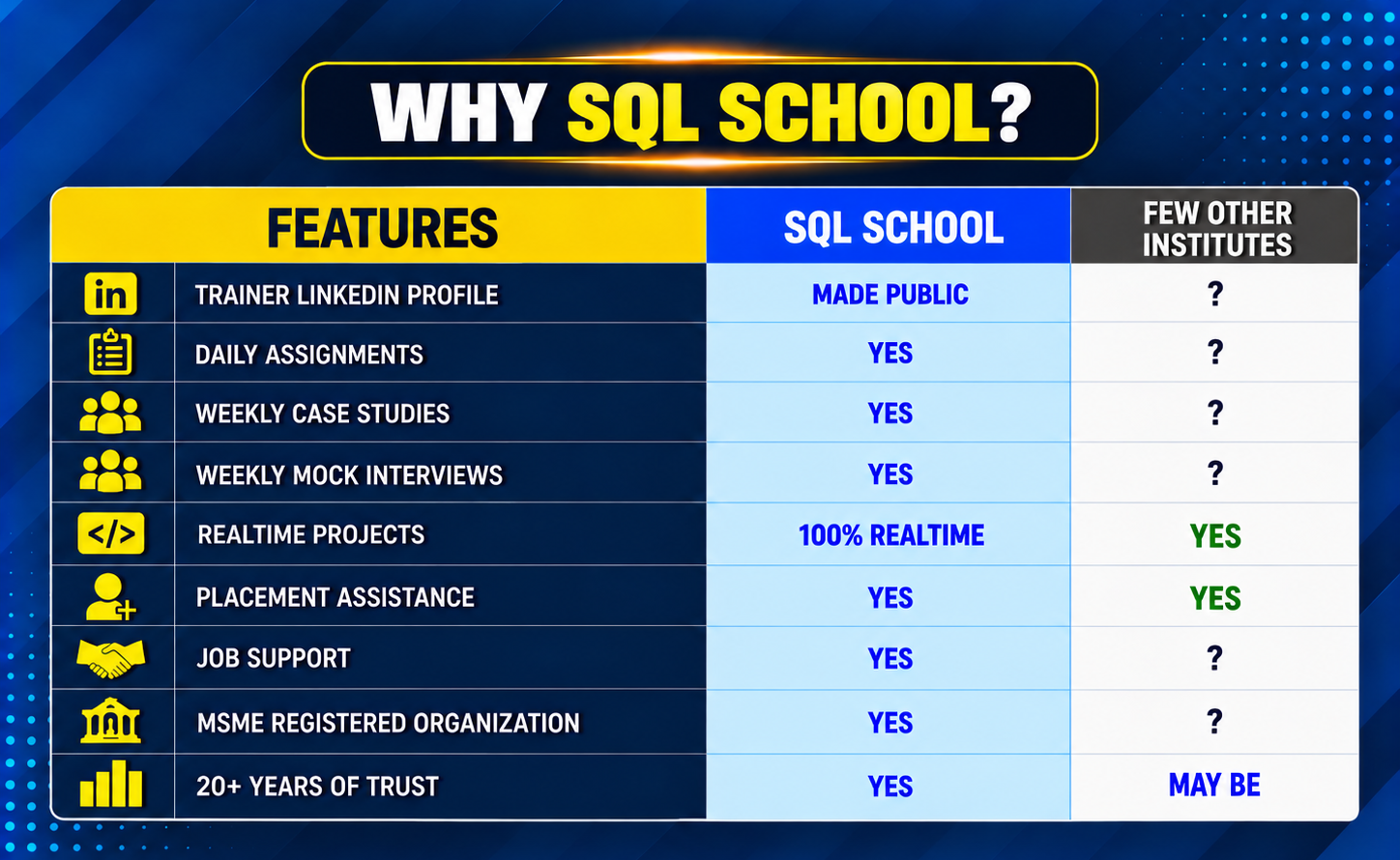
Why Choose SQL School
- 100% Real-Time and Practical
- ISO 9001:2008 Certified
- Concept wise FAQs
- TWO Real-time Case Studies, One Project
- Weekly Mock Interviews
- 24/7 LIVE Server Access

- Realtime Project FAQs
- Course Completion Certificate
- Placement Assistance
- Job Support
- Realtime Project Solution
- MS Certification Guidance