
Azure SQL DBA Training for Beginners: Master Cloud Fundamentals, PaaS vs. IaaS, and Azure Subscriptions
Introduction: Build Your Foundation for Cloud Database Administration
Cloud technology has changed how organizations deploy applications, store information, and manage databases. Microsoft Azure provides cloud services that enable businesses to run database workloads with flexibility, scalability, and reduced infrastructure management.
For aspiring database administrators, Azure SQL DBA Training for Beginners is an excellent starting point to understand cloud computing, Azure infrastructure, database deployment models, and subscription management.
Before working with advanced Azure SQL DBA concepts, beginners should learn how cloud environments operate, how PaaS differs from IaaS, and how Azure accounts and subscriptions organize cloud resources.
This guide introduces these essential concepts with practical examples to help you begin your journey toward becoming an Azure SQL Database Administrator.
Discover the Role of an Azure SQL Database Administrator
An Azure SQL Database Administrator manages and maintains database environments hosted on Microsoft Azure. Depending on the selected service, responsibilities may include database configuration, security, performance optimization, backup and recovery, monitoring, and troubleshooting.
Azure offers multiple SQL deployment options, including Azure SQL Database, Azure SQL Managed Instance, and SQL Server running on Azure Virtual Machines.
Core Responsibilities of an Azure SQL DBA
- Configure and manage Azure SQL databases.
- Manage database users, permissions, and security.
- Monitor database health and performance.
- Understand backup, restore, and disaster recovery strategies.
- Troubleshoot database connectivity and query performance.
- Monitor resource consumption and cloud expenditure.
- Support database availability and business continuity.
Understanding these responsibilities helps beginners identify the technical skills needed for cloud database administration.
Explore the Building Blocks of Microsoft Azure Cloud
Cloud computing allows organizations to access computing resources over the internet instead of maintaining all physical servers and infrastructure themselves.
Microsoft Azure provides services for computing, storage, networking, databases, analytics, security, and application development.
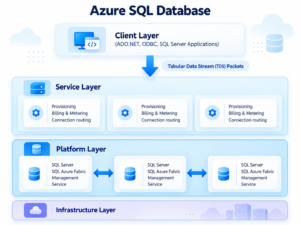
Four Cloud Concepts Every Beginner Should Know
Cloud Infrastructure: Understand how virtual machines, storage, networking, and computing resources support applications and databases.
On-Demand Resources: Learn how organizations provision cloud resources when required and scale them according to workload needs.
Cloud Security: Explore authentication, permissions, encryption, network security, and monitoring.
Availability and Scalability: Understand how service configurations and resource capacity help support business workloads.
Why Cloud Fundamentals Matter in DBA Training
A database administrator must understand where a database runs, how users connect to it, who manages its underlying infrastructure, and how its usage affects costs.
These fundamentals make it easier to select suitable Azure SQL services and troubleshoot issues in cloud environments.
Decode PaaS and IaaS: Two Approaches to Running SQL Server
One of the most important topics in Azure SQL DBA training is the difference between Platform as a Service (PaaS) and Infrastructure as a Service (IaaS).
Both models support cloud workloads, but they provide different levels of control and administrative responsibility.
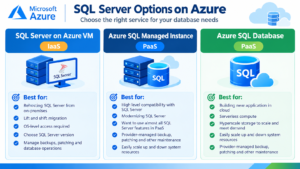
PaaS: Focus on Databases Instead of Infrastructure
Platform as a Service provides a managed environment where the cloud provider handles much of the underlying infrastructure and platform maintenance.
Azure example: Azure SQL Database.
Microsoft manages the underlying infrastructure and routine database-engine maintenance tasks. The DBA remains responsible for areas such as database configuration, access permissions, workload performance, and appropriate data protection settings.
Key advantages of PaaS:
- Reduced operating-system administration.
- Managed database-engine maintenance.
- Built-in backup and availability capabilities.
- Less routine infrastructure management.
- More focus on data, queries, and application workloads.
Practical example: An online shopping company needs a database for customer information, product catalogs, and order transactions. Azure SQL Database can provide a managed database platform without requiring the company to administer the underlying operating system.
IaaS: Gain Greater Control Over the Database Environment
Infrastructure as a Service provides computing resources such as virtual machines, networking, and storage. Customers manage more of the operating system and installed software.
Azure example: SQL Server installed on an Azure Virtual Machine.
The DBA or infrastructure team may need to manage operating-system updates, SQL Server patching, instance configuration, backups, security, and high availability.
Key advantages of IaaS:
- Greater operating-system control.
- Flexibility to configure SQL Server instances.
- Support for specific server-level requirements.
- A suitable migration option for some traditional SQL Server applications.
Practical example: A company runs a legacy application that depends on specific SQL Server instance configurations. Hosting SQL Server on an Azure VM may offer the control required to support that application.
PaaS vs. IaaS: Compare the Administration Requirements
| Feature | PaaS | IaaS |
|---|---|---|
| Example | Azure SQL Database | SQL Server on Azure VM |
| Operating system | Managed by Microsoft | Managed by the customer |
| SQL Server engine patching | Generally managed by Microsoft | Managed by the customer |
| Infrastructure control | Limited | Greater control |
| Backup approach | Built-in capabilities; configure and verify requirements | Customer manages the backup strategy |
| Best suited for | Managed database workloads | Workloads requiring server-level control |
Important: Azure SQL Managed Instance is another PaaS option that offers broader SQL Server instance compatibility. The right service depends on application requirements, compatibility, administration needs, availability, and cost.
Understand Azure Identity: How Accounts Provide Access
An Azure account provides the identity and access used to sign in to Microsoft Azure and work with authorized resources.
Depending on the environment, users may sign in with a Microsoft account or an organizational work or school account connected to Microsoft Entra ID.
After signing in, users can access the Azure portal and manage resources permitted by their assigned roles.
What Beginners Should Understand About Azure Accounts
- Authentication verifies a user’s identity.
- Authorization determines which resources and actions the user can access.
- Microsoft Entra ID supports identity and access management.
- Role-based access control helps assign permissions according to responsibilities.
Practical example: A database administrator may have permission to monitor an Azure SQL database, while another user may only have permission to view resource information.
Understanding identity and permissions is essential for protecting production databases.
Learn How Azure Subscriptions Organize Cloud Resources
An Azure subscription is a logical boundary used for resource organization, access management, and billing.
Organizations can use separate subscriptions for development, testing, and production environments to help manage costs and control access.
How Azure Resources Are Organized
A simplified Azure resource structure includes:
- Identity: The user or organizational identity that signs in.
- Management group (optional): Groups subscriptions for governance and policy management.
- Subscription: Organizes resources and provides a billing boundary.
- Resource group: Collects related Azure resources for management.
- Resources: Includes databases, virtual machines, storage accounts, and other services.
A single identity can access multiple subscriptions, depending on its permissions.
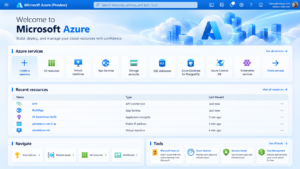
Why Subscription Knowledge Matters to DBAs
Understanding subscriptions helps database administrators identify where databases are deployed, review access assignments, track spending, and distinguish between environments.
For example, a company might maintain a development database in one subscription and a production database in another. This separation can support governance and cost management when configured appropriately.
Create Your First Azure Learning Environment
Beginners can use the Azure portal to explore subscriptions and cloud resources before moving into advanced database administration exercises.
Apply Your Knowledge Through a Beginner DBA Lab
Reading cloud concepts is useful, but practical exercises help reinforce what you learn.
Practice Exercise: Azure Fundamentals for Database Administrators
Complete the following activities:
- Sign in to the Azure portal.
- Identify the active subscription.
- Explore resource groups and access permissions.
- Compare Azure SQL Database with SQL Server on an Azure VM.
- Review the administrative responsibilities associated with PaaS and IaaS.
- Explore the Azure pricing calculator.
- Document the differences between cloud infrastructure management and database administration.
These activities establish a foundation for more advanced Azure SQL DBA exercises.
For technical reference, visit Microsoft’s official Azure SQL documentation:
Build the Next Layer of Your Azure SQL DBA Skills
After understanding cloud fundamentals, beginners can progress to practical database administration topics.
Azure SQL Database Deployment
Learn how to create database resources, select appropriate service options, and configure basic database settings.
Database Security and Access Control
Understand database users, authentication methods, permissions, firewall configuration, and secure connectivity.
Backup, Restore, and Recovery Planning
Explore backup retention, restore capabilities, and recovery planning according to business requirements.
Performance Monitoring and Query Optimization
Learn to monitor resource utilization, examine query performance, identify bottlenecks, and troubleshoot common database issues.
Cloud Networking and Connectivity
Understand how network rules, private connectivity options, and application connections affect database accessibility and security.
Cost Optimization and Resource Management
Learn how compute, storage, workload patterns, and service selection influence cloud expenditure.
Progressive hands-on learning helps learners connect cloud concepts with real database administration tasks.
Why Choose SQL School for Azure SQL DBA Training?
SQL School Training Institute in Hyderabad focuses on practical technical training designed to help learners develop database skills through guided exercises and real-world scenarios.
The learning experience can include:
- Step-by-step SQL Server and Azure SQL concepts.
- Practical database administration exercises.
- Scenario-based projects and troubleshooting.
- Resume guidance and interview preparation.
- Placement assistance.
Learners can strengthen their understanding of SQL Server administration before progressing into cloud-based database management and advanced Azure SQL DBA responsibilities.
Conclusion: Turn Cloud Fundamentals Into Practical DBA Skills
Learning Azure SQL DBA begins with understanding cloud computing, the difference between PaaS and IaaS, and the relationship between Azure accounts, subscriptions, resource groups, and deployed services.
PaaS reduces infrastructure maintenance, while IaaS offers greater control over the operating system and SQL Server environment. Understanding these differences helps aspiring DBAs select suitable deployment models and understand their administrative responsibilities.
Start with the Azure portal, explore subscription management, and practise cloud fundamentals before progressing to database security, backup and recovery, performance monitoring, and troubleshooting.
With structured learning and consistent practice, beginners can build a strong foundation for pursuing Azure SQL DBA opportunities.
Start Your Azure SQL DBA Training with SQL School
Want to develop practical cloud database administration skills?
Explore Azure SQL DBA training at SQL School Training Institute and learn about the available batches, course structure, and hands-on training options.
Website: https://sqlschool.com/
Contact: +91 9666440801 | +91 9951440801
Build your foundation in SQL Server and Azure SQL concepts through guided learning and practical exercises.
#AzureSQLDBA #AzureSQLTraining #MicrosoftAzure #PaaSVsIaaS #CloudComputing #SQLDBA #DatabaseAdministration #AzureTraining #SQLSchool

