
How to Create and Manage Schemas in SQL Server: A Complete Practical Tutorial
Introduction: Organizing Database Objects with SQL Server Schemas
As databases grow, managing tables, views, stored procedures, and other database objects becomes increasingly challenging. Microsoft SQL Server provides schemas to organize these objects into logical groups, making database development, administration, and security management more efficient.
Understanding how to create and implement schemas in SQL Server is an essential skill for SQL developers, SQL DBAs, and data engineers working with enterprise databases.
In this tutorial, you will learn how to create schemas, assign database objects to schemas, manage permissions, inspect schema details, and implement a practical schema design using SQL Server Management Studio (SSMS).
Understanding the Role of Schemas in SQL Server
A schema is a logical container for database objects within a SQL Server database. It provides a structured way to group objects according to business functions, application modules, or security requirements.
For example, a company might organize its database using the following schemas:
Sales– Customer orders and sales transactionsHR– Employee and department informationFinance– Payments and financial recordsReporting– Views and reporting objects
A table can be referenced using its schema-qualified name, such as Sales.Orders or HR.Employees.
Unlike separate databases, schemas allow related objects to remain within the same database while maintaining logical separation.
Key Benefits of Implementing Schemas in SQL Server
Implementing schemas correctly improves database organization and administration in several ways.
Logical Separation of Business Data
Schemas help organize database objects according to departments or business functions, making large databases easier to navigate.
Simplified Permission Management
Database administrators can grant permissions on an entire schema instead of configuring access separately for every object.
Reduced Object Naming Conflicts
Different schemas can contain objects with the same name. For example, Sales.Customers and Support.Customers can coexist within the same database.
Improved Database Maintenance
Organized schemas make database deployments, troubleshooting, and ongoing maintenance easier to manage.
Better Support for Enterprise Applications
Applications with multiple modules can use separate schemas to establish clear boundaries between database objects.
Preparing the SQL Server Environment for Schema Creation
Before creating schemas, ensure that SQL Server is running and that you have access to SQL Server Management Studio (SSMS).
You also need appropriate permissions to create schemas and database objects.
For this demonstration, we will use a sample database named CompanyDB. The examples are suitable for a practice environment and can be adapted to an existing database.
Building a Practice Database for Schema Implementation
First, create a sample database and switch to it.
CREATE DATABASE CompanyDB;
GO

USE CompanyDB;
GO
The CREATE DATABASE statement creates the database, while USE CompanyDB makes it the active database for subsequent statements in the session.
If CompanyDB already exists, use the existing database instead of running the creation statement again.
Creating Your First Custom Schema
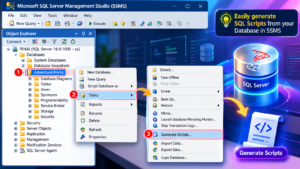
SQL Server allows you to create a schema using the CREATE SCHEMA statement.
CREATE SCHEMA Sales;
GO
This creates a schema named Sales inside the current database.
To confirm that the schema exists, query the system catalog view:
SELECT
    name AS SchemaName,
    schema_id
FROM sys.schemas
WHERE name = 'Sales';
The result displays the schema name and its unique identifier within the database.
Designing a Multi-Schema Database Structure
In a business application, a single schema may not be sufficient to organize every database object.
Create additional schemas for different business functions:
CREATE SCHEMA HR;
GO

CREATE SCHEMA Finance;
GO

CREATE SCHEMA Reporting;
GO
The database now contains separate schemas for sales, human resources, finance, and reporting.
This structure provides a foundation for organizing tables, views, and stored procedures according to their business purpose.
Creating Business Tables Under Specific Schemas
Once schemas are available, create tables using schema-qualified names.
For the Sales department, create an orders table:
CREATE TABLE Sales.Orders
(
    OrderID INT PRIMARY KEY,
    CustomerName VARCHAR(100),
    OrderDate DATE,
    TotalAmount DECIMAL(12,2)
);
GO
For the HR department, create an employee table:
CREATE TABLE HR.Employees
(
    EmployeeID INT PRIMARY KEY,
    EmployeeName VARCHAR(100),
    Department VARCHAR(50),
    Salary DECIMAL(12,2)
);
GO
The Sales.Orders table belongs to the Sales schema, while HR.Employees belongs to the HR schema.
Specifying the schema explicitly helps developers understand where database objects belong and avoids ambiguity when names overlap.
Populating Schema-Based Tables with Sample Records
Insert sample data into the tables to test the implementation.
INSERT INTO Sales.Orders
    (OrderID, CustomerName, OrderDate, TotalAmount)
VALUES
    (101, 'Ravi', '2026-10-10', 15000.00),
    (102, 'Priya', '2026-10-12', 22000.00),
    (103, 'Kiran', '2026-10-15', 35000.00);

INSERT INTO HR.Employees
    (EmployeeID, EmployeeName, Department, Salary)
VALUES
    (1, 'Anil', 'IT', 65000.00),
    (2, 'Sneha', 'Finance', 72000.00);
GO
These records provide sample business data for testing queries, creating views, and exploring schema-level permissions.
Retrieving Records from Schema-Qualified Tables
Use the schema name followed by the table name to retrieve data.
SELECT *
FROM Sales.Orders;
To retrieve employee information:
SELECT *
FROM HR.Employees;
Schema-qualified queries make SQL code more readable and clearly identify the objects being accessed.
Creating Reporting Views Within a Dedicated Schema
Views are useful for presenting filtered or summarized information without requiring users to query the underlying tables directly.
Create a view inside the Reporting schema:
CREATE VIEW Reporting.HighValueOrders
AS
SELECT
    OrderID,
    CustomerName,
    OrderDate,
    TotalAmount
FROM Sales.Orders
WHERE TotalAmount >= 20000;
GO
Retrieve the results:
SELECT *
FROM Reporting.HighValueOrders;
This view returns orders with a total amount of at least 20,000. It also demonstrates how a reporting object can reference a table located in another schema.
Organizing Stored Procedures by Business Function
Schemas can also contain stored procedures, allowing database operations to be grouped according to their purpose.
Create a stored procedure under the Sales schema:
CREATE PROCEDURE Sales.GetOrders
AS
BEGIN
    SELECT
        OrderID,
        CustomerName,
        OrderDate,
        TotalAmount
    FROM Sales.Orders;
END;
GO
Execute the procedure using its schema-qualified name:
EXEC Sales.GetOrders;Organizing procedures in this manner makes database code easier to discover, maintain, and document.
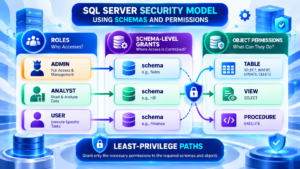
Securing Database Objects with Schema-Level Permissions
Schemas provide a convenient way to manage permissions for database objects.
For example, create a database role for users who need read access to the Sales schema:
CREATE ROLE SalesReader;
GO

GRANT SELECT
ON SCHEMA::Sales
TO SalesReader;
GO
Add an existing database user to the role:
ALTER ROLE SalesReader
ADD MEMBER SalesUser;
GO
Replace SalesUser with the actual database username.
The role receives SELECT permission on objects covered by the grant in the Sales schema. Review existing permissions and security policies to ensure that the effective access is appropriate.
Best practice: Follow the principle of least privilege. Grant users only the permissions necessary for their responsibilities, especially when schemas contain confidential business information.
Inspecting Schema Details Through SQL Server System Views
SQL Server provides system catalog views for exploring database schemas and their associated objects.
Listing Schemas Available in the Database
SELECT
    name AS SchemaName,
    schema_id,
    principal_id
FROM sys.schemas
ORDER BY name;
Identifying Tables and Their Parent Schemas
SELECT
    s.name AS SchemaName,
    t.name AS TableName
FROM sys.tables AS t
INNER JOIN sys.schemas AS s
    ON t.schema_id = s.schema_id
ORDER BY s.name, t.name;
Reviewing Objects Inside a Particular Schema
SELECT
    s.name AS SchemaName,
    o.name AS ObjectName,
    o.type_desc AS ObjectType
FROM sys.objects AS o
INNER JOIN sys.schemas AS s
    ON o.schema_id = s.schema_id
WHERE s.name = 'Sales'
ORDER BY o.type_desc, o.name;
These queries help database administrators inspect schema structures, prepare documentation, and troubleshoot database organization issues.
Moving Existing Database Objects Between Schemas
Sometimes an existing table needs to be moved from one schema to another.
SQL Server provides the ALTER SCHEMA ... TRANSFER statement for this purpose.
For example, move an existing table named OrdersArchive from the dbo schema to the Sales schema:
ALTER SCHEMA Sales
TRANSFER dbo.OrdersArchive;
GO
After the transfer, the table is referenced as Sales.OrdersArchive.
Before moving objects in a production database, review application references, permissions, dependencies, and deployment scripts. Changing an object’s schema can affect code that relies on its previous name.
Managing Schema Removal and Structural Changes
A schema should be removed only when it is no longer required.
SQL Server does not provide a direct schema-renaming statement. Renaming generally involves creating a replacement schema, transferring objects, updating dependencies and permissions, and removing the original schema once it is empty.
To drop an empty schema, use:
DROP SCHEMA Reporting;This command succeeds only when the schema contains no objects. In the example database, the Reporting schema contains a view, so that view must be handled before the schema can be dropped.
Always review dependencies and back up important data before making structural changes.
Applying Schema Design to a Real-World Business Database
Consider a retail company that uses SQL Server to manage orders, employees, payments, and business reports.
A suitable database organization might look like this:
| Schema | Business Responsibility | Example Object |
|---|---|---|
| Sales | Customer orders and transactions | Sales.Orders |
| HR | Employee records | HR.Employees |
| Finance | Payment information | Finance.Payments |
| Reporting | Analytical and reporting views | Reporting.HighValueOrders |
In this design, developers can organize application logic by business function, while database administrators can configure permissions according to departmental responsibilities.
For example, sales analysts may need read access to sales information, while finance users may require access to payment records. HR information can be restricted to authorized users.
The exact schema and permission structure should be designed around business requirements, application dependencies, and security policies.
Recommended Practices for Reliable Schema Management
Follow these practices when implementing schemas in development or production environments:
- Choose descriptive schema names: Use names that clearly communicate the business purpose of the objects.
- Use schema-qualified references: Explicitly specify the schema when creating and accessing database objects.
- Plan permissions carefully: Apply role-based access and least-privilege principles.
- Separate objects logically: Group tables, views, and stored procedures according to application or business requirements.
- Document structural changes: Record object transfers, permission changes, and schema modifications.
- Review dependencies: Check application code and references before moving or removing objects.
- Test deployment scripts: Validate schema changes in development or test environments before production deployment.
Troubleshooting Common SQL Server Schema Issues
Error: Schema Already Exists
A schema name must be unique within a database. Check sys.schemas before attempting to create an existing schema again.
Error: Permission Denied
Confirm that the executing user has the necessary database permissions to create or modify schemas and objects.
Error: Cannot Drop Schema
The schema may still contain tables, views, stored procedures, or other objects. Inspect its contents and handle dependencies before removing it.
Objects Appear Under the Wrong Schema
Specify the intended schema explicitly when creating objects, such as CREATE TABLE Sales.Orders, rather than relying on the default schema.
Understanding these issues helps developers and DBAs manage schemas more reliably.
Conclusion: Build Better SQL Server Databases with Schema Management
SQL Server schemas provide a practical way to organize database objects, simplify permission management, and maintain a structured database environment.
By learning to create schemas, assign tables and procedures, build reporting views, inspect system catalogs, and manage schema-level permissions, you can develop a strong foundation in SQL Server database design and administration.
Practice these examples in SQL Server Management Studio and adapt them to realistic business scenarios to strengthen your SQL development and DBA skills.
Take Your SQL Server Skills Further with SQL School
Looking to improve your SQL Server development and database administration expertise?
SQL School Training Institute, Hyderabad, offers practical training with hands-on exercises, real-time projects, scenario-based learning, resume guidance, and interview preparation.
Build your SQL knowledge through practical exercises and industry-oriented learning.
Contact: +91 9666440801 / +91 9951440801
Website: https://sqlschool.com/
#SQLServer #SQLSchema #SQLTutorial #SQLDevelopment #SQLDBA #DatabaseManagement #SQLServerTraining #SQLSchool

