
Snowflake Streams & Change Data Capture (CDC): A Hands-On Tutorial for 2026
Build Incremental Data Pipelines with Snowflake SQL, Streams, and Tasks
Modern businesses generate massive volumes of data from applications, customer transactions, financial systems, and cloud platforms. Processing this data efficiently and keeping analytics systems up to date are important responsibilities of a Data Engineer.
Traditional ETL pipelines often process entire datasets, even when only a few records have changed. This approach can increase processing time, consume additional compute resources, and delay analytics.
Snowflake Streams and Change Data Capture (CDC) provide a practical solution for capturing data changes and processing them incrementally.
In this Snowflake Streams tutorial, you will learn how CDC works, how to create and query Snowflake Streams, how to process inserted, updated, and deleted records, and how to automate data pipelines using Snowflake Tasks.
Whether you are a fresher, SQL Developer, ETL Developer, or experienced Data Engineer, this hands-on guide will help you understand how to implement CDC using Snowflake SQL.
Why Modern Data Pipelines Need Change Data Capture
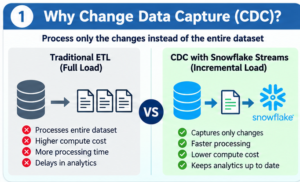
Imagine an e-commerce company that stores millions of customer and order records in a database.
Every day, new customers register, existing customers update their profiles, and orders are created or cancelled.
If the analytics team processes the entire dataset every time a change occurs, it can lead to unnecessary data processing.
Change Data Capture addresses this challenge by identifying and capturing only the changes made to the source data.
What Does CDC Capture?
CDC captures the following types of data modifications:
- INSERT: New records added to the source table.
- UPDATE: Existing records modified with new values.
- DELETE: Records removed from the source table.
Instead of reprocessing all historical data, CDC pipelines can process the captured changes and apply them to downstream tables.
This makes CDC a valuable technique for incremental data loading, data synchronization, and cloud data warehouse development.
Understanding Snowflake Streams: The Foundation of CDC
Snowflake Streams are database objects that enable change tracking on supported source objects.
A stream provides access to change records between two transactional points in time. It uses an offset to track which changes have been consumed.
When a source table receives new data or undergoes modifications, a stream can expose the relevant changes for downstream processing.
Snowflake Streams are commonly used with SQL statements and Snowflake Tasks to implement incremental data processing.
How Does a Snowflake Stream Track Changes?
Consider a customer table containing the following records:
| Customer ID | Customer Name | City |
|---|---|---|
| 101 | Rahul | Hyderabad |
| 102 | Priya | Bangalore |
| 103 | Arjun | Chennai |
If the city of customer 102 changes from Bangalore to Mumbai, the source table reflects the updated information.
A standard Snowflake Stream can expose the change records representing the old and new versions of the row.
The downstream pipeline can then update the target table without performing a complete refresh.
Snowflake Stream Types: Choosing the Right CDC Approach
Snowflake provides different stream types based on the source object and change-tracking requirements.
Standard Streams for Complete Change Tracking
Standard streams track inserts, updates, and deletes.
They are suitable for CDC pipelines where downstream tables need to reflect source table modifications.
Append-Only Streams for New Data Processing
Append-only streams track inserted rows.
They are useful when a pipeline processes newly added data and does not require update or delete tracking.
Insert-Only Streams for Supported External Objects
Insert-only streams are designed for supported external data objects, such as certain external tables and externally managed Iceberg tables.
They are useful for capturing new data according to the capabilities of the source object.
Selecting the correct stream type depends on the source data, business requirements, and processing strategy.
Snowflake CDC Architecture: From Source Tables to Analytics
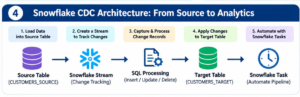
A typical Snowflake CDC pipeline includes a source table, a stream, a processing statement, and a target table.
The workflow follows this sequence:
- Load data into the source table.
- Create a stream to track source table changes.
- Capture changes through the stream.
- Process change records using SQL.
- Apply the changes to the target table.
- Automate the workflow using Snowflake Tasks.
This architecture is useful for building incremental data pipelines that keep analytics tables updated as source data changes.
Hands-On Lab: Implement CDC Using Snowflake SQL
Let’s implement a practical Snowflake CDC pipeline using customer data.
In this example, you will create a source table, insert sample records, create a stream, update existing records, and process the captured changes into a target table.
Lab Step 1: Prepare the Snowflake Training Environment
Create a database and schema.
CREATE DATABASE CDC_TRAINING_DB;

CREATE SCHEMA CDC_TRAINING_DB.CDC_SCHEMA;

USE DATABASE CDC_TRAINING_DB;

USE SCHEMA CDC_SCHEMA;
This environment will be used to implement and test the CDC workflow.
Lab Step 2: Build a Customer Source Table
Create a source table to represent customer data received from an application.
CREATE OR REPLACE TABLE CUSTOMERS_SOURCE
(
    CUSTOMER_ID INT,
    CUSTOMER_NAME VARCHAR(100),
    CITY VARCHAR(50),
    CUSTOMER_STATUS VARCHAR(20)
);
Insert sample customer records.
INSERT INTO CUSTOMERS_SOURCE
VALUES
(101, 'Rahul', 'Hyderabad', 'ACTIVE'),
(102, 'Priya', 'Bangalore', 'ACTIVE'),
(103, 'Arjun', 'Chennai', 'ACTIVE');
Verify the data.
SELECT *
FROM CUSTOMERS_SOURCE;
Lab Step 3: Enable Change Tracking with a Stream
Create a stream on the customer source table.
CREATE OR REPLACE STREAM CUSTOMERS_STREAM
ON TABLE CUSTOMERS_SOURCE;
The stream begins tracking changes from its creation offset.
Now the source table is ready for the CDC demonstration.
Lab Step 4: Capture Newly Inserted Customer Records
Insert a new customer.
INSERT INTO CUSTOMERS_SOURCE
VALUES
(104, 'Sneha', 'Pune', 'ACTIVE');
Query the stream.
SELECT *
FROM CUSTOMERS_STREAM;
The query returns the captured change record along with the stream metadata columns.
This demonstrates how a Snowflake Stream can expose newly inserted data for incremental processing.
Lab Step 5: Explore CDC Metadata Columns
Snowflake Streams include metadata columns that help identify the nature of a captured change.
| Metadata | Purpose |
|---|---|
| METADATA$ACTION | Indicates INSERT or DELETE |
| METADATA$ISUPDATE | Identifies records associated with an UPDATE |
| METADATA$ROW_ID | Identifies the tracked row |
Use the following query to inspect the captured records.
SELECT
    CUSTOMER_ID,
    CUSTOMER_NAME,
    CITY,
    CUSTOMER_STATUS,
    METADATA$ACTION,
    METADATA$ISUPDATE,
    METADATA$ROW_ID
FROM CUSTOMERS_STREAM;
These metadata columns are particularly important when implementing CDC logic for updates and deletes.
Lab Step 6: Create the Destination Analytics Table
Create a target table that stores the customer data for downstream analytics.
CREATE OR REPLACE TABLE CUSTOMERS_TARGET
(
    CUSTOMER_ID INT,
    CUSTOMER_NAME VARCHAR(100),
    CITY VARCHAR(50),
    CUSTOMER_STATUS VARCHAR(20)
);
Load the initial customer dataset.
INSERT INTO CUSTOMERS_TARGET
SELECT
    CUSTOMER_ID,
    CUSTOMER_NAME,
    CITY,
    CUSTOMER_STATUS
FROM CUSTOMERS_SOURCE;
The target table now contains the initial customer records.
Lab Step 7: Simulate a Customer Update
Let’s change the city of customer 102.
UPDATE CUSTOMERS_SOURCE
SET CITY = 'Mumbai'
WHERE CUSTOMER_ID = 102;
Now query the stream.
SELECT *
FROM CUSTOMERS_STREAM;
A standard stream represents an update using two change records:
- A DELETE record representing the previous row.
- An INSERT record representing the updated row.
Both records have METADATA$ISUPDATE = TRUE.
This allows downstream processing to identify an update rather than treating it as a standalone deletion.
Lab Step 8: Apply Captured Changes Using MERGE
The MERGE statement is a common approach for applying CDC records to a target table.
The following example processes inserts, updates, and deletes.
MERGE INTO CUSTOMERS_TARGET T
USING
(
    SELECT
        CUSTOMER_ID,
        CUSTOMER_NAME,
        CITY,
        CUSTOMER_STATUS,
        METADATA$ACTION AS ACTION_TYPE,
        METADATA$ISUPDATE AS IS_UPDATE
    FROM CUSTOMERS_STREAM
) S
ON T.CUSTOMER_ID = S.CUSTOMER_ID

WHEN MATCHED
    AND S.ACTION_TYPE = 'DELETE'
    AND S.IS_UPDATE = FALSE
THEN DELETE

WHEN MATCHED
    AND S.ACTION_TYPE = 'INSERT'
THEN UPDATE SET
    T.CUSTOMER_NAME = S.CUSTOMER_NAME,
    T.CITY = S.CITY,
    T.CUSTOMER_STATUS = S.CUSTOMER_STATUS

WHEN NOT MATCHED
    AND S.ACTION_TYPE = 'INSERT'
THEN INSERT
(
    CUSTOMER_ID,
    CUSTOMER_NAME,
    CITY,
    CUSTOMER_STATUS
)
VALUES
(
    S.CUSTOMER_ID,
    S.CUSTOMER_NAME,
    S.CITY,
    S.CUSTOMER_STATUS
);
This MERGE statement applies the captured changes to the destination table.
Lab Step 9: Validate the Final Customer Records
Run the following query.
SELECT *
FROM CUSTOMERS_TARGET;
The target table should now reflect the processed changes.
You have successfully implemented the basic Snowflake CDC workflow using Streams and MERGE.
Automating CDC Processing with Snowflake Tasks
Manual execution of SQL statements is useful during development, but production data pipelines need automation.
Snowflake Tasks allow you to schedule SQL statements and execute them when configured conditions are met.
By combining Streams and Tasks, you can automate the processing of captured changes.
Create an Automated CDC Task
CREATE OR REPLACE TASK CDC_PROCESSING_TASK
WAREHOUSE = COMPUTE_WH
SCHEDULE = '1 MINUTE'
WHEN SYSTEM$STREAM_HAS_DATA('CUSTOMERS_STREAM')
AS
MERGE INTO CUSTOMERS_TARGET T
USING
(
    SELECT
        CUSTOMER_ID,
        CUSTOMER_NAME,
        CITY,
        CUSTOMER_STATUS,
        METADATA$ACTION AS ACTION_TYPE,
        METADATA$ISUPDATE AS IS_UPDATE
    FROM CUSTOMERS_STREAM
) S
ON T.CUSTOMER_ID = S.CUSTOMER_ID

WHEN MATCHED
    AND S.ACTION_TYPE = 'DELETE'
    AND S.IS_UPDATE = FALSE
THEN DELETE

WHEN MATCHED
    AND S.ACTION_TYPE = 'INSERT'
THEN UPDATE SET
    T.CUSTOMER_NAME = S.CUSTOMER_NAME,
    T.CITY = S.CITY,
    T.CUSTOMER_STATUS = S.CUSTOMER_STATUS

WHEN NOT MATCHED
    AND S.ACTION_TYPE = 'INSERT'
THEN INSERT
(
    CUSTOMER_ID,
    CUSTOMER_NAME,
    CITY,
    CUSTOMER_STATUS
)
VALUES
(
    S.CUSTOMER_ID,
    S.CUSTOMER_NAME,
    S.CITY,
    S.CUSTOMER_STATUS
);
Resume the task.
ALTER TASK CDC_PROCESSING_TASK RESUME;The task can now automatically process stream changes based on its schedule and condition.
Note that the warehouse must exist, the role must have the required privileges, and the task must be resumed before scheduled execution.
Where Snowflake CDC Is Used in Real Business Scenarios
Snowflake Streams and CDC are useful for several real-world data engineering applications.
E-Commerce Analytics: Track Orders as They Change
An e-commerce business can capture new orders, order updates, and cancellations.
CDC pipelines can process these changes and update sales analytics tables for reporting.
Customer Data Platforms: Keep Profiles in Sync
Customer information can change frequently across business applications.
CDC enables incremental synchronization of customer records and downstream data stores.
Financial Analytics: Process Transaction Changes
Financial systems can use CDC to process new or modified transaction records for reporting, reconciliation, and analysis.
Retail Operations: Maintain Inventory Insights
Inventory changes can be captured and processed to maintain updated stock information for business analytics.
Enterprise Data Warehousing: Reduce Repeated Processing
CDC can support incremental loading of fact and dimension tables instead of repeatedly refreshing entire datasets.
Skills Gained from the Project
- Snowflake Streams and CDC
- Incremental data processing
- SQL MERGE operations
- Snowflake Tasks
- Data pipeline development
- Data validation and troubleshooting
- Cloud data warehouse concepts
- Real-time analytics implementation
This project provides practical exposure to the techniques used in modern cloud data engineering workflows.
Snowflake Streams vs Dynamic Tables: Understanding the Difference
Snowflake Streams and Dynamic Tables are both useful for data processing, but they solve different problems.
Streams expose change records that can be consumed through SQL statements and Tasks.
Dynamic Tables provide a declarative approach to defining transformation results, with Snowflake managing refresh processing.
Use Streams and Tasks when you need explicit control over CDC records and processing logic.
Use Dynamic Tables when you want Snowflake to manage refreshes for a defined transformation pipeline.
Understanding the differences helps Data Engineers choose an appropriate architecture for each project.
Essential Snowflake CDC Best Practices for 2026
When building production-ready CDC pipelines, consider these practices.
Select the Correct Stream Type
Choose the stream type based on the source object and whether the pipeline needs to capture inserts, updates, or deletes.
Consume Changes Within the Retention Window
Streams depend on source object history. Monitor the source object’s retention and extension limits to avoid stream staleness.
Apply Changes Through Reliable Transactions
Use appropriate SQL statements to apply changes consistently and ensure the processing transaction commits successfully.
Monitor Automated Tasks
Monitor task execution, failures, and processing delays to maintain pipeline reliability.
Validate Source and Target Data
Check for duplicate records, missing values, and inconsistent keys before processing data into analytics tables.
Design for Incremental Processing
Process only the changes required for each pipeline run and avoid unnecessary full-table refreshes.
Who Should Learn Snowflake Streams and CDC?
This tutorial is suitable for:
- Freshers aspiring to become Data Engineers
- SQL Developers transitioning into cloud data engineering
- Experienced ETL Developers
- Snowflake Developers
- Cloud Data Engineers
- Data Analysts interested in data pipeline development
- Professionals preparing for Snowflake interviews
- IT professionals planning a career transition
A strong foundation in SQL and database concepts will help learners understand the hands-on exercises more effectively.
Career Opportunities After Learning Snowflake CDC
Snowflake CDC is a valuable skill for professionals working with modern cloud data platforms.
Relevant career roles include:
- Snowflake Data Engineer
- Cloud Data Engineer
- Snowflake Developer
- ETL Developer
- Data Warehouse Developer
- Analytics Engineer
- Data Integration Engineer
Combining Snowflake SQL, Streams, Tasks, data modeling, and practical project experience can help learners build skills relevant to these career paths.
Advance Your Cloud Data Engineering Skills with SQL School
SQL School Training Institute provides practical training designed to help learners develop technical skills through hands-on exercises and real-time project experience.
The learning approach focuses on step-by-step explanations, practical SQL implementation, and industry-oriented scenarios.
What You Can Learn
- Snowflake SQL and data warehouse concepts
- Snowflake Streams and Change Data Capture
- Snowflake Tasks and automation
- Incremental data processing
- Data pipeline development
- Real-time project scenarios
- Interview preparation
- Practical cloud data engineering skills
Whether you are a fresher, an experienced professional, or someone planning a career transition, hands-on learning can help you build a stronger foundation in Snowflake Data Engineering.
Start Building Snowflake Data Pipelines in 2026
Understanding Snowflake Streams and Change Data Capture is an important step toward developing efficient incremental data pipelines.
By learning how to capture source changes, process CDC records, automate SQL workflows, and maintain analytics tables, you can gain practical experience with modern data engineering concepts.
Learn Snowflake with 100% Hands-On Training, Real-Time Projects, and Practical Industry Experience at SQL School.
Visit: https://sqlschool.com/
Contact: +91 9666440801 | +91 9951440801
Take the next step toward building your Snowflake and Cloud Data Engineering skills in 2026.
#Snowflake #SnowflakeStreams #SnowflakeCDC #ChangeDataCapture #SnowflakeTutorial #SnowflakeTraining #DataEngineering #CloudDataEngineering #SnowflakeSQL #RealTimeData #DataPipelines #IncrementalDataProcessing #SnowflakeTasks #SQLTraining #HandsOnTraining #DataEngineer #SQLSchool #Snowflake2026 #DataWarehouse #ETL #CDCProject #LearnSnowflake #CloudComputing #DataAnalytics #RealTimeAnalytics

