Azure Data Factory vs Databricks: Complete Comparison Guide for Data Engineers
In today’s data-driven world, organizations generate massive amounts of data from applications, databases, IoT devices, APIs, and business systems. To transform this raw data into valuable business insights, companies rely on modern Data Engineering platforms.
Two of the most popular technologies in the Microsoft ecosystem are Azure Data Factory (ADF) and Azure Databricks.
A common question among aspiring Data Engineers is:
Should I learn Azure Data Factory or Databricks?
The answer is simple:
Both are important, but they serve different purposes.
In this article, we will explore the differences, features, advantages, use cases, and career opportunities of Azure Data Factory and Databricks.
What is Azure Data Factory (ADF)?
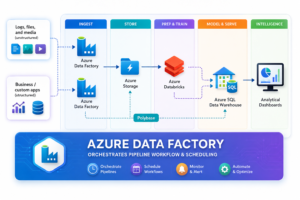
Azure Data Factory (ADF) is Microsoft’s cloud-based data integration service used to create, schedule, orchestrate, and automate data pipelines.
It helps organizations move data between different systems without writing extensive code.
Key Features of Azure Data Factory
- Data Movement and Migration
- Visual Drag-and-Drop Interface
- Pipeline Orchestration
- Workflow Automation
- Integration Runtime
- Trigger-Based Scheduling
- Data Flow Transformations
- Monitoring and Alerting
- Hybrid Data Integration
- Integration with Azure Services
Common ADF Use Cases
✅ Copy data from SQL Server to Data Lake
✅ Database Migration Projects
✅ Scheduled ETL Workflows
✅ Workflow Automation
✅ Data Synchronization
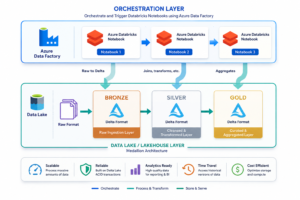
✅ Triggering Databricks Notebooks
✅ Data Integration from Multiple Sources
What is Azure Databricks?
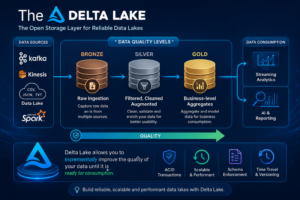
Azure Databricks is a cloud-based analytics platform built on Apache Spark.
It is designed for large-scale data processing, advanced analytics, machine learning, and real-time streaming workloads.
Databricks provides collaborative notebooks where Data Engineers, Data Scientists, and Analysts can work together.
Key Features of Azure Databricks
- Apache Spark Engine
- PySpark Development
- Spark SQL
- Delta Lake
- Data Lakehouse Architecture
- Machine Learning Integration
- Auto Scaling Clusters
- Streaming Analytics
- Notebook Collaboration
- Unity Catalog Governance
Common Databricks Use Cases
✅ Big Data Processing
✅ Data Transformation
✅ Delta Lake Implementation
✅ Data Lakehouse Projects
✅ AI & Machine Learning
✅ Streaming Data Analytics
✅ Advanced ETL Development
✅ Data Engineering Pipelines
Understanding ETL in Data Engineering
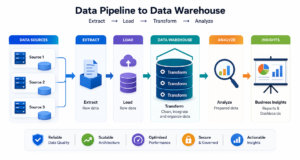
Before comparing ADF and Databricks, let’s understand ETL.
ETL Stands For
Extract
Collect data from multiple sources:
- SQL Server
- Oracle
- APIs
- CSV Files
- Azure Storage
- SAP Systems
Transform
Clean, enrich, validate, and format the data.
Load
Store processed data into:
- Data Warehouse
- Data Lake
- Delta Lake
- Business Intelligence Systems
Both ADF and Databricks participate in ETL pipelines, but in different ways.
Azure Data Factory vs Databricks: Detailed Comparison
| Feature | Azure Data Factory | Azure Databricks |
|---|---|---|
| Primary Purpose | Data Integration & Orchestration | Data Processing & Analytics |
| Technology | Managed Azure Service | Apache Spark Platform |
| Coding Requirement | Low Code | Code Intensive |
| ETL Capability | Basic to Moderate | Advanced |
| Data Movement | Excellent | Limited |
| Workflow Automation | Excellent | Limited |
| Big Data Processing | Moderate | Excellent |
| Machine Learning | Not Primary Focus | Strong Support |
| Streaming Analytics | Limited | Excellent |
| Spark Support | No Native Spark | Built on Spark |
| Delta Lake | No | Yes |
| Lakehouse Architecture | No | Yes |
| Performance for Large Data | Moderate | Excellent |
| Best For | Data Integration | Data Processing |
Architecture Perspective
Azure Data Factory Role
ADF is responsible for:
- Data Ingestion
- Scheduling
- Monitoring
- Workflow Automation
- Pipeline Management
- Data Movement
Think of ADF as the Conductor of an Orchestra.
It coordinates the movement of data across systems.
Databricks Role
Databricks is responsible for:
- Data Transformation
- Big Data Processing
- Data Analytics
- Machine Learning
- Streaming
- Data Lakehouse Implementation
Think of Databricks as the Engine of the Data Platform.
It performs the heavy computational work.
Advantages of Azure Data Factory
1. Low-Code Development
Business users can create pipelines with minimal coding.
2. Easy Integration
Supports hundreds of data connectors.
3. Workflow Automation
Automates repetitive data operations.
4. Cost Effective
Suitable for simple ETL workloads.
5. Enterprise Scheduling
Supports event-based and time-based triggers.
Advantages of Azure Databricks
1. Massive Scalability
Processes terabytes and petabytes of data.
2. Spark-Powered Performance
Built on Apache Spark for distributed computing.
3. Delta Lake Support
Provides ACID transactions and reliable data lakes.
4. Machine Learning Ready
Supports AI and ML workloads.
5. Real-Time Processing
Excellent for streaming and near real-time analytics.
Which Technology Should You Learn First?
Learn Azure Data Factory First If:
- You are new to Data Engineering.
- You come from SQL or DBA background.
- You want to understand ETL pipelines.
- You prefer low-code solutions.
Learn Databricks First If:
- You already know SQL and Python.
- You want Big Data expertise.
- You are interested in AI and Analytics.
- You want to become a Spark Developer.
Best Recommendation
For maximum career opportunities:
Learn Azure Data Factory + Databricks Together
This combination is highly demanded in modern Azure Data Engineering projects.
Future Scope of ADF and Databricks
The demand for cloud data platforms continues to grow rapidly.
Organizations are modernizing legacy ETL systems and moving toward:
- Data Lakehouses
- Real-Time Analytics
- AI-Driven Data Platforms
- Cloud Data Warehouses
Because of this trend, professionals skilled in both Azure Data Factory and Databricks are among the most sought-after Data Engineering resources worldwide.
Frequently Asked Questions (FAQs)
Is Azure Data Factory replacing Databricks?
No. Both solve different problems and complement each other.
Can Azure Data Factory perform transformations?
Yes, but for complex transformations Databricks is usually preferred.
Is Databricks an ETL tool?
Databricks can perform ETL operations, but its strength lies in large-scale data processing and analytics.
Which has better career opportunities?
Both are highly valuable. Learning both significantly improves employability.
Do companies use ADF and Databricks together?
Yes. Most enterprise Azure Data Engineering projects use ADF for orchestration and Databricks for processing.
Conclusion
Azure Data Factory and Azure Databricks are not competitors; they are complementary technologies.
Azure Data Factory excels at orchestration, scheduling, workflow automation, and data movement.
Azure Databricks excels at big data processing, analytics, Spark workloads, Delta Lake implementation, and machine learning.
The most successful Azure Data Engineers understand both platforms and know when to use each one.
If your goal is to build a successful career in Data Engineering in 2026 and beyond, mastering both ADF and Databricks is one of the smartest investments you can make.
Azure Data Factory VS Databricks Notes: Download Here