
Power Apps is a powerful low-code platform from Microsoft that enables users to design, develop, and deploy custom business applications with ease. It integrates seamlessly with Power BI, Microsoft 365, and Dynamics 365, helping organizations automate workflows, improve efficiency
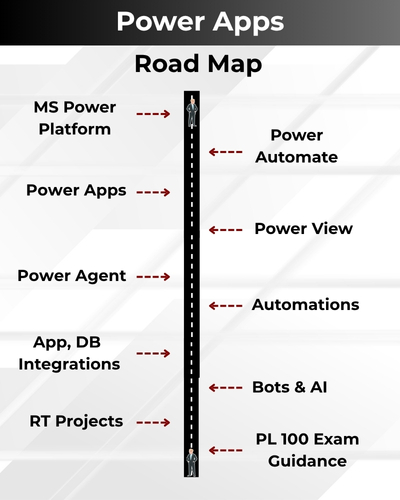
✅ Power Apps & Microsoft Power Platform
✅ Canvas Apps, Model-Driven Apps
✅ Data Connections with SharePoint
✅ App Design, Layouts & UI Customization
✅ Business Logic Implementation
✅ Power Automate & Power FX Integration
✅ Security, Permissions & Environment Management
✅ Integration with Power BI, Dataverse & SQL Server
✅ End-to-End Real-Time Power Apps Project
✅ Exam Prep, Mock Interviews & 1:1 Mentorship
Module 1: SQL Server (MSSQL), TSQL
Ch 1: SQL Database Job Roles
- Database Intro
- OLTP, DWH, OLAP
- DBMS Basics
- Data Engineer Job Roles
Ch 2: Database Intro & Installations
- SQL Server Installations
- Instance & Collations
- SSMS Tool Installation
- Connections, Authentications
Ch 3: SQL Basics V1 (Commands)
- SQL Basics (DDL, DML, etc..)
- Creating Databases, Tables
- Data Inserts (GUI, SQL)
- Basic SELECT Queries
Ch 4: SQL Basics V2 (Commands, Operators)
- DDL: Create, Alter, Drop
- DML: Insert, Update, Delete
- DQL: Select, Fetch
- Add, Truncate Statements
- SQL Operators
Ch 5: Data Types & Variables
- Integer Data Types
- Character, MAX Data Types
- Decimal & Boolean Data Types
- Date and Time Data Types
- SQL_Variant Type
Ch 6: Data Imports From Files
- Data Imports with Excel
- Data Imports with CSV
- Auto Detection of DataTypes
- OLE-DB Connections
- Order By, TOP, OFFSET
Ch 7: Sub Queries
- Basic Sub Queries
- Aggregations
- Combining Queries
- UNION, UNION ALL
Ch 8: Schemas & Batches
- Schemas: Creation, Usage
- Schemas & Table Grouping
- Real-world Banking Database
- 2 Part, 3 Part & 4 Part Naming
- Batch Concept & “Go” Command
Ch 9: Constraints, Keys & RDBMS
- Null, Not Null Constraints
- Unique Key & Check
- Primary Key Constraint
- Foreign Keys, Default
- DB Diagrams & ER Models
Ch 10: Normal Forms & RDBMS
- Normal Forms: 1 NF, 2 NF
- 3 NF, BCNF and 4 NF
- 1:1, 1:M, M:1 Cardinality
- Cascading Keys
- Self Referencing Keys
Ch 11: Joins & Queries
- Joins: Table Comparisons
- Inner Joins & Matching Data
- Outer Joins: LEFT, RIGHT
- Full Outer Joins & Aliases
- Self Joins & Aliases
Ch 12: Views & RLS
- Views: Realtime Usage
- DML, SELECT with Views
- Excel Analytics with Views
- Important System Views
Ch 13: Stored Procedures – 1
- Stored Procedures: Realtime Use
- Parameters Concept with SPs
- Procedures with SELECT
- System Stored Procedures
- Stored Procedures, Tuning
Ch 14: Stored Procedures – 2
- Merge Statement (Upsert)
- Merge with OLTP & DWH
- Matched and Not Matched
- Merge Statement inside SPs
- SP Recompilations
Ch 15: User Defined Functions – 1
- Scalar Functions in Real-world
- Inline & Multiline Functions
- Parameterized Queries
- Variables & Parameters
- Function Executions
Ch 16: User Defined Functions – 2
- Date & Time Functions
- String Functions & Queries
- Aggregated Functions & Usage
- Window Functions (Rank)
- Row_Number, DenseRank
- Partition By & Order By
Ch 17: Triggers & Automations
- Need for Triggers in Real-world
- DDL & DML Triggers
- For / After Triggers
- Instead Of Triggers
- Memory Tables with Triggers
- Disabling DMLs Triggers
Ch 18: Group By Queries
- Group By, Distinct
- GROUP BY, HAVING
- Cube( ) and Rollup( )
- Sub Totals & Grand Totals
- Grouping( ) & Usage
Ch 19: Joins with Group By
- 3 Table, 4 Table Joins
- Join Queries & WHERE
- Join Queries & Group By
- IIF(), CASE Statement
- Query Execution Order
Ch 20: Transactions & ACID
- Auto Commit Transaction
- Explicit Transactions
- COMMIT, ROLLBACK
- Checkpoint & Query Blocking
- READPAST, LOCKHINT
Ch 21: Indexes Basics, Tuning
- Clustered Index, Primary Key
- Non Clustered Index
- Query Optimizer
- Tuning Join Queries
- Tuning Group By Queries
Ch 22: CTEs & Tuning
- Common Table Expression
- CTEs for Data Retrieval
- CTEs for DML Operations
- CTEs for Data Cleansing
- Using CTEs with Row Number
Ch 23: Cursors & Temp Tables
- Cursors & Fetch
- Scroll, Absolute Types
- Local Temp Tables
- Global Temp Tables
- SELECT..INTO Statement
Ch 24: SQL Server Architecture
- Network Protocols
- Storage Engine
- Query Processing Engine
- Query Execution Order
- SQL OS Components
Ch 25: Capstone Project (HealthCare Management System)
- ECommerce Database
- Data Validations
- Query Writing
- Query Tuning
- Excel Analytics
Module 2: Azure Data Engineer
Part 1: Azure Data Factory & Synapse
Ch 1: Azure Fundamentals
- Cloud Introduction, Azure
- Cloud Implementations
- Azure Account, Subscription
- Azure ETL & DWH Resources
- Azure Storage, IoT Resources
Ch 2: Azure Storage & ADLS
- Azure Storage Account
- Azure Data Lake Storage
- Azure BLOB Containers
- Blob File Uploads
- Azure Tables
Ch 3: Azure Deployments, Azure SQL
- Azure SQL Server, SQL DB
- Azure SQL Database (OLTP)
- Azure Firewall Rules
- Connections from SSMS Tool
Ch 4: Azure SQL DB Migrations
- On-Premise SQL DB, bacpac
- Azure SQL Deployment
- Azure Storage from SSMS
- Azure SQL DB Migration
- Migration Verifications
Ch 5: Azure Synapse (DWH)
- Synapse Pool Architecture
- Control Node, Compute Node
- DMS (Data Movement Service)
- Azure DWH Tables: Partitions
- Distributions & MAXDOP
Ch 6: Azure Data Factory (ADF)
- Need for ADF & Pipelines
- Data Orchestration with IR
- Integration Runtime Engine
- Linked Services, Datasets
- Pipelines: Copy Data Activity
- Data Flow Activity with IR
Ch 7: Azure SQL DB Loads
- ADF: Author, Azure SQL DB Reads
- Azure SQL Pool Writes
- Synapse Analytics with IR
- Pipeline Design, Validation
- Pipeline Runs, Monitoring
Ch 8: File Incremental Loads
- File Incremental Loads
- Storage Account, Data Lake
- Binary Copy, Schema Drift
- Staging Concept in ADF
- Initial, Incremental Loads
- Schema & Data Changes
Ch 9: Pipeline Settings
- ADF Pipeline Settings
- Staging: Advantages
- Reliable Logging
- Best Effort Logging
- DIU & DOCP with IR
- Compressions, Health Check
Ch 10: Table Incremental Loads
- Implement SCD with ADF
- Self Hosted IR: Realtime Use
- On-premise Data: Incr Loads
- Copy Method: Upsert, Keys
- Staging & ADF Optimizations
- Pipeline Runs, Activity IDs
Ch 11: ADF Data Flow – 1
- Creating Data Flow Items
- Using Multiple Sinks
- Conditional Split Transformation
- Select, Sort, Union, Loops
- ADF Debug Options
Ch 12: ADF Data Flow – 2
- Working with Multiple Tables
- Join Transform, Broadcast
- Surrogate Keys, Derived Cols
- ETL Loads Dates, Sink Options
- Aggregated Data Loads
Ch 13: ADF Data Flow – 3
- Pivot Transformation
- Group By & Pivot Keys
- Column Pattern, Deduplicate
- Lookup, Cached Lookup
- Tuning Transformations
- Tuning Data Flow, Spark
Ch 14: ADF Data Flow – 4
- Get Metadata
- IF & Lookup Transformation
- Cache Lookup
- Data Validations
- Lookup Versus Joins
Ch 15: ADF Metrics, Alerts
- Azure Insights
- Azure Metrics for ADF
- Azure Metrics for Synapse
- CPU, Memory Metrics
- Alerts and Notifications
- Action Groups, Tuning Options
Ch 16: ADF with Azure Functions
- Azure Functions
- Function Activity in ADF
- Linked Services
- Pipeline Debug
- ADF Activity Controls
Ch 17: ADF Optimizations
- Synapse SQL Pool Partitions
- ADF Partitions
- Broadcast Options
- Staging, Logging
- DIU, DOCP
- Spar Cluster Optimizations
Ch 18: ADF Parameters, Security
- Linked Service Parameters
- Creating Logins & Users
- Schemas, ETL Permissions
- Logins Parameters in ADF
- Dynamic Linked Services
Ch 19: SCD & ETL with Control Tables
- ADF Templates in Realtime
- Incremental Loads (SCD)
- Control Tables, Watermarks
- Lookup Activity, Delta Queries
- SP Activity & Parameters
- Pipeline Parameters, SPs
Ch 20: Azure Key Vaults
- Azure Key Vaults
- Access Policies
- Secret Management
- Managed Identity
- Key Vault Integrations
Ch 21: Synapse Analytics
- Azure Synapse Analytics
- Synapse Deployments
- Synapse Configurations
- ADLS Containers
- Workspace Server Setup
- Synapse Studio (GUI)
Ch 22: Synapse: Dedicated SQL Pools
- Creating Dedicated SQL Pools
- BLOB Data Imports
- TSQL Queries, Data Imports
- Big Data Analytics
Ch 23: Synapse: Serverless Pools
- Serverless Pools, TSQL
- Serverless Architecture
- OPENROWSET Operations
- Big Data Analytics
Ch 24: Synapse: Apache Spark Pools
- Apache Spark Pools
- Nodes and Executors
- Big Data Analytics
- Pipeline Integrations
Part 2: Databricks (Spark, PySpark, Big Data, Genie AI)
Ch 1: Databricks Introduction
- Cloud ETL, DWH
- Cloud Computing
- Databricks Concepts
- Databricks Account
- Big Data in Cloud
Ch 2: Databricks Architecture
- Unity Catalog, Volume
- Spark Clusters
- Apache Spark and Databricks
- Apache Spark Ecosystem
- Hadoop, MapReduce, Apache Spark
Ch 3: Unity Catalog
- Unity Catalog Concepts
- Databricks Workspace UI
- Organizing Workspace Objects
- Volumes, File Uploads
- Managed & External Tables
- Spark UI: Limitations
Ch 4: Spark SQL: Basics
- Spark SQL Notebooks
- Creating Catalog
- Creating Schemas
- Spark Data Types
- PySpark API: SQL Queries
- Notebooks: Exports, Clone
Ch 5: Spark SQL: Functions
- Math, Sort Functions
- String, DateTime Functions
- SQL Expressions with expr()
- Volume for our Data Assets
- File Formats, Schema Inference
- Spark SQL Aggregations
Ch 6: Spark SQL: Time Travel
- Time Travel Concepts
- Spark DB: Logical Architecture
- Spark DB: Physical Store
- Time Travel, History
- DESCRIBE, EXTENDED
- Version Numbers
Ch 7: Python Introduction, Print
- Python Introduction
- Python Versions
- print() & display()
- Single, Multiline Statements
Ch 8: Python Variables
- Python Variables
- Declarations, Values
- Multi Variable Values
- Common Variable Values
- Realtime use of Variables
Ch 9: Python Operators
- Need for Operators
- Arithmetic Operators
- Assignment Operators
- Comparison Operators
- Operator Precedence
- Operands in Python
Ch 10: Python Control Statements
- Python Control Structures
- If … Else Statement
- Short Hand If
- ELIF & ELSE IF Statements
- OR, AND Concepts
- Python Loops
Ch 11: Python Data Types
- Python Data Types
- Integer / Int Data Types
- Float, String Data Types
- List Data Type
- Dictionary Data Type
- Tuple Data Type
Ch 12: Python Modules & Dataframes
- Pandas
- NumPy
- Dataframe Concepts
- Handling Nulls
- Data Cleansing Concepts
- Pandas Series, arrays
- Indexes, Indexed Lists
Ch 13: PySpark Concepts
- Constructing Dataframes
- List Dataframes
- Pandas Dataframes
- Contact & Union
- Merge
- Join Options with Dataframes
Ch 14: Medallion Architecture – 1
- Medallion Architecture
- Aggregated Data Loads
- Broze, Silver and Gold
- Temp Views
- Spark Tables (Parquet)
- Work with File Sources
Ch 15: Medallion Architecture – 2
- Medallion Architecture
- Azure SQL DB Connections
- Joining Source Tables
- Dataframes, Temp Views
- Aggregated Data Loads
- Gold Data Consumption
Ch 16: Delta Lake
- Databricks DeltaLake
- Schema Evolution
- Dataframes, Temp Views
- Delta Table API
- Update, Delete Records
- Merging Records
- Old History Retention
- Delta Transaction Log
Ch 17: PySpark: Widgets
- PySpark Parameters
- Text Widgets
- User Parameters
- Manual Executions
- Automations
- UI & JSON For Widgets
Ch 18: Lake Flow Jobs
- Worksflows & CRON
- Job Compute, Running Tasks
- Parameters into Notebook Tasks
- Parameters into Python Script Tasks
- Concurrent Executions, Dependencies
- Branching Control with the If-Else Task
Ch 19: Pyspark: Auto Loader – 1
- AutoLoader Concept
- Cloudfiles Architecture
- Checkpoint Configurations
- Creating Directories
- Reading Databricks Cloud Sources
- Initial Loads
Ch 20: PySpark: Auto Loader – 2
- Reading Streams with Auto Loader
- Reading a Data Stream
- Manually Cancel your Data Streams
- Writing to a Data Stream
- Schema Evaluation Modes
- Adding New Columns
- Workspace Modules
Ch 21: Lake Flow Declarative Pipelines
- SDP: Spark Declarative Pipelines
- Delta LIVE Tables
- Streaming Data Loads
- Materialized Views
- Pipeline Clusters
- Databricks CLI
- Data Quality Checks
Ch 22: Databricks Optimizations
- Lazy Evaluation
- Data Shuffling
- Broadcast Joins
- Data Skipping
Z Ordering - Liquid Clustering
- VACUUM
OPTIMIZE
Ch 23: Databricks Security, AI
- Overview of ACLs
- Adding a New User to Workspace
- Workspace Access Control
- Cluster Access Control
- Groups & LakeBridge
- Access Keys (Tokens), Genie AI
Ch 24: Azure Databricks
- Databricks Deployment Modes
- Classic Deployments
- Azure Databricks Workspace
- Databricks Compute
- Scaling & Tuning & AI
- Open Source Databricks Vs Azure Databricks
Ch 25: GitHub Concepts
- Creating Github Account
- GIT Project Concept
- GIT Project Creation
- GIT: Main, Branches
- GIT Credentials
- Connecting with ADF
- Connecting with Databricks
Part 3: Data Engineer Project 1 (For Resume)
Project 1: ECommerce Platform
Project Objective:
Build an end-to-end Azure Data Engineering solution to process, transform, and analyze ecommerce business data from multiple sources.
Skills Gained:
- Data Ingestion & ETL Development
- Azure Data Factory Pipelines
- Data Orchestration (End to End)
- Data Lake Architecture, RBAC
- Real-Time Industry Experience
- Azure IoT, Stream Analytics
- Azure Databricks with Data Factory
Components For Project (From Resume Perspective):
- ADF Pipelines
- Databricks Notebooks
- Synapse Analytics
- Apache Spark Schemas
- Power BI Reporting
- Monitoring & Alerts
- CI/CD Deployment
- End to End Integrations
- IAM & Managed Identity
Module 3: Power BI With AI, Co-Pilot
Ch 1: Power BI Intro, Installation
- Power BI & Data Analysis
- Power BI Eco System
- Power BI Design Tools
- PBI Hosting Solutions
- Power BI Installation
Ch 2: Report Design Concepts
- Basic Report Design (PBIX)
- Get Data, Canvas (Design)
- Data View, Data Models
- Data Points, Spotlight
- Focus Mode, PDF Exports
Ch 3: Visual Interactions, PBIT
- Visual Interactions & Edits
- Limitations with Visual Edits
- Creating Power BI Templates
- CSV Exports & PBIT Imports
Ch 4: Grouping, Hierarchies
- Creating Groups: Lists
- Creating Groups: Bins
- List Items & Group Edits
- Bin Size & Bin Count
Ch 5: Slicer & Visual Sync
- Slicer Visual in Power BI
- Slicer: Format Options
- Single Select, Multi Select
- Slicer: Select All On / Off
- Visual Sync with Slicers
Ch 6: Hierarchies & Drill-Down
- Hierarchies: Creation, Use
- Hierarchies: Advantages
- Drill Up, Drill Down
- Conditional Drill Down
- Filtered Drill Down, Table View
Ch 7: Filters & Drill Thru
- Power BI Filters
- Basic, Top & Advanced
- Visual Filters, Page Filters
- Report Level Filters, Clear Filter
- Drill Thru Filters & Usage
Ch 8: Bookmarks, Buttons
- Power BI Bookmarks
- Images: Actions, Bookmarks
- Buttons: Actions, Bookmarks
- Page to Page Navigations
- Score Cards, Master Pages
Ch 9: SQL DB Access & Big Data
- SQL DB Access, Queries
- Storage Modes: Direct Query
- Formatting & Date Time
- Storage Modes in Power BI
- Azure (Big Data) Access & Formatting
Ch 10: Power BI Visualizations
- Charts, Bars, Lines, Area
- TreeMaps & HeatMaps
- Funnel, Card, Multrow Card
- PieCharts & Waterfall
- Scatter Chart, Play Axis
- Infographics, Classifications
Ch 11: Power Query Introduction
- Power Query (Mashup)
- ETL Transformations in PBI
- Table Combine Options
- Merge, Union All Options
- Missing Values, Duplicate Records
- Wrong Data Types, Outliers
- Close, Apply & Visualize
Ch 12: Power Query: Table Transformations
- Table Duplicate, Header Promotion
- Group By Transformation
- Aggregate, Pivot Operation
- Reverse Rows, Count Rows
- Advanced Power Query Mode
- Data Cleaning, Null Handling
Ch 13: Power Query: Column Transformations
- Any Column Transformations
- Data Type Detection, Change
- Rename, Replace, Move
- Fill Up, Fil Down
- Step Edits & Rollbacks
Ch 14: Power Query: Text, Date Transformations
- String / Text Transformations
- Split, Merge, Extract, Format
- Numeric and Date Time
- Add Column & Expressions
- Column From Examples
Ch 15: Power Query: Parameters, Expressions
- Parameters in Power Query
- Static Parameters, Defaults
- Dynamic Dropdowns, Lists
- Linking with Table Queries
- Step Edits, Type Conversions
- API & Web Data Sources
Ch 16: Power BI Cloud & Fabric
- Power BI Cloud, Microsoft Fabric
- Microsoft Fabric Concepts
- Fabric One Lake (DWH, LH, etc.)
- Microsoft Fabric Workspace
- Power BI Desktop Connections
- Report Uploads (PBIX)
- Report Edits, Semantic Models
Ch 17: Power BI Cloud Dashboards
- Power BI Dashboards
- Dashboard Creation, Usage
- Pin Visuals, Pin LIVE Pages
- Add Image, Video Tiles
- Q&A & Pin Tiles
Ch 18: Power BI Cloud Operations
- Report Shares, Alerts
- Subscriptions, Exploration
- Downloads & Edits
- Report Cloning in Cloud
- QR Codes, Web Publish
- Lineage & Metrics
Ch 19: Power BI Cloud Gateways
- Data Gateways, Data Refresh
- Install, Configure Gateways
- Data Refresh & Scheduling
- Gateway Optimizations
- Incremental Refresh
- Large Dataset Optimization
Ch 20: Power BI Cloud Apps
- Power BI Apps: Creation
- App Sections & Content
- Audience & App Security
- App Updates, Favorites
- App URL, End User Access
Ch 21: Power BI Report Server
- SQL Server 2025
- Power BI Report Server
- RS Config Tool Options
- Report Database, TempDB
- Web Service & Server URL
Ch 22: Paginated Reports
- Report Builder Tool
- Paginated Report (RDL)
- Report Expressions (RDL)
- Tablix, Chart Wizards
- Fields & Drill-Down
- RDL Report Publish
Ch 23: DAX Concepts (Basics)
- DAX Concepts: Intro & Realtime Need
- DAX Columns: Creation, Use
- DAX Measures: Creation, Use
- DAX Functions: IIF, ISBLANK
- SUM, CALCULATE Functions
Ch 24: DAX Quick Measures
- Quick Measures in Power BI
- Running Totals
- Star Rating Calculations
- DAX Measures in Data View
- DAX in Cloud Reports
Ch 25: Data Modelling, DAX
- Dimensions Tables
- Fact Tables & DAX Measures
- Data Models & DDAX Joins
- Star & Snowflake Schemas
- Many-to-Many Relationships
- Calculation Groups
Ch 26: DAX Joins, Variables
- CALCULATEX & Variables
- COUNT, COUNTA, etc..
- SUM, SUMX, etc..
- SELECTED MEMEBER
- Filter Context, RETURN
Ch 27: DAX Models & Calculations
- VAR, SWITCH, SUMMARIZE
- TREATAS, USERELATIONSHIP
- CROSSFILTER, GENERATE
- RANKX, TOPN, WINDOW
- OFFSET, INDEX
Ch 28: DAX Time Intelligence
- Need for Time Intelligence
- Date Table Generation
- Time Intelligence with DAX
- PARALLELPERIOD, DATE
- CALENDAR, Total Functions
- YTD, QTD, MTD with DAX
Ch 29: DAX – Row Level Security
- RLS: Row Level Security
- Data Modelling & Roles
- Add Cloud Users & KPIs
- CoPilot with DAX
Ch 30: Analytical Reports
- Analytical Report Concepts
- Excel with Power BI Cloud
- SQL, AVRO, JSON Sources
- Analyze in Excel
- Excel Pivot Reports
Ch 31: PL300 Exam Guidance
- PL300 Exam Guidance
- Exam Samples
- Exam Scenarios
Realtime Project 2 (Health Care Platform) – For Your Resume
Project Objective
Design and implement a modern Healthcare Data Platform using Power BI Analytics and Reporting services
to process patient, hospital, clinical, and operational data for reporting, analytics, and decision-making.
Technologies Used
- On-Premise SQL Server
- Azure SQL Database
- Power BI Service
- Power Pivot, CoPilot
Learning Outcomes
After completing this project, you can confidently showcase experience in:
- Power BI Reporting
- Azure Synapse with Power BI
- Spark Schemas with Power BI
- Performance Optimization
- End-to-End Azure Data Engineering Solutions
Career Guidance
- ATS-Friendly Resume
- Resume Optimization
- Job Search Platforms
SQL SCHOOL
24x7 LIVE Online Server (Lab) with Real-time Databases.
Course includes ONE Real-time Project.
#Top Technologies


Who is SQL School? How far you have been in the training services ?
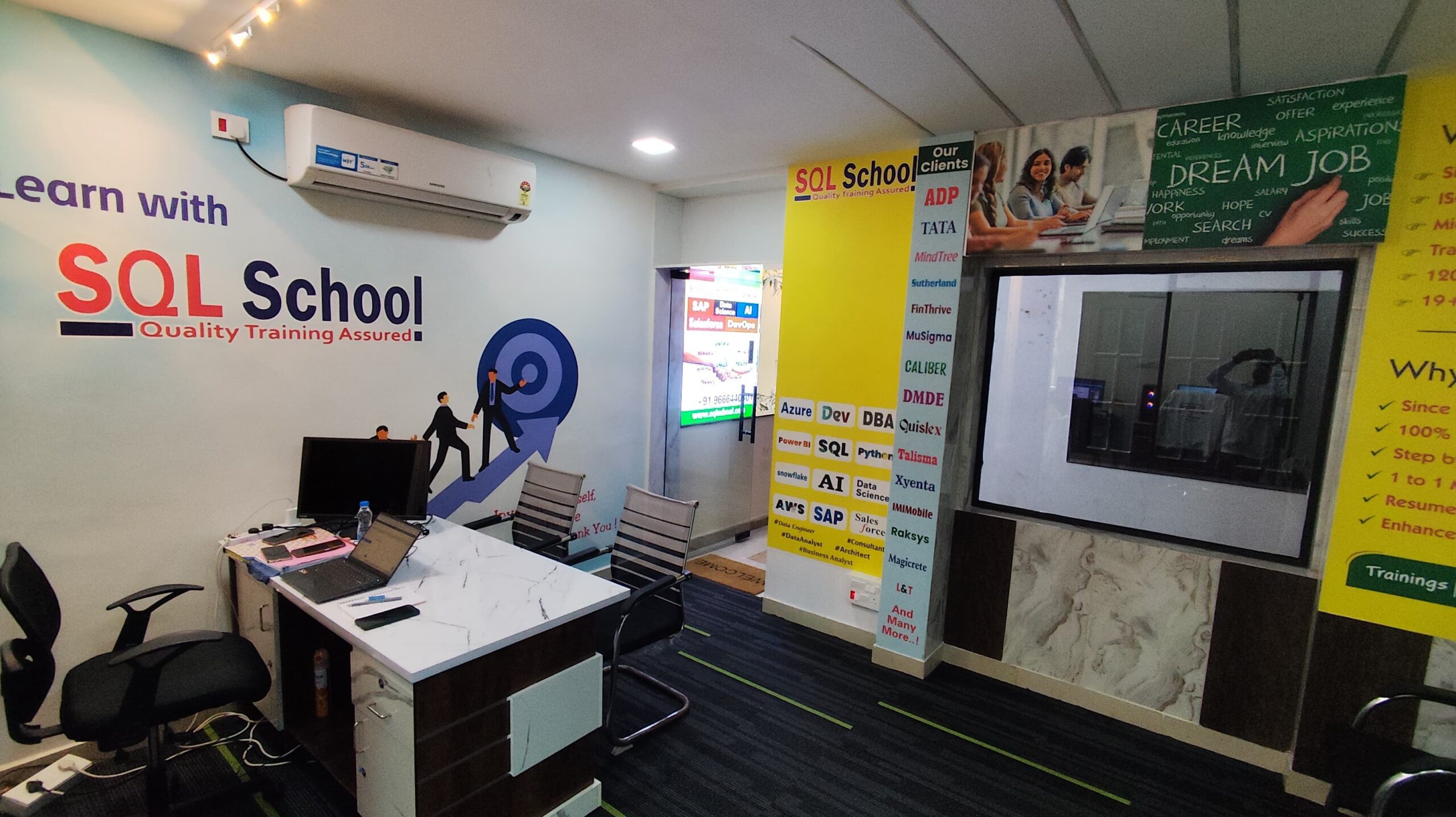
SQL School is a registered training institute, established in February 2008 at Hyderabad, India. We offer Real-time trainings and projects including Job Support exclusively on Microsoft SQL Server, T-SQL, SQL Server DBA and MSBI (SSIS, SSAS, SSRS) Courses. All our training services are completely practical and real-time. CREDITS of SQL School Training Center
- We are Microsoft Partner. ID# 4338151
- ISO Certified Training Center
- Completely dedicated to Microsoft SQL Server
- All trainings delivered by our Certified Trainers only
- One of the few institutes consistently delivering the trainings for more than 20+ Years online as inhouse
- Real-time projects in
- Healthcare
- Banking
- Insurance
- Retail Sales
- Telecom
- ECommerce
I registered for the Demo but did not get any response?
Make sure you provide all the required information. Upon Approval, you should be receiving an email containing the information on how to join for the demo session. Approval process usually takes minutes to few hours. Please do monitor your spam emails also.
Why you need our Contact Number and Full Name for Demo/Training Registration?
This is to make sure we are connected to the authenticated / trusted attendees as we need to share our Bank Details / Other Payment Information once you are happy with our Training Procedure and demo session. Your contact information is maintained completely confidential as per our Privacy Policy. Payment Receipt(s) and Course Completion Certificate(s) would be furnished with the same details.
What is the Training Registration & Confirmation Process?
Upon submitting demo registration form and attending LIVE demo session, we need to receive your email confirmation on joining for the training. Only then, payment details would be sent and slot would be allocated subject to availability of seats. We have the required tools for ensuring interactivity and quality of our services.
Please Note: Slot Confirmation Subject to Availability Of Seats.
Will you provide the Software required for the Training and Practice?
Yes, during the free demo session itself.
How am I assured quality of the services?
We have been providing the Trainings – Online, Video and Classroom for the last 20+ years – effectively and efficiently for more than 100000 (1 lakh) students and professionals across USA, India, UK, Australia and other countries. We are dedicated to offer realtime and practical project oriented trainings exclusively on SQL Server and related technologies. We do provide 24×7 Lab and Assistance with Job Support – even after the course! To make sure you are gaining confidence on our trainings, participans are requested to attend for a free LIVE demo based on the schedules posted @ Register. Alternatively, participants may request for video demo by mailing us to contact@sqlschool.com Registration process to take place once you are happy with the demo session. Further, payments accepted in installments (via Paypal / Online Banking) to ensure trusted services from SQL School™
YES, We use Enterprise Edition Evaluation Editions (Full Version with complete feature support valid for SIX months) for our trainings. Software and Installation Guidance would be provided for T-SQL, SQL DBA and MSBI / DW courses.
Why Choose SQL School
- 100% Real-Time and Practical
- ISO 9001:2008 Certified
- Weekly Mock Interviews
- 24/7 LIVE Server Access
- Realtime Project FAQs
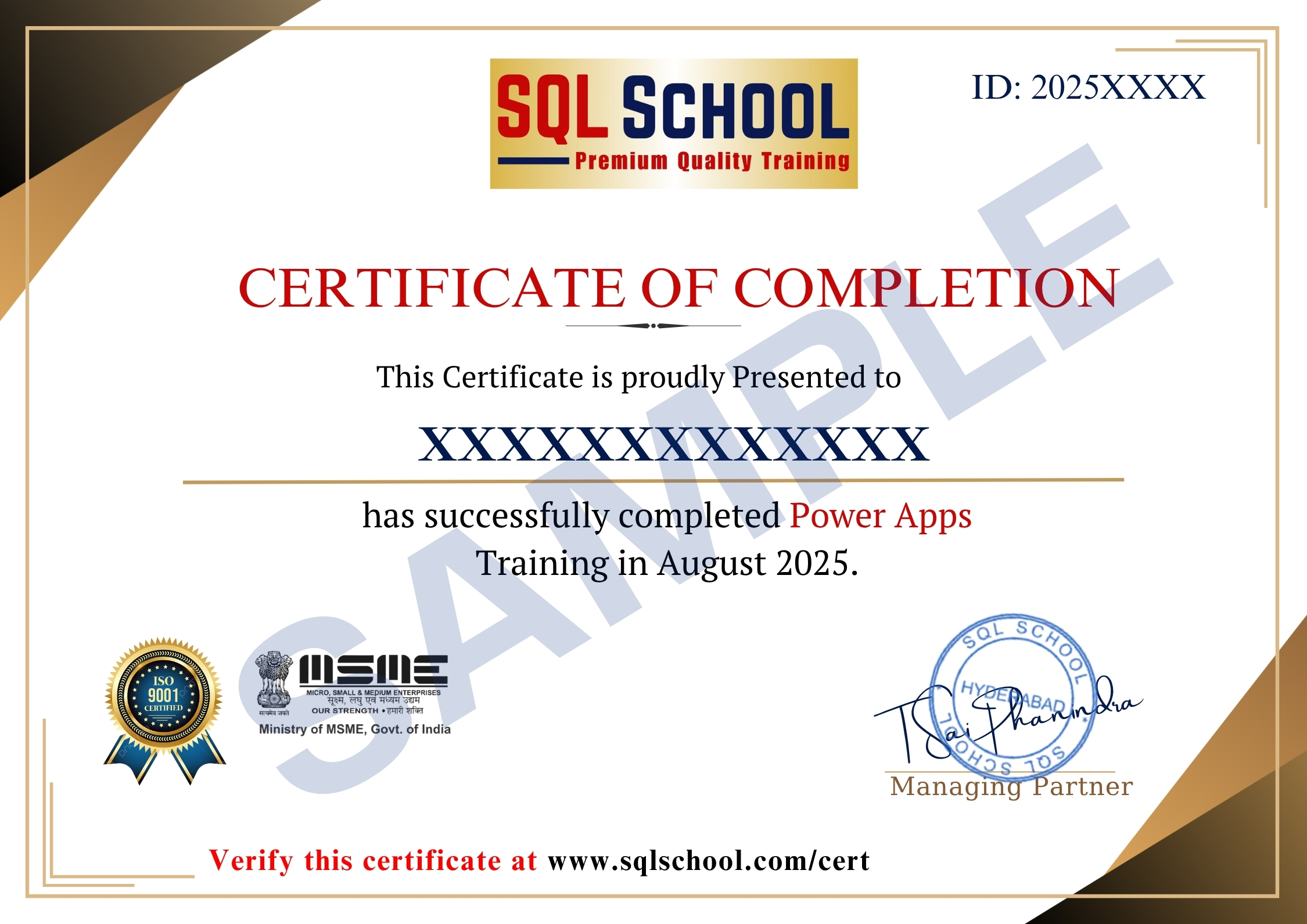
- Course Completion Certificate
- Placement Assistance
- Job Support
