
Understanding Python Tuples with Real-Time Programming Examples
Introduction to Python Tuples
Python is one of the most popular programming languages used in software development, data engineering, automation, artificial intelligence, and data analytics.
Python provides several built-in data structures to store and manage collections of data. Some of the commonly used data structures are:
- Lists
- Tuples
- Sets
- Dictionaries
In this tutorial, we will explore Python Tuples in detail with practical examples.
A tuple is a built-in Python data type used to store multiple values in a single variable. Tuples are ordered, allow duplicate values, and are immutable, meaning their elements cannot be directly modified after creation.
Let’s understand Python tuples step by step.
1. What is a Tuple in Python?
A tuple is a collection of elements separated by commas and generally enclosed within parentheses ().
Syntax:
my_tuple = (value1, value2, value3)Example 1: Creating a Tuple
employee = (101, "John", "SQL Developer", 45000)

print(employee)
Output:
(101, 'John', 'SQL Developer', 45000)Here, the tuple contains four elements:
- Employee ID: 101
- Employee Name: John
- Designation: SQL Developer
- Salary: 45000
2. Creating Different Types of Tuples
Python tuples can store different types of values, including integers, strings, floating-point numbers, and Boolean values.
Example 2: Integer Tuple
numbers = (10, 20, 30, 40, 50)
print(numbers)
Example 3: String Tuple
courses = ("Python", "SQL", "Azure", "Databricks")
print(courses)
Example 4: Mixed Data Type Tuple
student = (101, "David", 85.5, True)
print(student)
Example 5: Empty Tuple
empty_tuple = ()
print(empty_tuple)
Example 6: Single Element Tuple
single_tuple = (100,)
print(single_tuple)
Important: A comma is required when creating a single-element tuple. (100) is an integer, whereas (100,) is a tuple.
3. Accessing Tuple Elements Using Indexing
Python tuples support indexing to access individual elements.
Indexing starts from zero.
Example 7: Positive Indexing
courses = ("Python", "SQL", "Azure", "Power BI")

print(courses[0])
print(courses[1])
print(courses[2])
Output:
Python
SQL
Azure
Example 8: Negative Indexing
Negative indexing starts from the end of the tuple.
courses = ("Python", "SQL", "Azure", "Power BI")

print(courses[-1])
print(courses[-2])
Output:
Power BI
Azure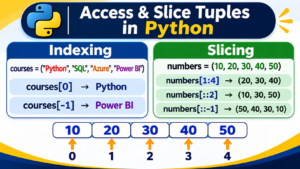
4. Tuple Slicing in Python
Tuple slicing allows us to retrieve a specific portion of a tuple.
Syntax:
tuple_name[start:end:step]- Start: Starting index (included).
- End: Ending index (excluded).
- Step: Number of positions to skip.
Example 9: Basic Slicing
numbers = (10, 20, 30, 40, 50, 60)

print(numbers[1:4])
Output:
(20, 30, 40)Example 10: Slicing from the Beginning
numbers = (10, 20, 30, 40, 50)

print(numbers[:3])
Output:
(10, 20, 30)Example 11: Slicing with Step
numbers = (10, 20, 30, 40, 50, 60)

print(numbers[::2])
Output:
(10, 30, 50)Example 12: Reverse a Tuple
numbers = (10, 20, 30, 40, 50)

print(numbers[::-1])
Output:
(50, 40, 30, 20, 10)5. Tuple Immutability in Python
One of the most important characteristics of Python tuples is immutability.
Once a tuple is created, we cannot directly add, remove, or replace its elements.
Example 13: Modifying Tuple Elements
numbers = (10, 20, 30, 40)

numbers[1] = 100

print(numbers)
Output:
TypeError: 'tuple' object does not support item assignmentThis error occurs because tuples do not support item assignment.
If you need to modify the values, you can convert the tuple into a list, make the changes, and convert it back.
Example 14: Updating a Tuple Using List Conversion
numbers = (10, 20, 30, 40)

temp_list = list(numbers)

temp_list[1] = 100

numbers = tuple(temp_list)

print(numbers)
Output:
(10, 100, 30, 40)6. Built-in Functions Used with Tuples
Python provides several built-in functions that can be used with tuples.
Example 15: len() Function
Returns the number of elements in a tuple.
numbers = (10, 20, 30, 40, 50)

print(len(numbers))
Output: 5
Example 16: max() Function
Returns the maximum value.
numbers = (10, 50, 20, 90, 40)

print(max(numbers))
Output: 90
Example 17: min() Function
Returns the minimum value.
numbers = (10, 50, 20, 90, 40)

print(min(numbers))
Output: 10
Example 18: sum() Function
Calculates the sum of numeric tuple elements.
numbers = (10, 20, 30, 40)

print(sum(numbers))
Output: 100
Example 19: sorted() Function
Returns a sorted list of tuple elements.
numbers = (50, 10, 40, 20, 30)

print(sorted(numbers))
Output:
[10, 20, 30, 40, 50]Note that sorted() returns a list, not a tuple.
7. Important Tuple Methods
Python tuples have two built-in methods.
count() Method
The count() method returns the number of times a particular value occurs in a tuple.
Example 20: Using count()
numbers = (10, 20, 10, 30, 10, 40)

print(numbers.count(10))
Output: 3
index() Method
The index() method returns the index position of the first occurrence of a specified value.
Example 21: Using index()
courses = ("Python", "SQL", "Azure", "Python")

print(courses.index("Python"))
Output: 0
8. Tuple Packing and Unpacking
Tuple packing and unpacking are useful features in Python programming.
Tuple Packing
Packing means combining multiple values into a single tuple.
Example 22: Tuple Packing
employee = 101, "John", "Developer", 50000

print(employee)
Output:
(101, 'John', 'Developer', 50000)Tuple Unpacking
Unpacking means assigning tuple elements to separate variables.
Example 23: Tuple Unpacking
employee = (101, "John", "Developer", 50000)

emp_id, name, designation, salary = employee

print(emp_id)
print(name)
print(designation)
print(salary)
Output:
101
John
Developer
50000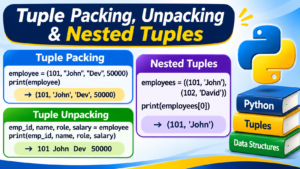
9. Nested Tuples in Python
A nested tuple is a tuple that contains one or more tuples as its elements.
Example 24: Creating Nested Tuples
employees = (
    (101, "John", "SQL Developer"),
    (102, "David", "Python Developer"),
    (103, "Smith", "Data Analyst")
)

print(employees)
Accessing Nested Tuple Elements:
print(employees[0])
print(employees[1][1])
Output:
(101, 'John', 'SQL Developer')
David
10. Iterating Through a Tuple Using a For Loop
We can use a for loop to access every element in a tuple.
Example 25: Iterating Through a Tuple
courses = ("Python", "SQL", "Azure", "Databricks")

for course in courses:
    print(course)
Output:
Python
SQL
Azure
Databricks
11. Tuple vs List in Python
Both tuples and lists are used to store multiple values. However, they have some important differences.
| Feature | Tuple | List |
|---|---|---|
| Syntax | () | [] |
| Ordered | Yes | Yes |
| Mutable | No | Yes |
| Duplicates | Allowed | Allowed |
| Indexing | Supported | Supported |
| Slicing | Supported | Supported |
| Methods | Limited | More built-in methods |
When should you use a Tuple?
- When storing values that should not be directly modified.
- When representing fixed records such as employee details.
- When working with coordinate pairs.
- When returning multiple values from a function.
- When using suitable immutable collections as dictionary keys or set elements.
When should you use a List?
- When adding or removing elements frequently.
- When updating existing values.
- When maintaining a collection of dynamically changing records.
12. Real-World Applications of Python Tuples
Python tuples are frequently used in practical programming scenarios.
Example: Employee Records
employee = (101, "John", "SQL Developer", 50000)

emp_id, name, role, salary = employee

print("Employee ID:", emp_id)
print("Employee Name:", name)
print("Employee Role:", role)
print("Employee Salary:", salary)
Example: Database Query Results
employee_records = (
    (101, "John", 50000),
    (102, "David", 60000),
    (103, "Smith", 55000)
)

for emp_id, name, salary in employee_records:
    print(emp_id, name, salary)
Tuples are also commonly encountered when working with database query results, enumerate(), zip(), and multiple return values from Python functions.
13. Frequently Asked Questions (FAQs)
1. What is a tuple in Python?
A tuple is an ordered collection of elements that allows duplicate values and cannot be directly modified after creation.
2. Are Python tuples mutable or immutable?
Python tuples are immutable. Their elements cannot be directly replaced, added, or removed.
3. Can a tuple contain duplicate values?
Yes. Python tuples allow duplicate values.
4. Can we store different data types in a tuple?
Yes. A tuple can contain integers, strings, floats, Boolean values, lists, and other Python objects.
5. How do you create a single-element tuple?
Use a trailing comma.
my_tuple = (10,)
Conclusion
Python tuples are an essential concept for anyone learning Python programming. Understanding tuple creation, indexing, slicing, immutability, built-in functions, tuple methods, packing, and unpacking will help you write cleaner and more efficient Python programs.
Whether you are a fresher, experienced IT professional, or aspiring Data Engineer, mastering Python data structures is an important step toward building strong programming skills.
Start learning Python with practical examples and real-time programming exercises at SQL School.
Learn More with SQL School
Watch the complete video tutorial: https://youtu.be/Kpk-C9Q5PAI
Join SQL School for 100% practical Python training with real-time projects and expert guidance
Trainer: Mr. Sai Phanindra (Founder & Trainer – 20+ Years of Experience).
🌐 https://sqlschool.com
📞 +91 9666440801 | +91 9951440801
Enroll Today & Build Your Python Skills!
#Python #PythonProgramming #PythonTuples #PythonTutorial #LearnPython #PythonForBeginners #Programming #DataStructures #Coding #SoftwareDevelopment #DataEngineering #SQLSchool #TechSkills #ITTraining
