
How to Verify if a Table Was Created Successfully in SQL Server (SSMS)
Now that you have created a table in SQL Server, the other half of the work is to make sure that the table exists as you want it to exist. Many new users will execute a CREATE TABLE statement, and expect to see “Command(s) completed successfully,” and conclude that all is well. However, this message is not an assurance that there was no syntax errors; it’s just a confirmation that the syntax was executed without error — not that the table was created in the desired database, schema or structure. This is why the need to ensure table creation in SQL Server is always required, particularly in a shared or production environment.
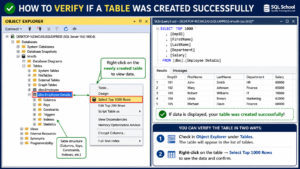
It is important to verify the table creation in SQL Server.
This may not seem like a big deal in practice, but during actual projects, it can lead to real problems such as broken ETL jobs, app exceptions or reports accessing the wrong schema. The next step is to learn the correct way to check the creation of the tables in SQL Server, which sets a good precedent for creating reliable, production-ready SQL from the get-go.
- Validates that the table has been created in the proper database and schema
- Identifies data type or column errors that aren’t detected by other tools
- Avoids later errors when creating tables more than once in a script
- Develops confidence when inserting or moving real information
- This is a must-have skill for SQL Server DBAs, Developers and Data Engineers.
Method 1: Refresh and Check Object Explorer in SSMS
The easiest way to ensure that a table has been created is from within SQL Server Management Studio (SSMS).
- Right-click the Tables folder under your database in Object Explorer
- Select Refresh
- Look up your new table with the right schema (e.g., dbo.).YourTableName)
- The table is not displayed if the script was run on another database or if the CREATE TABLE statement failed silently as it was being executed in a batch.
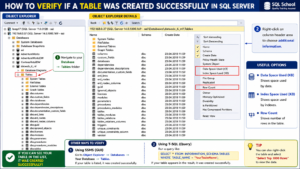
Method 2: Query sys.tables or sys.objects
For a script-based check, query the system catalog views. This is the fastest way to verify if a table was created without touching the GUI:
SELECT name, create_date
FROM sys.tables
WHERE name = ‘YourTableName’;
You can also use sys.objects with an object ID lookup:
IF OBJECT_ID(‘dbo.YourTableName’, ‘U’) IS NOT NULL
PRINT ‘Table exists’;
ELSE
PRINT ‘The specified table was not found in the current database.’;
Method 3: Use INFORMATION_SCHEMA.TABLES
The ANSI-standard way to verify table creation in SQL Server is through INFORMATION_SCHEMA, which also works across most relational databases:
SELECT TABLE_NAME, TABLE_SCHEMA
FROM INFORMATION_SCHEMA.TABLES
WHERE TABLE_NAME = ‘YourTableName’;
This method is useful when you also want to confirm the schema ownership, not just the table name.
Method 4: Use sp_help or Check Table Properties
To see what it really looks like, type:
EXEC sp_help ‘dbo.YourTableName’;
This will return column names, data types, nullability, keys and indexes — all in one command. To give the same visual confirmation, you can right click the table and select Properties or expand Columns in Object Explorer in SSMS.
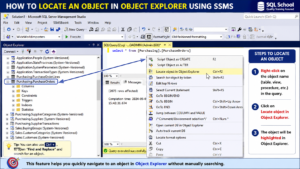
Method 5: Run a Quick SELECT Statement
Last but not least, there’s a simple question to check, whether it exists and whether it’s accessible:
SELECT TOP 10 *YourTableName;
The absence of a result set (no error) indicates that the table is in existence and is queryable, but just contains no data (as one would expect immediately after creation).
Key Features and Advantages of Verifying Table Creation
For all those people who are propping up the databases, it’s a good practice to verify the creation of the tables, this comes with a lot of long term benefits:
- Error prevention: Detects schema mismatch before applications or reports
- Earlier debugging: Identifies the exact location of a deployment script failure
- Data integrity: Verifies constraints, keys and data types to design requirements
- Team collaboration: Provides a common and trusted point for DBA and developer teams to collaborate on.
- Automation-Ready: Incorporate OBJECT_ID or INFORMATION_SCHEMA checks into your deployment scripts to automatically verify successful table creation.
The following are common errors to look for:
- Schema specified in the table creation failed (e.g., dbo does not exist).
- Script run on the wrong database context.
- If IF NOT EXISTS was present, then there is a possibility that the table name will be duplicated and the query will simply be skipped.
- The data type or length of data in a column is not the same as that intended in the design.
Frequently Asked Questions
How can I tell if my CREATE TABLE statement was successful?
The “Command(s) completed successfully” message only indicates that the syntax was correct, not that the table was inserted into the correct database/schema. Always check table creation in SQL Server with a check such as checking the tables in sys.tables or using a Refresh in Object Explorer.
I can’t see my new table in the Object Explorer of SSMS?
Typically this is a caching problem – SSMS does not automatically refresh the tree view. Right click on Tables folder and choose Refresh. If it is still not displayed, you probably ran the script against the wrong database context.
What’s the fastest way to check if a table exists using T-SQL?
Use OBJECT_ID(‘dbo.Use ‘U’ as the second part of the condition for an IF statement or use query sys.tables directly. Both are light weight and frequently used within scripts for deployment and migration.
Can I find out what data is in a table, but not whether or not it exists?
Yes — run EXEC sp_help ‘dbo.To view all the columns, data types, keys, and indexes in a single result set, view the result set for ‘YourTableName’, or examine the Columns node under the table in Object Explorer.
Is INFORMATION_SCHEMA.Is there any way to verify using TABLES that is better than using sys.tables?
INFORMATION_SCHEMA.The format is ANSI-standard and portable (TABLES), but the format is SQL Server-specific and provides more metadata (such as create_date) (sys.tables). Either will work for most SQL Server-only projects to check to see if the tables were created.
Conclusion
It doesn’t matter if you’re just starting out with SQL Server or an experienced developer, knowing how to check the creation of a table in SQL Server is a skill which will save you hours of debugging later. Now with the Object Explorer check and a fast system catalog query, you’ll always know what exists in your database — and where.
Desire real-world experience with SQL Server, SSMS and database administration? Take advantage of SQL School’s SQL Server and DBA training courses to get structured, instructor-led training.

