
How to Resolve 942 Error in Oracle Database: A Complete Guide
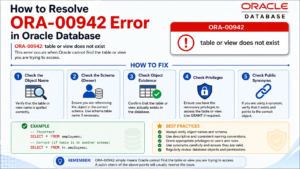
If you work with Oracle databases, chances are you’ve run into the dreaded ORA-00942: table or view does not exist message at least once. Knowing how to resolve 942 Error quickly can save you hours of frustration, especially when you’re in the middle of writing queries, building reports, or deploying an application. In this guide, we’ll break down exactly what causes this error, walk through step-by-step fixes, and explain why understanding this error matters for anyone learning Oracle SQL or working as a DBA.
What Is the 942 Error?
The ORA-00942 error appears when Oracle cannot locate a table or view that a SQL statement is trying to access. It’s one of the most common errors beginners and even experienced developers face. Learning how to resolve 942 Error is a foundational skill because it touches on permissions, schema design, and naming conventions — all core topics in any good SQL or DBA training program.
Common Causes of the 942 Error
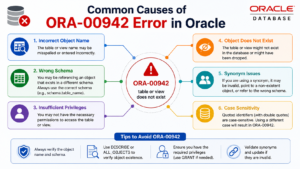
- The table or view genuinely does not exist in the database
- A typo in the table name or schema reference
- Missing privileges (SELECT, INSERT, UPDATE, DELETE) on the object
- Referencing a table without the correct schema prefix
- The table exists in a different schema than the one you’re connected to
- A synonym pointing to a table that has been dropped or renamed
How to Resolve 942 Error: Step-by-Step
Here’s a practical, step-by-step approach on how to resolve 942 Error whenever it pops up in your environment:
- Check the table name spelling — Oracle object names are unforgiving. Double-check for typos or extra spaces.
- Verify the table exists — Run a query against ALL_TABLES or USER_TABLES to confirm the object is actually there.
- Check the schema prefix — If the table belongs to another schema, reference it as schema_name.table_name.
- Confirm privileges — Ask your DBA to grant the required SELECT, INSERT, or UPDATE privileges using the GRANT statement.
- Check for synonyms — If you’re using a synonym, verify it still points to a valid object with SELECT * FROM ALL_SYNONYMS.
- Reconnect with the correct user — Sometimes the fix is as simple as logging in with the account that owns the object.
Features and Importance of Understanding This Error
Beyond the quick fix, there’s real value in understanding the mechanics behind the 942 error. This is exactly why the topic of how to resolve 942 Error is included in structured Oracle DBA and SQL training — it teaches you how Oracle handles object resolution, schema ownership, and access control all at once.
- Improves troubleshooting speed — You stop guessing and start diagnosing systematically
- Builds strong SQL fundamentals — Reinforces how schemas, privileges, and synonyms interact
- Prepares you for real project environments — Production systems often have multi-schema architectures where this error is common
- Useful for interview preparation — Oracle error codes are a frequent topic in DBA and SQL developer interviews
Advantages of Learning to Resolve Oracle Errors the Right Way
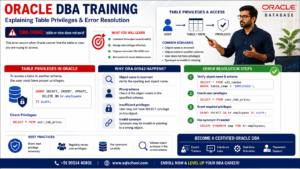
Many learners search for how to resolve 942 Error as a one-off fix, but there’s a bigger advantage in learning the underlying concepts properly:
- Reduces downtime during real-world project deployments
- Builds confidence working across multiple schemas and environments
- Helps you write cleaner, more portable SQL code
- Strengthens your understanding of Oracle’s privilege and security model
- Makes you more valuable as a DBA or data engineer who can self-troubleshoot
Best Practices to Avoid the 942 Error in the Future
Prevention is always better than repeated troubleshooting. Once you know how to resolve 942 Error, apply these best practices so it doesn’t keep coming back:
- Always use fully qualified object names (schema.table) in shared environments
- Maintain a naming convention document across your team
- Set up proper role-based privilege grants instead of ad hoc access
- Regularly audit synonyms and dropped objects during schema cleanups
- Use version control for DDL scripts to avoid deployment mismatches
Conclusion
The ORA-00942 error might look intimidating the first time you see it, but once you understand the root causes, resolving it becomes second nature. Mastering how to resolve 942 Error isn’t just about fixing a single error message — it’s about building a solid foundation in Oracle database concepts, privileges, and schema management that will serve you throughout your career as a DBA or data professional.
Want hands-on practice with real-time Oracle DBA scenarios like this one? Explore SQL School’s Oracle DBA and SQL training programs to build these troubleshooting skills with expert guidance.

