
Azure DevOps Training: Master CI/CD, Cloud Automation, DevOps Tools & Real-Time Projects
Modern software teams are expected to deliver applications faster, release updates frequently, and maintain high levels of quality and security. Manual development and deployment processes can make this difficult, especially when multiple developers, testers, cloud engineers, and operations teams are involved.
Azure DevOps brings many of these activities into a connected workflow. It provides tools for planning work, managing source code, automating builds, testing applications, creating deployment pipelines, managing packages, and supporting continuous delivery.
For students, working professionals, developers, cloud engineers, testers, and job seekers, Azure DevOps Training can provide practical knowledge of how modern applications move from an idea to a production environment.
What is Azure DevOps?
Azure DevOps is a collection of Microsoft services designed to support the software development and delivery lifecycle.
Instead of treating planning, coding, testing, deployment, and monitoring as completely separate activities, DevOps connects them into a continuous workflow.
A typical process can look like:
Plan → Code → Review → Build → Test → Release → Deploy → Monitor
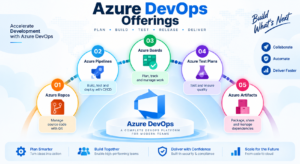
Azure DevOps includes services such as Azure Boards, Azure Repos, Azure Pipelines, Azure Test Plans, and Azure Artifacts.
The real value of Azure DevOps comes from connecting these services with technologies such as Git, Docker, Kubernetes, Terraform, PowerShell, Azure CLI, and Microsoft Azure.
Why is Azure DevOps Important?
Imagine a development team where a developer finishes a feature and then manually sends the code to another team for testing. After testing, someone manually prepares the application for deployment.
This process can become slow and difficult to manage.
With DevOps automation, many of these activities can be connected.
For example:
Developer commits code
↓
Automated validation
↓
Application build
↓
Automated tests
↓
Artifact creation
↓
Deployment to test environment
↓
Approval
↓
Production deployment
↓
Monitoring
Azure Pipelines supports CI/CD workflows that can build, test, package, and deploy applications across different environments and platforms.
This makes Azure DevOps particularly relevant for organizations adopting cloud computing and automated software delivery.
Azure DevOps Components You Should Know
Azure Boards – From Requirements to Tasks
Before writing code, teams need to understand what has to be built.
Azure Boards helps teams organize and track development work.
Common work items include:
- Epics
- Features
- User Stories
- Tasks
- Bugs
- Backlog items
- Sprints
For example, an online shopping project might contain:
Epic: E-Commerce Platform
Feature: Customer Checkout
User Story: Customer should be able to pay using a credit card
Tasks:
- Create payment API
- Develop payment screen
- Add validation
- Write unit tests
This creates a connection between business requirements and technical implementation.
Azure Repos – Manage Code with Git
Code needs to be stored safely and versioned so that developers can collaborate.
Azure Repos provides Git repositories for source-code management.
Developers can work with:
- Repositories
- Branches
- Commits
- Pull requests
- Code reviews
- Merge operations
- Branch policies
A typical workflow is:
Main Branch
→ Feature Branch
→ Code Changes
→ Pull Request
→ Review
→ Merge
This gives development teams a controlled way to introduce code changes.
Azure Pipelines – The Automation Engine
One of the most important topics in Azure DevOps Training is Azure Pipelines.
Azure Pipelines can automate the journey from source code to deployment.
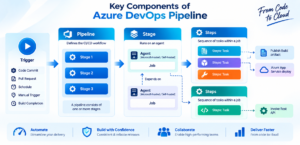
A simple pipeline can follow:
Code → Build → Test → Package → Deploy
For example, a developer pushes a new version of an application.
The pipeline can automatically:
- Retrieve the source code
- Restore dependencies
- Build the application
- Run automated tests
- Perform validation checks
- Generate an artifact
- Deploy the application
- Run post-deployment checks
Microsoft’s Azure Pipelines architecture examples show workflows where pull requests trigger validation, CI creates build artifacts, CD deploys them through environments, and monitoring tools provide operational feedback.
Azure Test Plans – Bring Testing into the Workflow
Software is not ready simply because it builds successfully.
Teams also need to verify that the application behaves correctly.
Azure Test Plans can support activities such as:
- Test case management
- Manual testing
- Exploratory testing
- Test suites
- Test execution
- Defect tracking
When testing is connected with development and delivery workflows, teams can identify problems before they reach production.
Azure Artifacts – Manage Reusable Packages
Modern applications often depend on libraries and packages.
Azure Artifacts provides package management capabilities for ecosystems such as:
- NuGet
- npm
- Maven
- Python
- Universal Packages
Organizations can use package feeds to manage reusable components and dependencies as part of their development lifecycle.
CI and CD Explained with a Practical Example
Continuous Integration
Continuous Integration (CI) focuses on regularly integrating code changes and automatically validating them.
Example:
Developer Push
→ Build
→ Unit Tests
→ Code Validation
→ Build Artifact
The objective is to identify issues early rather than waiting until the end of development.
Continuous Delivery
Continuous Delivery prepares validated application changes for release through an automated process.
For example:
Build
→ Development
→ Testing
→ UAT
→ Production
Approvals and validation can be incorporated between environments.
Continuous Deployment
Continuous Deployment takes automation further by automatically deploying validated changes to a target environment.
The exact release strategy depends on an organization’s application, risk, security, and operational requirements.
Azure DevOps and Infrastructure as Code
DevOps is not limited to application code.
Infrastructure can also be managed using code.
This approach is known as Infrastructure as Code (IaC).
Popular technologies include:
- Terraform
- Bicep
- ARM templates
- Azure CLI
- PowerShell
For example, instead of manually creating cloud resources one by one, an organization can define infrastructure configuration and use an automated pipeline to provision or update resources.
This makes infrastructure changes easier to standardize, review, reproduce, and automate.
Azure DevOps with Docker and Kubernetes
Modern applications are increasingly built using containers.
Azure DevOps can participate in workflows involving:
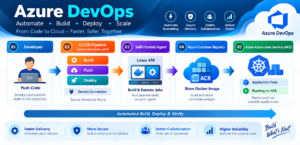
Source Code
→ Build
→ Docker Image
→ Container Registry
→ Deployment
→ Kubernetes
For microservices applications, CI/CD pipelines can build application components, create container images, publish them, and deploy them to Kubernetes environments. Microsoft provides Azure DevOps architectures demonstrating CI/CD workflows for Kubernetes-based applications.
Tools Commonly Used with Azure DevOps
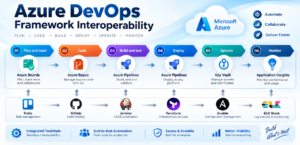
A practical Azure DevOps professional may work with a combination of technologies.
Source Control
- Git
- Azure Repos
- GitHub
CI/CD
- Azure Pipelines
- YAML
- Build pipelines
- Deployment pipelines
Cloud
- Microsoft Azure
- Azure App Service
- Azure Virtual Machines
- Azure Functions
- Azure Storage
Containers
- Docker
- Azure Container Registry
- Kubernetes
- Azure Kubernetes Service
Infrastructure
- Terraform
- Bicep
- ARM Templates
- Azure CLI
What Do Azure DevOps Professionals Actually Do?
An Azure DevOps professional may be responsible for much more than creating pipelines.
Typical responsibilities can include:
- Designing CI/CD workflows
- Managing Git repositories
- Creating YAML pipelines
- Automating application deployments
- Managing cloud infrastructure
- Supporting development teams
- Configuring environments
- Managing secrets and permissions
- Implementing infrastructure as code
- Working with containers
- Monitoring deployments
- Investigating pipeline failures
- Improving release processes
- Supporting DevSecOps practices
The exact responsibilities vary by organization and role.
Skills Required for Azure DevOps
Learners should gradually develop knowledge of:
- Azure fundamentals
- Git
- Linux fundamentals
- Windows administration
- Networking
- CI/CD
- YAML
- PowerShell
- Azure CLI
- Docker
- Kubernetes
- Terraform or Bicep
- Cloud security
- Monitoring and logging
Azure DevOps Career Opportunities
Azure DevOps knowledge can support several technology career paths.
Azure DevOps Engineer
Works with Azure DevOps services, CI/CD, automation, cloud deployment, repositories, and infrastructure.
DevOps Engineer
Works across development and operations to improve software delivery and automation.
Cloud Engineer
Works with cloud infrastructure, deployment, networking, automation, and operations.
Build and Release Engineer
Focuses on application builds, release workflows, artifacts, and deployment processes.
Platform Engineer
Builds internal platforms, automation frameworks, infrastructure, and developer tooling.
Site Reliability Engineer
Focuses on reliability, observability, automation, scalability, and operational processes.
Azure DevOps Certification – AZ-400
Learners interested in Microsoft certification can explore the Microsoft Certified: DevOps Engineer Expert certification.
The certification uses AZ-400: Designing and Implementing Microsoft DevOps Solutions as its required exam, with Microsoft currently listing Azure Administrator Associate or Azure Developer Associate as prerequisite certification options.
The AZ-400 exam includes areas related to:
- Development processes and communication
- Source control
- Build and release pipelines
- Security and compliance
- Instrumentation and monitoring
Certification candidates should always check Microsoft’s current exam guide because certification objectives can change over time.
Frequently Asked Questions
What is Azure DevOps?
Azure DevOps is Microsoft’s platform for planning, source control, software development, testing, package management, CI/CD, and application delivery.
Is Azure DevOps the same as Microsoft Azure?
No. Microsoft Azure is a cloud platform, while Azure DevOps provides services that support software development and delivery workflows.
Is Git required for Azure DevOps?
Git is an important technology for source control and collaborative development in Azure DevOps environments.
What is Azure Pipelines?
Azure Pipelines is a CI/CD service used to automate application builds, testing, packaging, and deployment.
Conclusion
Azure DevOps is not simply a tool for creating deployment pipelines. It represents a broader approach to connecting planning, development, testing, automation, security, deployment, and monitoring.
Azure DevOps provides a powerful platform for automating software development, testing, deployment, and cloud operations. With practical knowledge of Git, CI/CD, Azure Pipelines, Docker, Kubernetes, and automation, learners can build strong DevOps skills and understand real-world project workflows. Hands-on Azure DevOps Training can help students and working professionals prepare for modern cloud and DevOps opportunities.
Azure Deveops Training Course: https://sqlschool.com/azure-devops-training/
Ready to start your Azure DevOps journey?
Reach us today for a FREE Demo Session and experience practical, real-time Azure DevOps training.
Trainer: Mr. Sai Phanindra
Reach Us: +91 9666440801 | +91 9951440801
Website: www.sqlschool.com
#AzureDevOps #AzureDevOpsTraining #DevOpsTraining #AzureTraining #MicrosoftAzure #DevOpsEngineer #AzureDevOpsEngineer #CICD #AzurePipelines #Git #Docker #Kubernetes #CloudComputing #CloudDevOps #DevOpsCareer #DevOpsJobs #CloudEngineer #InfrastructureAsCode #DevSecOps #RealTimeProjects #PracticalTraining #SQLSchool #FreeDemo

