
ETL Admin: Complete Guide to ETL Administration, Skills, Tools, Responsibilities & Career Opportunities
Data is at the center of modern business applications, reporting, analytics, and decision-making. But collecting data is only the beginning. Organizations also need reliable systems to move data from different sources, process it, validate it, and make it available for reporting and analytics.
This is where ETL Administration becomes important.
An ETL Administrator works behind the scenes to monitor data pipelines, manage ETL environments, troubleshoot failed jobs, support production deployments, monitor system resources, and help ensure that data reaches its destination successfully.
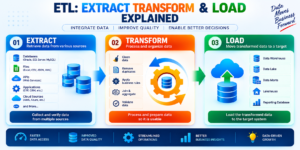
ETL processes commonly involve extracting data from multiple sources, transforming it according to business rules, and loading it into a data warehouse, data lake, or other target platform.
Whether you are a beginner, SQL professional, DBA, ETL Developer, or IT professional planning to move toward Data Engineering, understanding the role of an ETL Admin can provide a strong foundation for working with modern data platforms.
What Is ETL?
ETL stands for:
- Extract
- Transform
- Load
It is a data integration process used to move information from one or more source systems into a target environment.
Extract
The extraction stage collects information from sources such as:
- SQL Server
- Oracle
- PostgreSQL
- Excel files
- CSV files
- APIs
- Enterprise applications
- Cloud applications
Transform
Raw information is prepared for business use. Transformation may include:
- Cleaning incorrect data
- Removing duplicates
- Changing data types
- Joining multiple datasets
- Filtering records
- Applying business rules
- Aggregating information
- Validating data
Load
The processed information is loaded into a target such as:
- Data warehouse
- Data lake
- Data mart
- Lakehouse
- Reporting database
ETL can use either full loads or incremental loads depending on the business requirement and data architecture.
What Is an ETL Administrator?
An ETL Administrator is responsible for the operational management, monitoring, maintenance, and support of ETL environments and data pipelines.
An ETL Developer generally focuses on building data integration workflows, while an ETL Admin is more focused on keeping those workflows running reliably in development, testing, and especially production environments.
For example, an ETL Developer may create an SSIS package that loads customer data into a warehouse.
The ETL Administrator may then:
- Deploy the package.
- Configure the schedule.
- Monitor its execution.
- Check logs.
- Investigate failures.
- Validate successful data loading.
- Monitor server resources.
- Coordinate with the DBA or development team when required.
This makes ETL Administration an important bridge between ETL development, database administration, infrastructure, and production operations.
Why Is ETL Administration Important?
Modern organizations may have hundreds or thousands of ETL jobs and pipelines running on schedules.
A failure in one important pipeline can affect:
- Business reports
- Power BI dashboards
- Data warehouse refreshes
- Customer analytics
- Financial reporting
- Operational applications
- Management decision-making
ETL monitoring therefore becomes an essential operational activity. Modern pipeline architectures commonly include monitoring as a core component alongside extraction, transformation, and loading.
An ETL Admin helps organizations identify problems before they become larger operational issues.
ETL Architecture Explained
A traditional ETL architecture can be represented as:
Source Systems → Staging → ETL Processing → Data Warehouse → Data Marts → BI & Reporting
The staging layer is commonly used as an intermediate area where extracted data can be held before further processing.
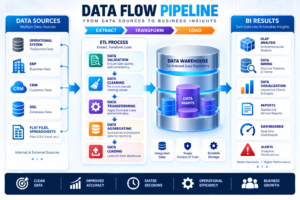
Source Systems
Source systems contain the original business information.
Examples include:
- CRM applications
- ERP systems
- Transaction databases
- E-commerce applications
- Banking systems
- Healthcare applications
- CSV and Excel files
- APIs
Staging Area
The staging area temporarily stores extracted data.
It provides an intermediate layer between source systems and the transformation or loading process.
ETL Processing Layer
This is where data is:
- Cleaned
- Validated
- Transformed
- Joined
- Aggregated
- Standardized
Data Warehouse
The data warehouse stores integrated information for analytical workloads.
Data Marts
Data marts can provide business-focused datasets for areas such as:
- Sales
- Finance
- HR
- Marketing
- Operations
Reporting and Analytics
The processed information can then be consumed by BI and analytics applications such as Power BI.
What Does an ETL Admin Do?
The responsibilities of an ETL Administrator can vary depending on the organization and technology stack.
1. ETL Environment Management
An ETL environment may include:
- Development
- Testing
- UAT
- Staging
- Production
The ETL Admin helps maintain configurations and operational readiness across these environments.
2. Job Scheduling
ETL jobs may run:
- Hourly
- Daily
- Weekly
- Monthly
- On demand
The administrator checks whether scheduled processes start and finish as expected.
3. Job Monitoring
Monitoring includes checking:
- Job status
- Execution duration
- Failed tasks
- Delayed processes
- Pipeline dependencies
- Data processing volumes
4. Production Support
When a production ETL job fails, the ETL Admin investigates the problem and coordinates with the appropriate technical team.
5. Deployment Support
ETL packages, scripts, and configurations frequently move between environments.
The administrator may assist with:
- Deployment
- Configuration
- Scheduling
- Validation
- Post-deployment monitoring
ETL Admin Tools and Technologies
An ETL Administrator may work with a combination of traditional database technologies and modern cloud data platforms.
Microsoft SQL Server
SQL Server is commonly used for database storage, ETL workloads, data warehousing, and reporting environments.
An ETL Admin may work with:
- Databases
- SQL Agent jobs
- Stored procedures
- Permissions
- Logs
- Performance monitoring
T-SQL
Strong SQL knowledge is extremely useful for ETL administration.
T-SQL helps administrators:
- Validate data
- Investigate failures
- Check record counts
- Analyze performance
- Compare source and target data
SQL Server Integration Services
SSIS is a Microsoft data integration technology used for building ETL packages and workflows.
ETL Administrators may be responsible for monitoring SSIS package execution, troubleshooting failures, and supporting deployments.
Azure Data Factory
Azure Data Factory is a cloud data integration service used for creating and orchestrating data pipelines.
An ETL Admin may monitor:
- Pipelines
- Activities
- Triggers
- Integration runtimes
- Pipeline failures
- Execution duration
Azure Data Lake Storage
Azure Data Lake Storage can provide scalable storage for enterprise data and can be integrated into modern data pipelines.
Azure Synapse Analytics
Synapse can be used for analytics and data warehousing workloads within Microsoft Azure data architectures.
Azure Databricks
Databricks is commonly used for large-scale data processing, Spark workloads, notebooks, and modern data engineering.
PowerShell
PowerShell can help automate administrative and operational activities in Microsoft environments.
Git
Git and related deployment processes can be used for version control and managing ETL development and release workflows.
A Day in the Life of an ETL Administrator
An ETL Admin’s daily activities can vary depending on production requirements.
A typical day may include:
Morning Monitoring
Check overnight jobs and identify:
- Failed jobs
- Delayed jobs
- Incomplete loads
- Long-running processes
Investigating Failures
Review logs and identify the reason for failure.
For example:
Pipeline Failed → Check Log → Identify SQL Error → Investigate Database → Resolve Issue → Rerun → Validate Data
How an ETL Admin Troubleshoots a Failed Job
A structured troubleshooting process is important.
- Identify the failed job.
- Check the execution time.
- Review the error message.
- Open the detailed execution log.
- Check source and target connectivity.
- Validate permissions.
- Check CPU, memory, and storage.
- Verify upstream dependencies.
- Identify the root cause.
- Apply the appropriate fix.
- Rerun the process according to operational procedures.
- Validate the resulting data.
- Document the incident and resolution.
This systematic approach is particularly important in production environments.
ETL Admin Career Opportunities
ETL Administration knowledge can complement several technology careers.
ETL Administrator
Focuses on managing and monitoring ETL environments.
ETL Production Support Engineer
Focuses on production operations, incident resolution, and pipeline monitoring.
ETL Support Engineer
Works on troubleshooting ETL jobs and operational issues.
Data Warehouse Administrator
Works with data warehouse environments and their supporting infrastructure.
SQL Server DBA
Professionals with strong SQL and database administration knowledge can expand into ETL and data platform operations.
Azure Data Engineer
Combines ETL, cloud, data storage, processing, and pipeline development skills.
Data Engineer
Designs and maintains data processing and integration solutions.
Cloud Data Engineer
Works primarily with cloud-based data platforms and pipelines.
ETL Developer
Designs and develops data integration workflows and transformations.
ETL Admin Learning Roadmap
If you are starting from the beginning, a structured approach can make learning easier.
Step 1: Learn SQL and T-SQL
Step 2: Learn SQL Server Fundamentals
Step 3: Understand ETL Concepts
Step 4: Learn SSIS
Step 5: Learn Data Warehousing
Step 6: Learn Azure Data Factory
Step 7: Learn Azure Data Lake and Synapse
Step 8: Learn Databricks and PySpark Basics
Step 9: Practice Monitoring and Troubleshooting
Step 10: Build Real-Time Projects
ETL Admin Training: Who Should Learn It?
ETL Administration can be useful for:
- Freshers interested in data technologies
- SQL Developers
- SQL DBAs
- ETL Developers
- Production Support Engineers
- Database professionals
- Data Analysts moving toward data engineering
- IT professionals interested in cloud data platforms
Professionals who already understand SQL and databases can use those foundations while learning ETL administration and cloud technologies.
Frequently Asked Questions
What is an ETL Administrator?
An ETL Administrator manages, monitors, troubleshoots, and supports ETL jobs, workflows, environments, and data pipelines.
Is ETL Admin a good career option?
ETL Administration provides a technical career path that combines SQL, ETL, database, cloud, monitoring, troubleshooting, and production-support skills.
What skills are required for ETL Admin?
SQL, T-SQL, ETL concepts, SSIS, Azure Data Factory, data warehousing, monitoring, troubleshooting, security, and automation are useful skills.
Is SQL required for ETL Admin?
Yes. SQL is important for data validation, troubleshooting, investigating failures, and interacting with databases.
Build Your ETL Admin Skills with SQL School Training Institute
Want to develop practical skills in ETL Administration, SQL Server, SSIS, Azure Data Factory, cloud data platforms, monitoring, troubleshooting, and real-time projects?
ETL Admin Training at SQL School Training Institute
Learn through:
- 20 Years of Trust
- 100% Practical Training
- Step-by-Step Learning
- Real-Time Projects
- Scenario-Based Training
- Resume Guidance
- Interview Preparation
- 100% Placement Assistance
The training can help learners build practical knowledge across SQL Server, T-SQL, ETL, SSIS, Azure Data Factory, cloud data platforms, monitoring, troubleshooting, and production-oriented scenarios.
Start your ETL Admin learning journey and build the technical foundation required for modern data environments.
Conclusion
ETL Administration is about much more than simply monitoring whether a job has completed.
An ETL Administrator works across data pipelines, databases, ETL tools, cloud platforms, security, scheduling, performance, troubleshooting, and production operations.
As organizations adopt cloud-based data platforms and increasingly complex data architectures, ETL professionals need to understand both traditional technologies such as SQL Server and SSIS and modern platforms such as Azure Data Factory, Azure Data Lake, Synapse, and Databricks.
A practical learning path that begins with SQL and T-SQL, progresses through ETL, SSIS, data warehousing, Azure Data Factory, cloud platforms, monitoring, troubleshooting, and real-time projects, can provide a structured foundation for building ETL Administration skills.
ETL Admin Training Course: https://sqlschool.com/etl-admin-training/
Start Your ETL Admin Career Today!
Join ETL Admin Training at SQL School and gain practical skills through real-time projects and scenario-based training.
Trainer: Mr. Sai Phanindra
Reach Us: +91 9666440801, +91 9951440801
Website: www.sqlschool.com
👉 Enroll Today & Build Your ETL Admin Career!
#ETLAdmin #ETLAdministration #ETLAdminTraining #ETLAdministrator #ETLTools #ETLDeveloper #SQLServer #SSIS #AzureDataFactory #DataEngineering #DataWarehouse #ETLMonitoring #ETLTroubleshooting #DataEngineer #SQLTraining #ETLCareer #SQLSchool #DataAnalytics

