
MSSQL vs Spark SQL: A Complete Guide to Database Processing and Big Data Technologies
Introduction to MSSQL and Spark SQL in Modern Data Engineering
Data is one of the most valuable assets for modern businesses. Organizations generate enormous amounts of data through customer transactions, websites, mobile applications, financial systems, and cloud platforms. Managing and processing this data efficiently requires powerful database and data engineering technologies.
Two important technologies in this area are Microsoft SQL Server (MSSQL) and Apache Spark SQL.
Although both technologies support SQL queries, they are designed for different purposes. MSSQL focuses on relational database management, transactional processing, and enterprise applications, whereas Spark SQL focuses on distributed data processing and large-scale analytics.
For SQL developers and aspiring data engineers, understanding the differences between MSSQL and Spark SQL is important for choosing the right technology and developing industry-relevant skills.
In this guide, we will explore their architecture, features, query syntax, performance, scalability, practical applications, and career opportunities.
1. Microsoft SQL Server Explained: Features and Business Applications
Microsoft SQL Server, commonly known as MSSQL, is a relational database management system developed by Microsoft.
It helps organizations store, organize, retrieve, update, and manage structured information using relational database tables.
SQL Server uses Transact-SQL (T-SQL), an extension of SQL, to perform database operations.
Businesses across industries use MSSQL to manage financial transactions, customer information, inventory, employee records, and enterprise application data.
Important Capabilities of Microsoft SQL Server
1. Relational Data Management
SQL Server organizes information into tables with rows and columns. Relationships between tables help maintain structured and consistent data.
2. Transaction Processing
SQL Server supports ACID properties to ensure reliable database transactions.
3. Database Security
It provides authentication, authorization, encryption, auditing, and role-based access control.
4. Query Performance Optimization
SQL Server provides execution plans, indexes, statistics, and query optimization features to improve query performance.
5. Stored Procedures and Functions
Developers can create reusable database programs to perform business operations and automate database tasks.
6. Backup and Recovery
SQL Server provides full, differential, and transaction log backups to protect business data.
7. High Availability and Disaster Recovery
Features such as Always On Availability Groups help maintain database availability and support disaster recovery strategies.
Where Is MSSQL Used?
- Banking and financial applications
- Enterprise resource planning systems
- Customer relationship management platforms
- Retail and e-commerce applications
- Inventory and sales management
- Business intelligence and reporting
- Enterprise database administration
2. Apache Spark SQL: The Technology Behind Distributed Data Processing
Spark SQL is a module of Apache Spark used to process structured and semi-structured data.
It enables developers and data engineers to execute SQL queries on large datasets using Spark’s distributed computing capabilities.
Unlike a traditional relational database, Spark SQL is not primarily a database management system. It is a query processing component within a distributed data processing engine.
Spark SQL works with programming languages such as Python, Scala, Java, and R.
It also supports different data formats and storage systems, including Parquet, JSON, CSV, ORC, Avro, and Hive tables.
Powerful Features of Apache Spark SQL
1. Distributed Computing
Spark distributes data processing tasks across multiple machines in a cluster.
2. Catalyst Query Optimizer
The Catalyst Optimizer analyzes and optimizes SQL queries to generate efficient execution plans.
3. DataFrame Processing
Spark provides DataFrames for working with structured datasets using SQL-like operations.
4. Multiple Data Source Connectivity
Spark SQL can read and process data from different file formats, databases, and storage systems.
5. Adaptive Query Execution
Adaptive Query Execution (AQE) can optimize query execution using runtime statistics.
6. Programming Language Integration
Developers can combine SQL queries with PySpark, Scala, Java, and R code.
7. Large-Scale Data Processing
Spark SQL is designed for distributed analytical workloads involving large volumes of data.
Industry Applications of Spark SQL
- Enterprise data engineering
- Big data analytics
- Data lake transformations
- Cloud-based ETL pipelines
- Customer behavior analysis
- Retail and financial analytics
- Data warehouse development
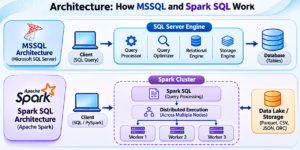
3. Inside the Engine: How MSSQL and Spark SQL Process Queries
Understanding the internal architecture helps explain why these technologies behave differently.
How Microsoft SQL Server Executes a Query
SQL Server uses a database engine architecture to process queries and manage data.
Its major components include:
- Relational Engine
- Query Processor
- Query Optimizer
- Storage Engine
- Buffer Manager
- Transaction Manager
When a developer executes a query, SQL Server parses and validates the SQL statement, generates an execution plan, retrieves the required data, and returns the results.
For example:
SELECT *
FROM Employees
WHERE Department = 'IT';
SQL Server analyzes the query, identifies the required table, evaluates available indexes, and chooses an execution plan.
How Spark SQL Executes a Query
Spark SQL uses a distributed query execution architecture.
Its important components include:
- Spark Driver
- Cluster Manager
- Spark Executors
- Catalyst Optimizer
- Tungsten Execution Engine
- DataFrames and Datasets
When a Spark SQL query is submitted, Spark creates a logical plan, optimizes it, generates a physical plan, and distributes the execution tasks across available executors.
For example:
SELECT *
FROM Employees
WHERE Department = 'IT';
Spark SQL analyzes the query and distributes processing according to the data source, partitioning, and execution environment.
4. MSSQL vs Spark SQL: A Side-by-Side Technical Evaluation
The following comparison highlights the major differences between these technologies.
| Comparison Area | MSSQL | Spark SQL |
|---|---|---|
| Technology Type | Relational Database Management System | Distributed SQL Processing Engine |
| Developed By | Microsoft | Apache Software Foundation |
| Query Language | T-SQL | Spark SQL |
| Architecture | Database Server Architecture | Distributed Computing Architecture |
| Processing Model | Database engine execution | Distributed execution |
| Storage | SQL Server database files | External files, tables, and storage systems |
| Scalability | Vertical and supported horizontal solutions | Horizontal cluster scaling |
| Transactions | Full ACID transaction support | Depends on the storage and table format |
| Optimization | Cost-Based Query Optimizer | Catalyst Optimizer |
| Programming Languages | T-SQL and external integrations | Python, Scala, Java, R, SQL |
| Data Formats | Relational database tables | Parquet, JSON, CSV, ORC, Avro |
| Main Workload | OLTP and database workloads | Big data analytics and ETL |
| Development Tools | SSMS, Azure Data Studio | Spark SQL CLI, notebooks, PySpark |
| Typical Roles | SQL Developer, SQL DBA | Data Engineer, Spark Developer |
5. SQL Syntax Comparison: Writing Queries in MSSQL and Spark SQL
One major advantage of learning Spark SQL after MSSQL is that many SQL concepts are transferable.
SELECT, WHERE, JOIN, GROUP BY, ORDER BY, and window functions are available in both technologies.
However, differences exist in data types, functions, DDL operations, procedural features, and execution behavior.
Let’s examine some practical examples.
Example 1: Defining Employee Tables
MSSQL Query:
CREATE TABLE Employees
(
    EmployeeID INT PRIMARY KEY,
    EmployeeName VARCHAR(100),
    Salary DECIMAL(10,2),
    Department VARCHAR(50)
);
Spark SQL Query:
CREATE TABLE Employees
(
    EmployeeID INT,
    EmployeeName STRING,
    Salary DECIMAL(10,2),
    Department STRING
)
USING DELTA;
Key difference:
- MSSQL supports VARCHAR for character columns.
- Spark SQL commonly uses STRING.
- The USING DELTA clause specifies Delta Lake as the table provider where supported.
Example 2: Adding Employee Information
MSSQL Query:
INSERT INTO Employees
VALUES
(1, 'John', 50000, 'IT'),
(2, 'David', 60000, 'HR'),
(3, 'Smith', 70000, 'Finance');
Spark SQL Query:
INSERT INTO Employees
VALUES
(1, 'John', 50000, 'IT'),
(2, 'David', 60000, 'HR'),
(3, 'Smith', 70000, 'Finance');
Both technologies support inserting records, although table-provider capabilities and syntax can vary.
6. Query Performance and Optimization: Which Engine Performs Better?
Performance is an important factor when selecting a data processing technology.
However, MSSQL and Spark SQL are designed for different workload requirements. Their performance depends on dataset size, hardware, configuration, query complexity, and optimization techniques.
MSSQL Performance Optimization Techniques
SQL Server provides several features to improve query execution:
- Clustered and non-clustered indexes
- Execution plan analysis
- Query optimization
- Index maintenance
- Statistics updates
- Stored procedure optimization
- Table partitioning
- Memory and resource management
These techniques are particularly useful for transactional applications and relational database workloads.
Spark SQL Performance Optimization Techniques
Spark SQL provides distributed processing and query optimization features:
- Data partitioning
- Broadcast joins
- Data caching
- Predicate pushdown
- Catalyst query optimization
- Adaptive Query Execution
- Columnar storage formats
- Data skipping where supported by the storage layer
These techniques help improve performance when processing large analytical datasets.
Performance: Which One Should You Select?
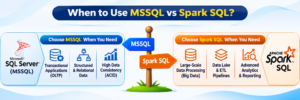
For small transactional workloads and indexed relational queries, MSSQL is often a better fit.
For large-scale analytical workloads that benefit from distributed processing, Spark SQL is often a better choice.
Neither technology is universally faster. The right choice depends on the workload and system architecture.
7. Real-World Scenarios: Choosing the Right Technology for Your Project
Let’s understand how businesses use these technologies through practical scenarios.
Scenario 1: Banking Transaction Management Using MSSQL
A banking organization manages customer details, account information, deposits, withdrawals, and transaction records.
SQL Server can be used to maintain relational data, process transactions, enforce database constraints, and manage security.
Scenario 2: E-Commerce Data Analytics Using Spark SQL
An e-commerce organization receives millions of website activity records, product transactions, customer interactions, and order details.
Spark SQL can process large datasets across a distributed environment and generate analytical datasets for business reporting.
Scenario 3: Enterprise Data Engineering Using Both Technologies
An organization stores its transactional information in MSSQL and uses Spark SQL for large-scale transformations.
A typical workflow:
- Extract transactional data from SQL Server.
- Transfer the data to cloud storage.
- Read the data using Apache Spark.
- Perform transformations using Spark SQL and PySpark.
- Store processed information in Parquet or Delta Lake.
- Connect Power BI to the analytical data for reporting.
This approach combines the strengths of relational database management and distributed data processing.
8. Integration Architecture: Connecting MSSQL with Spark SQL
MSSQL and Spark SQL can work together in modern data engineering environments.
One common integration approach is JDBC connectivity.
Spark can connect to SQL Server using the Microsoft JDBC Driver.
Example PySpark code:
jdbc_url = (
    "jdbc:sqlserver://server_name:1433;"
    "databaseName=CompanyDB;"
    "encrypt=true;"
    "trustServerCertificate=false"
)

properties = {
    "user": "username",
    "password": "password",
    "driver": "com.microsoft.sqlserver.jdbc.SQLServerDriver"
}

df = spark.read.jdbc(
    url=jdbc_url,
    table="dbo.Employees",
    properties=properties
)

df.createOrReplaceTempView("Employees")

spark.sql("""
    SELECT Department, AVG(Salary) AS AverageSalary
    FROM Employees
    GROUP BY Department
""").show()
This example demonstrates how Spark can read SQL Server data, create a temporary view, and execute Spark SQL queries.
For production environments, use secure credential management, appropriate JDBC driver configuration, and suitable partitioning for large data transfers.
9. Career Roadmap: MSSQL Developer vs Spark SQL Data Engineer
Both technologies offer opportunities in the data industry, but their job responsibilities are different.
Career Path with MSSQL
Professionals specializing in SQL Server can explore:
- SQL Developer
- SQL Server DBA
- Database Administrator
- Database Developer
- SQL Performance Tuning Specialist
- Database Analyst
Recommended technical skills:
- SQL Server
- T-SQL
- Joins and Subqueries
- Stored Procedures
- Functions and Views
- Indexing and Performance Tuning
- Backup and Recovery
- Database Security
Career Path with Spark SQL
Professionals specializing in Spark SQL can explore:
- Data Engineer
- Big Data Engineer
- Azure Data Engineer
- Databricks Engineer
- PySpark Developer
- Data Platform Engineer
Recommended technical skills:
- Apache Spark
- Spark SQL
- Python and PySpark
- DataFrames
- Delta Lake
- ETL and ELT
- Azure Data Lake Storage
- Azure Databricks
- Microsoft Fabric
10. Learning Recommendation: Should You Start with MSSQL or Spark SQL?
Your learning path depends on your existing technical knowledge and career goals.
For Beginners:
Start with SQL fundamentals, relational database concepts, MSSQL, joins, subqueries, functions, and stored procedures.
For SQL Developers:
Build on your existing T-SQL knowledge by learning Python, PySpark, Spark SQL, and distributed data processing.
For Aspiring Data Engineers:
Focus on SQL, Python, Azure Data Lake Storage, Apache Spark, Databricks, and modern data engineering architectures.
Learning MSSQL first can provide a strong foundation in SQL concepts, while Spark SQL introduces distributed data processing techniques.
What Makes SQL School Training Different?
- 19+ Years of Proven Training Experience
- 100% Practical and Interactive Classes
- Real-Time Industry-Based Projects
- Assignments and Hands-On Exercises
- Weekly Student Feedback
- Daily Job Updates
- Resume Guidance
- One-to-One Mock Interview Preparation
- 100% Placement Assistance
Conclusion: Bringing Relational Databases and Big Data Together
MSSQL and Spark SQL are both valuable technologies in the modern data ecosystem, but they serve different purposes.
Microsoft SQL Server is designed for relational database management, transactional processing, enterprise applications, and structured data storage.
Spark SQL is designed for distributed data processing, large-scale analytics, and modern data engineering pipelines.
Understanding both technologies helps professionals work across traditional database systems and modern cloud-based data platforms.
Whether your goal is to become a SQL Developer, SQL DBA, Azure Data Engineer, or Databricks Engineer, developing practical knowledge of these technologies can strengthen your technical foundation.
MSSQL FOR SPARK SQL WEBINAR Notes: Click Here
SPARK SQL BASIC OPV1 Notes: Click Here
Founder & Trainer: Mr. Sai Phanindra – 19+ Years of Industry Expertise
Take the next step toward your data career!
📞 Contact: +91 9666440801 / +91 9951440801
🌐 Website: https://sqlschool.com/
Register for a Free Demo Class Today!
#MSSQL #SparkSQL #SQLServer #ApacheSpark #TSQL #PySpark #DataEngineering #BigData #BigDataAnalytics #AzureDataEngineering #AzureDatabricks #Databricks #MicrosoftFabric #SQLDeveloper #SQLDBA #DataAnalytics #ETL #DataProcessing #SQLTraining #SQLSchool

