
What do you mean by SQL Server Instance?
One of the first things you’ll encounter when you start working with SQL Server, or even when you are getting ready to become a DBA, is the term “instance.” Well, what is SQL Server Instance? A SQL Server instance is a SQL Server database engine that is installed and running on a physical or virtual machine. Even if more than one instance is installed on the same server, each is completely separate, having its own set of system databases, memory allocation, security settings, and configuration.
Why it’s important to know what is SQL Server Instance is important, as almost every real-world SQL Server environment from a single developer laptop to a large enterprise data center uses instances to organize and isolate databases. If this wasn’t the case, multiple applications, environments or multiple clients on a shared piece of hardware would be much harder to manage.
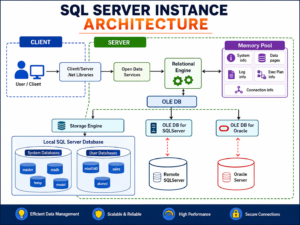
Breaking Down What is SQL Server Instance
During the installation of SQL Server, you are presented with the following question: Do you want to install a default instance or a named instance? At practice, this is the answer to the question: What is SQL Server Instance?
- Default Instance – Only specified by the name of the server/machine (e.g., SERVER01). There can be only one default machine.
- Named – Identified by the ServerName\InstanceName (e.g., SERVER01\SQL2022). Multiple named instances may be loaded in a machine.
For each one, either default or named, there will be its own:
- A database engine process (sqlservr.exe)
- Database objects that are commonly used by the system (master, model, msdb, tempdb)
- The configuration for login and security.Login and security setup.
- The port number and network configuration.Port number, network configuration.
- Allocate memory and resources.Memory allocation and resources.
Why Understanding What is SQL Server Instance Matters for DBAs
If you ever become a Database Administrator (DBA) it is imperative to understand what SQL Server Instance is. For organizations, they may have several instances on the same physical server to:
- Use separate dev, test and production environments
- Separate apps and/or clients (typically found in SaaS and hosting environments)
- Install different SQL Server patch levels or versions on the same machine
- Handle departmental security boundaries.Control Departmental Security Boundaries.
This is why SQL Server interview panels often ask you to describe what is SQL Server Instance — it reveals if you know more than just how to write SQL queries.
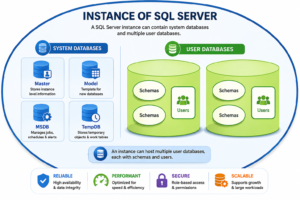
TheInstance vs Database Confusion
One of the common confusions while learning about what SQL Server Instance is when it gets confused with a “database”. Here’s the distinction:
- An instance is the running engine or the “container” or “service.”
- A database is the “content” that resides in the container, inside the instance.
There can be dozens of databases in one instance, but each database can be part of only one instance. So, when troubleshooting, remember to ask, “Is it a memory problem, a service problem, a security problem, or a database problem (tables, queries, indexes)?
Different types of Instances and Configuration.
Once the basic understanding of the term “SQL Server Instance” is clear, it is helpful to understand the common instance types that are utilized in real projects:
- Standalone Instance – means one instance running on one server, typical for smaller installations.
- Multiple Named Instances – Multiple instances that are isolated on the same server.
- Clusters of instances – set to high availability with Failover Cluster Instances (FCI).
- Cloud-hosted Instance – deployed using Azure SQL Managed Instance or SQL Server on Azure VMs.
Nothing changes from the basic idea behind each type, SQL Server Instance: it is an isolated instance of the SQL Server engine running its own groups of databases and resources, no matter where it is installed.
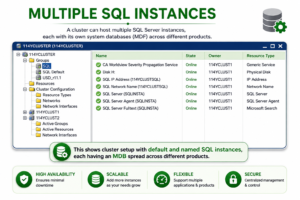
To check SQL Server Instances, use the following steps:
Running instances need to be identified by DBAs and developers frequently. Some useful suggestions:
- Open SQL Server Configuration Manager, and look at SQL Server Services.
- In SQL Server Management Studio (SSMS) execute the SELECT @@SERVERNAME; statement.
- To list the available instances on the network use the Command Prompt: sqlcmd -L.
- See if there are entries in the Windows Services panel such as SQL Server (INSTANCENAME).
These steps highlight the ‘real life’ aspect of SQL Server Instance — it isn’t just theory, it’s something you will study and manage continuously throughout your DBA career.
Conclusion
SQL Server Instance – it is a single copy of the SQL Server database engine, which can be installed on the same machine with other instances (SQL Server installations), each with its own set of databases, security and configuration. From being new to databases and learning the basics, to preparing for an interview for a position as a DBA, understanding this topic provides a foundation for server architecture, licensing, HA, and multi-tenant hosting.
SQL School’s DBA and Azure Databricks training programs teach these concepts using hands-on labs that go beyond definitions into how to configure your servers, cluster them for high availability, and implement best practices for server administration and database maintenance.
FAQs
In simple words, what is SQL Server Instance?
A running instance of the server database engine on one machine that has its own databases, memory, and settings, separate from any other instances of the engine on the same server.
Is it possible to run several SQL Server instances on a single computer?
Yes. There may be one default instance and many named instances on a single physical or virtual server, none of which are connected with each other.
What is the difference between SQL Server instance and database?
An instance is the engine/service that runs SQL Server, and a database is the actual data storage, which exists within an instance. Many databases can be housed in one instance.
How can I get the name of the instance of SQL Server that I am using?
Use the SELECT @@SERVERNAME; statement on SSMS or look at SQL Server Configuration Manager and the Windows Services list for instance names.
What are the reasons for companies to use more than one instance of SQL Server?
To isolate environments (dev, test, production), to isolate client data, to run different versions of SQL Server, and to keep separate security boundaries.

