Python Introduction, Environments & Installations: A Complete Beginner’s Guide
Discover Python: The Programming Language Behind Modern Technology
Python has become one of the most widely used programming languages across the IT industry. Its simple syntax, readability, and extensive library ecosystem make it an excellent choice for beginners and experienced professionals.
From analyzing business data to developing cloud-based applications, Python plays an important role in solving real-world technology challenges.
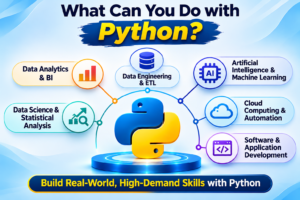
Python is a high-level, general-purpose programming language used in:
Data Analytics and Business Intelligence
Data Engineering and ETL Development
Artificial Intelligence and Machine Learning
Cloud Computing and Automation
Software and Application Development
Data Science and Statistical Analysis
For professionals looking to build a career in modern data technologies, learning Python provides a strong foundation for working with SQL, Azure, Microsoft Fabric, Databricks, and Snowflake.
What Is Python Programming and How Does It Work?
Python is a programming language that allows developers to communicate instructions to computers using a readable and structured syntax.
A Python program consists of a set of instructions that a computer executes to perform specific tasks or solve problems.
Python can be used to:
- Read and process files.
- Perform calculations and logical operations.
- Connect to databases.
- Retrieve data from APIs.
- Clean and transform datasets.
- Automate repetitive tasks.
- Generate reports and visualizations.
- Develop applications and data pipelines.
Python supports both simple programming scripts and large-scale enterprise applications, making it suitable for a wide range of technical requirements.
The Evolution of Python: From Its Creation to Modern Technology
Python was created by Guido van Rossum in the Netherlands.
Its development started in December 1989, and the first public release was introduced in February 1991.
Python was developed with the objective of making programming easier to learn, read, and maintain.
Important Milestones in Python’s History
| Year | Milestone |
|---|---|
| 1989 | Guido van Rossum began developing Python as a successor to the ABC programming language. |
| 1991 | The first public release of Python was introduced. |
| 1994 | Python 1.0 was released. |
| 2001 | The Python Software Foundation was established. |
| 2008 | Python 3.0 was released with major improvements and language changes. |
| 2010s | Python gained popularity in Data Science, AI, Machine Learning, and Big Data. |
| 2020s | Python became a major technology for cloud data engineering, analytics, automation, and AI. |
Python’s name was inspired by the British comedy television show Monty Python’s Flying Circus.
Why Python Became One of the Most Popular Programming Languages
Python was designed to make programming simple, readable, and productive.
Its major advantages include:
Simple and Readable Syntax
Python uses a clean and understandable syntax that helps beginners learn programming more easily.
Faster Development
Python allows developers to accomplish many tasks with fewer lines of code.
Flexible Applications
Python can be used for small scripts, automation tasks, and large enterprise applications.
Extensive Libraries
Python provides a large ecosystem of libraries for data analytics, data engineering, automation, and AI.
Cross-Platform Compatibility
Python can run across Windows, Linux, and macOS environments.
Integration with Other Technologies
Python can integrate with databases, APIs, cloud services, and other programming languages.
Python in the Real World: How Businesses Use Python
Python is widely used across modern technology domains to solve business and technical problems.
Python for Data Analytics
Data Analysts use Python to clean, transform, analyze, and visualize business data.
Libraries such as pandas, NumPy, Matplotlib, and Seaborn help professionals work with datasets and generate insights.
Python for Data Engineering
Data Engineers use Python to develop ETL and ELT pipelines, automate data processing, integrate APIs, and transform large datasets.
Python also supports distributed data processing through PySpark.
Python for Cloud Computing
Python helps automate cloud operations, interact with cloud services, and develop cloud-based data processing solutions.
Python for Artificial Intelligence
Python supports machine learning development, predictive analytics, AI application development, and intelligent automation.
Python for Business Automation
Python can automate repetitive business activities such as Excel processing, file handling, data extraction, and report generation.
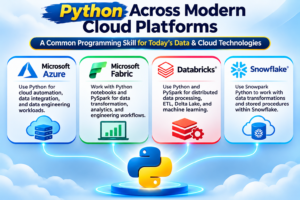
Python Across Modern Cloud Platforms: Azure, Fabric, Databricks & Snowflake
Python is a common programming skill across modern cloud data platforms.
Python with Microsoft Azure
Python supports cloud automation, data integration, and data engineering workloads within Azure environments.
Python with Microsoft Fabric
Python notebooks and PySpark are used for data transformation, analytics, and engineering workflows.
Python with Databricks
Python and PySpark support distributed data processing, ETL, Delta Lake, and machine learning.
Python with Snowflake
Snowpark Python allows developers to work with data transformations and stored procedures using Python within Snowflake.
Python provides a common programming foundation across these platforms, while each platform offers its own execution and orchestration environment.
Python Career Opportunities: Who Uses Python in the IT Industry?
Python is used by professionals across different IT and business roles.
Data Analyst
Data Analysts use Python for data cleaning, transformation, analysis, reporting, and visualization.
Data Engineer
Data Engineers use Python to build ETL and ELT pipelines, automate data processing, integrate APIs, and process large datasets.
Data Scientist
Data Scientists use Python for statistical analysis, data exploration, predictive modeling, and machine learning.
AI / ML Engineer
AI and Machine Learning Engineers use Python to develop, train, test, and deploy AI and machine learning applications.
Cloud / DevOps Engineer
Cloud and DevOps Engineers use Python for cloud automation, deployment workflows, monitoring, and operational tasks.
Software Developer
Software Developers use Python to develop backend applications, REST APIs, web services, and automation tools.
Business Analyst
Business Analysts use Python to automate Excel tasks, analyze business data, and generate reports and insights.
Python + SQL + Cloud Data Platform = A Strong Foundation for Modern Data Careers
Python Libraries and Technologies for Different Career Paths
Python offers a large collection of libraries and technologies that support different career paths.
| Career Path | Python Technologies and Libraries |
|---|---|
| Data Analyst | pandas, NumPy, Matplotlib, Seaborn |
| Data Engineer | pandas, PySpark, APIs |
| Azure Data Engineer | pandas, Azure SDK, PySpark |
| Fabric Data Engineer | pandas, PySpark, Fabric Notebooks |
| Databricks Engineer | pandas, PySpark, Delta Lake |
| Snowflake Engineer | pandas, Snowpark |
| AI / ML Engineer | pandas, scikit-learn, PyTorch, TensorFlow |
| Automation Engineer | pandas, requests, Selenium |
Learning Python fundamentals first helps learners understand how these libraries and technologies are used in real-world applications.
Understanding Python Environments: Where Does Python Code Run?
A Python environment is the setup in which Python programs run.
It typically includes a Python interpreter, installed libraries, and configuration settings required to execute code.
Python can be used through different environments depending on your learning goals and project requirements.
Local Computer Environment
Python can be installed directly on your computer.
This approach is useful for beginners who want to learn programming, practice exercises, and develop applications locally.
Development Tools
Tools such as Anaconda and Visual Studio provide environments for writing, executing, and managing Python code.
Online Programming Platforms
Platforms such as Google Colab, Kaggle, and Replit allow users to execute Python code through a browser.
These platforms are convenient for beginners who want to practice Python without setting up a local installation.
Enterprise Cloud Environments
Python can also be executed within cloud platforms such as Azure, Microsoft Fabric, Databricks, and Snowflake.
These environments are commonly used for data engineering, analytics, and enterprise workloads.
Installing Python on Windows: A Step-by-Step Beginner Guide
Installing Python on Windows is a common starting point for beginners.
Follow these steps to install Python on your system.
Step 1: Visit the Python Official Website
Open the official Python website:
https://www.python.org/downloads/
Step 2: Download Python
Download the recommended Python installer for Windows or use the Python Install Manager option provided on the official website.
Step 3: Run the Installer
Open the downloaded installer and follow the installation instructions.
Step 4: Complete the Installation
Finish the installation process and ensure Python is available on your system.
Step 5: Verify the Python Installation
Open Command Prompt and execute the following command:
python --versionIf Python is installed and available through your system configuration, the command displays the installed Python version.
You can also try:
py --versionThis helps confirm that Python is ready to use.
Python Setup with Anaconda: Start Learning Through JupyterLab
Anaconda is a Python distribution that provides tools and packages for Python development and data science workflows.
It is a useful option for learners who want to practice Python using notebooks.
Installation Steps
- Visit the official Anaconda website.
- Download the Anaconda installer for your operating system.
- Install Anaconda by following the setup instructions.
- Open Anaconda Navigator.
- Launch JupyterLab or Jupyter Notebook.
- Create a new Python notebook.
- Write Python code and execute the notebook cells.
Anaconda provides a convenient environment for learning Python, data analytics, and data science.
Run Python Without Installing It: Explore Google Colab
You do not always need to install Python on your computer to start learning.
Online platforms such as Google Colab allow you to write and execute Python code directly through a web browser.
How to Start with Google Colab
- Open Google Colab.
- Sign in with your Google account.
- Create a new Python notebook.
- Write your Python code.
- Execute the notebook cells.
Google Colab is a convenient option for beginners, students, and professionals who want to practice Python without configuring a local environment.
Python in Enterprise Cloud Environments: Azure, Fabric, Databricks & Snowflake
Python can be executed in enterprise cloud environments for data engineering, analytics, and automation.
General Steps
- Sign in to the desired cloud platform.
- Set up the required environment and resources.
- Create a notebook or supported Python execution environment.
- Write Python code.
- Execute the code and review the results.
Python in Azure
Python can be used for cloud automation, data integration, and data engineering tasks.
Python in Microsoft Fabric
Fabric notebooks support Python-based data processing and analytics workflows, including PySpark.
Python in Databricks
Databricks provides notebook-based environments for Python, PySpark, distributed data processing, and data engineering.
Python in Snowflake
Snowflake supports Python-based development through Snowpark and other supported Python execution capabilities.
These environments allow professionals to apply Python skills to real-world data workloads.
Choosing the Right Python Environment for Your Learning Goals
The best Python environment depends on your learning goals.
| Learning Requirement | Recommended Starting Option |
|---|---|
| Learn basic Python programming | Local Python installation |
| Practice Python notebooks | Anaconda with JupyterLab |
| Start without installation | Google Colab |
| Learn cloud data engineering | Azure or Microsoft Fabric |
| Learn distributed data processing | Databricks |
| Learn Python-based Snowflake development | Snowflake |
Beginners can start with a local installation or Google Colab and gradually move to enterprise cloud environments as they learn more advanced concepts.
Learn Python with SQL School: Build Your Programming Foundation
Python is an important programming skill for professionals interested in Data Analytics, Data Engineering, Cloud Computing, Automation, and Artificial Intelligence.
At SQL School Training Institute, learners can build their Python foundation and explore how Python is used across modern data platforms.
Training topics and technologies include:
- Python programming fundamentals
- Python libraries and technologies
- Python for Data Analytics
- Python for Data Engineering
- Python with Azure
- Python with Microsoft Fabric
- Python with Databricks
- Python with Snowflake
- Practical exercises and real-time projects
Whether you are a fresher, an experienced IT professional, or someone looking to transition into a data-related career, learning Python can help you develop valuable programming and data processing skills.
Frequently Asked Questions About Python
What is Python used for?
Python is used for software development, data analytics, data engineering, cloud computing, automation, artificial intelligence, and machine learning.
Is Python suitable for beginners?
Yes. Python has a readable syntax and supports a wide range of beginner-friendly learning resources and development environments.
Can I learn Python without installing it?
Yes. Online platforms such as Google Colab allow you to write and execute Python code through a web browser.
What is the difference between Python and Anaconda?
Python is a programming language. Anaconda is a Python distribution that provides tools and packages for development, data science, and related workflows.
Can Python be used with SQL?
Yes. Python can connect to databases, execute SQL queries, process data, and automate database-related tasks.
Conclusion
Python is a versatile programming language used in data analytics, data engineering, AI, and cloud computing. By learning Python fundamentals, setting up the right development environment, and practicing with real-time projects, you can build valuable technical skills and prepare for exciting career opportunities.
At SQL School Training Institute, learn Python fundamentals, work with industry-relevant libraries, explore cloud platforms, and gain practical experience through real-time projects. Start your Python learning journey and build the technical foundation needed for today’s data and cloud careers.
Python Introduction, Environments & Installations Notes: Click Here
Python Training: https://sqlschool.com/python-courses/
Begin Your Python Learning Journey
Learn Python programming and explore how it connects with SQL, cloud data platforms, and modern analytics technologies.
SQL School Training Institute – Hyderabad
Website: https://sqlschool.com
Phone: +91 90300 40801, +91 96664 40801
Explore Python training and build your foundation for modern data and cloud technologies.

