
SQL DBA Training: Build the Skills Behind Every Reliable Data Platform
Every application has a story behind its data.
When a banking application displays an account balance, an e-commerce website processes an order, or an enterprise application retrieves customer information, databases are working behind the scenes.
But storing data is only the beginning.
Someone needs to make sure the database is available, secure, fast, recoverable, and ready to handle business workloads. This is where a SQL Database Administrator (SQL DBA) becomes critical.
SQL DBA Training prepares professionals to work with the systems that keep business databases running. Modern DBA training goes beyond creating databases and running SQL queries. It covers administration, performance engineering, security, automation, high availability, disaster recovery, cloud databases, and production troubleshooting.
What Exactly Does a SQL DBA Manage?
Think of a database as a busy digital warehouse.
Applications continuously send requests. Users access information. Developers execute queries. ETL processes move data. Backups run in the background. Reports consume resources. Security policies control access.
The DBA is responsible for keeping this entire environment healthy.
A SQL DBA typically manages:
- SQL Server instances
- Databases and database files
- User access and permissions
- Backups and restores
- SQL Server Agent jobs
- Indexes and statistics
- Query performance
- Blocking and deadlocks
- Storage and capacity
- High availability
- Disaster recovery
- Database security
- Monitoring and alerts
- Database migrations
This makes DBA work much broader than simply writing SQL queries.
Why Do Companies Need SQL DBAs?
A database failure can affect an entire business.
Imagine an online shopping platform where customers cannot complete orders because the database is unavailable. Or imagine a financial application where queries suddenly take several minutes instead of milliseconds.
The problem may not be visible to the end user as a “database problem,” but the DBA is often one of the first professionals responsible for finding the root cause.
A SQL DBA helps organizations answer important questions:
Is the database available?
Is it performing efficiently?
Is the data protected?
Can the database be recovered after a failure?
Who has access to sensitive information?
Can the environment handle future growth?
These responsibilities make database administration an important part of enterprise IT.
SQL DBA Is More Than Backup and Restore
One of the biggest misconceptions about database administration is that a DBA only performs backups and restores.
Modern SQL DBA responsibilities are much broader.
A production DBA may spend one part of the day investigating a slow query, another part reviewing failed SQL Agent jobs, and later troubleshoot blocking between application transactions.
Another day may involve migrating a database to Azure, configuring security, testing disaster recovery, or helping developers optimize application queries.
Therefore, a strong SQL DBA course should teach learners how to think like a production database professional, not just memorize commands.
The Core Building Blocks of SQL DBA
SQL Server Architecture
Understanding SQL Server architecture is the starting point for database administration.
DBAs need to understand concepts such as:
- SQL Server instances
- Database Engine
- Memory architecture
- Data files
- Transaction log
- TempDB
- Buffer pool
- Storage
- Checkpoints
- Transactions
Architecture knowledge helps DBAs understand why a database behaves the way it does.
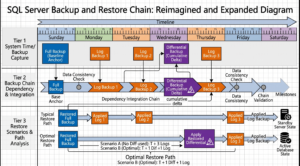
Backup and Recovery: Protecting Business Data
Data protection is one of the most important DBA responsibilities.
A DBA needs to design backup strategies based on business requirements rather than simply scheduling backups.
Important concepts include:
- Full backup
- Differential backup
- Transaction log backup
- Recovery models
- Point-in-time recovery
- Restore sequences
- Backup validation
- Recovery testing
A backup that has never been tested is not enough.
A professional DBA must also understand whether the organization can actually recover the required data within the required time.
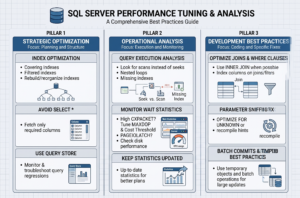
SQL Server Performance: Finding the Real Problem
Database performance is where SQL DBA knowledge becomes highly valuable.
When an application becomes slow, the DBA needs to investigate rather than immediately assume that the database needs more hardware.
Possible causes include:
- Poorly written queries
- Missing indexes
- Incorrect indexes
- Outdated statistics
- Blocking
- Deadlocks
- Excessive CPU usage
- Memory pressure
- Storage latency
- Poor execution plans
- Resource contention
A SQL Server performance tuning specialist learns to identify the actual bottleneck and select an appropriate solution.
Database Security: Who Can Access What?
Data security is another major DBA responsibility.
A DBA manages access using concepts such as:
- Logins
- Users
- Roles
- Permissions
- Authentication
- Authorization
- Auditing
- Encryption
For example, a developer may need access to a development database but should not automatically receive unrestricted access to production data.
Good database administration follows the principle of providing users with only the access they actually require.
High Availability and Disaster Recovery
A production database cannot simply stop because one server has failed.
Organizations therefore design architectures that can continue operating or recover quickly when failures occur.
SQL DBAs may work with:
- Always On Availability Groups
- Failover Cluster Instances
- Log Shipping
- Replication
- Backup and restore
- Disaster recovery environments
Two important concepts are:
RPO — Recovery Point Objective
How much data loss can the business tolerate?
RTO — Recovery Time Objective
How quickly must the system be restored?
Understanding these requirements allows a DBA to design practical recovery strategies.
The SQL DBA Toolset
A DBA rarely works with one tool.
Modern database administrators use a combination of administration, monitoring, automation, and troubleshooting tools.
SQL Server Management Studio
SSMS is one of the most commonly used tools for SQL Server administration.
DBAs use it for:
- Query execution
- Database management
- Security
- Backup and restore
- SQL Agent
- Monitoring
- Troubleshooting
T-SQL
T-SQL is essential for SQL Server professionals.
It can be used to:
- Query data
- Manage databases
- Automate administrative tasks
- Investigate problems
- Create stored procedures
- Generate reports
- Perform maintenance activities
Extended Events
Useful for investigating SQL Server activity and performance-related problems.
PowerShell
PowerShell can automate repetitive administration and operational tasks.
Monitoring Platforms
Enterprise teams may also use dedicated monitoring and observability platforms to monitor database health, performance, alerts, and infrastructure.
Where ETL Fits Into SQL DBA?
Database administration and data integration frequently intersect.
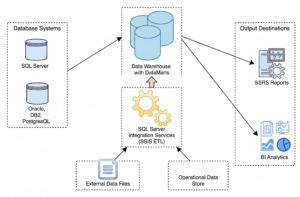
ETL means:
Extract → Transform → Load
An ETL process may extract data from multiple systems, transform it according to business rules, and load it into a data warehouse or analytical platform.
This creates another career opportunity for professionals with strong SQL and database administration skills.
An ETL Administrator may be responsible for:
- Monitoring ETL jobs
- Managing scheduled jobs
- Troubleshooting package failures
- Checking source and target databases
- Managing permissions
- Monitoring data loads
- Investigating performance problems
- Supporting SQL Server Integration Services environments
This is one reason SQL DBA knowledge can be useful beyond traditional database administration.
SQL DBA Job Roles: Where Can Your Career Go?
SQL DBA knowledge can lead to multiple specialized roles.
SQL Server DBA
The traditional DBA role focuses on managing SQL Server environments.
Typical responsibilities include:
- Administration
- Backup and recovery
- Security
- Monitoring
- Performance tuning
- High availability
- Troubleshooting
Azure SQL DBA
An Azure SQL DBA focuses on cloud-based SQL workloads.
Career focus: SQL Server + Azure + Cloud Administration
Common responsibilities:
- Azure SQL administration
- Cloud migration
- Security
- Performance
- Monitoring
- Backup and recovery
- High availability
Production DBA
A Production DBA works with business-critical databases.
Career focus: Availability + Troubleshooting + Operations
Production DBAs often deal with:
- Critical incidents
- Database outages
- Blocking
- Deadlocks
- Failed jobs
- Backup failures
- Performance issues
- Production changes
SQL Performance Engineer
This role focuses heavily on database performance.
Career focus: Query Optimization + Performance Engineering
Skills include:
- Execution plans
- Indexing
- Statistics
- Wait analysis
- Blocking
- Deadlocks
- Query optimization
- Resource analysis
ETL Administrator
An ETL Administrator supports data movement and integration systems.
Career focus: Data Integration + SQL + ETL Operations
Responsibilities may include:
- ETL job monitoring
- SSIS administration
- Data load troubleshooting
- Scheduling
- Database connectivity
- Performance monitoring
- Data warehouse support
Database Engineer
A Database Engineer combines database knowledge with engineering and automation.
Career focus: Database + Cloud + Automation + Development
A Database Engineer may work with:
- SQL Server
- Azure
- Automation
- CI/CD
- Infrastructure
- Database migrations
- Performance
- Data platforms
Cloud Database Administrator
The Cloud DBA extends traditional database administration into cloud environments.
Career focus: Database Administration + Cloud Platforms
Depending on the organization, professionals may work with Azure, AWS, or other cloud database technologies.
Database Architect
This is a senior-level career direction.
A Database Architect focuses on designing database solutions rather than only administering existing environments.
Areas include:
- Database architecture
- Data modeling
- Scalability
- High availability
- Disaster recovery
- Security architecture
- Cloud architecture
- Performance strategy
SQL DBA Training at SQL School
At SQL School, SQL DBA learning is designed around practical database administration and real-time scenarios.
The training approach focuses on:
- SQL Server Administration
- T-SQL
- Backup & Recovery
- Database Security
- Performance Tuning
- High Availability
- Disaster Recovery
- SQL Server Agent
- Monitoring
- Troubleshooting
- Azure SQL
- Real-time projects
- Interview-oriented preparation
With 20+ years of experience, SQL School focuses on practical, real-time and job-oriented technology training for learners and working professionals.
Frequently Asked Questions
Is SQL DBA only about SQL queries?
No. SQL queries are only one part of DBA work. Database administration also involves security, backups, recovery, monitoring, performance, availability, automation, and troubleshooting.
Is SQL DBA a good career option?
SQL DBA skills can provide opportunities in database administration, production support, cloud database administration, database engineering, performance engineering, and related data-platform roles.
What is the difference between SQL DBA and Azure SQL DBA?
A traditional SQL DBA may primarily manage SQL Server environments, while an Azure SQL DBA specializes in Microsoft’s cloud database services and cloud-based SQL workloads.
Can SQL DBA professionals work in ETL?
Yes. SQL DBA knowledge is useful for ETL administration because ETL systems depend heavily on databases, SQL queries, scheduled jobs, permissions, storage, and performance.
Should a SQL DBA learn Azure?
Learning Azure SQL and cloud concepts can expand the career opportunities of traditional SQL Server professionals as organizations modernize their database environments.
Conclusion
SQL DBA is no longer just a database maintenance role. It has evolved into a combination of database administration, performance engineering, security, automation, cloud computing, and reliability engineering.
Starting with SQL Server DBA Training can provide the foundation to progress toward roles such as Azure SQL DBA, Production DBA, ETL Administrator, SQL Performance Engineer, Database Engineer, Cloud DBA, and Database Architect.
For professionals who enjoy solving technical problems and working with critical data systems, SQL DBA can be a strong pathway into the modern data and cloud ecosystem.
Start Your SQL DBA Journey Today!
Get practical SQL DBA training with real-time projects and industry-focused scenarios.
👉 Reach us for a Free Demo
📞 +91 99514 40801 | 🌐 sqlschool.com
Trainer: Mr. Sai Phanindra
#SQLDBA #SQLDBATraining #SQLDBACourse #SQLServer #SQLServerDBA #SQLServerTraining #DatabaseAdministrator #DatabaseAdministration #DBATraining #DBACareer #SQLPerformanceTuning #SQLServerPerformance #SQLServerBackup #DatabaseSecurity #HighAvailability #DisasterRecovery #AzureSQL #AzureSQLDBA #AzureSQLTraining #CloudDBA #ETLAdministrator #DatabaseEngineer #ProductionDBA #DataEngineering #CloudComputing #SQLTraining #ITTraining #DatabaseCareer #SQLSchool #SQLTrainingHyderabad #DBATrainingHyderabad

