
Discover how Azure Databricks Administrators manage secure, scalable enterprise data platforms with Unity Catalog, monitoring & automation.
Data Engineers Build Pipelines. Databricks Administrators Keep the Platform Running.
Behind every reliable data pipeline, secure workspace and successful analytics platform is an administration strategy that keeps technology, people and business operations working together.
Discover what Azure Databricks Administrators actually do, how they solve production challenges and why their responsibilities extend far beyond managing compute.
Imagine a Monday Morning at a Global Organization
An enterprise operates multiple Azure Databricks workspaces to support its data engineers, analysts, developers and business intelligence teams.
Overnight, several scheduled data pipelines failed. A finance analyst cannot access a required table. A development compute resource has been running unnecessarily, and the organization is investigating an unexpected increase in cloud expenditure.
Meanwhile, a new team needs access to the platform without exposing confidential production data.
Who Handles These Challenges?
Data engineers investigate transformation logic. Business analysts review reporting requirements. Azure Databricks Administrators coordinate platform access, compute configuration, governance, operational monitoring and infrastructure-related troubleshooting.
Their responsibility is to help maintain a reliable, controlled environment where data and AI teams can perform their work effectively.
Data Engineer vs. Databricks Administrator
These roles work closely together, but their primary responsibilities differ. In smaller organizations, one professional may perform both functions.
Databricks Data Engineer
- Develop data pipelines.
- Write SQL and PySpark transformations.
- Implement ETL and ELT workflows.
- Build Delta Lake tables.
- Improve data quality.
- Develop business-ready datasets.
Databricks Administrator
- Manage workspaces and user access.
- Govern compute configurations.
- Administer Unity Catalog permissions.
- Monitor usage, jobs and platform health.
- Coordinate security and connectivity.
- Support production reliability.
Understanding What an Administrator Actually Manages
Azure Databricks administration involves multiple layers, including the Databricks account, workspaces, compute resources, identities, data governance and connected Azure cloud services.
Understanding the relationship between these layers helps administrators identify where a problem exists rather than troubleshooting every issue in the same way.
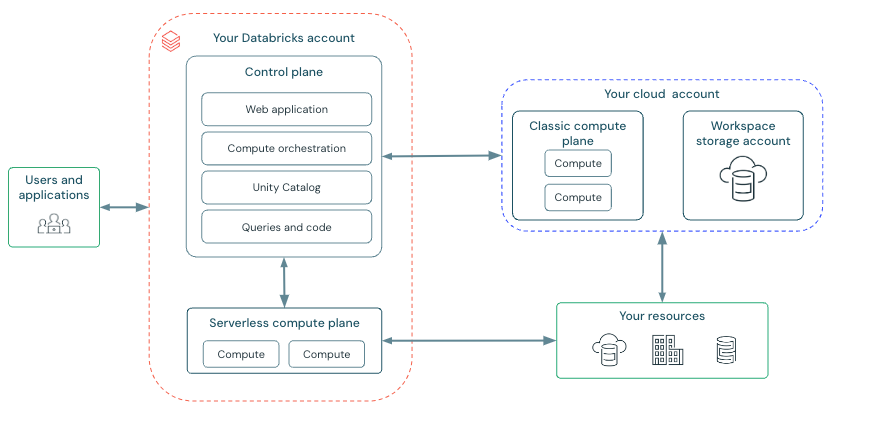
Control Plane
The control plane includes platform services managed by Azure Databricks, such as the workspace web application and compute orchestration capabilities.
Compute Plane
This is where data processing occurs. Classic compute resources operate within the customer's Azure subscription, while serverless compute operates in a Databricks-managed compute plane.
Administration Responsibilities at Different Levels
| Administrative Role | Primary Responsibility |
|---|---|
| Account Administrator | Account-wide identities, workspace assignments, usage management and account-level configuration. |
| Workspace Administrator | Workspace settings, access controls, compute administration and operational management within a workspace. |
| Metastore Administrator | An optional Unity Catalog role with administrative capabilities for a specific metastore. |
| Azure Administrator | Azure resources, cloud networking, storage permissions and associated infrastructure configuration. |
In an enterprise, these responsibilities may be distributed across several teams. A Databricks workspace administrator does not automatically possess every Azure or Unity Catalog permission.
Why Enterprises Separate Development and Production
Consider an organization where developers create experimental notebooks in the same environment used for critical production pipelines.
Without suitable controls, testing activities can create operational risks, accidental modifications and unexpected resource consumption.
A common enterprise approach is to separate development, testing and production environments, supported by environment-specific permissions.
Illustrative Enterprise Workspace Strategy
Experimentation
Developer Access
Integration Testing
Release Verification
Controlled Deployment
Restricted Access
Workspace separation alone is not enough to guarantee data isolation. Administrators must also configure identity assignments, catalog privileges, workspace bindings and appropriate storage access.
An Employee Cannot Access a Business-Critical Table
A finance analyst signs in successfully to the Databricks workspace but receives a permission error while querying a sales reporting table.
How Should the Administrator Respond?
- Confirm the analyst's account identity and group membership.
- Verify that the user has access to the required workspace and SQL warehouse.
- Check Unity Catalog privileges at catalog, schema and table levels.
- Review relevant workspace bindings.
- Grant only the privileges approved for the analyst's business role.
- Validate access and document the change.
Unity Catalog Governance Model
Practical Example: Read-Only Access for Finance Analysts
Suppose the organization has an existing catalog named finance, a schema named reporting, a table named sales_summary and an account group named finance_analysts.
GRANT USE CATALOG
ON CATALOG finance
TO `finance_analysts`;

GRANT USE SCHEMA
ON SCHEMA finance.reporting
TO `finance_analysts`;

GRANT SELECT
ON TABLE finance.reporting.sales_summary
TO `finance_analysts`;
These statements grant access to the required hierarchy and table, without granting permission to modify its data.
Inspect Existing Permissions
SHOW GRANTS ON CATALOG finance;

SHOW GRANTS ON SCHEMA finance.reporting;

SHOW GRANTS ON TABLE
finance.reporting.sales_summary;These examples assume that the objects and group already exist and that the executing identity has the required authority to manage privileges.
Connecting Databricks to Azure Storage Without Exposing Credentials
Organizations frequently store enterprise datasets in Azure Data Lake Storage Gen2. Administrators need to provide controlled access to these datasets without exposing storage keys in notebooks or distributing shared credentials to users.
Azure Databricks Access Connectors, managed identities, Unity Catalog storage credentials and external locations provide an administration pattern for governing access to supported Azure Storage locations.
Managed Identity and Governed Storage Access
Illustrative External Location Configuration
CREATE EXTERNAL LOCATION IF NOT EXISTS
finance_external_location

URL 'abfss://finance@yourstorageaccount.dfs.core.windows.net/reporting/'

WITH (
    STORAGE CREDENTIAL finance_storage_credential
)

COMMENT 'Approved finance reporting location';
This example assumes an existing Unity Catalog storage credential configured with an authorized Azure managed identity.
Replace the storage account and location names with the values from your own approved training environment. The storage path, networking and permissions must already be configured appropriately.
When Cloud Costs Increase Unexpectedly
An organization discovers that its Databricks expenditure has increased even though the number of production pipelines has remained relatively stable.
Further investigation identifies oversized compute resources, long-running interactive sessions and workloads without consistent resource tagging.
Uncontrolled Environment
- Unrestricted compute creation.
- Oversized worker configurations.
- Idle interactive resources.
- Missing project tags.
- Limited usage visibility.
Governed Environment
- Approved compute policies.
- Suitable worker limits.
- Auto-termination controls.
- Resource ownership and tags.
- Regular usage monitoring.
Compute Policies: Preventing Unnecessary Resource Usage
Administrators can define compute policies to standardize supported configurations and restrict inappropriate resource selections.
For example, an organization may enforce approved runtime versions, maximum worker counts and auto-termination settings for development compute.
{
  "autotermination_minutes": {
    "type": "fixed",
    "value": 20,
    "hidden": true
  },

  "autoscale.max_workers": {
    "type": "range",
    "maxValue": 4,
    "isOptional": true
  }
}
This is a partial example of a policy definition for compatible classic compute configurations. A complete organizational policy may need additional restrictions, depending on the workload and compute type.
Why Compute Selection Matters
| Compute Option | Typical Application | Administration Focus |
|---|---|---|
| All-Purpose Compute | Interactive development and exploration | Policies, access and idle termination |
| Jobs Compute | Automated and scheduled workloads | Runtime, sizing and execution reliability |
| SQL Warehouse | SQL analytics and business intelligence | Permissions, scaling and auto-stop |
| Serverless Compute | Supported managed workloads | Usage controls, availability and monitoring |
Monitor Usage Through System Tables
Databricks billing system tables allow authorized administrators to analyze recorded usage and understand consumption patterns across workloads.
SELECT
    workspace_id,
    sku_name,
    SUM(usage_quantity) AS total_dbus

FROM system.billing.usage

WHERE usage_date >= CURRENT_DATE() - 7
  AND usage_unit = 'DBU'

GROUP BY
    workspace_id,
    sku_name

ORDER BY total_dbus DESC;
This query summarizes Databricks Unit consumption for the selected date range. DBU consumption is not the same as total monetary expenditure.
Actual costs may depend on SKU pricing, contractual arrangements and applicable Azure infrastructure charges.
What Happens When a Production Databricks Job Fails?
A critical reporting pipeline is scheduled to refresh business data before the beginning of the working day.
However, the job fails during execution and downstream dashboards are not updated. Administrators and data engineers must coordinate to identify and resolve the underlying problem.
Production Incident Response Workflow
Common Production Issues and Investigation Areas
| Issue | Possible Cause | Investigation |
|---|---|---|
| Compute fails to start | Quota, policy or network restrictions | Compute events and Azure configuration |
| Permission denied | Missing privileges or incorrect run identity | Unity Catalog grants and job permissions |
| Library installation failure | Runtime or dependency incompatibility | Library status and installation logs |
| Slow job execution | Data skew or unsuitable resources | Spark UI, task metrics and query profile |
| Storage connection failure | Managed identity, firewall or DNS issues | Storage credential and network configuration |
| Unexpected duplicate records | Non-idempotent processing after a retry | Pipeline logic and previous execution results |
What Does a Databricks Administrator Do During a Working Day?
The exact responsibilities vary across organizations. The following fictional schedule illustrates the operational work that a platform administration professional may perform.
Review Platform Health
Inspect overnight job executions, failed workloads, compute availability and outstanding incidents.
Identity and Access Requests
Process approved user onboarding, review group assignments and validate environment-specific permissions.
Compute and Usage Review
Review resource consumption, evaluate long-running workloads and identify optimization opportunities.
Production Support
Coordinate with data engineers to investigate failed jobs, configuration problems and connectivity issues.
Deployment and Automation
Review approved platform changes, deployment configurations and automation requirements for upcoming releases.
Governance and Operational Reporting
Review relevant audit information, update incident documentation and record pending administrative actions.
This role combines technical administration, troubleshooting, communication, security awareness and an understanding of business priorities.
Who Changed the Permissions? Who Accessed the Data?
Enterprise administrators must help organizations maintain visibility into platform activities, access changes and other security-related events.
Audit information can help authorized teams investigate incidents, validate operational controls and understand administrative changes.
Example: Review Recent Audit Events
SELECT
    event_time,
    workspace_id,
    user_identity.email AS user_email,
    service_name,
    action_name

FROM system.access.audit

WHERE event_date >= CURRENT_DATE() - 1

ORDER BY event_time DESC

LIMIT 100;
This illustrative query displays recent available audit events for investigation. Audit visibility, permissions, regional coverage and retention depend on the account configuration and supported features.
Identity Governance
Group-based permissions, account identities, service principals and approved access workflows.
Data Governance
Catalog privileges, data ownership, lineage, row filters and column masks.
Operational Auditing
Review administrative events, access changes and relevant platform activity.
Why Azure Networking Knowledge Matters
Some Databricks issues are not caused by notebooks, SQL statements or Spark transformations. They originate in the surrounding cloud infrastructure.
Administrators working with enterprise environments should understand Azure networking concepts and coordinate with infrastructure and security teams when private connectivity is required.
| Azure Component | Administration Relevance |
|---|---|
| Virtual Network | Network design for supported classic compute deployments. |
| VNet Injection | Deploy supported classic Databricks compute into a customer-managed network. |
| Azure Private Link | Enable supported private connectivity scenarios. |
| Private DNS | Resolve private endpoint addresses correctly. |
| Microsoft Entra ID | Enterprise identity management and authentication. |
| Managed Identities | Support authorized Azure resource access without embedded credentials. |
Explore Databricks Administration in Practice
Unity Catalog & Metastore Configuration
Explore workspace setup, catalog governance, storage credentials and enterprise data access.
External educational resource: VJ Tech Talks.Career Transition for Database Administrators
Explore broader Azure, Big Data and ETL administration career development concepts.
SQL SCHOOL educational resource. Not a dedicated Databricks Admin tutorial.Moving Beyond Manual Administration
Manually managing every job, workspace object and permission becomes increasingly difficult as an organization grows.
Databricks administrators can use supported CLI commands, REST APIs and infrastructure automation tools to make administrative processes more consistent and repeatable.
Manual Operations
- Inspecting jobs individually.
- Repeated configuration changes.
- Manual environment preparation.
- Inconsistent operational documentation.
Automated Operations
- Scripted resource inspection.
- Repeatable deployment configurations.
- Version-controlled infrastructure.
- Standardized administrative workflows.
Read-Only Databricks CLI Examples
# List configured authentication profiles

databricks auth profiles

# List accessible workspace objects

databricks workspace list /

# List accessible jobs

databricks jobs list

# List accessible compute resources

databricks clusters list
These examples require a compatible Databricks CLI installation, configured authentication and appropriate access to the target workspace.
Administrators can extend their automation capabilities using REST APIs, Terraform and deployment workflows after mastering the fundamental platform concepts.
Preparing for Recovery Before an Incident Happens
Production administration is not limited to monitoring healthy systems. Organizations also need a strategy for recovering from accidental modifications, deployment failures and larger infrastructure disruptions.
Code and Configuration
Maintain version-controlled notebooks, job definitions and supported infrastructure configurations.
Data Recovery
Understand Delta Lake history, retention and supported recovery operations.
Disaster Recovery
Plan recovery priorities, dependencies, acceptable data loss and restoration requirements.
Inspect Delta Table History
DESCRIBE HISTORY
finance.reporting.sales_summary;
If the table uses Delta Lake and the executing identity has the appropriate permissions, administrators can inspect available table operations and version history.
Can You Build and Administer a Governed Databricks Environment?
Consider a practical administration project for a fictional retail and finance organization.
The organization needs a shared data platform for development teams, reporting analysts and scheduled business workloads, while maintaining controlled access to confidential information.
Enterprise Databricks Administration Project
Business objective: Establish an operational environment that supports secure data engineering, analytics and reliable production execution.
Administration objective: Implement workspace access, resource policies, data governance, monitoring and operational troubleshooting.
Project Implementation Lifecycle
Plan the Environment
Identify business teams, workload requirements and development versus production access boundaries.
Establish Platform Access
Configure approved identities, groups, workspace assignments and operational permissions.
Implement Data and Compute Controls
Establish Unity Catalog privileges, storage access patterns and approved compute configurations.
Monitor Production Workloads
Configure job execution, inspect monitoring information and investigate simulated operational incidents.
Review Usage and Reliability
Analyze resource consumption, identify optimization opportunities and document administrative improvements.
Expected Project Deliverables
- Enterprise workspace architecture diagram.
- Identity and group access matrix.
- Compute policy configuration.
- Unity Catalog governance design.
- Approved storage access configuration.
- Monitoring and usage analysis queries.
- Sample incident investigation report.
- Operational administration checklist.
These deliverables are suggested portfolio outputs based on the administration scenarios discussed in this article.
Learn to Administer Databricks, Not Just Navigate the Workspace.
Develop hands-on experience in workspace configuration, Unity Catalog, compute management, monitoring, security and enterprise administration.
Is Databricks Administration a Suitable Career Path for DBAs?
Database administrators already possess experience in security, user management, performance monitoring, recovery concepts and production troubleshooting.
These responsibilities provide a useful foundation for learning modern cloud data platform administration. However, Databricks also introduces additional requirements involving distributed compute, Azure infrastructure and unified data governance.
| Existing DBA Experience | Related Databricks Responsibility |
|---|---|
| Database Security | Unity Catalog access governance |
| Logins and Database Roles | Account identities, groups and privileges |
| Performance Monitoring | Compute metrics and SQL query analysis |
| SQL Agent Jobs | Lakeflow Jobs and workflow monitoring |
| Resource Management | Compute policies and usage optimization |
| Database Recovery | Delta recovery and platform recovery planning |
| Database Auditing | Audit events and system tables |
These are conceptual similarities, not exact feature-for-feature replacements. DBAs should also develop knowledge of Spark, cloud storage, Azure networking and modern deployment practices.
Potential Career Progression
Career progression depends on practical experience, infrastructure knowledge, automation capabilities and the responsibilities of the target position.
Career Opportunities in Modern Data Platform Administration
Azure Databricks Administrator
Manage workspaces, access controls, resource policies and operational administration.
Data Platform Engineer
Build and maintain automated, reliable cloud data infrastructure.
Databricks Support Engineer
Investigate platform incidents, configuration problems and operational failures.
Cloud Data Administrator
Support data platform resources, security and cloud operations.
Data Governance Engineer
Implement data access controls, governance standards and auditing capabilities.
Platform Architect
Design enterprise platform architecture, typically requiring substantial relevant experience.
Develop Practical Administration Experience with SQL SCHOOL
SQL SCHOOL's Azure Databricks Administration training is designed to help professionals understand and manage enterprise Databricks environments through practical learning.
Practical Labs
Explore workspace operations, compute configurations and administrative controls.
Enterprise Governance
Practice Unity Catalog, group-based permissions and secure storage integration.
Real-Time Project
Apply platform administration concepts within an enterprise-style scenario.
Training Technologies and Concepts
Azure DatabricksMicrosoft Entra IDUnity CatalogADLS Gen2Compute PoliciesSQL WarehousesLakeflow JobsSystem TablesAudit LogsAzure NetworkingDatabricks CLIREST APICost OptimizationRecovery PlanningMr. Sai Phanindra
Chief Mentor | SQL SCHOOL | 20+ Years of Experience
Explore practical approaches to database technologies, cloud platforms, data engineering and enterprise administration.
Think Like a Databricks Administrator
Instead of memorizing definitions, practice explaining how you would investigate and resolve the following administration situations.
A user can open the workspace but cannot query a table. What would you check?
Verify workspace and compute access, group membership, USE CATALOG, USE SCHEMA and SELECT privileges, along with relevant workspace bindings.
An interactive compute resource remains active overnight. How would you prevent this?
Review the workload requirements and use appropriate auto-termination settings, compute policies and usage monitoring for compatible compute resources.
A scheduled job works for its developer but fails under its production identity. Why?
The configured run identity may lack required privileges, compute access, workspace permissions or authorized access to dependent data assets.
How would you protect confidential salary information from unauthorized analysts?
Review group-based privileges, data ownership, approved access boundaries, column masks, row filters or governed views as appropriate for the requirements.
Cloud usage increased significantly. Where would you begin your investigation?
Analyze billing usage by workspace and workload, inspect compute utilization, review resource tags and evaluate long-running or oversized resources.
A production notebook was accidentally modified. How would you prepare for such incidents?
Maintain version-controlled source code, approved deployment procedures and documented recovery processes. Restrict direct modifications in production.
Prepare for Your Next Professional Opportunity
SQL SCHOOL IT JOB DESK
Explore IT job opportunities and professional career development services designed to help candidates strengthen their technical profiles.
Continue Your Cloud Technology Learning Journey
Azure Databricks Administration
Develop enterprise workspace, security and platform management skills.
Explore Course →Databricks Data Engineering
Develop data pipelines using SQL, PySpark and modern lakehouse technologies.
Explore Course →SQL DBA with Azure
Strengthen database administration and cloud database management skills.
Explore Course →Azure ETL Administration
Explore operational administration across Azure data integration services.
Explore Course →Azure Data Engineering
Understand cloud data integration, processing and analytical architectures.
Explore Course →Generative AI with Databricks
Explore modern data and AI capabilities and their enterprise applications.
Explore Course →A Reliable Data Platform Requires More Than Development
Data engineering enables organizations to transform information into valuable business insights. Platform administration helps ensure that this work takes place in a secure, controlled and reliable environment.
Azure Databricks Administrators bring together cloud infrastructure knowledge, data governance, resource management, security, automation and production support.
For database administrators, cloud professionals and production support engineers, developing these capabilities can provide a meaningful pathway towards modern data platform roles.
Become an Azure Databricks Administration Professional
Build practical skills in enterprise workspace management, Unity Catalog, Azure security, monitoring and platform optimization.
Expert-Led LIVE Training
Hands-On Administration Labs
Real-Time Enterprise Project
Resume & Interview Preparation
SQL SCHOOL
Expert Training. Career Success.
