
ADF vs Databricks in 2027: Which Technology Should You Choose for a Successful Data Engineering Career?
Introduction: The Changing Landscape of Modern Data Engineering
Data Engineering has become one of the most important areas in the IT industry. Organizations generate enormous amounts of data from applications, databases, websites, business transactions, and cloud platforms. Managing this information requires powerful tools that can collect, process, transform, and deliver data efficiently.
Among the popular technologies in the Microsoft Azure ecosystem, Azure Data Factory (ADF) and Azure Databricks play important roles in building modern data engineering solutions.
Although both technologies are used to develop data pipelines, their capabilities and purposes are different.
Azure Data Factory focuses primarily on data integration, movement, and workflow orchestration, whereas Azure Databricks provides a powerful environment for distributed data processing using Apache Spark, Python, PySpark, and SQL.
But which technology should you learn in 2027? Is ADF sufficient for becoming an Azure Data Engineer? Does Databricks offer better career opportunities? Or should you learn both?
Let’s explore the differences through practical examples, architecture, industry applications, and career opportunities.
Understanding the Role of Azure Data Factory in Cloud Integration
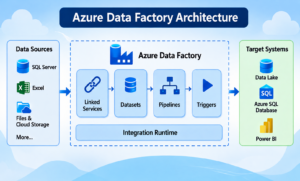
Azure Data Factory is a cloud-based data integration service provided by Microsoft Azure. It helps organizations create, schedule, and manage data pipelines across different data sources and destinations.
ADF allows Data Engineers to automate data movement and orchestrate complex workflows using a visual development environment.
Core Capabilities That Make ADF Useful
- Pipeline Management: Create and manage automated data workflows.
- Copy Activity: Transfer data between different sources and destinations.
- Mapping Data Flows: Perform data transformations using a visual interface.
- Linked Services: Establish connections to databases, storage accounts, and other services.
- Datasets: Define the structure and location of source and destination data.
- Integration Runtime: Enable data movement and connectivity across cloud and on-premises environments.
- Triggers: Execute pipelines based on schedules or supported events.
- Monitoring: Track pipeline execution, errors, and performance.
Practical Example: Automating Daily Business Data
Imagine a company stores customer information in SQL Server, product information in Excel files, and sales information in cloud storage.
Using Azure Data Factory, a Data Engineer can:
- Connect to SQL Server and cloud storage.
- Extract customer and sales information.
- Move the data into Azure Data Lake Storage Gen2.
- Execute transformation activities.
- Trigger Databricks notebooks for advanced processing.
- Load the processed information into the target system.
- Schedule the entire workflow to run automatically.
ADF makes it easier to coordinate these operations without manually executing individual tasks.
Exploring Azure Databricks and Its Distributed Computing Power
Azure Databricks provides a collaborative data intelligence platform built around Apache Spark. It supports large-scale data engineering, analytics, machine learning, and AI workloads.
Databricks enables developers to process large datasets using distributed computing instead of relying entirely on traditional single-machine processing approaches.
Data Engineers can develop transformation logic using Python, PySpark, and Spark SQL.
Technologies That Power the Databricks Ecosystem
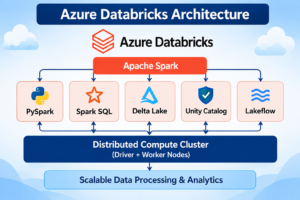
- Apache Spark: Distributed data processing engine.
- PySpark: Python interface for developing Spark applications.
- Spark SQL: SQL-based data processing and querying.
- Delta Lake: Reliable data storage with ACID transaction support.
- Unity Catalog: Centralized data governance and access management.
- Lakeflow: Data pipeline development and orchestration capabilities.
- Lakehouse Architecture: Combines data lake flexibility with data warehouse capabilities.
- Machine Learning and AI: Supports advanced analytics and AI-driven workloads.
Practical Example: Processing Large-Scale Transaction Data
Consider an online shopping platform that generates millions of customer transactions.
A Data Engineer can use Databricks to:
- Read raw transaction data from ADLS Gen2.
- Process the information using PySpark.
- Remove duplicate records.
- Handle missing and invalid values.
- Apply business transformation rules.
- Store cleaned datasets in Delta Lake.
- Create aggregated datasets for reporting.
- Make the final data available for Power BI dashboards.
Databricks is particularly useful when organizations need scalable data processing and complex transformations.
ADF vs Databricks: A Technical Comparison Across Key Features
Understanding the functional differences between these technologies helps Data Engineers choose the right solution for their requirements.
| Technical Area | Azure Data Factory | Azure Databricks |
|---|---|---|
| Main Purpose | Data integration and orchestration | Data processing and analytics |
| Development | Visual pipeline designer | Python, PySpark, SQL |
| Data Movement | Built-in Copy Activity | Connectors and code-based ingestion |
| Transformation | Mapping Data Flows and external compute | PySpark and Spark SQL |
| Processing Architecture | Managed activities and connected compute | Distributed Spark processing |
| Big Data Workloads | Orchestrates processing services | Processes large datasets |
| Batch Processing | Pipeline-based execution | Spark batch processing |
| Streaming | Event-based orchestration and integrations | Structured Streaming |
| Scheduling | Pipeline triggers | Lakeflow Jobs |
| Governance | Azure integration and security controls | Unity Catalog |
| AI and ML | Orchestrates external workloads | Supports ML and AI workloads |
| Primary Strength | Data integration | Advanced data engineering |
The comparison makes one thing clear: ADF and Databricks are complementary technologies rather than direct replacements for each other in every scenario.
Inside the Architecture: How ADF and Databricks Process Data
Both technologies use different architectural approaches to manage data engineering workloads.
How Azure Data Factory Organizes Pipeline Execution
ADF uses a pipeline-based architecture consisting of several components:
- Pipelines
- Activities
- Datasets
- Linked Services
- Integration Runtime
- Triggers
A pipeline contains multiple activities that execute in a defined sequence or according to dependencies.
For example:
SQL Server → ADF Copy Activity → ADLS Gen2 → Databricks Notebook → Azure SQL Database
ADF manages the workflow and coordinates the execution of different operations.
How Databricks Handles Distributed Data Processing
Databricks uses Apache Spark architecture to distribute processing tasks across compute resources.
Important components include:
- Spark Driver
- Worker Nodes
- Spark Executors
- PySpark
- Spark SQL
- Delta Lake
- Unity Catalog
The Spark driver coordinates the execution of jobs, while executors perform distributed processing tasks.
This architecture helps Data Engineers handle complex transformations and large-scale datasets.
Performance and Scalability: Selecting the Right Processing Engine
Performance depends on workload size, architecture, data sources, configuration, and transformation requirements.
When ADF Delivers Better Operational Simplicity
ADF is suitable for:
- Moving data between multiple systems.
- Automating scheduled ETL workflows.
- Managing pipeline dependencies.
- Connecting cloud and on-premises environments.
- Coordinating external processing services.
Its performance depends on factors such as Integration Runtime, source and destination throughput, parallelism, and activity configuration.
When Databricks Becomes the Better Processing Choice
Databricks is suitable for:
- Large-scale data transformations.
- Complex joins and aggregations.
- Distributed data processing.
- PySpark-based ETL applications.
- Incremental data processing.
- Streaming data workloads.
- Advanced analytics and AI applications.
Its performance depends on compute configuration, partitioning, caching, query optimization, and workload design.
Technical Recommendation: Use ADF for efficient data integration and orchestration. Use Databricks for scalable and complex data processing.
Building an Enterprise Data Pipeline Using Both Technologies
One of the most valuable skills for an Azure Data Engineer is understanding how ADF and Databricks work together.
Let’s understand this through an industry-oriented project.
Project Scenario: Developing an E-Commerce Intelligence Platform
Business Requirement:
An e-commerce organization wants to consolidate customer information, product details, sales transactions, and order information into a centralized analytical platform.
The company needs automated data ingestion, transformation, validation, and reporting.
Project Development Workflow
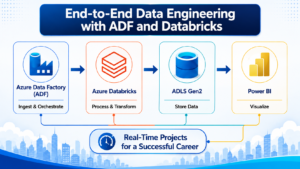
Stage 1: Extracting Source Data with ADF
Create pipelines to extract information from SQL Server, Excel files, and other supported data sources.
Stage 2: Landing Raw Data in Azure Data Lake
Use ADF Copy Activity to transfer the source information into ADLS Gen2.
Stage 3: Applying Business Transformations in Databricks
Develop PySpark notebooks to clean data, remove duplicates, validate records, and apply business logic.
Stage 4: Organizing Information Through Medallion Architecture
Implement three data layers:
- Bronze: Raw source information.
- Silver: Cleaned and validated information.
- Gold: Business-ready aggregated information.
Stage 5: Managing Reliable Data Using Delta Lake
Store processed datasets in Delta tables and implement appropriate data management strategies.
Stage 6: Automating Pipeline Execution
Use ADF for cross-service orchestration and Databricks capabilities for notebook and job execution.
Stage 7: Delivering Business Insights Through Power BI
Create dashboards to analyze:
- Total Revenue
- Monthly Sales
- Customer Purchases
- Product Performance
- Regional Sales
- Business Growth Trends
Project Outcome:
An end-to-end Data Engineering solution that combines Azure Data Factory, Databricks, ADLS Gen2, Delta Lake, and Power BI.
Beyond ADF: Why Microsoft Fabric Is Also Important in 2027
Microsoft Fabric is another important platform that Data Engineers should understand.
Fabric provides an integrated analytics environment that includes:
- Fabric Data Factory
- Lakehouse
- Data Warehouse
- Notebooks
- Real-Time Intelligence
- Power BI
Fabric Data Factory provides data integration and orchestration capabilities within the Microsoft Fabric ecosystem.
Organizations evaluating new data platforms should understand both Azure Data Factory and Fabric Data Factory.
Existing ADF solutions also remain relevant because many organizations continue to maintain their established Azure data pipelines.
Therefore, learning ADF, Databricks, and Microsoft Fabric provides a broader understanding of modern Microsoft data engineering technologies.
Choosing Your Learning Path: ADF First or Databricks First?
The right learning sequence depends on your existing technical knowledge and career objectives.
Start with ADF If You Are Building Your Azure Foundation
ADF is a good starting point if:
- You are new to Azure Data Engineering.
- You understand SQL and relational databases.
- You want to learn ETL concepts.
- You want to understand data integration.
- You are interested in cloud pipeline development.
It helps you understand data movement, workflow dependencies, scheduling, and pipeline monitoring.
Prioritize Databricks If You Want Advanced Data Processing Skills
Databricks is a strong choice if:
- You already know SQL and Python.
- You want to learn Apache Spark.
- You are interested in PySpark development.
- You want to build scalable ETL applications.
- You want to understand Lakehouse architecture.
- You are interested in advanced analytics and AI.
It provides practical experience with distributed data processing and modern data platforms.
The Best Learning Strategy: Combine ADF, Databricks, and Python
For aspiring Azure Data Engineers, learning both tools is a valuable approach.
ADF teaches you how to orchestrate and move data across systems.
Databricks teaches you how to process and transform data at scale.
Python and SQL provide the programming and querying foundations required to work effectively with these platforms.
Combining these technologies helps you develop a complete Data Engineering skill set.
Career Scope in 2027: What Employers Expect from Data Engineers
Organizations are increasingly looking for professionals who can understand complete data workflows rather than just individual tools.
Career Opportunities After Learning ADF
- Azure Data Engineer
- ETL Developer
- Data Integration Developer
- Cloud Data Engineer
Career Opportunities After Learning Databricks
- Databricks Data Engineer
- PySpark Developer
- Big Data Engineer
- Lakehouse Data Engineer
- Cloud Data Engineer
Essential Technical Skills for Long-Term Career Growth
To strengthen your Data Engineering profile, focus on:
- SQL and Advanced T-SQL
- Python Programming
- Azure Data Factory
- Azure Data Lake Storage Gen2
- Azure Databricks
- Apache Spark and PySpark
- Delta Lake
- Microsoft Fabric
- Data Pipeline Development
- Real-Time Industry Projects
Practical knowledge of these technologies helps you understand enterprise requirements and develop complete data engineering solutions.
Common Learning Gaps That Can Affect Your Data Engineering Career
Learning tools without understanding practical implementation can create challenges during technical interviews and real-world projects.
Avoid these common mistakes:
1. Depending Only on Visual Tools
Understand the SQL, Python, and transformation logic behind your pipelines.
2. Ignoring Distributed Processing Concepts
Learn Spark architecture, partitioning, transformations, and actions.
3. Skipping Real-Time Project Implementation
Build end-to-end projects that connect multiple data sources and technologies.
4. Not Understanding Data Lake Architecture
Understand Bronze, Silver, and Gold layers and how data moves between them.
5. Ignoring Data Quality and Performance
Practice validation, incremental loading, error handling, and performance optimization.
Build Your Future in Azure Data Engineering with SQL School
Want to develop practical skills in Azure Data Engineering and work on real-world projects?
SQL School Training Institute provides practical, interactive, and step-by-step IT training designed to help students and working professionals strengthen their technical skills.
Explore Our Data Engineering Training Modules
- Microsoft SQL Server and Advanced T-SQL
- Azure Data Factory
- Azure Data Lake Storage Gen2
- Azure Databricks
- Python and PySpark
- Delta Lake and Medallion Architecture
- Microsoft Fabric Data Engineering
- Real-Time Data Engineering Projects
Why Learners Choose SQL School
- 19+ Years of Proven Training Experience
- 100% Practical and Interactive Training
- Step-by-Step Technical Sessions
- Assignments and Hands-On Exercises
- Scenario-Based Real-Time Projects
- Weekly Feedback
- Daily Job Updates
- Resume Guidance
- One-on-One Mock Interviews
- 100% Placement Assistance
Founder & Trainer: Mr. Sai Phanindra – 20+ Years of Industry Expertise.
Final Decision: ADF vs Databricks – Which One Should You Master?
There is no universal winner between Azure Data Factory and Azure Databricks.
Each technology plays a different role in modern Data Engineering.
Choose ADF when your primary requirement is data integration, data movement, and pipeline orchestration.
Choose Databricks when your primary requirement is distributed processing, complex transformations, PySpark, and Lakehouse development.
However, if your goal is to become a skilled Azure Data Engineer in 2027, don’t restrict yourself to one technology.
Our Recommendation: Learn SQL + Python + Azure Data Factory + Azure Databricks + Microsoft Fabric.
This combination provides a strong foundation for building scalable cloud-based data pipelines, processing enterprise datasets, and developing end-to-end analytics solutions.
The future of Data Engineering belongs to professionals who understand how different technologies work together to solve real business problems.
Take the First Step Towards Your Data Engineering Career
Learn modern cloud technologies, develop practical skills, and gain experience through real-time project implementation.
SQL School Training Institute – Hyderabad
Website: https://sqlschool.com/
Contact: +91 9666440801 / +91 9951440801
Build your technical expertise and move towards your Data Engineering career goals!
#ADFvsDatabricks #AzureDataFactory #AzureDatabricks #DataEngineering2027 #AzureDataEngineer #PySpark #MicrosoftFabric #SQLSchool
