
How to Store Data Using SQL? A Step-by-Step Practical Guide for Beginners
Introduction: Understanding the Power of SQL Data Storage
Have you ever wondered how applications store thousands or millions of records and retrieve them within seconds?
Whether you shop online, transfer money through banking applications, register for an online course, or book a flight, data is continuously generated, stored, and processed in the background.
But where does all this information go, and how is it managed?
The answer is Databases and SQL (Structured Query Language).
SQL is a standard language used to communicate with relational database management systems. It helps developers and database administrators create databases, organize information, insert records, retrieve data, and maintain business information.
In this practical guide, we will explore how to store data using SQL step by step, using Microsoft SQL Server and SQL Server Management Studio (SSMS).
By the end of this tutorial, you will understand how to create a database, design tables, insert records, retrieve information, update existing data, and manage database records using SQL queries.
Let’s get started!
1. Behind Every Database: How SQL Organizes Information
Before writing SQL queries, let’s understand how databases organize information.
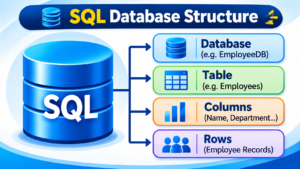
A relational database stores information in structured tables consisting of rows and columns.
Consider an organization that maintains employee information.
Instead of storing employee details in separate documents, the organization can maintain all records inside a centralized SQL database.
For example:
Employee Table
| EmployeeID | EmployeeName | Department | Salary |
|---|---|---|---|
| 101 | Rahul | IT | 45000 |
| 102 | Priya | HR | 40000 |
| 103 | Kiran | Finance | 50000 |
| 104 | Arjun | IT | 55000 |
Here:
- Database: Stores related information.
- Table: Organizes information into a structured format.
- Column: Represents an employee attribute.
- Row: Represents an individual employee record.
- Primary Key: Uniquely identifies each employee.
This structure makes it easier to manage, search, and retrieve business information.
2. Setting Up Your SQL Workspace Before Storing Data
To perform practical SQL operations, we need a database environment.
For this demonstration, we will use:
- Microsoft SQL Server 2025 – Database Engine.
- SQL Server Management Studio (SSMS) – Query and database management tool.
Installation Procedure:
- Download Microsoft SQL Server from the official Microsoft website.
- Install the SQL Server Database Engine.
- Download and install SQL Server Management Studio.
- Launch SSMS after installation.
- Connect to your SQL Server instance.
- Open a New Query window.
Once the connection is successful, you are ready to execute SQL statements.
3. Building Your First Database with CREATE DATABASE
A database is the foundation for storing and managing information.
Before creating tables or inserting records, we need to create a database.
Let’s create a database named EmployeeDB.
SQL Query:
CREATE DATABASE EmployeeDB;
GO
Explanation:
- CREATE DATABASE: Creates a new database.
- EmployeeDB: Specifies the database name.
- GO: Separates SQL batches in SSMS.
After executing the query, refresh the Databases folder in Object Explorer to see the newly created database.
To start working with this database, execute:
USE EmployeeDB;
GO
Now EmployeeDB is the current database context for subsequent queries in this connection.
4. Designing an Employee Table to Hold Business Records
A database alone does not define how employee information should be organized.
We need tables to store individual records.
Let’s create an Employees table inside EmployeeDB.
SQL Query:
CREATE TABLE Employees
(
    EmployeeID INT PRIMARY KEY,
    EmployeeName VARCHAR(100) NOT NULL,
    Department VARCHAR(50),
    Salary DECIMAL(10,2),
    JoiningDate DATE,
    City VARCHAR(50)
);
GO
Understanding the Table Structure:
| Column | Data Type | Purpose |
|---|---|---|
| EmployeeID | INT | Employee identification |
| EmployeeName | VARCHAR(100) | Employee name |
| Department | VARCHAR(50) | Department information |
| Salary | DECIMAL(10,2) | Employee salary |
| JoiningDate | DATE | Date of joining |
| City | VARCHAR(50) | Employee location |
Important SQL Concepts:
- PRIMARY KEY: Prevents duplicate and NULL key values.
- NOT NULL: Ensures the employee name must be provided.
- VARCHAR: Stores variable-length character data.
- DECIMAL: Stores numeric values with decimal precision.
- DATE: Stores date information.
A properly designed table helps maintain data accuracy and consistency.
5. Choosing the Right SQL Data Types for Accurate Storage
Every column in a SQL table must have an appropriate data type.
Data types determine what kind of information can be stored in a particular column.
Some commonly used SQL Server data types include:
| Data Type | Description | Example |
|---|---|---|
| INT | Integer values | 100 |
| BIGINT | Large integer values | 9876543210 |
| VARCHAR | Variable-length text | Rahul |
| NVARCHAR | Unicode text | Hyderabad |
| DATE | Date values | 2026-11-14 |
| DATETIME2 | Date and time | 2026-11-14 10:30 |
| DECIMAL | Exact decimal numbers | 25000.50 |
| BIT | Boolean-style values | 0 or 1 |
Why Does Data Type Selection Matter?
Choosing the correct data type helps:
- Maintain data accuracy.
- Reduce unnecessary storage consumption.
- Improve database design.
- Prevent invalid data entry.
- Support efficient data processing.
For example, employee salary should be stored using DECIMAL rather than VARCHAR because salary is a numeric value that may contain decimal places.
6. Saving Your First Records with the SQL INSERT Command
Now comes the most important part: storing actual information in the database.
SQL provides the INSERT INTO statement to add new records to an existing table.
Let’s insert employee information into the Employees table.
SQL Query:
INSERT INTO Employees
(
    EmployeeID,
    EmployeeName,
    Department,
    Salary,
    JoiningDate,
    City
)
VALUES
(
    101,
    'Rahul',
    'IT',
    45000,
    '2026-01-10',
    'Hyderabad'
);
Explanation:
- INSERT INTO: Specifies the table where data should be stored.
- Column Names: Define the destination columns.
- VALUES: Contains the information to be inserted.
After executing this query, one employee record will be added to the Employees table.
How to Insert Multiple Records at Once
Instead of executing separate INSERT statements, we can insert multiple records using a single query.
INSERT INTO Employees
(
    EmployeeID,
    EmployeeName,
    Department,
    Salary,
    JoiningDate,
    City
)
VALUES
(102, 'Priya', 'HR', 40000, '2026-02-15', 'Bangalore'),
(103, 'Kiran', 'Finance', 50000, '2026-03-20', 'Chennai'),
(104, 'Arjun', 'IT', 55000, '2026-04-05', 'Hyderabad'),
(105, 'Sneha', 'Marketing', 42000, '2026-05-12', 'Pune');
Now multiple employee records are stored in the database.
7. Reading Stored Information Through SELECT Queries
Once data is inserted, we need a way to retrieve and analyze it.
The SELECT statement is used to retrieve information from SQL tables.
Retrieve All Employee Records:
SELECT *
FROM Employees;
The asterisk (*) represents all columns.
Retrieve Selected Columns:
SELECT EmployeeName, Department, Salary
FROM Employees;
Retrieve Employees from a Specific City:
SELECT *
FROM Employees
WHERE City = 'Hyderabad';
Find Employees Earning More Than 45,000:
SELECT *
FROM Employees
WHERE Salary > 45000;
The SELECT statement combined with WHERE conditions helps retrieve only the information required for a particular business requirement.
8. Modifying Existing Records Using the UPDATE Statement
Business information changes regularly.
For example, employees may change departments, receive salary revisions, or relocate to different cities.
SQL provides the UPDATE statement to modify existing records.
Example: Update an Employee’s Salary
UPDATE Employees
SET Salary = 60000
WHERE EmployeeID = 101;
This query updates the salary of the employee whose EmployeeID is 101.
Example: Change an Employee’s Department
UPDATE Employees
SET Department = 'Data Engineering'
WHERE EmployeeID = 104;
Important: Always verify your WHERE condition before executing an UPDATE statement. Without a WHERE condition, all records in the table may be updated.
9. Removing Unwanted Records with the DELETE Command
Sometimes, records are no longer required in a database.
For example, duplicate test records or outdated information may need to be removed.
SQL provides the DELETE statement to remove records from a table.
Example:
DELETE FROM Employees
WHERE EmployeeID = 105;
This query removes the employee record with EmployeeID 105.
DELETE vs TRUNCATE
Both commands remove data, but they work differently.
| DELETE | TRUNCATE |
|---|---|
| Removes selected or all rows | Removes all rows |
| Supports WHERE condition | Does not support WHERE |
| Logs row deletions | Uses page-level deallocation mechanisms |
| Can be used with appropriate transaction rollback | Can also be rolled back within an appropriate transaction |
Be careful when executing data removal commands, particularly in production databases.
10. Checking Whether Your Data Was Stored Successfully
After performing INSERT, UPDATE, and DELETE operations, it is important to verify the results.
Execute the following query:
SELECT *
FROM Employees
ORDER BY EmployeeID;
This query displays the current employee records in ascending order of EmployeeID.
You can also verify the total number of employee records using:
SELECT COUNT(*) AS TotalEmployees
FROM Employees;
The COUNT function returns the total number of records in the table.
In SSMS, you can also expand:
EmployeeDB → Tables → dbo.Employees
Right-click the Employees table and select Edit Top 200 Rows to view the stored information.
11. What Happens Behind the Scenes When SQL Server Stores Data?
Executing an INSERT statement is only one part of the data storage process.
Behind the scenes, SQL Server’s Database Engine manages the storage, transaction processing, and retrieval of information.
Let’s understand some important components.
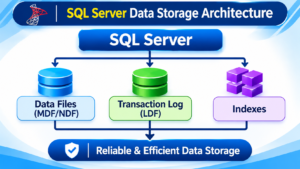
1. Data Files (MDF and NDF)
SQL Server uses database data files to store database objects and data pages.
- MDF: Primary data file.
- NDF: Secondary data file, when configured.
2. Transaction Log File (LDF)
SQL Server maintains transaction log records to support transaction recovery and database consistency.
3. Data Pages and Extents
SQL Server organizes data into pages, typically 8 KB in size. Eight contiguous pages form an extent.
4. Buffer Pool
SQL Server uses memory to cache database pages and reduce unnecessary disk reads.
5. Indexes
Indexes help SQL Server locate information efficiently without scanning every row in a table for many queries.
6. Transactions
Transactions help group related database operations into a logical unit of work.
These components work together to support reliable database storage and retrieval.
Smart Database Practices Every SQL Beginner Should Follow
Writing SQL queries is important, but maintaining a reliable database requires good practices.
Consider the following recommendations:
- Always select appropriate data types.
- Define primary keys for important tables.
- Use foreign keys to maintain relationships between tables.
- Apply constraints to prevent invalid information.
- Avoid unnecessary duplicate records.
- Use indexes based on query requirements.
- Use transactions for critical data modifications.
- Take regular database backups.
- Implement appropriate database permissions.
- Test queries before executing them in production environments.
These practices help maintain database integrity, security, and performance.
Where SQL Data Storage Powers Real-World Applications
SQL data storage is not limited to learning environments. It is widely used across industries.
Here are some practical examples.
Banking and Financial Services
Banks use databases to maintain customer accounts, transaction histories, deposits, withdrawals, and payment information.
E-Commerce Platforms
Online shopping applications store product information, customer details, orders, payments, and inventory records.
Healthcare Applications
Hospitals maintain patient information, appointment schedules, medical records, and billing details.
Education Management Systems
Educational institutions store student details, course information, attendance, examination results, and fee records.
Enterprise Business Applications
Organizations use SQL databases to manage employees, payroll, operations, financial information, and business transactions.
Understanding SQL data storage provides a strong foundation for working with these applications.
Frequently Asked Questions About Storing Data Using SQL
1. What is SQL data storage?
SQL data storage refers to storing structured information inside relational database tables using SQL commands.
2. Which SQL command is used to store data?
The INSERT INTO statement is used to insert new records into an existing SQL table.
3. Can we store multiple records using one SQL query?
Yes. SQL Server supports inserting multiple rows using a single INSERT INTO statement with multiple VALUES clauses.
4. What is the difference between INSERT and UPDATE?
INSERT adds new records to a table, whereas UPDATE modifies existing records.
5. Can SQL store images and files?
Yes. SQL Server supports binary data types such as VARBINARY(MAX), which can store binary content. However, file storage architecture should be selected based on application requirements.
6. What is the difference between SQL and SQL Server?
SQL is a language used to manage relational databases. SQL Server is Microsoft’s relational database management system that uses Transact-SQL (T-SQL).
7. Is SQL important for Data Engineers and Data Analysts?
Absolutely. SQL is an essential skill for querying, transforming, managing, and analyzing data across modern data platforms.
Conclusion: Turn SQL Fundamentals into Practical Database Skills
Learning how to store data using SQL is one of the first steps toward becoming a skilled SQL Developer, Database Administrator, Data Analyst, or Data Engineer.
From creating databases and designing tables to inserting, retrieving, updating, and deleting records, SQL provides the essential commands required to manage structured information.
However, professional SQL knowledge goes beyond basic commands.
You should also develop practical skills in:
- Advanced T-SQL Programming
- SQL Joins and Subqueries
- Common Table Expressions (CTEs)
- Window Functions
- Stored Procedures and Functions
- Database Design and Normalization
- Indexing and Performance Tuning
- Transactions and Query Optimization
The best way to master these concepts is through hands-on practice, real-time assignments, and industry-based projects.
Explore Our Training Programs:
SQL | SQL DBA | Azure Data Engineering | Power BI | Microsoft Fabric
Whether you are a fresher, experienced professional, or planning a career transition, start your learning journey with practical training.
Start Learning SQL Today!
Contact: +91 9666440801 | +91 9951440801
Website: https://sqlschool.com/
Learn SQL. Practice Real-Time Projects. Build Your IT Career!
#SQL #SQLServer #SQLTutorial #LearnSQL #DatabaseManagement #SQLForBeginners #TSQL #SQLDeveloper #SQLTraining #SQLSchool
