
Businesses will have to choose between Power BI and Microsoft Fabric in 2026.
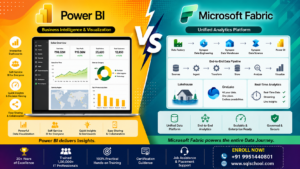
Whether you’re dealing with data or not, you’ve likely faced the Power BI vs Microsoft Fabric dilemma at least once this year. Microsoft has been aggressively marketing Fabric as its all-in-one data platform, and this has left many analysts, students and business owners wondering if it is replacing Power BI, or if they’re meant for Microsoft to use together. But the short answer is, they’re not really competitors in the traditional sense — it’s all about understanding how they work together and how it fits into your organization’s needs to select the right skill set or platform for you. In this blog we’ll explain the functions of each, where they overlap and how to choose between them.
What is Power BI?
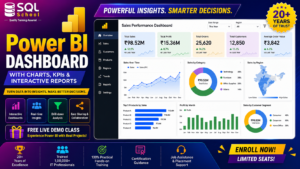
Power BI is Microsoft’s Business Intelligence and Data Visualization tool. It allows you to connect to virtually any data source such as Excel, SQL Server, Azure, Google Analytics, and hundreds of other sources, then create interactive dashboards, reports, and KPI scorecards. There are three components of Power BI: Power BI Desktop (for creating reports), the Power BI Service (to publish and share reports online), and the Power BI Mobile. It is widely adopted by business analysts, data analysts, and decision makers who are trying to communicate a story from raw data, in a timely fashion. In the Power BI vs Microsoft Fabric debate, there are multiple layers: Power BI is the visualization & reporting layer (the part end-users use and interact with).
What is Microsoft Fabric?
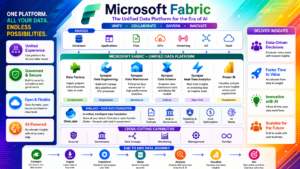
Microsoft Fabric is a much larger, end-to-end analytics platform that was introduced to integrate data engineering, data integration, data warehousing, real-time analytics and business intelligence into a single SaaS experience. Azure Fabric integrates together multiple tools—Azure Data Factory, Azure Synapse, and Power BI—into a single tool, all of which rely on a common storage space, called OneLake. So, when people ask about Power BI vs Microsoft Fabric, it is important to understand that Power BI is one of the workloads inside of Fabric and not a competing product. Fabric extends the reporting layer capabilities already provided by Power BI with data engineering (Spark notebooks), data warehousing, data factory pipelines, and real-time intelligence.
Power BI vs Microsoft Fabric: Key Differences
| Aspect | Power BI | Microsoft Fabric |
|---|---|---|
| Primary purpose | Data visualization & reporting | End-to-end data platform (engineering to BI) |
| Scope | Single BI workload | Multiple workloads: Data Factory, Synapse, Data Science, Real-Time Intelligence, Power BI |
| Storage | Dataset-based (Import/DirectQuery) | OneLake — unified lake storage (Delta/Parquet) |
| Best for | Dashboards, reports, self-service BI | Data pipelines, lakehouses, warehousing, and BI together |
| Licensing | Pro / Premium per user or capacity | Fabric capacity (F SKUs) covering all workloads |
This table gives a quick overview of the practical aspects of Power BI vs Microsoft Fabric: Power BI is a niche reporting product, while Fabric is a platform that contains the same reporting product as a component.
Advantages of Power BI
- Easier to learn, suitable for the newcomers and business users
- There is a big demand for jobs, community and tutorials in every field.
- The tool can be used independently of the Fabric stack
- Easy to implement for small teams who require dashboards and reporting
- This is seamlessly integrated with Excel and the common Microsoft 365 applications.
Advantages of Microsoft Fabric
- Removes data silos and brings engineering, warehousing, and BI together in OneLake.
- Minimizes need to provision different licenses and services (Synapse, Data Factory, Power BI)
- Real-time analytics & spark based data science are built in.
- Supports growth to match enterprise’s large and complex data estate
- Microsoft’s direction of data will be a skill that is going to be valuable in the long term.
Weighing these advantages is really at the heart of Power BI vs Microsoft Fabric decision-making. Smaller teams and individual analysts may prefer using Power BI as it is easy to learn and meets their reporting requirements. The larger organisations with multiple data engineering, warehousing and analytics functions under one governance are more likely to progress to the full Fabric platform.
Power BI vs Microsoft Fabric: What to learn or adopt?
For students and working professionals aiming to pursue a career in analytics, Power BI remains a logical first choice for now: it is in high demand, easy to learn, and will be a crucial building block before accessing Fabric. For those who are already working with Power BI and are looking to advance into data engineering or platform level positions, Fabric is the recommended next step, as it extends upon the Power BI concepts, introduces pipelines, lakehouses, and Spark notebooks. The answer to Power BI vs Microsoft Fabric for businesses may depend on the scale—Power BI is suitable for simple reporting, while Fabric is ideal for businesses that want a single platform to link their entire data lifecycle.
Frequently Asked Questions
Will Power BI be replaced by Microsoft Fabric?
No it’s not being replaced, it’s being extended with data engineering, warehousing, real-time capabilities around it; Power BI is part of the Microsoft Fabric as its workload for BI/reporting.
If I am already familiar with Power BI, do I need to learn Microsoft Fabric?
Not immediately. Independent of any other role, skills in Power BI are still relevant for reporting. When moving to a data engineering, lakehouse or platform-level analytics position Learning Fabric becomes relevant.
Is it possible to use Power BI without having to use Microsoft Fabric?
Yes. Power BI is a completely independent app that has its own licensing (Pro/Premium) model and does not require a Fabric capacity to create and publish reports.
Power BI vs. Microsoft Fabric: which is more costly?
Power BI is generally more affordable as it is on a per user or per smaller capacity basis. Microsoft Fabric is priced per capacity (F SKUs) meaning that the overall cost will be based on the amount of services that you use (data engineering, warehousing, real-time analytics).
Does MS Fabric apply to large enterprise?
Fabric is meant to be scalable, it’s not just for big organizations. But even larger teams that require pipelines, a lakehouse, and BI can also benefit — though in smaller teams that require only reports may be able to get by with Power BI alone.
Which should be the first platform to learn – Power BI or Microsoft Fabric?
Power BI is best for beginners. It is easier to learn, has a huge demand for jobs, and underpins the conceptual concepts that will be required before interacting with the wider Microsoft Fabric platform.
Conclusion
The winner here is not really a winner; Power BI and Microsoft Fabric are not competitors, they are each a key workload on the larger platform: Microsoft Fabric. Whether you require a focused reporting or an end-to-end analytics ecosystem depends on your requirements. In either case, laying a strong foundation in Power BI will make learning Microsoft Fabric much easier in the future.
Dive into learning Power BI and Microsoft Fabric skills for working on the job? Discover the practical training programs in SQL School, developed by industry professionals that will help you become certification- and career-ready.

