
What is TMDL? A Tabular Model Definition Language tutorial for Power BI.
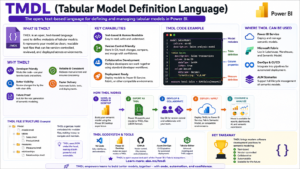
If you’re developing Power BI or Analysis Services solutions, you may have heard a new term in the recent update: TMDL. So, what is TMDL? Tabular Model Definition Language, or TMDL for short, is a human-readable, text-based format that Microsoft has recently added to the Power BI Desktop and Analysis Services to define and manage semantic models. It is replacing the now complex JSON-based TMSL Tabular Model Scripting Language with a cleaner syntax which is easier to read, write and version-control and is developer friendly.
Whether it is a more code-first and DevOps-focused Power BI approach to creating semantic models, or a shift toward an increasingly self-service data environment, knowing what is a TMDL is a must-know for data professionals. The TMDL is a simple, indented text file like a YAML file, rather than having to navigate through nested json files, you can view and edit your model as simple text files, making collaboration and source control much smoother.
What was the reason for the TMDL?
Prior to TMDL, Power BI semantic models were stored and edited in the TMSL (JSON) file format. Although the files are quite functional, JSON files were too big, too hard to read at first glance and too hard to compare between version changes in git. These very issues are what led to the creation of TMDL by Microsoft. When people ask about what’s a TMDL and why it matters, the unvarnished truth is that it was created to enable teams that practice modern BI development to create models faster, cleaner and Git-friendly.
- Saves space and clutter from the visual representation of a file, as opposed to JSON/TMSL
- Makes diffs (version comparisons) made with Git easier to read.
- Uses a folder-based structure with one file per table, measure or role
- Enables better teamwork amongst various developers in the same model.
Key features of TMDL.
With the simple definition out of the way, let’s explore how much TMDL can do in a real Power BI project. TMDL isn’t a mere cosmetic modification, it is actually a complete change in how a semantic model is saved on disk.
- Human readable syntax: Indentation based structure like YAML, but without using a lot of curly braces and brackets
- Object-per-file structure: Every table, measure or relationship is a file
- Works well with source control tools for change tracking when using Native Git integration.
- TMDL View in Power BI Desktop: A built-in editor pane to view and edit model metadata directly
- Power BI, Microsoft Fabric (semantic models), and Azure Analysis Services compatibility: Supported on both Power BI and Microsoft Fabric (semantic models) and Azure Analysis Services.
The TMDL (Text to Data) data type in Power BI Desktop
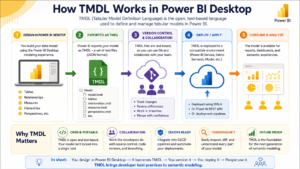
In a nutshell, a TMDL is a file, accessible in the Model view ribbon of Power BI Desktop, that lists the criteria required to achieve water quality goals. This presents your entire semantic model (tables, columns, measures, relationships and roles) as plain text in a side by side editor. Changes to DAX measures, renaming an object’s name, or formatting properties are reflected in your model instantly in this view.
Developers can then export a model within a TMDL folder structure such as the “Save As” TMDL option in the Power BI Desktop or via other tools like Tabular Editor. This exported folder can then be pushed to a Git repository, allowing proper version control (which was cumbersome to do with the old JSON-based approach).
TMDL vs Traditional TMSL/JSON Format
A common question after learning what is TMDL is how it actually compares to the older format. Here’s a quick breakdown:
- Readability: TMDL uses clean indentation; TMSL uses nested JSON brackets
- File structure: TMDL splits objects into separate files; TMSL is usually one large file
- Version control: TMDL produces cleaner, smaller Git diffs; TMSL diffs are noisy and hard to review
- Editing experience: TMDL is easier for manual editing; TMSL is more machine-oriented
Benefits of Learning TMDL for BI Professionals
For anyone building a career in Power BI, Data Engineering, or Business Intelligence, knowing what is TMDL and how to use it is quickly becoming a practical skill rather than an optional one. As enterprises move toward CI/CD pipelines for Power BI deployments, TMDL plays a central role in enabling automated testing, deployment, and collaborative development of semantic models.
- Enables proper DevOps practices for Power BI semantic models
- Makes team collaboration on large models far more manageable
- Improves troubleshooting since changes are easy to trace
- Prepares professionals for Microsoft Fabric’s modern development workflow
Who Should Learn TMDL?
If you’re a Power BI Developer, Data Engineer, or Analytics Engineer working with enterprise-scale semantic models, learning TMDL alongside DAX, Power Query, and data modeling fundamentals will give you a real edge. It’s also valuable for anyone managing Power BI deployments through Azure DevOps or GitHub, where clean version control matters.
Conclusion
To summarize what is TMDL: it’s Microsoft’s modern, text-based language for defining Power BI and Analysis Services semantic models — designed to replace clunky JSON files with a readable, Git-friendly format. As Power BI development moves closer to standard software engineering practices, TMDL is set to become a core skill for every serious BI developer and data engineer.

