
Oracle DBA Training: Learn Oracle Database Administration from Basics to Advanced
In today’s data-driven world, organizations depend on reliable databases to manage customer information, financial transactions, business applications, and enterprise operations. Oracle Database is a widely used database management system designed to store, organize, and process business-critical information.
To maintain these databases, companies need skilled professionals who can manage database security, monitor performance, perform backups, and troubleshoot technical issues. These responsibilities are handled by Oracle Database Administrators (DBAs).
Learning Oracle DBA concepts can help beginners, SQL developers, and IT professionals build practical database administration skills and explore career opportunities in enterprise database management.
What Does an Oracle Database Administrator Actually Do?
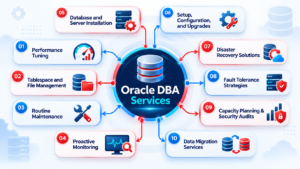
An Oracle Database Administrator is responsible for maintaining the availability, security, performance, and reliability of Oracle databases.
Oracle DBAs work with database instances, storage structures, user accounts, backup systems, and performance monitoring tools. They also collaborate with developers and infrastructure teams to ensure that applications can access data efficiently.
Typical Oracle DBA responsibilities include:
- Installing and configuring Oracle Database.
- Creating and managing database users and privileges.
- Monitoring database health and resource utilization.
- Performing database backup and recovery operations.
- Managing tablespaces and datafiles.
- Troubleshooting database errors and connectivity issues.
- Analyzing slow queries and improving database performance.
Oracle DBAs help organizations maintain stable database environments and protect important business information.
Understanding the Core Architecture Behind Oracle Database
Understanding Oracle Database architecture is one of the first steps in learning database administration.
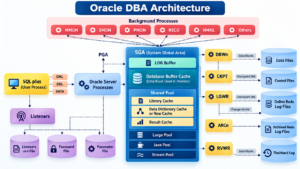
Oracle Database architecture includes an instance and the database files associated with it. The instance consists of memory structures and background processes that help manage database operations.
Important components include:
- System Global Area (SGA): Shared memory used for database operations, caching, and internal processing.
- Program Global Area (PGA): Memory associated with individual server or background processes.
- Background Processes: Processes that perform tasks such as writing modified blocks, recording changes, and recovering database operations.
- Datafiles: Files that store database data.
- Control Files: Files containing important structural information about the database.
- Online Redo Log Files: Files that record changes needed to support recovery.
A clear understanding of these components helps DBAs investigate database startup problems, storage issues, and recovery scenarios.
Oracle DBA Installation and Configuration: Building Your First Database Environment
Oracle DBA learning becomes more effective when theoretical concepts are combined with practical exercises.
The installation and configuration stage introduces learners to database software, system requirements, database creation, and connectivity.
Typical learning activities include:
- Understanding Oracle Database installation requirements.
- Installing a suitable Oracle Database version in a supported environment.
- Creating or configuring a database.
- Connecting through SQL*Plus or Oracle SQL Developer.
- Exploring database users, schemas, and objects.
- Practicing database startup and shutdown operations.
Installation procedures vary depending on the Oracle Database version and operating system. Always follow the relevant official installation documentation.
Mastering SQL and PL/SQL for Oracle Database Administration
SQL is essential for interacting with Oracle Database. DBAs use SQL to inspect database objects, retrieve information, examine configuration details, and investigate application queries.
Important SQL topics include:
- SELECT statements and filtering conditions.
- Joins, subqueries, and common table expressions.
- Aggregate functions and grouping.
- Views, indexes, and constraints.
- Data definition and data manipulation statements.
- Transaction management.
PL/SQL extends SQL with procedural programming features. Learning procedures, functions, packages, cursors, and exception handling can help DBAs understand database-side programs and troubleshoot stored code.
Strong SQL knowledge is particularly valuable when investigating application errors and database performance problems.
Oracle RMAN Backup and Recovery: Protecting Business-Critical Data
Database failures can occur because of hardware problems, storage failures, accidental changes, or operational mistakes. A well-planned backup and recovery strategy helps organizations reduce data loss and restore database services.
Oracle Recovery Manager (RMAN) is a utility designed to manage Oracle Database backup and recovery operations.
Oracle DBAs should understand:
- Full and incremental backups.
- Backup scheduling and monitoring.
- Database restore operations.
- Recovery procedures and recovery objectives.
- Archived redo logs and their role in recovery.
- Backup validation and recovery testing.
Practical exercises should include taking backups, checking backup status, and performing recovery tests in a controlled training environment.
A successful backup is important, but the ability to restore and recover data correctly is equally essential.
Oracle Database Performance Tuning: Finding and Fixing Bottlenecks
Database performance problems can affect application response times, reporting, and business operations. Oracle DBAs investigate these issues by analyzing queries, execution plans, resource usage, and database activity.
Key performance tuning concepts include:
- Reading SQL execution plans.
- Understanding indexes and their appropriate use.
- Identifying inefficient SQL statements.
- Monitoring CPU, memory, and disk activity.
- Investigating locking and contention.
- Reviewing database performance statistics.
- Evaluating query behavior before and after changes.
Performance tuning requires systematic investigation rather than making random configuration changes. DBAs should measure the impact of each change and verify that performance improves without affecting data correctness.
Managing Oracle Database Security, Users, and Storage
Security and storage management are ongoing responsibilities in an Oracle DBA role.
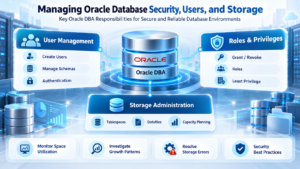
Database administrators create users, assign privileges, manage roles, and review access to database objects. Following the principle of least privilege helps ensure that users receive only the permissions necessary for their responsibilities.
Storage administration involves managing tablespaces, datafiles, and available capacity. DBAs monitor space utilization, investigate growth patterns, and plan for future requirements.
Important areas to practice include:
- Creating and managing database users.
- Granting and revoking privileges.
- Understanding roles and schemas.
- Monitoring tablespace utilization.
- Investigating storage-related errors.
- Applying security and access-management best practices.
These skills help maintain secure and reliable database environments.
Essential Oracle DBA Tools for Daily Database Operations
Oracle DBAs use several tools to perform administrative and troubleshooting tasks.
SQL*Plus: A command-line interface for executing SQL, PL/SQL, and administrative commands.
Oracle SQL Developer: A graphical tool for connecting to Oracle Database, browsing objects, and developing SQL and PL/SQL code.
Oracle Enterprise Manager: Provides database monitoring and management capabilities, depending on the product and configuration.
Oracle Recovery Manager (RMAN): Supports backup, restore, and recovery operations.
Linux Command-Line Tools: Help administrators inspect processes, files, logs, permissions, and operating system resources.
Understanding when to use each tool is an important part of practical Oracle DBA training.
Oracle DBA Career Opportunities
Oracle Database Administration offers several career paths for professionals interested in database technologies and enterprise systems.
Common job roles include:
- Junior Oracle DBA
- Oracle Database Administrator
- Senior Oracle DBA
- Oracle Database Performance Tuning Specialist
- Oracle Backup and Recovery Specialist
- Oracle Database Consultant
- Database Operations Engineer
- Cloud Database Administrator
Career progression depends on practical skills, experience, technical expertise, and the requirements of individual employers.
Real-World Oracle DBA Scenarios Every Learner Should Practice
Hands-on exercises help learners connect database concepts with the issues administrators encounter in production environments.
Consider these practice scenarios:
Scenario 1: Database Connection Failure
An application cannot connect to Oracle Database. Investigate network connectivity, connection configuration, listener status, database availability, and relevant error messages.
Scenario 2: Tablespace Running Out of Space
A tablespace is approaching its capacity. Examine space usage, identify growth patterns, and evaluate suitable storage-management actions.
Scenario 3: Slow SQL Query
A report takes too long to complete. Review its execution plan, examine filtering and join conditions, and investigate whether indexing or query changes could improve performance.
Scenario 4: Database Recovery Requirement
A database encounters a failure. Review available backups, recovery requirements, and the appropriate RMAN recovery procedure in a controlled environment.
Scenario 5: Unauthorized Database Access
A user attempts to access an object without the required permissions. Investigate the user’s privileges and roles, then apply the appropriate access controls.
Practicing these scenarios builds troubleshooting skills and prepares learners to explain technical decisions during interviews.
Frequently Asked Questions About Oracle DBA
1. What is Oracle DBA training?
Oracle DBA training teaches learners how to administer Oracle databases, manage users and storage, perform backups, troubleshoot issues, and monitor database performance.
2. Can a beginner learn Oracle DBA?
Yes. Beginners can start with SQL fundamentals and gradually learn Oracle architecture, database administration, backup and recovery, and performance tuning.
3. Is SQL required for Oracle DBA?
Yes. SQL is essential for querying data, examining database objects, analyzing application queries, and performing many database administration tasks.
4. What is RMAN in Oracle DBA?
RMAN stands for Recovery Manager. It is an Oracle utility used to manage database backups and perform restore and recovery operations.
5. What is the difference between an Oracle DBA and an Oracle Developer?
An Oracle DBA primarily manages database availability, security, storage, backups, recovery, and performance. An Oracle Developer primarily builds database applications, SQL queries, PL/SQL programs, and business logic. In some organizations, their responsibilities overlap.
6. What skills are important for an Oracle DBA interview?
Important topics include Oracle architecture, SQL, user and privilege management, tablespaces, RMAN, database startup and shutdown, performance tuning, and troubleshooting scenarios.
Conclusion
Oracle Database Administration is an important technical discipline focused on database availability, security, performance, backup, and recovery. Learning SQL, Oracle architecture, RMAN, performance tuning, and practical troubleshooting can help you build a strong foundation for an Oracle DBA career.
Whether you are a fresher, an IT professional, or someone looking to expand your database skills, a structured learning approach combined with hands-on practice can help you prepare for database administration responsibilities.
Oracle DBA Training: https://sqlschool.com/oracledba-training/
Oracle DBA Curriculum: https://sqlschool.com/wp-content/uploads/2025/12/Oracle-DBA.pdf
Start Your Database Learning Journey with SQL School
Looking to strengthen your database skills and prepare for a career in database technologies?
Explore training opportunities at SQL School Training Institute, Hyderabad, with practical learning, step-by-step guidance, and real-time project exposure across database and data engineering technologies.
Contact SQL School:
- +91 9666440801
- +91 9951440801
Visit: https://sqlschool.com/
#OracleDBA #OracleDBATraining #OracleDatabase #OracleDatabaseAdministration #DatabaseAdministrator #OracleDBACourse #DatabaseManagement #OracleRMAN #BackupAndRecovery #PerformanceTuning #SQLTraining #PLSQL #DatabaseSecurity #DatabaseArchitecture #DatabaseCareer #ITCareer #DBATraining #RealTimeProjects #SQLSchool #HyderabadTraining

