
How to fix SQL error 3013: BACKUP DATABASE is Terminating Abnormally.
If you work with SQL Server databases, you’ve encountered the “cryptic message” backup job failure that happens in the middle of the process. SQL Error 3013 is one of the most frequently encountered backup and restore failures that a DBA will encounter and typically appears as “BACKUP DATABASE is terminating abnormally” or “RESTORE DATABASE is terminating abnormally. This guide explains the causes of SQL Error 3013, how to resolve it step-by-step, and the importance of having a good backup strategy that is probably more critical than most teams realize.
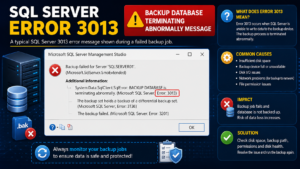
What is SQL Error 3013?
SQL Error 3013 occurs in SQL Server when it is unable to read or write a filemark on the backup device, and a backup or restore operation is unable to complete. As simple as that, when the engine can’t remember that one backup set has ended and the next started on the media, it aborts the job, rather than trying to write an unusable file. It is generally accompanied by a secondary message (such as the backup data at the end of the device is incorrectly formatted) that indicates that there is a problem with the backup set on disk or tape.
Common Causes of SQL Error 3013
Understanding SQL Error 3013 triggers helps in fixing the error. The most common are:
- When the backup is written, there is not enough free space on the destination drive.
- An existing .bak file or back-up device is corrupted.
- When writing to a remote share, loss of network connection during the backup.
- Denied or missing NTFS permissions on the backup folder or file.
- Attempting to back up data and log files on the same device at the same time (typical on older SQL Server 2005 instances):
- A physical disk failure, SAN volume failure, or tape failure.
- A database that fails to be backed up because it is already in Suspect mode.
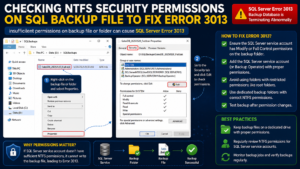
If you have SQL Error 3013, you can use the following step by step methods to solve it.
Method 1: Check File and Folder properties.
Right click the backup folder, or .bak file, and view the properties on the Security tab. Ensure that the SQL Server service account is not denied anything as Authenticated Users. One of the quickest ways to cause SQL Error 3013 to a new attempt to backup is to have it denied write permission
Method 2: you need to delete the Old Backup Device and try again.
If the existing backup set is damaged, delete the backup set and regenerate a new backup set from scratch:
BACKUP DATABASE YourDatabase
TO DISK = ‘D:\Backups\YourDatabase_New.bak’
WITH FORMAT, INIT;
The WITH FORMAT clause will suppress any previous media header that was written, eliminating inconsistencies that cause the error.
Method 3: Check Available Disk Space
Make sure the destination drive has the capacity to accommodate the entire backup file. One of the most common causes of SQL Error 3013 is a write failure in the middle of a backup, particularly on large databases with a large transaction logs.
Method 4: RESTORE HEADERONLY and RESTORE VERIFYONLY.
If failure on the restore side, examine the set to be backed up prior to restore:
RESTORE HEADERONLY FROM DISK = ‘D:\Backups\YourDatabase.bak’;
The line RESTORE VERIFYONLY FROM DISK = ‘D:\Backups\YourDatabase.bak’; will take the backup file from a folder named D:\Backups\YourDatabase.bak.
This will indicate if the backup set is complete or if you must resort to a prior full backup.
Method 5: Test Network and Storage Reliability
If backups are written to a network share or SAN, eliminate dropouts and disk failures. Temporarily moving the backup destination to reliable local storage will help confirm that if SQL Error 3013 is indeed the problem, it is due to the media.
Method 6: Restore From the Last Known Good Full Backup
If none of this works and the backup file cannot be recovered, restore from the last known good full backup and go forward with differential and log backups. That is why a tried-and-tested back-up rotation is more important than any one solution!
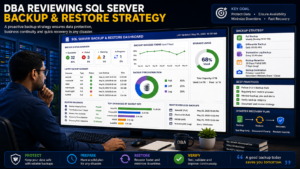
Why Fixing SQL Error 3013 Matters
Backup failures can be more than just a nuisance; they can be a business continuity risk. For every hour that a database is not backed up, there is one hour it is vulnerable to permanent data loss due to hardware failure, ransomware attacks or accidental deletion. Fast and understanding resolution of SQL Error 3013 ensures you maintain your recovery point objective (RPO) and compliance and audit requirements. If your production system stores financial or healthcare information or customer information, an undetected backup error can become a major business threat in just days.
Advantages of a Proactive Backup Strategy
There are real benefits to teams that are proactive rather than reactive to errors, such as SQL Error 3013:Teams that can prevent errors like SQL Error 3013 rather than deal with them see real benefits:
- Swifter recovery periods – backed-up information reduces the uncertainty during an outage time.
- Minimized risk of data loss — filemark or permission problems caught early result in no data loss
- Improved compliance posture – auditors will want documented and tested restore procedures
- Lower downtime costs — a working backup is a disaster is a restore.
- Improved DBA skill set — learn how to troubleshoot backup issues and develop essential talents that are sought after in DBA positions
Backup and recovery is one of the most tested jobs done by a DBA and mastering SQL Error 3013 is an essential component to any good SQL Server DBA training
Frequently Asked Questions
What does BACKUP DATABASE is terminating abnormally mean?
It indicates that SQL Server failed to write or read a filemark on the backup device and it terminated the operation to prevent a corrupt backup file.
Is it possible for SQL Error 3013 to cause permanent data loss?
Depending on the error, it won’t delete data, but if it blocks the ability to successfully complete a backup and there is no previous valid backup, you are left with no recovery point until you address the error.
Is the inability to write the file because of low disk space the cause of this error?
Yes. Backup may fail if it runs out of disk space during the write, which can cause this exact error message to occur.
Does SQL Error 3013 have anything to do with the version?
Its underlying cause is similar from SQL Server version to SQL Server version, for instance, with SQL Server 2005, it was sometimes caused by the backup of data and log files at the same time; however, the approach to fix this issue is similar across versions.
Is it always necessary to use WITH FORMAT to correct it?
Use WITH FORMAT when the backup media is corrupted, but you only want to back up the most current backup sets.
What can I do to stop this error occurring again?
Keep an eye on free disk space, perform RESTORE VERIFYONLY checks on a regular basis, don’t combine data and log backups on the same device for legacy servers, and ensure backup jobs are stored on well-permissioned and reliable storage on legacy servers.
Conclusion
You’ll be able to fix SQL Error 3013 once you know the underlying cause: permissions, disk space, media corruption or connectivity. Making it a habit to periodically check backups and to have a systematic backup/restore procedure makes this error a rare and relatively easy-to-resolve occurrence. Develop these skills with SQL School’s DBA training course if hands-on learning in SQL Server backup and recovery, disaster recovery planning and real production troubleshooting are more your style.

