
AWS Security Professional: Learn Cloud Protection, Threat Detection, IAM & Security Projects
Introduction: Protecting Business Data in the AWS Cloud
Cloud computing has transformed how organizations build, deploy, and manage applications. Businesses use Amazon Web Services (AWS) to store sensitive information, host applications, operate databases, and manage enterprise workloads. As cloud adoption increases, protecting these resources against unauthorized access, data exposure, and security threats becomes a critical responsibility.
AWS Security Professional Training helps learners develop practical knowledge of cloud security, identity and access management, network protection, encryption, threat detection, and security monitoring.
Through hands-on exercises and real-world scenarios, learners can understand how to secure AWS resources, investigate suspicious activity, and apply security best practices.
Whether you are a fresher starting your IT career or an experienced professional looking to advance into cloud security, this training can help you develop relevant technical skills.
Understanding the AWS Shared Responsibility Model
Before securing cloud resources, it is important to understand the AWS Shared Responsibility Model.
AWS manages the security of the cloud, including the underlying infrastructure. Customers are responsible for security in the cloud, depending on the services they use and how those services are configured.
For example, AWS protects the underlying infrastructure supporting its cloud services, while customers must configure appropriate access permissions, protect their data, and secure their applications and workloads.
Understanding this distinction helps cloud professionals determine which security controls they need to implement.
Essential AWS Security Services Every Professional Should Know
AWS provides specialized services to help organizations manage identities, protect data, detect threats, and monitor cloud infrastructure.
AWS Identity and Access Management (IAM)
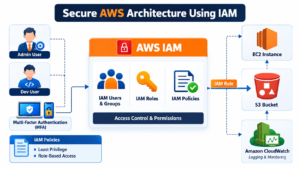
IAM helps control who can access AWS resources and which actions they can perform. Learners explore users, groups, roles, policies, multi-factor authentication, and least-privilege permissions.
Amazon GuardDuty for Intelligent Threat Detection
Amazon GuardDuty analyzes supported AWS data sources to identify potentially malicious activity and security risks. It helps security professionals investigate suspicious behavior and prioritize potential threats.
AWS CloudTrail for Activity Auditing
AWS CloudTrail records AWS account activity and API events. These records help teams investigate changes to resources, identify the identities involved in actions, and establish timelines during security investigations.
AWS Security Hub for Security Visibility
AWS Security Hub helps centralize security findings and evaluate security posture. It allows teams to review findings from supported security services and prioritize remediation activities.
AWS Key Management Service (KMS) for Encryption
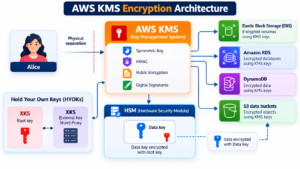
AWS KMS helps create and manage cryptographic keys used to protect data. Understanding encryption and key permissions is essential when designing secure cloud storage and applications.
AWS Config for Resource Configuration Monitoring
AWS Config records resource configurations and evaluates them against applicable rules. It helps identify configuration changes and potential compliance issues.
These services become more valuable when learners understand how to use them together in a practical security workflow.
Building Strong Identity and Access Controls with AWS IAM
Identity management is a fundamental part of AWS cloud security. Incorrect permissions can expose resources or allow users to perform actions beyond their responsibilities.
The IAM module focuses on:
- Creating and managing IAM users, groups, and roles.
- Writing and evaluating IAM policies.
- Applying least-privilege access principles.
- Configuring multi-factor authentication.
- Understanding resource-based and identity-based policies.
- Managing access between AWS services and accounts.
- Troubleshooting authorization failures.
Practical scenario: Create a policy that allows a developer to read files from an approved S3 bucket without granting unnecessary access to other AWS resources.
This exercise demonstrates how permission design can reduce the risk of unauthorized access.
Securing AWS Networks, Applications, and Cloud Infrastructure
Cloud security involves protecting network traffic, compute resources, and application endpoints from unauthorized access and common attacks.
Learners explore Amazon Virtual Private Cloud (VPC), subnets, route tables, security groups, network ACLs, and network connectivity.
Additional topics include:
- Secure Amazon EC2 configurations.
- Public and private subnet design.
- AWS Web Application Firewall (WAF).
- AWS Shield and DDoS protection concepts.
- Secure application configuration.
- Infrastructure hardening and patch management.
- Network access troubleshooting.
Practical scenario: Design a VPC containing a public-facing web server and a private application server. Configure security groups to permit only the necessary traffic between components.
This exercise introduces the principle of reducing unnecessary exposure in cloud environments.
Protecting Sensitive Information with AWS Encryption and Data Security
Organizations must protect sensitive business information throughout its lifecycle. AWS security training introduces the controls used to protect stored data, credentials, and application communications.
The data protection module covers:
- Encryption at rest and in transit.
- AWS Key Management Service (KMS).
- Amazon S3 bucket permissions.
- S3 Block Public Access.
- AWS Secrets Manager.
- Credential and secret management.
- Key access policies and rotation concepts.
- Backup and recovery considerations.
Practical scenario: Configure an S3 bucket with appropriate access permissions and encryption. Review the configuration to identify potential risks associated with public access or excessive permissions.
Learners can apply these concepts to develop more secure cloud storage configurations.
Investigating Security Alerts with AWS Monitoring Tools
Detecting suspicious activity is only one part of cloud security. Security professionals must also understand the evidence, determine the potential impact, and recommend appropriate remediation.
AWS monitoring and detection training introduces CloudTrail, GuardDuty, Security Hub, AWS Config, and Amazon Inspector.
Learners practise:
- Reviewing security findings.
- Investigating suspicious API activity.
- Identifying affected AWS resources.
- Reviewing relevant audit events.
- Understanding vulnerability findings.
- Assessing configuration risks.
- Documenting investigation results.
- Recommending corrective actions.
Practical scenario: Investigate a simulated security finding involving unusual API activity. Identify the associated identity, review relevant CloudTrail events, determine whether the activity appears authorized, and document the next steps.
AWS documentation provides further guidance on CloudTrail security best practices.
Hands-On AWS Security Projects for Real-World Experience
Practical projects help learners connect individual AWS services and understand how security controls work together.
Project 1: Design and Secure an AWS Cloud Environment
Create a sample cloud architecture using VPC, EC2, IAM, and S3. Configure access permissions, restrict network traffic, and review the security of the deployed resources.
Skills developed: IAM, network security, cloud architecture, and resource protection.
Project 2: Build a Cloud Security Monitoring Workflow
Use CloudTrail, GuardDuty, and Security Hub to understand activity records, review potential threats, and investigate security findings.
Skills developed: Threat detection, security monitoring, log analysis, and incident investigation.
Project 3: Implement Secure Cloud Data Storage
Configure storage permissions and encryption for an S3 bucket. Review access policies and identify settings that could expose sensitive information.
Skills developed: Data protection, encryption, access control, and cloud security auditing.
Recommended Learning Path for AWS Security Beginners
Learners can approach AWS security in a structured sequence:
- Cloud fundamentals: Understand AWS infrastructure, Regions, Availability Zones, and core services.
- Identity security: Learn IAM users, roles, policies, and authentication controls.
- Network protection: Study VPC, security groups, network ACLs, and secure architecture.
- Data protection: Practise encryption, KMS, S3 permissions, and secret management.
- Threat detection: Explore GuardDuty, CloudTrail, Security Hub, and AWS Config.
- Practical projects: Combine services to solve realistic cloud security scenarios.
- Interview preparation: Revise security concepts, troubleshooting approaches, and project explanations.
This progression helps learners build foundational knowledge before working on more complex security scenarios.
Career Opportunities After AWS Security Training
AWS security skills can support career development in cloud infrastructure, security operations, and cybersecurity, depending on a candidate’s previous experience and technical proficiency.
Relevant roles include:
- AWS Cloud Security Engineer
- Cloud Security Analyst
- AWS Cloud Engineer
- Cloud Security Administrator
- Cloud Infrastructure Engineer
- DevSecOps Engineer
- Security Operations Analyst
Employers may also expect networking knowledge, scripting skills, hands-on experience, and familiarity with security policies and incident response.
Training can support career preparation, but employment outcomes depend on individual skills, experience, and market requirements.
AWS Security Certification Preparation and Career Development
Learners interested in certification should identify the AWS certification pathway that matches their current experience and career goals.
Preparation can include reviewing official exam objectives, practising AWS configurations, completing hands-on labs, and studying security-related scenarios.
Visit the official AWS Certification website to review current certification options and exam requirements.
Completing a training course does not automatically provide an AWS certification; certification requires meeting the applicable exam requirements.
Why Choose SQL School for Practical AWS Security Learning?
SQL School Training Institute in Hyderabad focuses on practical, instructor-led technical training designed to help learners understand concepts through examples, exercises, and project-based learning.
Training features to highlight include:
- Step-by-step technical instruction.
- Hands-on practice and assignments.
- Real-world security scenarios.
- Practical project development.
- Resume guidance and interview preparation.
- Guidance on cloud-related career opportunities.
Trainer: Mr. Sai Phanindra, Founder & Trainer, with 19+ years of technical expertise.
Learners can contact SQL School to enquire about the AWS Security course syllabus, available batches, training format, and demo sessions.
Frequently Asked Questions About AWS Security Professional Training
Can freshers learn AWS Security Professional Training?
Yes. Freshers can begin with cloud fundamentals and networking concepts before learning IAM, encryption, monitoring, and threat detection.
Do I need programming knowledge to learn AWS security?
Advanced programming is not required for every security task. Basic command-line knowledge and scripting can be useful for automation and troubleshooting.
Which AWS services should I learn first?
Start with IAM, Amazon VPC, Amazon S3 security, and CloudTrail. Then progress to GuardDuty, Security Hub, KMS, AWS Config, and other services based on your learning goals.
Can system administrators move into cloud security?
Yes. System administrators can build on their existing operating system, access management, and troubleshooting knowledge by learning AWS infrastructure and security controls.
Does AWS Security Training guarantee a job?
No training program can guarantee employment. Practical skills, relevant experience, interview preparation, and individual performance all influence job opportunities.
Start Building Your AWS Cloud Security Skills Today
Cloud security requires more than knowing individual AWS services. Professionals must understand how identity permissions, network controls, encryption, monitoring, and threat detection work together to protect business workloads.
AWS Security Professional Training can help learners develop this knowledge through structured learning, practical exercises, and project-based experience.
Interested in learning AWS Security with SQL School?
Visit SQL School Training Institute to enquire about course details and available demo sessions.
Contact: +91 96664 40801 / +91 99514 40801
Build your cloud security knowledge, practise real-world scenarios, and prepare for the next step in your IT career.
#AWSSecurity #AWSSecurityTraining #AWSTraining #AWSCloudSecurity #CloudSecurity #CyberSecurity #AWSIAM #AmazonGuardDuty #AWSCloudTrail #AWSKMS #CloudComputing #CloudSecurityEngineer #AWSProjects #HandsOnTraining #RealTimeProjects #AWSCertification #ITTraining #CloudEngineer #SQLSchool #HyderabadTraining

