
Microsoft Fabric vs Azure Data Factory – Which Data Integration Platform to Choose in 2026?
If you are engaged in any of the data engineering activities, you have likely heard of both names in the same breath: Microsoft Fabric vs Azure Data Factory. This became one of the most popular and trending searches among data professionals in 2026 and it’s easy to see why: Microsoft has been aggressively marketing the ‘one platform to rule them all’ strategy for enterprises to adopt Microsoft Fabric as their data platform, and Azure Data Factory (ADF) has been the trusted work horse that thousands of businesses have relied on for ETL/ELT pipelines.
So which is the one that deserves your attention, your time, your learning time and your organisation’s budget? Whether you’re a data engineer, a student looking forward to your next certification, or an IT leader assessing tools for your team, in this guide, we’ll explore the Microsoft Fabric vs Azure Data Factory topic from every perspective: Architecture, pricing, performance, ease of use, and relevance to your career.
What Is Azure Data Factory?
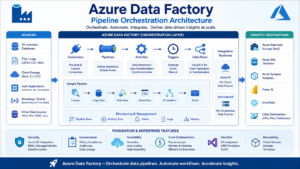
Azure Data Factory is a cloud-based data integration service that is designed to orchestrate and automate movement and transformation of data. It has been around for more than 3 years since 2015 and has evolved into one of the most popular ETL/ELT tools in the Azure ecosystem. Consider ADF as the plumbing and pipe-fitting services in your data estate, and it can connect to almost any type of data source, move data at scale, and initiate transformation jobs via Mapping Data Flows, Databricks notebooks, or stored procedures.
Key Features of Azure Data Factory
- More than 90 pre-installed database, SaaS app and file system connectors.
- Visual, drag and drop pipeline designer without coding
- Seamless integration with Azure Synapse Analytics, Databricks, and Azure SQL.
- Time-based scheduling, event-based scheduling (tumbling window)
- Visual, Spark-powered transformations with Mapping Data Flows.
- Support for enterprise DevOps workflows with Git integration and CI/CD.Integrate Git and support CI/CD for enterprise DevOps workflows.
If you are already using a traditional Azure data warehouse solution, such as Azure Synapse, SQL Server, or Azure Data Lake Storage (ADS), then ADF is still a solid option. It is battle-tested, mature and well documented in thousands of production environments.
So, what is Microsoft Fabric?
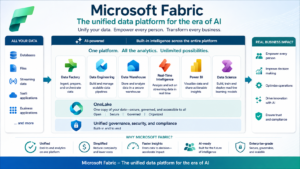
Microsoft Fabric is a new SaaS-based analytics platform that is quickly gaining ground since its launch in 2023, and integrates data integration, data engineering, data warehousing, real-time analytics, and business intelligence under one roof. Fabric gathers all of these elements together and bundles them together in a single location: A rebranded version of Data Factory is known as Data Factory in Fabric, as well as Synapse Data Engineering, Data Science, Real-Time Intelligence, and Power BI.
Key Components of Microsoft Fabric
- OneLake — a single, unified data lake for all of the organization
- Data Factory in Fabric — pipeline orchestration and dataflows, which is an evolution of ADF or Azure Data Factory.
- Spark-based notebooks and lakehouse tooling are the tools of the trade in Synapse Data Engineering.Tools of the trade in Synapse Data Engineering are notebooks and lakehouse tooling that use Spark.
- A fully managed, SQL-based warehouse, called Synapse Data Warehouse, is the only option.
- Power BI — Native, zero copy reporting on OneLake data.
- Real-time Intelligence — streaming analytics on event-driven data
This is the most important difference between Microsoft Fabric vs Azure Data Factory from a philosophical point of view, and it is the most important difference in how these features are used. ADF is an integration tool designed for a single purpose, whereas Fabric is an end-to-end analytics eco-system with data integration as one of many workloads.
Microsoft Fabric vs Azure Data Factory: Core Differences
| Aspect | Azure Data Factory | Microsoft Fabric |
|---|---|---|
| Scope | Dedicated data integration/ETL service | Full analytics suite (integration + warehouse + BI + real-time) |
| Storage | Relies on external Data Lake / Blob Storage | Built-in unified storage via OneLake |
| Compute Model | Pay-as-you-go, pipeline/activity-based | Capacity-based (Fabric Capacity Units, SKUs) |
| BI Integration | Requires separate Power BI setup | Native, zero-copy Power BI integration |
| Maturity | Established since 2015, very stable | Newer platform, evolving rapidly |
| Best Fit | Classic enterprise ETL/ELT workloads | Organizations wanting a unified lakehouse + BI platform |
Data Integration Capabilities
Both tools are built on the same pipeline engine as classic ADF, so if you are familiar with ADF, you will feel the same drag and drop experience when working with Data Factory in Fabric. In enterprise scenarios that require hybrid connectivity, self-hosted integration runtimes, and fine grained network configuration (private endpoint, managed VNets) in complex on-premises environments, however, ADF still outperforms Microsoft Fabric in terms of pure integration depth.
Fabric’s Data Factory, however, is designed for convenience and speed within the OneLake context — perfect for those scenarios where you want to push data into a lake, and then right into a Power BI report without a lot of hassle.
Pricing and Licensing
Cost is often the deciding factor in the Microsoft Fabric vs Azure Data Factory discussion. For ADF you only pay for what you consume: per pipeline orchestration run, per hour of Data Integration Unit, and per Data Flow execution. This provides a cost certainty, but demands careful monitoring at larger scale.
The model is completely flipped in Fabric with capacity-based SKUs (F2 – F2048). You buy a capacity tier and it has a pool of compute resources that are shared by all pipelines, notebooks, warehouses, and Power BI reports. For larger teams this might make it relatively easy to budget for larger teams, but for smaller teams that only need to run integration jobs in isolation, this may seem like a lot of money.
Quick Pricing Snapshot
- Use ADF for Tight integration workloads with less resources – pay when you orchestrate it.
- Relevant: For teams running several Fabric workloads at the same time, fixed capacity cost is the best option for Fabric.
Performance and Scalability
Both platforms are scalable to enterprise size data volumes, but in different ways. For precise control over throughput, ADF’s Integration Runtime can be scaled horizontally using self-hosted or Azure-hosted compute. Much of this is abstracted away by Fabric: with its capacity units automatically distributing resources among the running workloads, this is a lot of convenience — unless multiple teams are using the same capacity at peak times, in which case they will experience resource contention.
For real-world benchmarks, the speed of pipeline execution is similar, as it is using the same underlying engine. Whether your organization prefers to budget for capacity allocation or per-job billing, the real game-changers are in the capabilities of the two tools.Whether your organization prefers to budget for capacity allocation or per-job billing, the performance differentiators in the real world between Microsoft Fabric vs Azure Data Factory are really about capabilities.
How easy the item is to use and learn how to operate.
Fabric is a more gradual user experience for new users, from ingestion to reporting all within a single workspace, eliminating the need for context switching between Azure services. Although it is visual and low code, you have to separately provision and manage all the related services such as Data Lake Storage, Key Vault, and Synapse or Databricks for compute.
When it comes to skill selection, whether you’re a student or a working professional, it’s not always about the technical side and it’s all about the direction of your career.
When and When Not to Use Cases; When and How to use UML
Use Azure Data Factory when:
- An existing Azure Synapse/SQL Server environment.
- Your company wants complete job costing to be enforced.
- Granular control of hybrid, on-premises data connectivity is required.
Select Microsoft Fabric when:
- You’re building a new analytics platform from scratch
- You need high degree of data integration for BI reporting without data duplication.
- Your team requires data engineering, warehousing and real-time analytics all in one place.
Career/Skill Relevance
The choice between Microsoft Fabric vs Azure Data Factory may not be as straightforward of an either-or scenario as it sounds from a career perspective, however, because a majority of data engineering positions today require a working knowledge of both. While Microsoft has set its sights on Fabric, ADF skills are still in demand, and many enterprises continue to use it for mission-critical ETL pipelines. Learning ADF provides great knowledge about pipeline orchestration, and learning Fabric introduces lakehouse architecture, OneLake, and the unified analytics, skills that are more frequently appearing in data engineer and Azure architects job requirements.
Which One is the best to learn in 2026?
When starting from scratch, it makes sense to learn Azure Data Factory first to get a good foundation in pipeline orchestration, triggers and data flows, and then apply that knowledge to Microsoft Fabric to learn about lakehouse architecture and unified analytics. This evolution is what most businesses experience anyway; it’s a step by step journey, therefore it will take a few years before the professionals who can manage both sides of Microsoft Fabric vs Azure Data Factory become the most sought after.
Frequently Asked Questions
Is Azure Data Factory being replaced by Microsoft Fabric?
Not entirely. Standalone Azure Data Factory remains supported and widely adopted in current enterprise settings, while Microsoft Fabric provides its own Data Factory experience, leveraging a similar technology.
Which is more cost effective: Microsoft Fabric or Azure Data Factory?
Is dependent on use. The price model for ADF is pay-per-use, which is more cost effective when you need to integrate it occasionally or for lightweight workloads; the price model for Fabric is based on capacity, so it becomes more cost effective when you have multiple workloads (warehouse, BI, engineering) running together in the same team.
Is it possible to use Azure Data Factory pipelines within Microsoft Fabric?
Yes. Fabric’s Data Factory experience has similar concepts of pipelines, and Microsoft has offered guidance and tools to assist with the migration of existing ADF pipelines to Fabric.
Is the learning of both tools required?
Ideally, yes. The majority of companies are at a transition phase, and the ability to learn both the fundamentals of ADF and the uniform architecture of Fabric gives the data professional a lot more flexibility.
Can Microsoft Fabric be utilized by users outside of Microsoft Power BI?
No. Fabric connects deep with Power BI, but it is a complete analytics platform that includes data engineering, data science and warehousing, and real-time analytics — not just reporting.
Conclusion
Ultimately, Microsoft Fabric vs Azure Data Factory is not a race to the finish line, it’s a push to the finish line. Microsoft Fabric is the future of the unified, all-in-one analytics on Azure, while ADF is proven and reliable for classic ETL/ELT workloads. Those who are at ease with the transition between both will be the experts that will succeed in the coming years and years to come.
Looking to get hands-on experience with both platforms? Join SQL School’s Azure Data Engineering and Databricks courses in Hyderabad as well as available online, and learn Microsoft Fabric vs Azure Data Factory through real-world projects, industry experts and case studies. Give your data career a future with today’s enrollment.

