
What Are Window Functions in SQL Server? A Beginner-Friendly Guide with Examples
Have you ever faced a situation where you needed both detailed row-level data and summary information in the same query?

Understanding Window Functions In Ms Sql Server
Modern data analysis often requires calculations across a set of rows while still displaying individual row details. In Microsoft SQL Server, Window Functions provide a powerful way to perform such operations efficiently without using complex self-joins or sub queries.
What Are Window Functions?
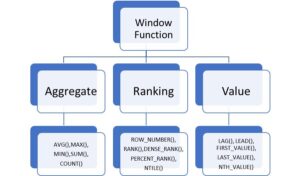
Window functions perform calculations across a group of rows related to the current row. Unlike aggregate functions that return a single result for a group, window functions preserve each row while providing additional analytical information.
These functions operate on a “window” of data defined by the OVER clause, allowing developers and database administrators to generate rankings, running totals, moving averages, and comparative analytics with ease.
Top Reasons for Using SQL Server
- centralized data storage
- fast data retrieval
- data security
Common Real-World Uses
- Banking and financial systems
- Healthcare applications
- Retail and e-commerce platforms
Why use window functions?
- Simplified query design
- Improved readability
- Better performance for analytical workloads
Advantages of Ms Sql Server Window Functions
1. Simplifies Complex Queries
2. Maintains Row-Level Details
Many SQL developers initially use GROUP BY to calculate totals, averages, and counts. While GROUP BY is useful, it has one major limitation:
It collapses multiple rows into a single aggregated result.
This is where Window Functions come to the rescue.
Window Functions allow us to perform calculations across a set of rows while preserving the individual row details.
In this article, we’ll explore:
- Why Window Functions are needed
- The limitations of GROUP BY
- SUM() OVER()
- ROW_NUMBER()
- RANK()
- DENSE_RANK()
All examples are demonstrated using Microsoft SQL Server (T-SQL).
Step 1: Create Sample Employee Table
CREATE TABLE Employees
(
EmpID INT,
EmpName VARCHAR(50),
Department VARCHAR(50),
Salary INT,
JoiningDate DATE
);
Insert sample data:
INSERT INTO Employees VALUES
(1, ‘Amit’, ‘IT’, 60000, ‘2021-01-10’),
(2, ‘Ravi’, ‘IT’, 75000, ‘2020-03-15’),
(3, ‘Sneha’, ‘IT’, 75000, ‘2022-06-20’),
(4, ‘Priya’, ‘HR’, 50000, ‘2021-07-01’),
(5, ‘Kiran’, ‘HR’, 65000, ‘2019-11-25’),
(6, ‘John’, ‘HR’, 50000, ‘2023-02-12’);
View the data:
SELECT * FROM Employees;
Step 2: The Limitation of GROUP BY
Suppose we want to find the total salary of each department.
SELECT Department,
SUM(Salary) AS TotalSalary
FROM Employees
GROUP BY Department;
Output
| Department | TotalSalary |
| HR | 165000 |
| IT | 210000 |
While this result is correct, we lose employee-level information.
We cannot see:
- Employee Name
- Individual Salary
- Joining Date
Only the aggregated values remain.
Step 3: Introducing Window Functions
Window Functions solve this problem.
SELECT
EmpName,
Department,
Salary,
SUM(Salary) OVER(PARTITION BY Department) AS DeptTotal
FROM Employees;
Output
| Employee | Department | Salary | DeptTotal |
| Amit | IT | 60000 | 210000 |
| Ravi | IT | 75000 | 210000 |
| Sneha | IT | 75000 | 210000 |
| Priya | HR | 50000 | 165000 |
| Kiran | HR | 65000 | 165000 |
| John | HR | 50000 | 165000 |
Notice how:
- Employee details remain visible.
- Department totals are available for every row.
- No data is lost.
This is the true power of Window Functions.
Understanding the OVER() Clause
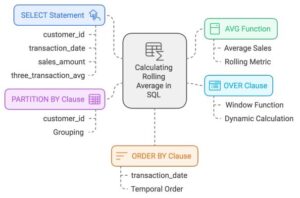
Every Window Function uses the OVER() clause.
Basic syntax:
FunctionName() OVER(
PARTITION BY ColumnName
ORDER BY ColumnName
)
PARTITION BY
Creates logical groups.
Example:
PARTITION BY Department
Creates separate windows for:
- IT Department
- HR Department
ORDER BY
Determines the sequence of rows within the window.
ROW_NUMBER()
The ROW_NUMBER() function assigns a unique sequential number to each row.
SELECT *,
ROW_NUMBER() OVER (ORDER BY Salary DESC) AS RowNumber
FROM Employees;
Output
| Employee | Salary | RowNumber |
| Ravi | 75000 | 1 |
| Sneha | 75000 | 2 |
| Kiran | 65000 | 3 |
| Amit | 60000 | 4 |
| Priya | 50000 | 5 |
| John | 50000 | 6 |
Common Uses
- Pagination
- Top N records
- Duplicate removal
Report sequencing
ROW_NUMBER() with PARTITION BY
Restart numbering for each department.
SELECT *,
ROW_NUMBER() OVER
(
PARTITION BY Department
ORDER BY Salary DESC
) AS DeptRowNo
FROM Employees;
Output
IT Department
| Employee | Salary | DeptRowNo |
| Ravi | 75000 | 1 |
| Sneha | 75000 | 2 |
| Amit | 60000 | 3 |
HR Department
| Employee | Salary | DeptRowNo |
| Kiran | 65000 | 1 |
| Priya | 50000 | 2 |
| John | 50000 | 3 |
RANK()
The RANK() function assigns ranks based on sorting order.
SELECT *,
RANK() OVER (ORDER BY Salary DESC) AS RankSeq
FROM Employees;
Output
| Employee | Salary | Rank |
| Ravi | 75000 | 1 |
| Sneha | 75000 | 1 |
| Kiran | 65000 | 3 |
| Amit | 60000 | 4 |
Notice that Rank 2 is skipped because two employees share Rank 1.
This behavior is known as ranking with gaps.
DENSE_RANK()
The DENSE_RANK() function is similar to RANK(), but it does not skip rank values.
SELECT *,
DENSE_RANK() OVER (ORDER BY Salary DESC) AS RankSeq
FROM Employees;
Output
| Employee | Salary | Dense Rank |
| Ravi | 75000 | 1 |
| Sneha | 75000 | 1 |
| Kiran | 65000 | 2 |
| Amit | 60000 | 3 |
No gaps exist in the ranking sequence.
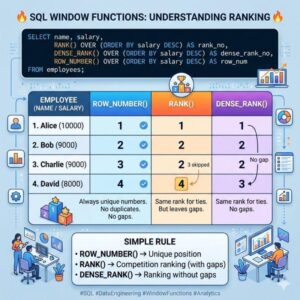
ROW_NUMBER vs RANK vs DENSE_RANK
| Salary | ROW_NUMBER | RANK | DENSE_RANK |
| 75000 | 1 | 1 | 1 |
| 75000 | 2 | 1 | 1 |
| 65000 | 3 | 3 | 2 |
| 60000 | 4 | 4 | 3 |
Remember
ROW_NUMBER()
- Always unique
- No duplicates
RANK()
- Same values get same rank
- Gaps appear
DENSE_RANK()
- Same values get same rank
- No gaps

Why Learn Window Functions?
Window Functions are widely used in:
- Financial reporting
- Payroll systems
- Banking applications
- Sales analytics
- HR dashboards
- Power BI backend queries
- Data Warehousing projects
Almost every SQL Server interview for intermediate and advanced positions includes Window Function questions
Final Thoughts
Window Functions are one of the most powerful features available in SQL Server.
They allow developers to:
- Keep detailed row-level data
- Perform aggregations
- Generate rankings
- Create advanced analytical reports
Without complex joins or subqueries.
If you’re serious about mastering SQL Server, learning Window Functions is essential.
why choose SQL school?
- Industry-Focused Curriculum
- Hands-On Practical Learning
- Expert Trainers
- Interview Preparation
- Affordable and High-Quality Education
Start Your SQL Journey with SQL School
- Whether you are looking to start a career in databases, improve your SQL skills, or prepare for your next job opportunity, SQL School provides the knowledge, practical experience, and professional guidance needed to succeed in the data-driven world
Watch the Complete YouTube LIVE Session
For more SQL Server tutorials, interview questions, and live training sessions:
🌐 www.sqlschool.com
📺 YouTube Channel: https://www.youtube.com/sequelschoolFull course details:- Expert SQL Server Training with Real – Time Projects
#SQLServer #SQLTraining #SQLServerTraining #TSQL #DatabaseTraining #SQLDeveloper #SQLDBA #MicrosoftSQLServer #SQLQueries #DatabaseDeveloper #SQLProgramming #DataAnalytics #BusinessIntelligence #DataEngineer #PowerBI #AzureSQL #QueryOptimization
Trainer: Mr. Sai Phanindra
With 20+ Years
LinkedIn Profile: www.linkedin.com/in/saiphanindra/

Contact No: +91 9030040801 or +91 9666640801

