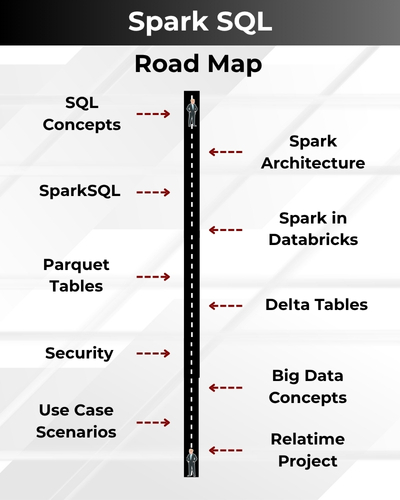
Spark SQL is a powerful component of Apache Spark that enables fast, distributed data processing using SQL queries. It combines big data scalability with the simplicity of SQL, making it ideal for analytics, ETL, and real-time data processing across massive datasets.
✅ SQL Server Architecture & Query Processing Internals
✅ Index Design, Maintenance & Optimization Techniques
✅ Execution Plans, Statistics & Query Cost Analysis
✅ Identifying & Resolving Performance Bottlenecks
✅ TempDB, Memory & CPU Optimization Strategies
✅ Locking, Blocking & Deadlock Troubleshooting
✅ Database Storage, I/O & File Management Best Practices
✅ Performance Monitoring using DMVs & Profiler
✅ End-to-End Real-Time MSSQL Project
✅ Exam Prep, Mock Interviews & 1:1 Mentorship
Microsoft SQL (TSQL) Training Course Contents:
Module 1: MSSQL & TSQL Queries
Ch 1: Database Intro & Job Roles
- Database Introduction
- Database Types: OLTP, DWH
- DBMS & Realtime Use
- DBMS Software & Purpose
- SQL : Purpose & Use
- SQL Server Versions, Editions
- Job Roles & Responsibilities
Ch 2: SQL Server Installations
- SQL Server 2022, 2019
- SSMS Tools Installation
- Database Engine (OLTP)
- SCM, Configuration Tools
- Instance Types, Uses
- Authentication Modes
- Collation, File Stream
Ch 3: SQL BASICS – 1
- Need for Databases, Tables
- Need for SQL Commands
- DDL, DML & DQL Statements
- Database Creation @ GUI
- Data Operations @ GUI
- Session ID, SQL Context
- DB, Tables, Data @ SQL
Ch 4: SQL BASICS – 2
- DDL Variants in MSSQL
- DML Variants in MSSQL
- INSERT & INSERT INTO
- SELECT & SELECT INTO
- Basic Operators in SQL
- Special Operators in MSSQL
- ALTER, ADD, TRUNCATE, DROP
Ch 5: Data Imports, Schemas
- Data Imports with Excel
- ORDER BY & UNION
- UNION ALL For Sorting Data
- Creating, Using Schemas
- Real-world Banking Database
- Table Migrations @ Schemas
- 2 Part, 3 Part & 4 Part Naming
Ch 6 : Constraints, Index Basics
- Need for Constraints, Keys
- NULL, NOT NULL, UNIQUE
- Primary Key & Foreign Key
- RDBMS and ER Models
- Identity Property, Default
- Clustered Index, Primary Key
- Non Clustered Index, Unique
Ch 7: Joins & Views Basics
- JOINS: Purpose. Inner Joins
- Left / Right / Full Outer Joins
- Cross Joins, Query Tuning
- Creating & Using Views
- DML, SELECT with Views
- RLS : WITH CHECK OPTION
- System Views & Metadata
Ch 8: Functions(UDF), Data Types
- Using Functions in MSSQL
- Scalar Value Functions
- Inline & Multiline Functions
- Date & Time Functions
- String, Aggregate Functions
- Data Types : Integer, Char, Bit
- SQL Variant, Timestamp, Date
Ch 9: Stored Procedures,Models
- Stored Procedures & Usage
- Creating, Testing Procedures
- Encryption, Deferred Names
- SPs for Validations, Analysis
- System SPs, Recompilation
- Normal Forms & Types
- Data Models, Self-References
Ch 10: Triggers, Temp Tables
- Need for Triggers
- DDL & DML Triggers
- Using Memory Tables
- Data Replication, Automation
- Local & Global Temp Tables
- Testing & Using Temp Tables
- SELECT .. INTO & Bulk Loads
Ch 11: DB Architecture, Locks
- Planning VLDBs : Files, Sizing
- Filegroups, Extents & Types
- Log Files : VLF, Mini LSN
- Table Location, Performance
- Schemas, Transfer, Synonyms
- Transactions Types, Lock Hint
- Query Blocking Scenarios
Ch 12 : Cursors & CTEs, Links
- Cursors : Realtime Use
- Fetch & Access Cursor Rows
- CTEs for SELECT, DML
- CTEs: Scenarios & Tuning
- Linked Servers, Remote Joins
- Linked Servers: MSDTC, RPC
- Tuning Remote Queries
Ch 13: Merge, Upsert & Rank
- Need for Merge in ETL
- Incremental Loads with SQL
- MERGE and RANK Functions
- Window Functions, Partition
- Identify, Remove Duplicates
Ch 14: Grouping & Cube
- Group By & HAVING
- Cube, Rollup & Grouping
- Joins with Group By
- 3 Table, 4 Table Joins
- Query Execution Order
Ch 15: Self Joins, Excel Analysis
- Self Joins & Self References
- UNION, UNION ALL
- Sub Queries with Joins
- IIF, CASE, EXISTS Statements
- Excel Analytics, Pivot Reports
Module 2: TSQL Programming
Ch 16: Adv. Stored Procedures 1
- Declaring, Using Variables
- Using Triggers with Views
- Updatable Views, DML
- Views & Stored Procedures
- Data Distributions in Tables
- Transactions with Procedures
- Conditional Commits in SPs
- Rollback Options in Realtime
Ch 17: Adv. Stored Procedures 2
- Table Valued Parameters
- Using TVP with Procedures
- Creating User Defined Types
- Big Data Copy & Transactions
- Using SPs & Table Variables
- Transactional Integrity
- Output Parameters in SP
- IN and OUT Options Usage
Ch 18: Adv. Stored Procedures 3
- Dynamic SQL Programs
- sp_executesql Extended SP
- Formatting Queries, Nvarchar
- Cursors Types: Local, Global
- Cursor Types: Static, Dynamic
- Forward Only, Scroll Types
- WHILE Loop: @@Fetch Status
- Variables with Dynamic SQL
Ch 19: Complex Functions (UDF)
- Inline, Table Line Functions
- Multi Line Table Functions
- Using LOOPs in Functions
- Variables & Return Values
- Table Generation Logic
- Date & Time Data Types
- Calendar Data Generations
Ch 20: Complex Functions – 2
- Reading JSON Data
- Using OPENROWSET ()
- Using nvarchar(max) values
- Using PIVOT () Function
- Data De-duplication in SQL
- Recursive CTEs, Anchors
- Recursive CTEs, Anchors
Ch 21 – 24: Banking Project
- Design & Planning Phase
- Querying Phase
- Programming Phase
- Debugging Phase
- Testing Phase
- Complete Project Solution
- Project FAQs, Resume Points
Module 3: Query Tuning
Ch 25: Performance Tuning Intro
- Performance Tuning: Reasons
- Factors Affecting Performance
- Processor Affinity and Memory
- Disk Configurations and Memory
- Server Dashboards & Monitoring
- Performance Tuning Techniques
Ch 26: Server Architecture
- Database Engine Components
- SQL OS Components
- Protocols and Query Processing
- MDAC and CLR Components
- Parsing and Compilation
- Memory Manager & IO Managers
Ch 27: Database Architecture
- Planning for Large Databases
- Primary & Secondary Data Files
- Filegroups, Spacing and Sizing
- Log File: Usage and Precautions
- Creating Tables with Filegroups
- Pages, Extents and VLF, MiniLSN
Ch 28: Query Audits
- Activity Monitor Tool
- Perfmon tool & counters
- Query Audits: DMVs, DMFs
- Plan Handle, Execution Time
- Auditing Long Running Queries
- Audit Frequent Running Queries
Ch 29: Query Store
- Buffer Cache: Limitations
- Query Store: Advantages
- Query Store: Configurations
- Operation Mode, Data Flush
- Query Mode, Capture Mode
- Stats Collection, Stale Queries
Ch 30: Indexes
- Indexes: Realtime Use
- Clustered Index: Sort, PadIndex
- Non-Clustered Index: Regular
- Included, Column Store Indexes
- Filtered, Online Indexes
- Covering Index, Selectivity
Ch 31: Indexed Views
- Views with Schemabinding
- Creating Views for Indexes
- Creating Indexes on Views
- Recursive Queries, Index Views
- Composite Indexes
- Indexes on Text Columns
Ch 32: Statistics
- Statistics: Realtime Use
- Automated Statistics
- Index Statistics
- Column Statistics
- Conditional Statistics
- Manual Update of Statistics
Ch 33: Partitions
- Partitions: Performance Tuning
- Partition Functions & Schemes
- Partition Un-partitioned Tables
- Compressions: ROW, PAGE
- Auditing Partitioned Structures
- Partitions Limitations with OLTP
Ch 34: Index Management
- Index Rebuilds, ReOrganize
- Database Maintenance Plans
- Page Count and Index Conditions
- Degree Of Parallelism Settings
- Resumable & Online Indexes
- PAUSE, RESUME in Rebuilds
Ch 35: Tuning Tools
- Tuning Tools: Workload Files, .trc
- Profiler Tuning Template, Events
- DTA, Profiler: Recommendations
- PDS: Physical Design Structures
- PDS Recommendations
- DTA with Query Execution Cache
Ch 36: Execution Plans
- Execution Plan Analysis
- IO Cost and CPU Cost
- SubTree & Operator Cost
- NUMA Nodes, Processor Affinity
- Thread Count, DOP
- Table & Index Scan, Index Seek
Ch 37, 38: Temporal & MOT Tables
- In-Memory Tables: Usage
- MOT Tables and Performance
- Memory Snapshots at Database
- File Stream Files in SQL Server
- Temporal Tables for DML Audits
- Temporal Tables for Data Audits
Ch 39: Lock Management
- LOCKS : Types & Isolation Levels
- S, X, IX,U, MD, Sch-M, Sch-S
- Lock Audits: SP_WHO2, SP_LOCK
- sysprocesses and Lock Waits
- Open Transaction, Blocking
- Deadlocks in Real-world
Ch 40: Isolation Levels
- Lock Hints and Isolation Levels
- Read Committed, Uncommitted
- Serializable, Repeatable Read
- Snapshot Isolation, Versioning
- Read Committed Snapshot
- Choosing Correct Isolation Level
Module 4: Azure SQL Dev
Ch 41: Cloud Basics, Azure Funda
- Cloud Fundamentals
- Cloud Concepts, Benefits
- IaaS, PaaS, SaaS Cloud Types
- Azure Cloud Concepts
- Azure Resources & Usage
- Azure Services & Purpose
- Azure Account & Subscription
Ch 42: Azure SQL Database
- Azure SQL Services
- Azure SQL Server Creation
- Azure SQL Databases
- Azure Firewall: Rules
- Test Connections from SSMS
- SSMS Tool: Test Connections
- ADS Tool: Installation, use
Ch 43: Azure SQL DB Migrations
- SQL DB Migration Options
- Data Migration Assistant: DMA
- DMA Tool, Migration Options
- On-Premises DB Export
- Azure SQL Database Import
- Azure Storage Account
- Linking SSMS with Azure
Ch 44: Azure SQL DB Licensing
- Azure SQL DB Licensing
- Per Database Licensing
- DTUs: Basic, Standard Types
- VPU and Plan Types
- DTU Versus VPU Licensing
- Elastic DTUs (eDTU) Usage
- Elastic Query Processing
Ch 45: Azure SQL DB Metrics
- Azure SQL DB Metrics
- CPU, Memory, Log Metrics
- Data File Metrics, Alerts
- Action Groups & Emails
- Query Performance Insight
- Automated Tuning Options
- Query Recommendations
Ch 46: Azure SQL DB Tuning, AI
- Automated Tuning Options
- Manual Tuning Options
- Server Level Tuning
- Database Level Tuning
- AI Search Service, Tuning
- AI Indexes and Practical Use
- Watermark Columns, Updates
Ch 47: Azure PaaS & Azure IaaS
- Azure PaaS: Operations
- Azure Paas: Limitations
- Azure IaaS: Advantages
- Azure IaaS Components
- Azure Virtual Machines
- Capacity & Networking
- Disk & Memory Config.
Ch 48: Azure IaaS Concepts
- Azure Virtual Machines
- SQL Server with Azure VM
- Access Azure VM from SSMS
- Migrations from PaaS
- Migrations from On-Premise
- Azure Data Studio, VMs
- Comparing SSMS & ADS Tool
Ch 49 – 50: Banking Project
- OLTP Databases in Azure
- Code Based Deployments
- Code Less Deployments
- Debugging Phases in Azure
- Testing Phases in Azure
- Complete Project Solution
- Project FAQs, Resume Points

SQL SCHOOL
24x7 LIVE Online Server (Lab) with Real-time Databases.
Course includes ONE Real-time Project.
#Top Technologies



Who is SQL School? How far you have been in the training services ?
SQL School is a registered training institute, established in February 2008 at Hyderabad, India. We offer Real-time trainings and projects including Job Support exclusively on Microsoft SQL Server, T-SQL, SQL Server DBA and MSBI (SSIS, SSAS, SSRS) Courses. All our training services are completely practical and real-time. CREDITS of SQL School Training Center
- We are Microsoft Partner. ID# 4338151
- ISO Certified Training Center
- Completely dedicated to Microsoft SQL Server
- All trainings delivered by our Certified Trainers only
- One of the few institutes consistently delivering the trainings for more than 20+ Years online as inhouse
- Real-time projects in
- Healthcare
- Banking
- Insurance
- Retail Sales
- Telecom
- ECommerce
I registered for the Demo but did not get any response?
Make sure you provide all the required information. Upon Approval, you should be receiving an email containing the information on how to join for the demo session. Approval process usually takes minutes to few hours. Please do monitor your spam emails also.
Why you need our Contact Number and Full Name for Demo/Training Registration?
This is to make sure we are connected to the authenticated / trusted attendees as we need to share our Bank Details / Other Payment Information once you are happy with our Training Procedure and demo session. Your contact information is maintained completely confidential as per our Privacy Policy. Payment Receipt(s) and Course Completion Certificate(s) would be furnished with the same details.
What is the Training Registration & Confirmation Process?
Upon submitting demo registration form and attending LIVE demo session, we need to receive your email confirmation on joining for the training. Only then, payment details would be sent and slot would be allocated subject to availability of seats. We have the required tools for ensuring interactivity and quality of our services.
Please Note: Slot Confirmation Subject to Availability Of Seats.
Will you provide the Software required for the Training and Practice?
Yes, during the free demo session itself.
How am I assured quality of the services?
We have been providing the Trainings – Online, Video and Classroom for the last 20+ years – effectively and efficiently for more than 100000 (1 lakh) students and professionals across USA, India, UK, Australia and other countries. We are dedicated to offer realtime and practical project oriented trainings exclusively on SQL Server and related technologies. We do provide 24×7 Lab and Assistance with Job Support – even after the course! To make sure you are gaining confidence on our trainings, participans are requested to attend for a free LIVE demo based on the schedules posted @ Register. Alternatively, participants may request for video demo by mailing us to contact@sqlschool.com Registration process to take place once you are happy with the demo session. Further, payments accepted in installments (via Paypal / Online Banking) to ensure trusted services from SQL School™
YES, We use Enterprise Edition Evaluation Editions (Full Version with complete feature support valid for SIX months) for our trainings. Software and Installation Guidance would be provided for T-SQL, SQL DBA and MSBI / DW courses.
Why Choose SQL School
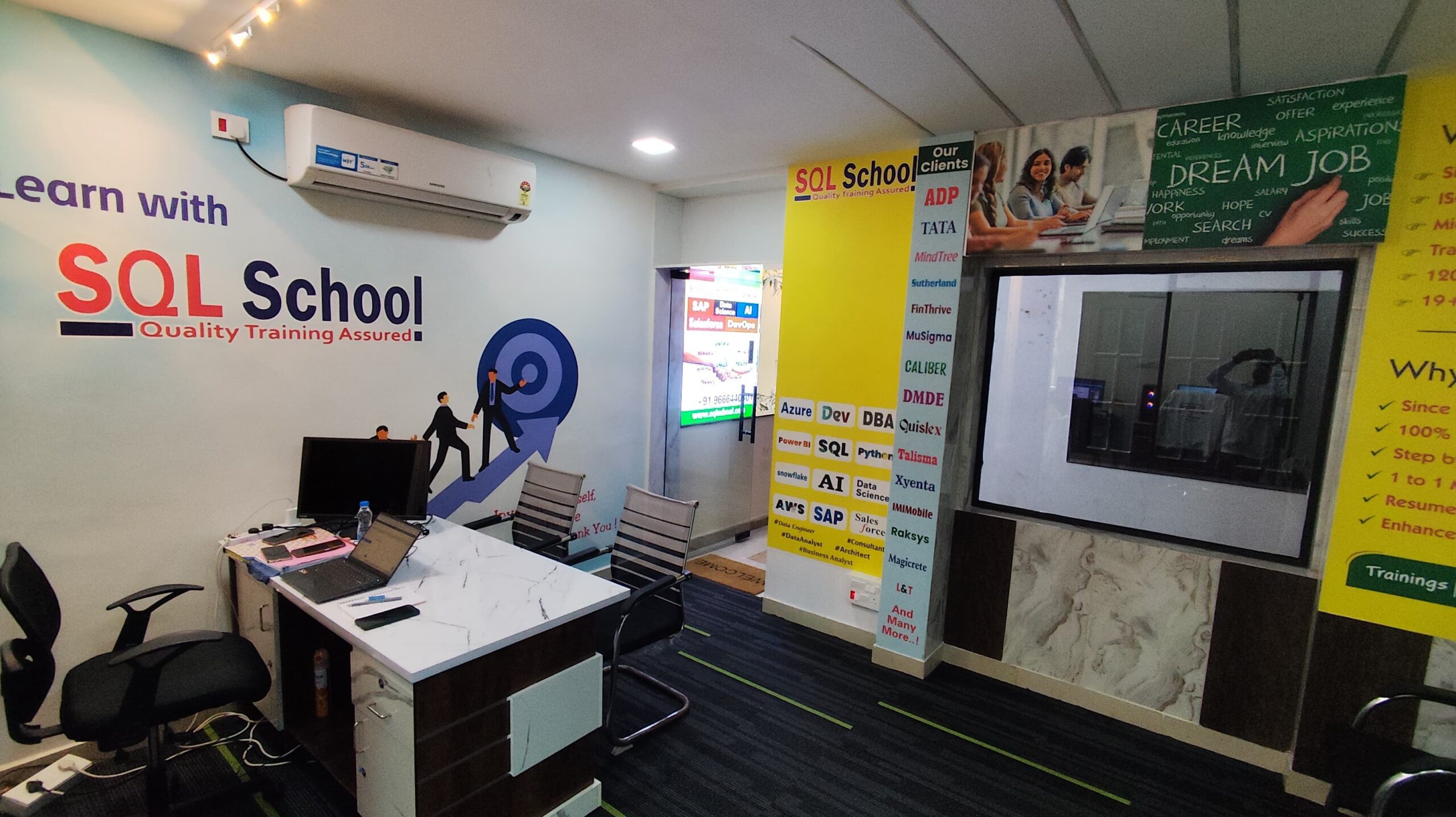
- 100% Real-Time and Practical
- ISO 9001:2008 Certified
- Weekly Mock Interviews
- 24/7 LIVE Server Access
- Realtime Project FAQs
- Course Completion Certificate
- Placement Assistance
- Job Support