
How to Move a Table to Another Filegroup in SQL Server: A Practical DBA Guide
Introduction: Organizing Database Storage Like a SQL Server DBA
As databases grow, managing storage becomes an important responsibility for SQL Server Database Administrators (DBAs). Large business applications generate thousands or millions of records, and organizing this data efficiently can simplify database maintenance, backup planning, and storage management.
Microsoft SQL Server provides a feature called filegroups that allows DBAs to organize database files and control where tables and indexes are stored.
In some situations, a table may need to be moved from one filegroup to another because of storage requirements, database architecture changes, or maintenance needs.
In this tutorial, you will learn how to move a table to another filegroup in SQL Server using practical T-SQL commands, a real-time business scenario, and verification queries.
Understanding SQL Server Filegroups and Their Role in Database Storage
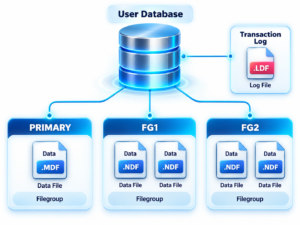
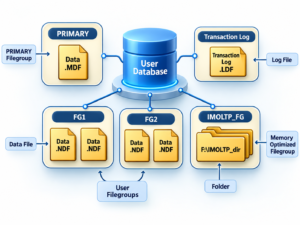
A filegroup is a logical container that groups one or more SQL Server data files. Database objects, including tables and indexes, can be assigned to a filegroup.
SQL Server supports several types of filegroup configurations:
- PRIMARY filegroup: The default filegroup created with the database.
- User-defined filegroups: Additional filegroups created to organize database objects.
- Read-only filegroups: Filegroups configured for data that does not require modification.
For example, a company might store employee information in one filegroup, historical sales data in another, and reporting-related indexes in a separate filegroup.
This approach helps database administrators plan storage according to application requirements.
Why Database Administrators Relocate Tables Between Filegroups
Moving a table to another filegroup can be useful when the existing database storage arrangement no longer meets operational requirements.
Common reasons include:
1. Better storage organization
Separate large or business-critical tables into dedicated filegroups.
2. Managing growing databases
Organize database objects as the amount of data increases.
3. Backup and recovery planning
Use filegroup-level backup and restore strategies where appropriate for the database recovery design.
4. Storage infrastructure planning
Place data files on suitable storage volumes according to capacity, performance, and availability requirements.
5. Database maintenance
Reorganize database storage during planned maintenance activities.
Moving a table does not automatically improve query performance. Actual performance depends on the storage hardware, workload, indexing, and database design.
Before You Begin: Identify the Current Filegroup
Before moving a table, identify its current storage location and determine whether it is a heap, a table with a clustered index, or a partitioned table.
Run the following query to list the filegroups in the current database:
SELECT
    name AS FilegroupName,
    is_default AS IsDefault,
    is_read_only AS IsReadOnly
FROM sys.filegroups;
To identify the storage location of a nonpartitioned table, use:
SELECT
    t.name AS TableName,
    i.name AS IndexName,
    i.type_desc AS IndexType,
    ds.name AS FilegroupName
FROM sys.tables AS t
INNER JOIN sys.indexes AS i
    ON t.object_id = i.object_id
INNER JOIN sys.data_spaces AS ds
    ON i.data_space_id = ds.data_space_id
WHERE t.name = 'EmployeeDetails'
  AND i.index_id IN (0, 1);
Here, index_id = 0 identifies a heap, while index_id = 1 identifies a clustered index.
For partitioned tables, additional checks are required because different partitions can reside on different filegroups.
Step-by-Step Guide: Moving a SQL Server Table to a New Filegroup
Consider a company database named CompanyDB. Its employee table is currently stored in the PRIMARY filegroup. The DBA wants to create a dedicated filegroup called FG_Employee and move the employee table there.
Step 1: Create a Dedicated Filegroup
Connect to the CompanyDB database and execute:
ALTER DATABASE CompanyDB
ADD FILEGROUP FG_Employee;
This creates a new filegroup named FG_Employee.
Step 2: Add a Physical Data File
A filegroup must contain at least one data file to store table data.
ALTER DATABASE CompanyDB
ADD FILE
(
    NAME = EmployeeDataFile,
    FILENAME = 'D:\SQLData\EmployeeData.ndf',
    SIZE = 100MB,
    FILEGROWTH = 50MB
)
TO FILEGROUP FG_Employee;
The directory must exist, and the SQL Server service account must have permission to access it. Change the file path to match your environment.
Step 3: Create a Sample Employee Table
The following example creates an employee table in the PRIMARY filegroup.
USE CompanyDB;
GO

CREATE TABLE dbo.EmployeeDetails
(
    EmployeeID INT NOT NULL,
    EmployeeName VARCHAR(100),
    Department VARCHAR(50),
    Salary DECIMAL(10,2)
)
ON [PRIMARY];
GO
Insert a few sample records:
INSERT INTO dbo.EmployeeDetails
    (EmployeeID, EmployeeName, Department, Salary)
VALUES
    (101, 'Rahul', 'IT', 65000),
    (102, 'Priya', 'HR', 55000),
    (103, 'Kiran', 'Finance', 60000);
GO
At this stage, the table is a heap because it does not have a clustered index.
Step 4: Move the Table Data to the Destination Filegroup
SQL Server does not provide a direct ALTER TABLE ... MOVE TO FILEGROUP command for this task.
For this example, create a clustered index on the destination filegroup:
CREATE CLUSTERED INDEX CX_EmployeeDetails
ON dbo.EmployeeDetails (EmployeeID)
ON FG_Employee;
GO
This creates a clustered index and stores the table’s clustered data in FG_Employee.
Important: This operation changes the table from a heap to a clustered table. Before using this method on an existing production table, review the current indexes, constraints, and application requirements.
If a table already has a clustered index, the usual approach is to rebuild that index on the destination filegroup using DROP_EXISTING = ON, preserving its existing index definition and options.
Real-Time Business Scenario: Separating Employee Data in a Growing Organization
Imagine an organization has a database supporting its HR application. The EmployeeDetails table initially resides in the PRIMARY filegroup along with other database objects.
Over time, the HR application grows, and the DBA decides to organize employee data separately to simplify storage administration.
The DBA creates FG_Employee, adds a data file, and moves the table’s clustered data to the new filegroup.
After the operation, the DBA can verify the destination and confirm that the employee records remain accessible.
Verify the Table’s New Storage Location
Execute the following query:
SELECT
    t.name AS TableName,
    i.name AS IndexName,
    ds.name AS FilegroupName
FROM sys.tables AS t
INNER JOIN sys.indexes AS i
    ON t.object_id = i.object_id
INNER JOIN sys.data_spaces AS ds
    ON i.data_space_id = ds.data_space_id
WHERE t.name = 'EmployeeDetails'
  AND i.index_id IN (0, 1);
Expected result:
| TableName | IndexName | FilegroupName |
|---|---|---|
| EmployeeDetails | CX_EmployeeDetails | FG_Employee |
The result confirms that the employee table’s clustered data is stored in the new filegroup.
Finally, validate that the records are accessible:
SELECT *
FROM dbo.EmployeeDetails;
This example demonstrates how SQL Server DBAs can relocate table data while verifying the database’s storage configuration.
Where Filegroup Management Is Used in Real Projects
1. Enterprise Application Databases
Large applications may contain customer, employee, transaction, and audit tables. Filegroups can help DBAs organize storage according to application and maintenance requirements.
2. Data Warehousing and Business Intelligence
Data warehouses often contain large fact tables and historical datasets. Filegroups, together with partitioning where appropriate, can support storage organization and maintenance of large analytical workloads.
3. Historical and Archival Data
Organizations may retain years of transactional information for reporting and compliance. Filegroup design can help separate older data from active data when combined with a suitable data-management strategy.
4. Database Backup and Recovery
SQL Server supports filegroup-level backup and restore operations. DBAs can incorporate these capabilities into recovery plans, taking into account dependencies, database recovery models, and recovery objectives.
5. Large Database Maintenance
When a database grows significantly, administrators may need to reorganize storage, plan capacity, and manage large indexes during maintenance windows. Filegroup management can form part of that process.
Best Practices Before Changing Filegroup Storage
Moving a table in a production database requires careful planning.
- Take a verified backup and prepare a recovery plan.
- Ensure the destination filegroup has sufficient storage capacity.
- Review existing indexes, constraints, and foreign key dependencies.
- Check transaction log capacity and the expected duration of the operation.
- Evaluate locking, blocking, and application availability requirements.
- Test the process in a development or staging environment first.
- Verify the destination filegroup and confirm that application queries continue to work.
These precautions help reduce operational risks during database maintenance.
Common Questions About Moving Tables Between Filegroups
Can we move a table without creating a clustered index?
Yes. For a heap, SQL Server supports moving the heap to another filegroup using ALTER TABLE ... REBUILD ON with the appropriate destination filegroup, subject to the table’s features and restrictions. Creating a clustered index is another option, but it changes the table’s storage structure.
Does moving a table automatically improve performance?
No. Filegroup placement alone does not guarantee faster queries. Performance depends on workload, indexing, storage hardware, and database design.
Can we move a clustered table to another filegroup?
Yes. A common method is to rebuild the existing clustered index on the destination filegroup, preserving the necessary index definition and options.
Can a partitioned table use multiple filegroups?
Yes. SQL Server partition schemes can map partitions to different filegroups, depending on the database design.
Conclusion: Build Practical SQL Server DBA Skills
Moving a table to another filegroup is a useful SQL Server database administration technique for organizing storage and managing growing databases.
By understanding filegroups, identifying a table’s storage structure, using the appropriate T-SQL operation, and verifying the results, DBAs can perform storage changes more confidently.
For production environments, always consider indexing, partitioning, backup and recovery, transaction log capacity, and application availability before relocating table data.
Learn SQL Server DBA with SQL School Training Institute
Want to strengthen your SQL Server DBA skills through practical examples and real-world database scenarios?
SQL School Training Institute, Hyderabad, offers training in SQL Server, SQL DBA, Azure SQL DBA, database administration, performance tuning, backup and recovery, and related technologies.
Our training emphasizes hands-on exercises, interactive sessions, scenario-based projects, interview preparation, and placement assistance.
Contact SQL School:
- Phone: +91 9666440801
- Phone: +91 9951440801
- Website: https://sqlschool.com/
Develop your database administration skills with practical training from experienced industry professionals.
#SQLServer #SQLServerDBA #SQLServerTutorial #Filegroups #DatabaseAdministration #ClusteredIndex #SQLTraining #DatabaseManagement #SQLSchool #DBATraining

