
SQL Window Functions – The Complete Beginner’s Guide
Have you ever wanted to calculate rankings, compare rows, or generate running totals without using complicated queries?
That’s exactly what SQL Window Functions are designed for.
Window Functions are among the most powerful features in SQL Server because they perform calculations across a set of rows while still displaying every individual row in the result.
If you’re preparing for SQL interviews or working as a Data Analyst, SQL Developer, DBA, or Power BI professional, mastering Window Functions is essential
YouTube:-https://www.youtube.com/watch?v=0zlhGdLKbrI
What are SQL Window Functions?
A Window Function performs calculations across a group of rows related to the current row without reducing the number of records.
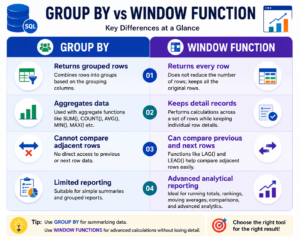
Unlike GROUP BY, Window Functions allow you to:
- Keep every row visible
- Perform calculations on related rows
- Generate rankings
- Compare previous and next rows
- Produce analytical reports
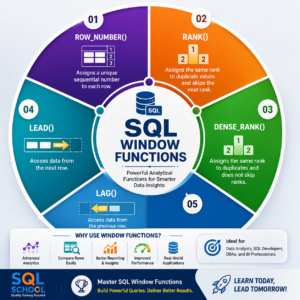
Why are Window Functions Important?
Window Functions are widely used in real-world business reporting.
They help you:
- Rank employees by salary
- Compare current sales with previous sales
- Calculate running totals
- Find top-performing employees
- Generate analytical dashboards
- Prepare interview-ready SQL queries
Sample Employee Table:-
Assume we have the following employee salary table
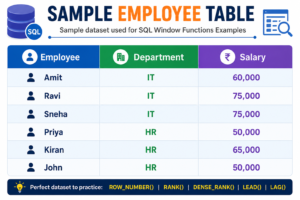
We’ll use this data to understand different Window Functions
Understanding OVER()
The OVER() clause defines the window on which the function operates.
It controls:
- Ordering of rows
- Partitioning into groups
- Calculation scope
Almost every Window Function uses the OVER() clause.
ROW_NUMBER() Function
The ROW_NUMBER() function assigns a unique sequential number to every row.
Use Cases
Pagination
Removing duplicate records
Creating serial numbers
Reporting
Example:-
Employees can be numbered according to their salary from highest to lowest.
Result:
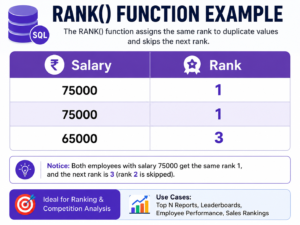
Even if two employees have the same salary, ROW_NUMBER always generates unique numbers
RANK() Function
The RANK() function assigns the same rank to duplicate values.
If two employees share the same salary, both receive the same rank.
The next rank is skipped
Example:
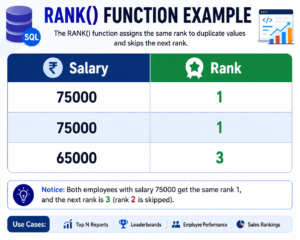
Notice that Rank 2 is skipped
DENSE_RANK() Function
The DENSE_RANK() function also gives the same rank to duplicate values.
However, unlike RANK(), it does not skip numbers.
Example:
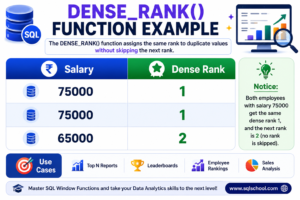
This makes DENSE_RANK ideal when continuous ranking is required.
LEAD() Function
The LEAD() function retrieves data from the next row.
It is commonly used for:
- Forecast comparisons
- Salary comparisons
- Next month sales
- Performance analysis
Example:
Current Salary → Next Employee Salary
This helps compare employees without using Self Joins.
LAG() Function
The LAG() function retrieves data from the previous row.
Common applications include:
- Month-over-month comparison
- Previous salary analysis
- Growth calculations
- Historical reporting
Example:
Current Salary → Previous Employee Salary
You can also calculate salary growth using the previous value.
GROUP BY vs Window Functions
Real-Time Business Applications
Window Functions are used in many industries:
- Banking transaction reports
- Sales dashboards
- HR salary analysis
- Healthcare reporting
- Financial analytics
- Inventory management
- Power BI dashboards
- Data warehouse reporting
SQL Interview Questions
Here are some common interview questions:
- What is a Window Function in SQL?
- Explain the OVER() clause.
- Difference between ROW_NUMBER() and RANK().
- Difference between RANK() and DENSE_RANK().
- When should we use LEAD()?
- What is the purpose of LAG()?
- Difference between GROUP BY and Window Functions.
- Can Window Functions be used with PARTITION BY?
Career Opportunities After Learning Window Functions
Learning SQL Window Functions is valuable for many IT roles:
- SQL Developer
- Database Administrator (DBA)
- Data Analyst
- Business Intelligence Developer
- Power BI Developer
- Azure Data Engineer
- Microsoft Fabric Engineer
- ETL Developer
- Data Warehouse Developer
Conclusion
SQL Window Functions simplify complex analytical tasks and make SQL queries more powerful and efficient. Functions like ROW_NUMBER (), RANK(), DENSE_RANK(), LEAD(), and LAG() are essential for modern reporting, dashboards, and interview preparation.
If you’re aiming for a career in SQL Development, Data Analytics, Power BI, or Data Engineering, mastering Window Functions is a must.
Start practicing these functions today and take your SQL skills to the next level!
Why Choose SQL School?
At SQL School Training Institute, we believe learning should be practical, career-focused, and designed to help you succeed in today’s competitive IT industry. Whether you’re a beginner or an experienced professional looking to upskill, SQL School provides the right training, expert guidance, and hands-on experience to help you achieve your career goals.
Industry-Focused Curriculum
Our courses are designed according to current industry requirements, covering the latest technologies and tools used by top companies.
👨🏫 Expert Trainers
Learn from experienced professionals with real-world expertise in SQL, Data Analytics, Power BI, Azure, Microsoft Fabric, Databricks, Python, and Data Engineering.
💻 Hands-On Practical Training
Gain practical experience through real-time projects, assignments, case studies, and live demonstrations that prepare you for real workplace challenges.
📂 Real-Time Projects
Work on industry-based projects to strengthen your portfolio and build confidence before attending interviews.
🎯 Interview Preparation
Receive comprehensive interview support, including mock interviews, resume-building guidance, technical interview questions, and placement assistance.
Start Your IT Career with SQL School
Whether your goal is to become a:
- SQL Developer
- Database Administrator (DBA)
- Data Analyst
- Power BI Developer
- Microsoft Fabric Engineer
- Azure Data Engineer
- Databricks Developer
- Python Developer
- Data Engineer
- AI & Machine Learning Professional
SQL School provides the skills, practical experience, and career guidance you need to succeed.

Build a Successful Career with SQL School
In today’s data-driven world, technical skills are the foundation of a successful IT career. Whether you aspire to become a SQL Developer, Database Administrator (DBA), Data Analyst, Power BI Developer, Azure Data Engineer, Microsoft Fabric Engineer, Databricks Developer, or AI Professional, SQL School provides the knowledge, practical experience, and career support to help you achieve your goals.
Our industry-focused curriculum, expert trainers, hands-on projects, interview preparation, certification guidance, and placement assistance are designed to make you job-ready and confident in real-world environments. At SQL School, learning goes beyond theory—we emphasize practical skills that employers value.
Take the first step toward a rewarding career by joining SQL School and learning from professionals who are committed to your success.
#SQL #SQLServer #WindowFunctions #ROWNUMBER #RANK #DENSERANK #LEAD #LAG #DataAnalytics #SQLDeveloper #PowerBI #Database #LearnSQL #SQLInterview #SQLSchool
Full Courses Details:-https://sqlschool.com/sql-server-training/
Trainer: Mr. Sai Phanindra.
With 20+ Years
📲 Follow us daily for more updates!
🎁 WhatsApp Channel: https://whatsapp.com/channel/0029VamSJLI35fLmVEvCPD3r
🎁 WhatsApp Job Updates : https://whatsapp.com/channel/0029Vb2LI8zG3R3dWqv5jS1T
🎁 Instagram : https://www.instagram.com/sqlschool__training
🎁 YouTube : www.youtube.com/sequelschool
🔥 Trainer Profile : www.linkedin.com/in/saiphanindra
🌐 Website : www.sqlschool.com
📞 Reach Us: +919951440801 | +919666440801
