Build In-Demand Data Skills with MSSQL, SQL DBA, Data Analytics & Power BI
The world is becoming increasingly data-driven, and organizations across every industry are investing heavily in technologies that help them store, manage, analyze, and visualize data effectively. Whether you are a fresher looking to enter the IT industry, a working professional planning a career transition, or someone aiming to upgrade their technical skills, learning SQL, Database Administration, Data Analytics, and Business Intelligence can significantly improve your career prospects.
To help learners understand these technologies and choose the right career path, SQL School is conducting a series of FREE LIVE Demo Sessions on June 16th, 2026. These sessions are designed to provide a practical overview of each technology, demonstrate real-world use cases, explain current job market demand, and showcase how these skills are used in enterprise environments.
FREE Demo Session Schedule
| Course | Date | Time (IST) |
|---|---|---|
| MSSQL & T-SQL Queries | June 16th, 2026 | 6:00 AM |
| SQL DBA | June 16th, 2026 | 6:00 AM |
| Data Analyst Program | June 16th, 2026 | 6:00 AM |
| Power BI | June 16th, 2026 | 9:00 AM |
MSSQL & T-SQL Queries Training – Build the Foundation of Every Data Career
Why Learn MSSQL & T-SQL?
Every modern application relies on databases. Whether it’s an e-commerce platform, banking application, healthcare system, ERP solution, or social media application, data is stored and managed using databases.
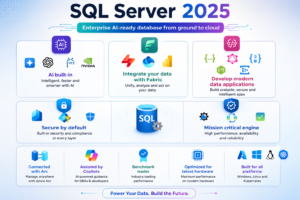
Microsoft SQL Server (MSSQL) is one of the most widely adopted enterprise database platforms in the world. It is trusted by thousands of organizations for handling critical business data.
At the heart of SQL Server lies T-SQL (Transact-SQL), Microsoft’s powerful extension of SQL that allows developers and data professionals to perform advanced querying, automation, reporting, and database programming.
Learning MSSQL and T-SQL is often the first step toward careers such as:
- SQL Developer
- Data Analyst
- ETL Developer
- Data Engineer
- Database Administrator
- Business Intelligence Developer
What You Will Learn in the MSSQL & T-SQL Course
Database Fundamentals
Understand how databases work and why organizations depend on relational database systems.
SQL Server Installation & Configuration
Learn how to install and configure SQL Server and SQL Server Management Studio (SSMS).
Writing SQL Queries
Master:
- SELECT Statements
- Filtering Data
- Sorting Data
- Aggregations
- Grouping Data
- Conditional Logic
Joins and Relationships
Learn how to combine data from multiple tables using:
- Inner Join
- Left Join
- Right Join
- Full Join
- Cross Join
- Self Join
Database Programming
Develop enterprise-grade solutions using:
- Stored Procedures
- Functions
- Views
- Triggers
Advanced Querying
Explore:
- Dynamic SQL
- Window Functions
- Common Table Expressions (CTEs)
- Recursive Queries
Query Optimization
Learn how SQL Server executes queries and how to improve performance.
Tools Covered
- SQL Server 2025
- SQL Server Management Studio (SSMS)
- Azure Data Studio
- SQL Profiler
- Database Engine Tuning Advisor
Why Companies Need SQL Professionals
Organizations generate terabytes of data daily. Skilled SQL professionals help businesses:
- Store data efficiently
- Retrieve information quickly
- Build reports
- Support applications
- Improve database performance
This makes MSSQL & T-SQL one of the most valuable skills for any data professional.
SQL DBA Training – Become a Database Administration Expert
What is SQL DBA?
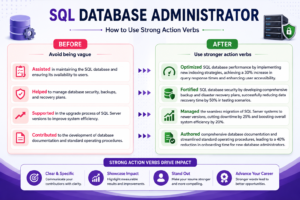
A SQL Database Administrator (DBA) is responsible for ensuring databases remain available, secure, optimized, and recoverable.
Whenever a company runs SQL Server databases, someone must:
- Monitor database health
- Manage backups
- Ensure high availability
- Resolve performance issues
- Protect business data
That responsibility belongs to a SQL DBA.
Why SQL DBA Remains a High-Demand Career
Databases power nearly every business application. Even in cloud environments, organizations continue to require skilled administrators who understand:
- Database Architecture
- Security
- Performance Tuning
- Disaster Recovery
- High Availability
This makes SQL DBA one of the most stable IT careers available today.
Course Highlights
SQL Server Administration
Learn how to manage SQL Server environments from installation to production deployment.
Backup & Recovery
Understand how organizations protect critical business data.
Topics include:
- Full Backups
- Differential Backups
- Transaction Log Backups
- Point-in-Time Recovery
Security Management
Learn:
- Logins
- Users
- Roles
- Permissions
- Encryption
Performance Tuning
Identify and resolve:
- Slow Queries
- Blocking Issues
- Deadlocks
- Resource Bottlenecks
High Availability
Master enterprise technologies such as:
- Always On Availability Groups
- Log Shipping
- Replication
- Database Mirroring Concepts
Monitoring & Troubleshooting
Learn real-world monitoring techniques used by production DBAs.
Tools Covered
- SQL Server 2025
- SQL Server Management Studio
- SQL Profiler
- Extended Events
- Performance Monitor
- Azure SQL Administration Tools
Real-Time DBA Responsibilities
A SQL DBA is responsible for:
- Managing Production Databases
- Disaster Recovery Planning
- Security Audits
- Capacity Planning
- Server Migrations
- Performance Optimization
Career Opportunities
- SQL DBA
- Azure SQL DBA
- Database Administrator
- Database Engineer
- Production Support Engineer
- Cloud Database Administrator
Data Analyst Program – Transform Data into Business Insights
Why Data Analytics is Growing Faster Than Ever
Every organization collects vast amounts of data from customers, products, sales, operations, and digital channels.
However, data alone has little value unless it can be transformed into meaningful insights.
This is where Data Analysts play a crucial role.
Data Analysts help businesses:
- Understand trends
- Identify opportunities
- Improve performance
- Reduce risks
- Make informed decisions
As a result, Data Analytics remains one of the most sought-after career paths globally.
What You Will Learn in the Data Analyst Program
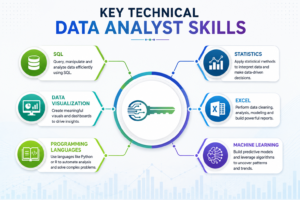
SQL for Analytics
Learn how to retrieve and analyze business data efficiently.
Advanced Excel
Master:
- Pivot Tables
- Lookup Functions
- Data Cleaning
- Dashboard Creation
Power BI
Build professional dashboards and reports.
Python for Data Analytics
Learn:
- Data Manipulation
- Data Cleaning
- Exploratory Analysis
- Automation
Business Reporting
Create executive-level reports that support decision-making.
Real-Time Projects
Work on practical projects from domains such as:
- Banking
- Healthcare
- Retail
- E-Commerce
- Finance
Tools Covered
- SQL Server
- Microsoft Excel
- Power BI
- Python
- Jupyter Notebook
Skills You Will Gain
- Data Cleaning
- Data Analysis
- Data Visualization
- Dashboard Development
- Reporting Automation
- Business Intelligence
Career Opportunities
- Data Analyst
- Business Analyst
- Reporting Analyst
- MIS Analyst
- BI Analyst
- Junior Data Scientist
Power BI Training – Master Business Intelligence & Data Visualization
Why Learn Power BI in 2026?
Organizations are making decisions faster than ever before.
Executives and managers need dashboards that provide real-time insights into:
- Sales Performance
- Revenue Growth
- Customer Behavior
- Operational Efficiency
- Financial Metrics
Power BI has become one of the world’s most popular Business Intelligence platforms because it enables businesses to transform complex data into easy-to-understand visual reports.
What You Will Learn in Power BI Training
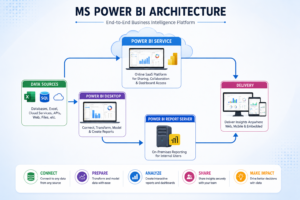
Power BI Desktop
Create professional reports and dashboards.
Data Transformation
Use Power Query to clean and prepare data.
Data Modeling
Build efficient relationships between datasets.
DAX (Data Analysis Expressions)
Learn advanced calculations and measures.
Dashboard Development
Create:
- KPI Dashboards
- Executive Dashboards
- Financial Dashboards
- Operational Dashboards
Power BI Service
Publish reports and collaborate with teams.
Tools Covered
- Power BI Desktop
- Power BI Service
- Power Query
- DAX Studio
- SQL Server
Key Components of Power BI
Power Query
Extract, transform, and load data.
Data Models
Create relationships and optimize performance.
DAX
Perform advanced calculations and analytics.
Visualizations
Present information through charts, tables, maps, and KPIs.
Power BI Service
Share and manage reports securely.
Career Opportunities
- Power BI Developer
- BI Consultant
- Data Visualization Specialist
- Reporting Analyst
- Business Intelligence Analyst
Why Learn with SQL School?
SQL School has been helping professionals build successful IT careers since 2009.
What Makes SQL School Different?
✅ 20+ Years of Industry Experience
✅ Real-Time Industry Projects
✅ Instructor-Led Live Sessions
✅ Hands-On Assignments
✅ Weekly Assessments
✅ Interview Preparation
✅ Resume Building Support
✅ Certification Guidance
✅ One-to-One Mentorship
✅ Career Roadmap Planning
✅ Practical Production Scenarios
✅ Lifetime Learning Community
Who Should Attend These Free Demo Sessions?
These sessions are ideal for:
- Fresh Graduates
- Job Seekers
- Working Professionals
- Software Developers
- Support Engineers
- Database Professionals
- Data Enthusiasts
- Career Switchers
- Engineering Students
Register for the FREE Demo Sessions Today
Whether you want to become a SQL Developer, SQL DBA, Data Analyst, or Power BI Professional, these free demo sessions will provide valuable insights into the technology, career opportunities, learning roadmap, and real-world applications.
Take the first step toward a rewarding career in Data and Analytics.
Contact SQL School
📞 +91 99514 40801
📞 +91 96664 40801
Conclusion:
MSSQL and T-SQL remain among the most valuable skills for database developers, data analysts, business intelligence professionals, and database administrators. From managing enterprise databases to building high-performance queries, reports, and data-driven applications, SQL Server continues to play a critical role in modern organizations worldwide.
Start your SQL learning journey today, practice real-world scenarios, and unlock exciting opportunities in Data Analytics, Business Intelligence, Data Engineering, and Database Administration.
MSSQL Training Course: https://sqlschool.com/sql-server-training/
SQL DBA Training Course: https://sqlschool.com/sql-dba-training/
Data Analyst Training Course: https://sqlschool.com/analyst-courses/
Power BI Training Course: https://sqlschool.com/powerbi-training/
#MSSQL #TSQL #SQLServer #MicrosoftSQLServer #SQLQueries #TSQLQueries #SQLTutorial #SQLLearning #SQLTraining #DatabaseManagement #DatabaseDeveloper #SQLDeveloper #DataEngineering #DataAnalytics #BusinessIntelligence #DatabasePerformance #QueryOptimization #SQLBestPractices #LearnSQL #SQLForBeginners #AdvancedSQL #SQLInterviewQuestions #DatabaseTraining #DataProfessionals #TechEducation #OnlineLearning #CareerInData #SQLSchool
Trainer: Mr. Sai Phanindra
With 20+ Years of
technical expertise exclusively on SQL & Database Technologies, I assure you 100% Practical, Step by Step Classes.
Linkdin Profile: www.linkedin.com/in/saiphanindra/
Contact No: +91 9030040801 or +91 9666440801