Become a Job-Ready MSBI ETL Developer with SQL + ADF Training
In today’s data-driven world, organizations rely heavily on structured data to make smart business decisions. This demand has created a massive need for skilled professionals in ETL development, especially those proficient in Microsoft technologies like SQL Server, MSBI, and Azure Data Factory (ADF). If you are looking to build a strong career as an MSBI ETL Developer, mastering SQL, SSIS, SSRS, and ADF is essential.
What is an MSBI ETL Developer?
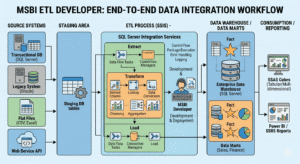
An MSBI ETL Developer specializes in extracting, transforming, and loading (ETL) data from multiple sources into a centralized system such as a data warehouse. Using tools like SSIS (SQL Server Integration Services), developers build data pipelines, automate workflows, and ensure high-quality data integration.
In addition, reporting tools like SSRS (SQL Server Reporting Services) help transform raw data into meaningful reports and dashboards that drive business insights.
Why SQL is the Foundation
Before diving into ETL tools, a strong foundation in SQL is crucial. SQL helps you:
- Query and manipulate large datasets
- Optimize performance using indexing and query tuning
- Write stored procedures and functions for automation
- Design relational databases
Without SQL expertise, building efficient ETL pipelines becomes difficult. That’s why any good MSBI training starts with SQL fundamentals and gradually progresses to advanced concepts.
Role of SSIS in ETL Development
SSIS is the backbone of MSBI ETL development. It allows you to:
- Extract data from multiple sources like Excel, databases, and flat files
- Apply transformations such as sorting, filtering, and aggregations
- Load data into data warehouses or destination systems
With real-time scenarios like incremental data loads and error handling, SSIS prepares you for industry-level ETL challenges.
Reporting with SSRS
Once the data is processed, it needs to be presented in a readable format. SSRS helps you:
- Create interactive and paginated reports
- Build dashboards with charts and visuals
- Implement filters, parameters, and drill-down reports
These reporting skills are highly valuable in business intelligence roles.
Why Learn Azure Data Factory (ADF)?
With the shift to cloud technologies, modern ETL is no longer limited to on-premise tools. Azure Data Factory (ADF) enables you to:
- Build cloud-based data pipelines
- Integrate with Azure SQL, data lakes, and other cloud services
- Migrate traditional SSIS packages to the cloud
ADF is a must-have skill for future-ready data engineers and ETL developers.
Career Opportunities
After completing SQL + MSBI + ADF training, you can explore roles such as:
- ETL Developer
- MSBI Developer
- Data Analyst
- Azure Data Engineer
Companies across industries are actively hiring professionals with these skills, making it a high-demand career path.
Becoming an MSBI ETL Developer is a smart career move if you enjoy working with data, solving complex problems, and building scalable solutions. By learning SQL, SSIS, SSRS, and Azure Data Factory together, you gain both traditional BI expertise and modern cloud capabilities.
Ready to Become a Skilled MSBI ETL Developer with Real-Time Experience?
Join SQL School — India’s most trusted platform for hands-on MSBI (SSIS, SSRS, SSAS) Training.
✅ Learn SSIS (ETL), SSRS (Reporting), and SSAS (Analysis Services) step-by-step
✅ Build real-time ETL pipelines, data warehouses, and reports
✅ Master data integration, transformation, and automation workflows
✅ Work on live projects with enterprise-level scenarios
✅ Perfect for ETL Developers, Data Engineers, and BI Professionals
🎯 Gain job-ready skills in Microsoft BI tools used by top companies!
📞 Call now at +91 9666640801
🌐 Visit 👉 www.sqlschool.com for a FREE demo session!
SQL School – Your Real-Time Path to MSBI ETL Developer Success.
#MSBI #ETLDeveloper #SQLServer #SSIS #SSRS #AzureDataFactory #DataEngineering #BusinessIntelligence #DataWarehouse #SQL
Trainer: Mr. Sai Phanindra
With 20+ Years of
technical expertise exclusively on SQL & Database Technologies, I assure you 100% Practical, Step by Step Classes.
Linkdin Profile: www.linkedin.com/in/saiphanindra/
Contact No: +91 9030040801 or +91 9666640801