SQL Server Management Studio (SSMS): A Powerful Tool for Managing SQL Databases
SQL Server Management Studio, commonly known as SSMS, is one of the most widely used tools for professionals working with Microsoft SQL Server databases. It provides a friendly graphical interface that allows users to manage, configure, monitor, and develop database solutions efficiently.
Over the years, SSMS has evolved from a simple database administration interface into a comprehensive environment used by database administrators, developers, data analysts, and data engineers across industries. It plays a crucial role in handling enterprise database systems, enabling professionals to perform complex operations with ease. Whether it involves managing production databases, executing SQL queries, optimizing database performance, or monitoring server activities, SSMS serves as the central management platform for SQL Server environments.
What is SQL Server Management Studio (SSMS)
SQL Server Management Studio (SSMS) is a graphical interface tool developed by Microsoft for managing and administering SQL Server databases and infrastructure.
It allows database professionals to perform various operations such as:
- Writing and executing SQL queries
- Managing database objects
- Monitoring performance
- Configuring server settings
- Backup and restore operations
- Security management
In simple terms:
SQL Server is the database engine, while SSMS is the interface used to interact with it. Through SSMS, users can visually manage databases instead of relying only on command-line tools.
Core Components of SQL Server Management Studio
From years of real-world usage, these are the components professionals rely on the most.
1. Object Explorer
Object Explorer is the navigation hub of SSMS. It allows users to browse and manage:
- Databases
- Tables
- Views
- Stored Procedures
- Security roles
- Linked servers
It provides a tree structure that makes database administration easier.
2. Query Editor
The Query Editor is where developers write and execute SQL code. Key capabilities include:
- T-SQL scripting
- Query execution plans
- IntelliSense suggestions
- Code formatting
- Debugging tools
This environment helps developers test queries before deploying them to production.
3. Database Design Tools
SSMS includes visual tools for designing databases such as:
- Table Designer
- Relationship Designer
- Index Management
- Schema comparison
These tools allow administrators to modify database structures without manually writing complex scripts.
4. Performance Monitoring Tools
Performance tuning is a major responsibility of DBAs. SSMS includes built-in tools like:
- Activity Monitor
- Query Execution Plans
- Query Store
- Performance Dashboard
These features help identify:
- Slow queries
- Resource bottlenecks
- Blocking sessions
5. Backup and Restore Management
Database protection is critical for enterprise systems. SSMS simplifies backup and recovery tasks including:
- Full database backups
- Differential backups
- Transaction log backups
- Point-in-time restore
These features ensure data can be recovered during failures or disasters.

Key Features Introduced in New SSMS 2025 Version
Modern SSMS versions have introduced many improvements that significantly enhance productivity. Some important updates include:
AI-Assisted Query Development
- New versions integrate GitHub Copilot assistance to help generate SQL queries faster. This feature reduces development time and helps beginners write better queries.
ARM64 Support
- SSMS 22 introduced Windows ARM64 support, allowing SQL professionals to run the tool on ARM-based devices. This expands compatibility with modern hardware platforms.
Microsoft Fabric Integration
- SSMS now integrates with Microsoft Fabric environments, allowing users to browse cloud-based SQL databases directly from the connection window. This strengthens the tool’s role in hybrid data architectures.
Links to download SSMS:
| SSMS Version | Build number | Release year | Download latest |
|---|---|---|---|
| SQL Server Management Studio 22 | 22.x.x.x | 2025 | Direct download 22.3.2 |
| SQL Server Management Studio 21 | 21.x.x.x | 2025 | Direct download 21.6.17 |
| SQL Server Management Studio 20 | 20.0.x.x | 2024 | Direct download 20.2.1 |
| SQL Server Management Studio 19 | 19.0.x.x | 2023 | Direct download 19.3 |
| SQL Server Management Studio 18 | 15.0.x.x | 2019 | Direct download 18.12.1 |
| SQL Server Management Studio 17 | 14.0.x.x | 2017 | Direct download 17.9.1 |
| SQL Server Management Studio 16 | 13.0.x.x | 2016 | Direct download 16.5.3 |
| Not standalone (integral part of SQL Server): | |||
| SQL Server Management Studio 2014 | 12.0.x.x | 2014 | Download 2014 |
| SQL Server Management Studio 2012 | 11.0.x.x | 2012 | Download 2012 |
| SQL Server Management Studio 2008 R2 | 10.50.x.x | 2010 | Download 2008 R2 |
| SQL Server Management Studio 2008 | 10.0.x.x | 2008 | Download 2008 |
Know more about SSMS versions:
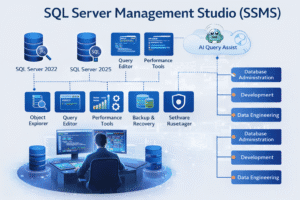
SQL Server Management Studio remains the most essential tool for SQL Server professionals. Over the past decade, it has evolved from a simple administration interface into a powerful platform for database management, development, and performance tuning.
With modern releases supporting AI assistance, cloud integrations, and advanced monitoring, SSMS continues to play a critical role in managing enterprise data systems. For anyone pursuing careers such as SQL Developer, Database Administrator, Data Analyst, or Data Engineer, mastering SSMS is an essential skill.
Ready to Master Microsoft SQL Server (MSSQL) Like a Pro?
Join SQL School — India’s most trusted institute for real-time MSSQL Training with hands-on projects and enterprise-level practice.
✅ Learn MSSQL 2019 & 2022 step-by-step
✅ Master T-SQL, Joins, Indexing, Stored Procedures, Functions & Triggers
✅ Gain real-time experience with SSMS and live server environments
✅ Perfect for aspiring SQL Developers, DBAs, and Data Professionals
🚀 Build strong database skills and unlock high-paying IT opportunities
🌐 Visit 👉 www.sqlschool.com for a FREE demo session!
SQL School – Your Real-Time Path to MSSQL Expertise & Career Success.
Trainer: Mr. Sai Phanindra
With 19+ Years of
technical expertise exclusively on SQL & Database Technologies, I assure you 100% Practical, Step by Step Classes.
Linkdin Profile: www.linkedin.com/in/saiphanindra/
Contact No: +91 9030040801 or +91 9666640801