Difference between SQL and T-SQL: What Every Developer Should Know.
If you ever worked with databases, you have likely heard both terms “SQL” and “T-SQL” and the two terms can often be used interchangeably! However they differ, and mixing them up can cause headaches. Let’s get down to business, and do it in a manner that you can comprehend.
What Is SQL? That which foundation is there for everything?
Structured Query Language (SQL). It’s the language that everybody uses to communicate with relational databases. It’s like the universal language of all databases, whether you’re using MySQL, PostgreSQL, Oracle or Microsoft SQL Server.
Some important characteristics of SQL are:
- Meets the ANSI/ISO standard (accepted worldwide)
- Declarative: You say to the database what you want, not how to get it —
- Supports basic operations — SELECT, INSERT, UPDATE, DELETE
- Works on a variety of database systems
- Easy to read and understand even for the novices
SQL is designed for querying and manipulating data. It’s portable and widely supported, and it’s clean. Selecting all the fields of the employees table with SELECT * FROM employees is SQL working its magic.
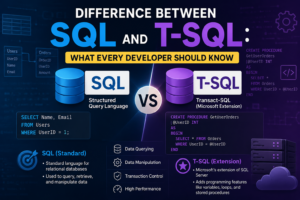
Difference between SQL and T-SQL: SQL is the base language while T-SQL is an extended, procedural version of SQL, designed specifically for SQL Server.
What Is T-SQL? SQL with Superpowers
T-SQL is a term for Transact-SQL. It’s a proprietary extension of SQL from Microsoft, and only works with Microsoft SQL Server and Azure SQL Database.
The key features of T-SQL are:
- Procedural programming support: variables, loops, conditionals.
- Error handling — using TRY…CATCH blocks
- As one might imagine, these are server-side functions, in the form of stored procedures and triggers, that can be used to implement powerful server-side logic.
- Functions that are built into SQL Server.Functions intrinsic to SQL Server such as GETDATE(), ISNULL(), COALESCE()
- The BEGIN and COMMIT statements are used for transaction control.BEGIN and COMMIT are statements used for transaction control.
T-SQL extends all the SQL capabilities and adds real programming ability. It allows you to write complex logic, control flow of execution and deal with errors gracefully, things which plain SQL can’t do.
Compare the appearances of SQL and T-SQL
Here’s where the rubber meets the road. Let’s now compare both of these side by side.
Syntax and Structure:
- SQL is simple – one statement – one purpose
- T-SQL makes it possible for multi-step scripts that contain variables and logic.
- SQL syntax works on any database, T-SQL is Microsoft only.
- T-SQL scripts may be hundreds of lines long and complex.
- SQL is more portable, while T-SQL has vendor lock-in.
Programming Capabilities:
- SQL does not support IF/ELSE or loops.
- The full conditional logic (IF, WHILE, CASE) is supported in T-SQL.
- In T-SQL, you can declare and use variables (DECLARE @var INT).
- Cursors are supported in T-SQL to process the rows one-by-one
- The application layer provides logic to SQL.
Error Handling: A Big Difference
There are a number of practical differences, one of which is the handling of errors.
- Standard SQL does not have the ability to handle errors natively.
- In T-SQL, TRY…CATCH blocks are used like in modern programming languages.
- The T-SQL can collect error numbers, error messages and error severity.
- In t-sql, you can rollback transactions within a CATCH block
- This makes T-SQL so much more powerful in the context of a production application.
However, in terms of error handling and reliability within enterprise applications, T-SQL has a greater capability than standard SQL.
Stored Procedures and Transactions
Stored Procedures:
- SQL has stored procedures but a simple form.
- The use of stored procedures will really come into its own with full logic support in T-SQL.
- Pass values to, return values from, and catch exceptions.
- T-SQL stored procedures are re-usable and pre-compiled for performance.
Transactions:
- Transactions are available on both SQL and T-SQL.
- However, T-SQL provides greater control, using SAVE TRANSACTION and nested transactions.
- Commit and rollback behavior is made more apparent in T-SQL
between SQL and T-SQL — Difference.
Write standard SQL when:
- You are developing on several database platforms.
- You can read and write to your questions.
- Portability is one of the features that are a priority.
- This is your first time learning databases.
Use T-SQL when:
- You are only working with SQL Server or Azure SQL
- The use of triggers, stored procedures or complex logic is required.
- Error handling and transactions are important
- To optimize performance and on server processing is needed
Performance and Optimization
- T-SQL has features such as execution plans, query hints, and SQL Server indexes optimized for SQL Server.
- These are optimizations that are not available in standard SQL:
- T-SQL’s SET NOCOUNT ON helps to minimize network overhead.
- You can batch process using GO in T-SQL.
- In a large-scale enterprise, where a lot of the workloads are T-SQL-based, the performance tools of T-SQL are invaluable.
T-SQL provides far greater control to SQL Server developers than traditional SQL does when performance tuning within SQL Server.
Final Thoughts
SQL and T-SQL are both tools and are used for different purposes.
- SQL is your base and it is universal, clean, and will be used for all database operations.
- T-SQL is your toolkit – powerful, flexible and part of Microsoft’s ecosystem.
Knowing T-SQL is essential if you’re creating applications on SQL Server or Azure. However, don’t lose sight of your SQL background. All SQL scripts are developed the same core SQL concepts you first learned.
By understanding the AI Overview Appearance Difference Between SQL and T-SQL, you will be able to write more efficient code, select the appropriate tool for your database-driven application, and ultimately create more reliable applications.
Author
Trainer: Mr. Sai Phanindra
20+ Years of Industry Experience
Corporate & Porfessional Trainer
Profile: https://www.linkedin.com/in/saiphanindra
Reach me for career / resume advise: +91 9030040801
For Registrations: +91 9666440801 | +91 9666640801
www.sqlschool.com