Top 100 Power BI Interview Questions
Level 1
Question 1: What kind of reports use RDL format in Power BI?
- The Paginated Reports use the RDL (Report Definition Language) format.
- These reports are designed for fixed-layout printing and exporting.
- These reports do not support Visual Interactions, Visual Sync and Power Query.
Question 2: Which tool is used to design Paginated Reports?
The Report Builder Tool is used to design Paginated Reports.
Question 3: What is the purpose of Power BI Report Server?
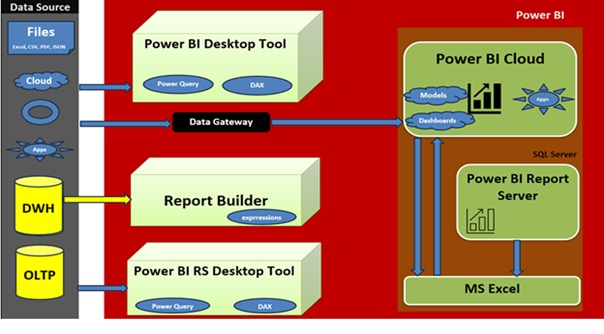
Power BI Report Server allows organizations to host Interactive and Paginated Reports on-premises.
Question 4: What file format is used to save Power BI Desktop reports?
Power BI Desktop reports are saved in the .PBIX &/ PBIT file format.
Question 5: What’s the difference between PBIX and PBIT files?
- PBIX File contains the report layout, visuals, and the actual data.
- PBIT File (Template) contains the report structure, but no data.
Question 6: What does “Focus Mode” do in Power BI visuals?
Focus Mode expands a selected visual to take up the entire report canvas for detailed examination.
Question 7: What are the key components of the Power BI ecosystem?
Key components include Power BI Desktop, Power BI Service (Cloud), Power BI Mobile, and Power BI Report Server.
Question 8: What is the role of Power Query (M) in Power BI?
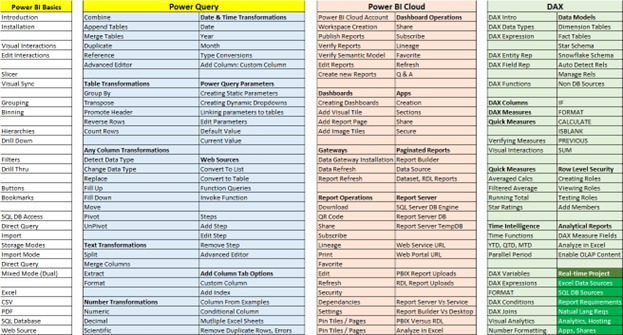
Power Query handles the ETL (Extract, Transform, Load) process—connecting, cleaning, and reshaping data using the M language.
Question 9: What is DAX used for in Power BI?
DAX (Data Analysis Expressions) is used to create Measures (dynamic aggregations) and Calculated Columns.
Question 10: What are the types of Power BI reports?
The primary types are Interactive Reports and Paginated Reports.
Question 11: What does ETL stand for in Power BI?
ETL stands for Extract, Transform, Load.
Question 12: Which transformation merges two tables in Power Query?
The Merge Queries transformation is used to join two tables based on a key.
Question 13: What is the use of “Column from Examples”?
It allows creating a custom column by providing sample output values, and Power Query generates the M code.
Question 14: What are static parameters in Power Query?
Static parameters define fixed, reusable values (like a server name) that can be easily modified without changing the underlying M code.
Question 15: How do dynamic dropdowns enhance query flexibility?
They allow report consumers to select a value that modifies the data retrieved by the query, often used via Power Query parameters.
Question 16: What is the purpose of “Step Edits”?
“Step Edits” (the Applied Steps pane) allows users to review, modify, or reorder the sequence of transformations applied to a query.
Question 17: Which transformation is used for string/text cleanup?
Transformations like Replace Values, Trim, and Clean are primarily used.
Question 18: What is the difference between Union All and Merge?
Merge joins tables horizontally (adds columns), while Union All (Append Queries) combines tables vertically (stacks rows).
Question 19: How do you convert data types in Power Query?
By selecting the column(s) and using the Data Type dropdown in the Power Query Editor.
Question 20: What is the role of expressions in Power Query?
Expressions (written in M language) define custom logic for transformations, like creating custom columns.
Question 21: What is a Power BI workspace?
A Power BI Workspace is a shared area in the Service used for collaboration, organizing, and storing reports, semantic models, and dashboards.
Question 22: How do you publish a report to Power BI Cloud?
By clicking the “Publish” button in Power BI Desktop and selecting the desired workspace.
Question 23: What is a semantic model in Power BI?
A Semantic Model (dataset) is the source of all data for reports and dashboards, including the data model and DAX measures.
Question 24: What does the Lineage View show?
The Lineage View shows the end-to-end data flow, from the original data sources to the reports that consume them.
Question 25: What is the function of a data gateway?
A Data Gateway securely connects the Power BI Service (Cloud) to on-premises data sources for data refresh.
Question 26: How do you schedule a data refresh in Power BI Service?
By going to the settings for the specific semantic model in the Service and configuring the scheduled refresh frequency.
Question 27: What’s the difference between dashboards and reports?
A Report is a multi-page interactive collection of visuals. A Dashboard is a single canvas displaying pinned visuals (tiles) from one or more reports.
Question 28: What are Power BI Apps used for?
Power BI Apps are used to bundle and share a curated collection of content (reports and dashboards) with a wider audience.
Question 29: How do you share a report in Power BI Cloud?
Using the Share button in the Service to grant specific users or groups access.
Question 30: What does “Subscribe” mean in Power BI?
“Subscribe” allows users to receive a snapshot of a report page or dashboard via email at scheduled intervals.
Question 31: What is TempDB used for in Power BI Report Server?
TempDB is used by the Report Server to temporarily store session and execution information during report processing.
Question 32: What does the CALCULATE function do in DAX?
CALCULATE evaluates an expression within a context modified by specified filters. It is the most powerful DAX function.
Question 33: What are Quick Measures in Power BI?
Quick Measures are predefined DAX calculation templates that users can apply through a guided interface.
Question 34: What is the difference between Star and Snowflake schemas?
A Star Schema connects the fact table directly to dimension tables. A Snowflake Schema further normalizes dimension tables into sub-dimensions.
Question 35: What are Fact Tables in data modelling?
Fact Tables contain the quantitative, transactional data (metrics or measures) used for analysis.
Question 36: What is Time Intelligence in DAX?
Time Intelligence is a set of DAX functions used to perform calculations that compare or aggregate data across different time periods (e.g., YTD, MoM).
Question 37: What does the PARALLELPERIOD function do?
It returns a set of dates that are the same period as the specified dates, but shifted by a given number of intervals.
Question 38: How are DAX variables used in expressions?
DAX variables (VAR) store the result of an expression, making complex formulas easier to read, debug, and often more efficient.
Question 39: What are AI fundamentals in the context of Power BI?
They include built-in capabilities like Key Influencers and Decomposition Tree visuals, and integration with Azure AI services.
Question 40: How is AI used in sentiment analysis in Power BI?
Power BI uses AI for sentiment analysis by integrating with Azure AI services to analyse text data and determine the emotional tone (positive, negative, neutral).
Question 41: What is the role of Azure AI in Power BI integration?
Power BI integrates with Azure AI services (e.g., Azure Machine Learning, Cognitive Services) to perform advanced analytics like scoring data and sentiment analysis
Question 42: How does AI enhance DAX calculations?
AI enhances DAX by assisting users in writing complex measures through natural language prompts and suggesting ways to optimize formulas.
Question 43: How does Power BI integrate with Azure AI?
Power BI integrates with Azure AI (e.g., Azure Machine Learning, Cognitive Services) to perform advanced analytics like sentiment analysis and scoring data.
Question 44: What is Microsoft CoPilot in Power BI?
Microsoft CoPilot is an AI-powered assistant that uses large language models (LLMs) to help users generate reports, summarize data, and write DAX measures via natural language.
Question 45: How can CoPilot be used in Power BI Desktop?
CoPilot assists with creating narrative summaries, drafting DAX formulas, and designing report layouts.
Question 46: What are the benefits of AI-powered analytics in Power BI?
Benefits include faster insight generation, improved data accessibility for non-technical users, and automated pattern detection.
Question 47: How does AI enhance DAX functionality?
AI enhances DAX by assisting users in writing complex measures through natural language prompts and suggesting ways to optimize formulas.
Question 48: What is AI Nomenclature in cloud analytics?
It refers to the terminology used to describe AI/ML tools and services in the cloud, such as “Azure AI Services” or “Cognitive Services.”
Question 49: How does Power BI use AI for sentiment analysis?
Power BI uses AI for sentiment analysis by integrating with Azure AI services to analyze text data and determine the emotional tone (positive, negative, neutral).
Question 50: What does the Spotlight feature do in Power BI visuals?
Spotlight highlights one specific visual by fading all other visuals into the background.