SQL Commands Explained: Features, Importance, Uses, and How to Master Them
In today’s data-driven world, almost every application relies on databases. From banking systems to e-commerce platforms, data must be stored, updated, and retrieved efficiently. This is where SQL Commands play a critical role.
SQL (Structured Query Language) is the standard language used to communicate with relational databases. SQL commands allow users to control data, manage structures, and perform powerful queries with ease.
What Are SQL Commands?
SQL commands are structured instructions that enable users to communicate directly with a database system. Through these commands, users can perform every essential operation required to manage and control data efficiently. SQL allows developers and data professionals to create and define database structures such as tables, views, and indexes, ensuring that data is stored in an organized and optimized manner.
In addition, SQL commands make it easy to insert new records, update existing information, and remove outdated data without affecting the overall database structure. Users can retrieve specific data using powerful query statements, allowing them to filter, sort, and analyze information based on business needs. SQL also provides robust security features by enabling administrators to control user access through permission-based commands, ensuring that sensitive data remains protected.
Create database structures
Insert and modify data
Retrieve information
Control user access
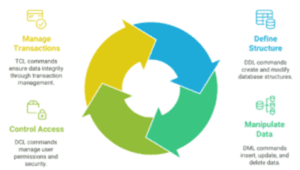
Manage transactions
Instead of writing complex programs, SQL allows you to perform all database operations using simple, readable statements.
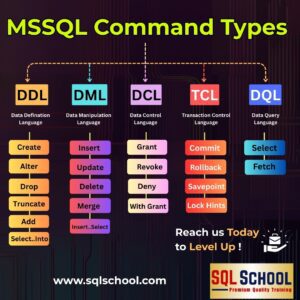
Key Categories of SQL Commands
SQL commands are grouped based on their purpose. Each category serves a specific role in database management.
1. Data Definition Language (DDL)
DDL commands define and modify database structures.
Common DDL Commands:
CREATE
ALTER
DROP
TRUNCATE
Use DDL when designing or changing tables, schemas, and indexes.
2. Data Manipulation Language (DML)
DML commands manage the actual data stored in tables.
Common DML Commands:
INSERT
UPDATE
DELETE
Use DML to add, edit, or remove records from the database.
3. Data Query Language (DQL)
DQL focuses on retrieving data.
Main Command:
SELECT
This command is widely used for reports, dashboards, and analytics.
4. Data Control Language (DCL)
DCL controls user permissions and security.
Commands:
GRANT
REVOKE
These ensure only authorized users can access or modify data.
5. Transaction Control Language (TCL)
TCL manages transactions and data consistency.
Commands:
COMMIT
ROLLBACK
SAVEPOINT
These help maintain data accuracy during multi-step operations.
Features of SQL Commands
SQL commands offer powerful features that make database operations efficient and reliable.
Simple and Readable Syntax
SQL uses English-like keywords such as SELECT, INSERT, and UPDATE, making it easy to learn and use.
Platform Independent
SQL works with all major databases including SQL Server, MySQL, PostgreSQL, Oracle, and SQLite.
High Performance
SQL can handle millions of records with fast query execution.
Secure Data Handling
With permission controls, SQL ensures data privacy and security.
Why SQL Commands Are Important
SQL commands are essential for anyone working with data.
Supports Business Applications
Most websites, ERP systems, and mobile apps depend on SQL databases.
Drives Data Analytics
SQL is the foundation of reporting tools like Power BI, Tableau, and Excel dashboards.
Essential for IT Careers
SQL is a core skill for:
Data Analysts
Data Engineers
Database Administrators
Software Developers
Business Analysts
Improves Decision Making
SQL helps extract meaningful insights from raw data.
Basic Example: Fetching Data
This retrieves customer names and cities from India.
Inserting Data
Adds a new student record.
Updating Data
Updates existing data.
Deleting Data
Removes the record.
FAQ’s – SQL Commands
1. What are SQL commands used for?
SQL commands are used to communicate with a database. They help users create tables, insert data, retrieve records, update information, control access, and manage transactions efficiently.
2. Who should learn SQL commands?
SQL commands are essential for students, software developers, data analysts, database administrators, business analysts, and anyone working with data-driven applications.
3. Are SQL commands difficult to learn?
No. SQL uses simple, English-like keywords such as SELECT, INSERT, UPDATE, and DELETE, making it easy for beginners to understand and practice.
4. What is the difference between DDL and DML commands?
DDL commands define the structure of the database, such as creating or modifying tables.
DML commands work with the actual data, such as inserting, updating, or deleting records.
5. Why is the SELECT command so important?
The SELECT command is used to retrieve data from a database. It is the most commonly used SQL command for reports, analytics, and dashboards.
6. Can SQL commands work with large databases?
Yes. SQL is designed to handle large volumes of data efficiently with features like indexing, filtering, and optimized queries.
7. Are SQL commands the same for all databases?
Most SQL commands follow standard syntax and work across major databases like SQL Server, MySQL, PostgreSQL, and Oracle, with minor variations.
Conclusion
SQL commands are the backbone of modern data systems. They allow users to manage databases, analyze information, and maintain secure, high-performance applications. Whether you are a fresher or an experienced professional, mastering SQL commands is essential for building a successful IT career.
At SQL School, we provide step-by-step SQL training with real-time projects, expert mentorship, and industry-focused learning paths to help you become job-ready.
MSSQL Training: https://sqlschool.com/sql-server-training/
MSSQL Curriculum: https://sqlschool.com/wp-content/uploads/2025/12/SQL-Server-TSQL-Training.pdf
#SQLCommands #LearnSQL #SQLTutorial #SQLForBeginners #DatabaseCommands #SQLQueries #SQLTraining #SQLCourse #SQLSchool #SQLServer #MySQL #PostgreSQL #OracleSQL #DataAnalytics #DataEngineering #DatabaseManagement
Trainer: Mr. Sai Phanindra
With 19+ Years of
technical expertise exclusively on SQL & Database Technologies, I assure you 100% Practical, Step by Step Classes.
Linkdin Profile: www.linkedin.com/in/saiphanindra/
Contact No: +91 9030040801 or +91 9666640801