Windows OS, 6 GB RAM, any processor. SQL School provides installation guidance and complete lab support.
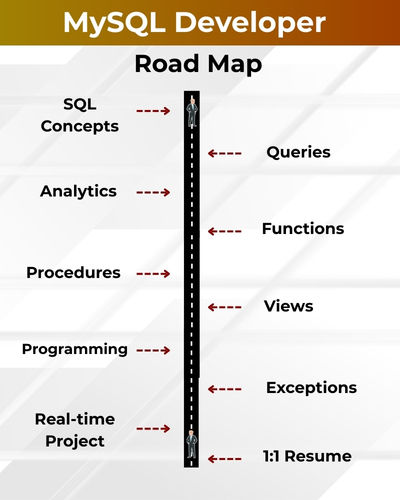
MySQL Developer plays a vital role in designing, developing, and optimizing reliable database systems. They work on schema design, complex queries, stored procedures, and performance tuning to ensure scalability and security. With the growing demand for data-driven applications, learning MySQL offers excellent career opportunities in web development, enterprise solutions, and cloud-based platforms.
✅ SQL Queries, Joins, Subqueries
✅ Stored Procedures & Functions
✅ Triggers, Views & Transactions
✅ Normalization, Database Design
✅ Indexing & Query Optimization
✅ Dynamic SQL & User Variables
✅ JSON, XML Data Handling
✅ Query Tuning Practices
✅ Real-Time PostgreSQL Projects
✅ 1:1 Mentorship & Career Prep
MySQL Developer Training
CHAPTER 1: INTRODUCTION TO DBMS
What is Database?; Purpose of Database & Management; Advantages of Database for Data
Storage; Introduction to DBMS; Database Design; Most Popular RDBMS Products; History, Real-
time Database Examples (LIVE); Microsoft SQL, Oracle & MySQL Differences; When to use
which?
CHAPTER 2: MYSQL INSTALLATION
MySQL Installation Process (step by step); Common Installation Errors & Solutions; MySQL
Workbench Installation Concepts & MySQL Command prompt; MySQL Versions and Editions
Comparisons; Connect Workbench Developer Tool; Creating a new User; Grant permission; Lock
and Unlock User Account;
CHAPTER 3: SQL LANGUAGE COMMANDS – 1
Structured Query Language (SQL); Data Definition Language (DDL); Data Retrieval Language
(DRL); Data Manipulation Language (DML); Transaction Control Language (TCL); Database
Security (DCL); Rules of SQL Queries and Statements; Real-world applicative uses of SQL;
Creating Users and Tables;
CHAPTER 4: SQL LANGUAGE COMMANDS – 2
Table Data Inserts; MySQL Data Types; DDL Commands with Examples; CREATE, ALTER,
TRUNCATE, DROP, RENAME; DESCRIBE command; DML, DRL Commands Operators;
INSERT, UPDATE, DELETE Statements; Truncate & Delete commands; SELECT; SQL
Comments; Single Line & Multi Line Comments;
CHAPTER 5: SQL OPERATORS
SET, AND, OR, NOT, IN; BETWEEN (NOT BETWEEN); Arithmetic, Logical Operators; Operator
Precedence; UNION, UNION ALL, INTERSECT, MINUS; LIKE (NOT LIKE), IS NULL (IS NOT
NULL); DCL and TCL;
CHAPTER 6: GROUPING QUERY RESULTS
Identify Distinct Values in Tables; Group & Aggregate function; Group By Operations in Queries;
Having Clause; Aggregate Functions with Group By; Order By; Query Execution Order with Group
By; Arithmetic Functions, Character Function; Date & Time Functions, String Function; Conversion
Functions;
CHAPTER 7: CONSTRAINTS & KEYS – 1
Data Integrity constraints; Domain Integrity Constraints; Entity Integrity Constraints; Referential
Integrity Constraints; Check Constraints; NOT NULL, UNIQUE Constraint; PRIMARY KEY and
Usage;
CHAPTER 8: CONSTRAINTS & KEYS – 2
FOREIGN KEY Constraints & Relations; Column & Table Constraints; Adding Constraints to
Tables, User Constraints ; Enabling – Dropping Constraints, Self Referential Integrity; Disabling
Constraints on Tables;
CHAPTER 9: QUERIES & JOINS
Need for Joins & Table Comparisons; SET Operations; Join Types : Equi Join, Simple Join; Inner
Join and Query Conditions; Cross Join (Cartesian Join); Non-Equi Join & Self Join; Outer Joins –
Types, Advantages; Cross Joins – Advantages * Limitations; Self Joins, Merge Joins, Sub
Queries; Inner Self Joins & HAVING;
CHAPTER 10: VIEWS, SYNONYMS, SEQUENCES
VIEWS IN MYSQL, Understanding Views & Use; Relational Views and Standard Views; SIMPLE
VIEWS and COMPLEX VIEWS in MYSQL; Column Definitions in VIEWS; Using VIEWS for DML
Operations; Forced Views, CHECK Constraints in Views;
CHAPTER 11: SUB QUERIES, NESTED QUERIES – 1
Sub Queries in Real-world; Dynamic Conditions with Sub Queries; Sub Queries and Nested Sub
Queries; How does oracle Execute Nested Sub Queries?; Inner Select and Outer Select Queries;
Usage of Sub Queries with WERE, HAVING; Impact of Having Clause in Sub Queries; Select Nth
Highest salary; Select Duplicate Records; Delete Duplicate Records; Advantages of MySQL Sub
Query;
CHAPTER 12: SUB QUERIES, NESTED QUERIES – 2
Subquery in the Select Clause; Subquery in the From Clause; Execution of Correlated Sub
Queries in SQL; IN, ANY SOME, ALL Operators in Sub Queries; PAIR WISE and NON PAIR WISE
in Sub Queries; Single Row Subquery & Multiple Row Subquery; Multiple Column Subquery;
Uncorrelated Subquery;
CHAPTER 13: PERFORMANCE (QUERY) TUNING
Indexes – Definition & Architecture; B Tree Concept; Clustered and Non clustered Indexes; Primary
Key and Clustered Index; Unique Key and Non-Clustered Indexes; Simple Index, Rebuild Index;
Materialized Views – Indexed Views; Composite Index, Function Based Index; Range and Hash
Partition; List Partition and Composite Partition; Parallel Query Process; Performance Tuning
Advantages?;
CHAPTER 14: MYSQL – (CONTROL STRUCTURE) – Level I
Simple If, If. Else. Nested If. Else Statements; Ladder, Selection, Simple Case Statements;
GOTO Label and EXIT Statements; Iterations, Simple LOOP, WHILE; FOR LOOP and
NESTED LOOPS in MYSQL; MYSQL Select statements; Composite Data Types;
CHAPTER 15: MYSQL – (CONTROL STRUCTURE) – Level 2
Cursor Variables and Management in MYSQL; Implicit & Explicit Cursors and Attributes; Cursor
with Parameters and Nested LOOPs; Cursors with Sub Queries, Reference Cursors; Implicit
Cursors, Explicit Cursor; Parameterized Cursors, Ref Cursors; MySQL Cursors Usage;
CHAPTER 16: MYSQL – (CONTROL STRUCTURE) – Level 2
Transaction Concepts in Databases with SQL; Transaction Types and Uses; Commit and
Rollback Operations; Nested Transactions with Save points; Database Read Consistency with
SQL; Creation of READ ONLY VIEWS – Realtime Use; Sequences, with Synonyms; View Vs
Synonym in MySQL;
CHAPTER 17: ADVANCED MYSQL – 1
Procedures in MYSQL: STORED PROCEDURE; Parameters (IN, OUT, IN OUT);
POSITIONAL and NAMED Notation; Procedure with Cursors and Sub Queries; ALTER and
DROP of Stored Procedures; Using SPs for Dynamic SQL Statements; Loops and Table
Variables in SQL Programs;
CHAPTER 18: ADVANCED MYSQL – 2
Functions in MYSQL: Real-time Usage; User Defined Functions, Nested Functions; Using
Functions in SQL Statements; Comparing Stored Procedures and Functions; Using SPs with
Table Value Functions; Analytical Function; Rank(), Dense_Rank(),Row_Number(); IFNULL()
FUNCTION;
CHAPTER 19: ADVANCED MYSQL – 3
Pragma_Autonomous_Transaction() with SPs; Returning into clause, Bulk Collect; For All,
Definer/Invoker Rights & Usage; About Flash Back Queries, Dynamic SQL; Flash Back
Command, Purge Command; Regular Expressions; Recycle Bin; Delete Recycle Bin Table;
CHAPTER 20: ADVANCED MYSQL – 4
MySQL Triggers: Row Level & Statement Level Triggers; DML Triggers; DDL Triggers and
Schema Level Triggers; OLD & NEW References, Trigger Auditing; Enabling / Disabling
Triggers, Dropping Triggers; Triggers and Data Manipulations; Memory Tables in Triggers;
DML & DDL Events with Triggers; Compound Triggers; Working with LARGE Tables;

What is the SQL Server T-SQL Training?
This course teaches complete SQL Server T-SQL from basics to advanced: SQL queries, T-SQL programming, query tuning, and Azure SQL development with real-time practical training.
Who can join this SQL course?
Anyone — freshers, non-IT students, Data Analysts, BI Developers, Data Engineers, and SQL Developers. No prerequisites. All topics start from basics.
What are the training plans available?
Plan A: MSSQL + TSQL Queries
Plan B: MSSQL + TSQL Programming + Query Tuning
Plan C: MSSQL + Programming + Tuning + Azure SQL Dev with AI
Each plan includes increasing depth and duration.
What are the core SQL basics covered?
Database creation, tables, DDL, DML, DQL, SELECT queries, operators, schema usage, Excel imports, and SQL Server installation.
Do you teach constraints and keys?
Yes. NULL, NOT NULL, UNIQUE, PRIMARY KEY, FOREIGN KEY, DEFAULT, ER diagrams, and relational modelling are covered.
What indexing topics will I learn?
Clustered, non-clustered, unique indexes, composite indexes, index tuning, index usage verification, and query optimizer basics.
Are joins taught in detail?
Yes. Inner, left, right, full outer, cross joins, multi-table joins, aliasing, join audits, and real-time comparison queries.
Do you teach Views, RLS, and metadata?
Yes. Creating & using views, DML with views, Row Level Security, CHECK OPTION, system metadata queries, and audits.
Will I learn Stored Procedures?
Yes. Writing stored procedures, input/output parameters, tuning SPs, metadata SPs, recompilation, and transaction-based procedures.
Are Functions taught in this SQL course?
Yes. Scalar, inline table-valued, multi-statement functions, date/time functions, string functions, and aggregated queries.
Do you cover Triggers and Automations?
Yes. DML triggers, DDL triggers, Instead Of triggers, replication logic, audit triggers, and automation concepts.
Will I learn transactions and ACID concepts?
Yes. Transaction control, commit/rollback, checkpoints, locks, blocking, lock hints, and real-time OLTP usage.
Do you teach SQL tuning and performance optimization?
Yes. CTEs for tuning, statistics, indexing strategies, partitions, query store, execution plans, DMVs/DMFs, and workload analysis.
What advanced T-SQL programming topics are included?
Variables, try-catch, table types, TVPs, dynamic SQL, recursive CTEs, loops, PIVOT/UNPIVOT, temp tables, synonyms, and debugging.
Is SQL Server architecture included in this course?
Yes. Database engine architecture, compiler, optimizer, SQL OS, storage, log files, filegroups, pages, extents, VLFs, and large database planning.
Do you cover locking, deadlocks, and isolation levels?
Yes. Lock types, blocking scenarios, deadlock analysis, SP_LOCK, SP_WHO2, profiler deadlock graphs, and all isolation levels including snapshot.
Is Azure SQL included in the training?
Yes, in Plan C. Azure SQL fundamentals, DB creation, networking, firewall, migrations, metrics, tuning, AI search, backups, and restores.
Are real-time projects part of the course?
Yes. The training includes mini projects, enterprise case studies, tuning assignments, and 3 real-time projects for resume placement.
What training modes are available?
Live Online Training, Self-Paced Videos, Corporate Training, Resume Support, Mock Interviews, and Free Demo Sessions.

Placement Partners