

#Azure Data Factory

Azure Data Factory (ADF) is a powerful cloud-based data integration service which allows developers to create, schedule, and manage data pipelines for ETL and data movement created by Microsoft. Mastering in Azure Data Factory can land you in Data Engineer, ETL Developer, and BI Specialist job roles

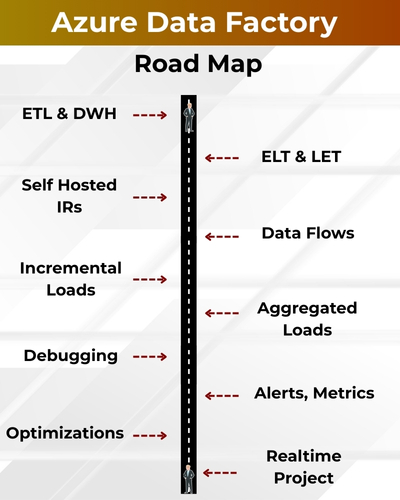
✅ ADF Pipelines & Data Flows
✅ Linked Services and Triggers
✅ Copy Activity, Mapping Data Flow
✅ Parameterization & Expressions
✅ Azure Synapse & Databricks
✅ CI/CD with GitHub & DevOps
✅ Monitoring, Debugging
✅ Key Vault & Managed Identities
✅ Real Time Project
✅ 1:1 Mentorship, Resume

Azure Data factory
Training Course Contents:

Module 1: MSSQL & TSQL Queries

Ch 1: SQL SERVER INTRODUCTION

  • Database Introduction
  •  Types of Databases
  •  Need for & ETL, DWH
  •  BI Implementations
  •  SQL Server Advantages
  •  Version, Editions of MSSQL
  •  Data Analyst Job Roles

Ch 2: SQL SERVER INSTALLATIONS

  • SQL Server 2019, 2017
  • SSMS Tools Installation
  • Database Engine (OLTP)
  • SCM, Configuration Tools
  • Instance Types, Uses
  • Authentication Modes
  • Collation, File Stream

Ch 3: SQL BASICS – 1

  • Need for Databases, Tables
  • Need for SQL Commands
  • DDL, DML & DQL Statements
  • Database Creation @ GUI
  • Data Operations @ GUI
  • Session ID, SQL Context
  • DB, Tables, Data @ SQL

Ch 4: SQL BASICS – 2

  • DDL Variants in MSSQL
  • DML Variants in MSSQL
  • INSERT & INSERT INTO
  • SELECT & SELECT INTO
  • Basic Operators in SQL
  • Special Operators in MSSQL
  • ALTER, ADD, TRUNCATE, DROP

Ch 5: Data Imports, Schemas

  • Data Imports with Excel
  •  ORDER BY & UNION
  • UNION ALL For Sorting Data
  •  Creating, Using Schemas
  •  Real-world Banking Database
  •  Table Migrations @ Schemas
  •  2 Part, 3 Part & 4 Part Naming

Ch 6 : Constraints, Index Basics

  • Need for Constraints, Keys
  •  NULL, NOT NULL, UNIQUE
  •  Primary Key & Foreign Key
  •  RDBMS and ER Models
  •  Identity Property, Default
  •  Clustered Index, Primary Key
  •  Non Clustered Index, Unique

Ch 7: Joins & Views Basics

  • JOINS: Purpose. Inner Joins
  • Left / Right / Full Outer Joins
  • Cross Joins, Query Tuning
  • Creating & Using Views
  • DML, SELECT with Views
  • RLS : WITH CHECK OPTION
  • System Views & Metadata

Ch 8: Functions(UDF), Data Types

  • Using Functions in MSSQL
  •  Scalar Value Functions
  • Inline & Multiline Functions
  • Date & Time Functions
  • String, Aggregate Functions
  • Data Types : Integer, Char, Bit
  • SQL Variant, Timestamp, Date

Ch 9: Stored Procedures,Models

  • Stored Procedures & Usage
  • Creating, Testing Procedures
  • Encryption, Deferred Names
  • SPs for Validations, Analysis
  • System SPs, Recompilation
  • Normal Forms & Types
  • Data Models, Self-References

Ch 10: Triggers, Temp Tables

  • Need for Triggers
  • DDL & DML Triggers
  • Using Memory Tables
  • Data Replication, Automation
  • Local & Global Temp Tables
  • Testing & Using Temp Tables
  • SELECT .. INTO & Bulk Loads

Ch 11: DB Architecture, Locks

  • Planning VLDBs : Files, Sizing
  • Filegroups, Extents & Types
  • Log Files : VLF, Mini LSN
  •  Table Location, Performance
  • Schemas, Transfer, Synonyms
  • Transactions Types, Lock Hint
  •  Query Blocking Scenarios

Ch 12 : Cursors & CTEs, Links

  • Cursors : Realtime Use
  • Fetch & Access Cursor Rows
  • CTEs for SELECT, DML
  • CTEs: Scenarios & Tuning
  • Linked Servers, Remote Joins
  • Linked Servers: MSDTC, RPC
  • Tuning Remote Queries

Ch 13: Merge, Upsert & Rank

  • Need for Merge in ETL
  • Incremental Loads with SQL
  • MERGE and RANK Functions
  • Window Functions, Partition
  • Identify, Remove Duplicates

Ch 14: Grouping & Cube

  • Group By & HAVING
  • Cube, Rollup & Grouping
  • Joins with Group By
  • 3 Table, 4 Table Joins
  • Query Execution Order

Ch 15: Self Joins, Excel Analysis

  • Self Joins & Self References
  •  UNION, UNION ALL
  •  Sub Queries with Joins
  •  IIF, CASE, EXISTS Statements
  •  Excel Analytics, Pivot Reports

Module 2 : Azure Data Factory

Ch 1: ETL, DWH Introduction

  • Database Introduction Data Warehouse (DWH)
  • Data Engineering Work Flow
  • Cloud Concepts: IaaS, PaaS
  • SaaS & Azure Cloud Concepts
  • Azure Resources & Groups
  • Storage, ETL, IoT Resources

Ch 2: Azure Intro, Azure SQL

  • Azure SQL Server, SQL DBA
  • Azure SQL Database (OLTP)
  • Azure SQL Pool (DWH)
  • Connections from SSMS Tool
  • Connections from ADS Tool
  • Pause / Resume SQL Pool
  • Source Data Configurations

Ch 3: Azure Synapse (DWH)

  • Synapse Pool Architecture
  • Control Node, Compute Node
  • DMS & Partitioned Tables
  • Creating Tables with TSQL
  • Distributions: RR, Hash, Repl
  • Big Data Loads with TQL
  • Important DMFs & DMVs

Ch 4: Azure Data Factory (ADF)

  • Need for ADF & Pipelines
  • Linked Services & IRs
  • Datasets, Pipelines, Triggers
  • Copy Data Activity & CDT
  • Data Loads Pipelines, DTUs
  • Pipeline Monitoring, Edits

Ch 5: ADF Incremental Loads – 1

  • File Incremental Loads
  • Storage Account, Data Lake
  • Binary Copy, Schema Drift
  • Staging Concept in ADF
  • DOCP, Logging & Consistency
  • Polybase Concept & Tuning

Ch 6: ADF Incremental Loads – 2

  • Implement SCD with ADF
  • Self-Hosted IR: Realtime Use
  • On-premise Data: Incr Loads
  • Copy Method: Upsert, Keys
  • Staging & ADF Optimizations
  • Pipeline Runs, Activity IDs

Ch 7: ADF Data Flow – 1

  • Data Flow Transformations
  • Spark Clusters for Debugging
  • Optimized Clusters, Preview
  • Conditional Split, SELECT
  • Sort, Union Transformations
  • Pipelines with Data Flow

Ch 8: ADF Data Flow – 2

  • Working with Multiple Tables
  • Join Transform, Broadcast
  • Row Filters, Column Filters
  • Surrogate Keys, Derived Cols
  • ETL Loads Dates, Sink Options
  • Aggregated Data Loads

Ch 9: ADF Data Flow – 3

  • Pivot Transformation
  • Group By & Pivot Keys
  • Column Pattern, Deduplicate
  • Lookup, Cached Lookup
  • Tuning Transformations
  • Tuning Data Flow, Spark

Ch 10: Synapse Analytics – 1

  • Azure Synapse Analytics
  • Dedicated SQL Pools
  • TSQL: Stored Procedures
  • Synapse Pipelines, Tuning
  • SP Activity in Pipelines, Jobs
  • Comparing ADF & Synapse

Ch 11: Synapse Analytics – 2

  • Serverless Pools in Synapse
  • TSQL Scripts with Serverless
  • ADLS Data Imports & ELT
  • Synapse Aggregation, Analytics
  • Synapse Optimizations
  • Synapse Security & Logins

Ch 12: Synapse Analytics – 3

  • Apache Spark Pool & Usage
  • Synapse Analytics with Pools
  • PySpark Staging, Aggregations
  • Spark Queries & Python ETL
  • Python Notebooks, Pipelines
  • Integrating Python with DWH

Ch 13: Parameters, SCD & ETL

  • ADF Templates in Realtime
  • Table Incremental Loads
  • Control Tables, Watermarks
  • Pipeline Parameters, SPs
  • Dynamic Data Sets, SCD

Ch 14: CDC @ ETL, ELT & Tuning

  • Using CDC in ADF
  • Control Tables (CT): Upserts
  • Handling Inserts, Updates
  • SCD Type 1 & Type 2
  • ADF, Synapse: Limitations

SQL SCHOOL

24x7 LIVE Online Server (Lab) with Real-time Databases.
Course includes ONE Real-time Project.

Azure Data Factory Training FAQ's

What is Azure Data Factory Job Role?

An Azure Data Factory (ADF) professional is responsible for designing, building, and managing cloud-based data integration pipelines using Microsoft’s ADF service. The role includes creating ETL/ELT pipelines, orchestrating data workflows, managing data movement across hybrid sources, and ensuring data transformation at scale. Azure Data Factory engineers play a critical part in modern data engineering and analytics solutions.

What are the Job Roles of an Azure Data Factory ?

💼 Top Job Roles:

1️⃣ Design and implement data pipelines using Azure Data Factory
2️⃣ Build and manage ETL and ELT workflows for structured and unstructured data
3️⃣ Integrate on-premises and cloud data sources securely
4️⃣ Orchestrate complex workflows with triggers, parameters, and variables
5️⃣ Monitor, troubleshoot, and optimize pipeline performance
6️⃣ Collaborate with data engineers, architects, and BI teams and more..!

What does our Azure Data Factory Training course contains?

The course is carefully curated with below module:
👉🏻Module 1: MSSQL & TSQL Queries
👉🏻Module 2: Azure Data Factory

Who can join this course?

  • Freshers targeting cloud data engineering careers

  • ETL developers moving to Azure data integration

  • SQL/DBA professionals upgrading to cloud pipelines

  • IT professionals interested in data orchestration and automation

  • Anyone passionate about building cloud data pipelines

No prior coding experience is required. All concepts are taught from scratch
What training modes are available?

Option 1:        LIVE Online Training  (100% Interactive, step by step, assignments)

Option 2:        Self Paced Videos (100% practical, step by step with concept wise assignments)

You may choose any one of these options, same curriculum!

I (Trainer) shall be available for doubts and clarifications, assignment check and review.

Why should I choose SQL School for Azure Data Factory training?

👉🏻 Every session is Practical, Step by Step with Concept wise FAQs !!

👉🏻 100% results with on-time practice.  Daily Tasks for every session.

👉🏻 Concept wise tasks be submitted before next class for Job Waiters / Starters.

👉🏻 Concept wise tasks due for submission by Weekends for Working Professionals.

Why Choose SQL School

  • 100% Real-Time and Practical
  • ISO 9001:2008 Certified
  • Weekly Mock Interviews
  • 24/7 LIVE Server Access
  • Realtime Project FAQs
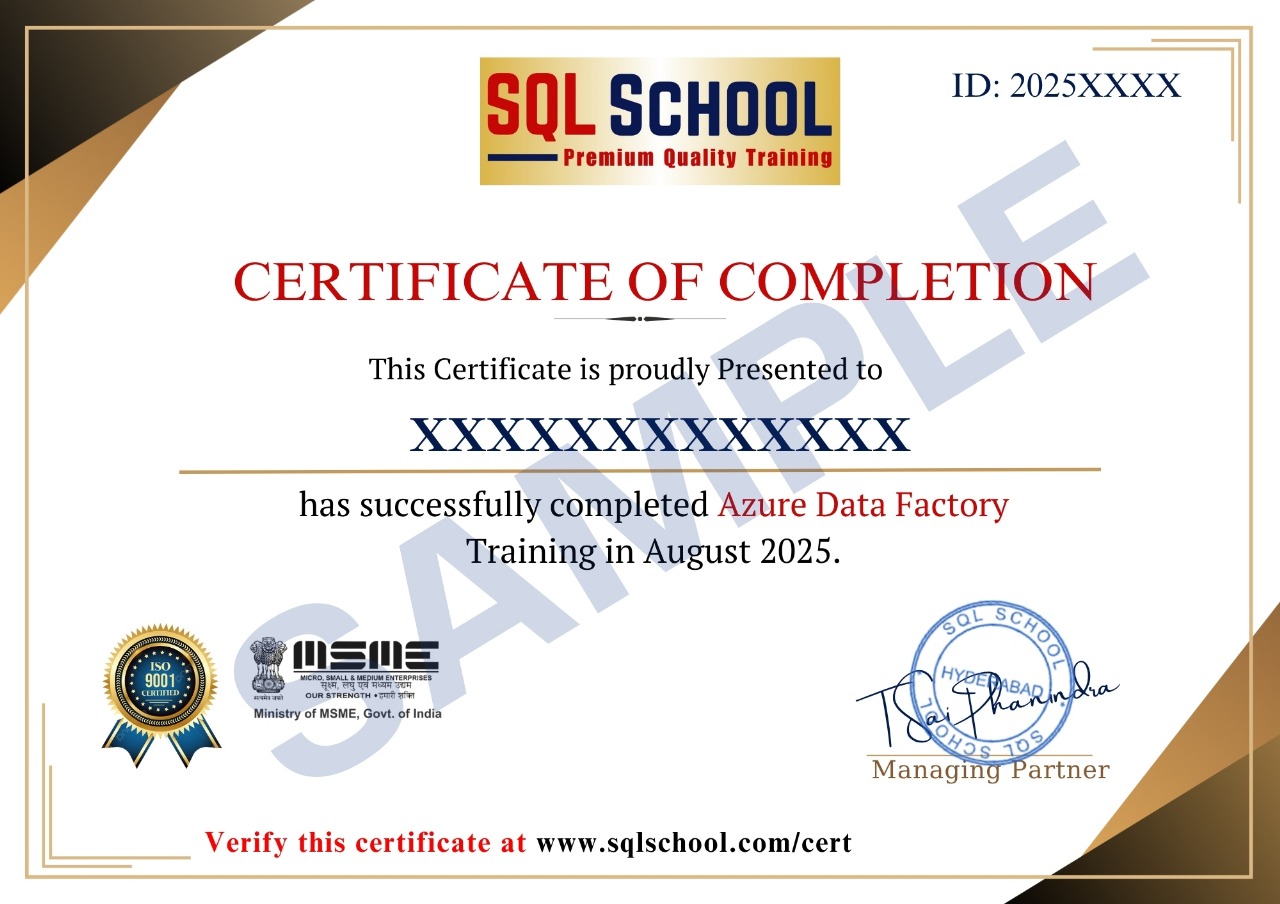
  • Course Completion Certificate
  • Placement Assistance
  • Job Support