
What is MFA? Multi-Factor Authentication Explained
With the increasing number of applications, databases, cloud applications and business systems going online, cyber security has become more of a necessity than a choice for individuals and organizations. Usernames and passwords alone are increasingly inadequate due to the possibility of being stolen, guessed, reused or even cracked by phishing and data breaches.
This is where Multi-Factor Authentication (MFA) comes into the picture.
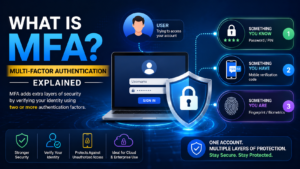
What is MFA? MFA is short for Multi-Factor Authentication.. It is a security approach that needs multiple authentication factors from two or more individuals to login to an account, application, system or cloud resource. According to NIST, MFA is authentication that uses at least two different types of authentication factors.
How Does MFA Work?
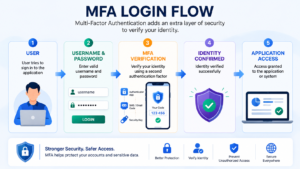
MFA provides extra protection to the standard login procedure. Rather than relying solely on a password, the system requests the user to verify his or her identity with his or her other independent factor.
Let’s say a worker logs in to a business’s cloud application.
- The employee is asked to log in using a username and password.
- Those credentials are validated by the system.
- A second authentication request is created.
- The employee signs off on the notification, enters a one-time code, uses a security key or provides biometric verification.
- On successful verification, access is granted.
It is easier to understand what is MFA when you consider it as multiple security checkpoints. Having the user’s password doesn’t mean an attacker can log on to the account.Having the password doesn’t mean that an attacker can log on to the account. Microsoft also refers to MFA as the second step of verification when you log in.
What are the 3 factors of authentication?
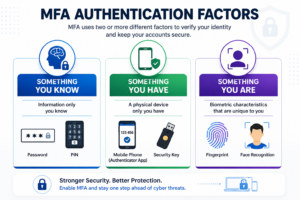
Typically, MFA will use three types of authentication factors. NIST refers to them as something you know, something you have, and something you are.
1. Something You Know
This is information that the user knows.
Examples include:
- Password
- PIN
- Passphrase
2. Something You Have
This includes something that the user has.
Examples include:
- Smartphone
- Hardware security key
- Smart card
- Cryptographic authenticator
3. Something You Are
This is based on biometric features.
Examples include:
- Fingerprint
- Facial recognition
- Other biometric characteristics
An important aspect of MFA is that they have different types of authentication factors. Two passwords are not considered to be true MFA as both are in the “something you know” class.
What is MFA For?
Even though passwords are not the preferred method of authentication, they continue to be a favorite target of attackers. They can be accessed via phishing, credential theft, password reuse, social engineering or compromised systems.
An extra barrier of security is being offered by MFA.
An attacker that gains possession of a password might require another factor, such as access to a registered device or security key. MFA is a recommended method of providing extra security for Internet-based services, according to NIST.
The principal advantages are:
- Stronger account security
- Additional protection if passwords are compromised
- Minimal exposure to credential-based attacks.Minimal exposure to credential based attacks.
- Improved security of valuable business data.Enhanced security of valuable business data.
- Stronger identity verification
- Supporting enterprise security and access-control strategies
So What is MFA? isn’t just a question of typing an OTP after a password. MFA is a more comprehensive method of identity security to ensure the person requesting access is who they claim to be.
Common MFA Methods
There are multiple authentication methods that can be used to implement MFA. Choices of methods are contingent on the level of security, infrastructure, user experience and sensitivity of the resource.
Common methods include:
- Authenticator applications
- One-time passcodes
- Push notifications
- Hardware security keys
- Smart cards
- Fingerprint authentication
- Facial recognition
- Certificate-based authentication
- Passkeys and FIDO2 authentication.
Microsoft Entra ID, for instance, lets users use MFA, as well as other forms of phishing-resistant authentication, like passkeys (FIDO2), Windows Hello for Business, and certificate-based authentication.
What is MFA? also requires knowledge of the fact that not all authentication methods are created equal. Modes should be selected according to risk and where applicable, stronger, phishing-resistant modes should be used.
MFA Example in a Real-World Scenario
Consider an organization using Microsoft Azure and Microsoft Entra ID.
An administrator attempts to access an important cloud resource.
Without MFA:
Username → Password → Access
If the password is compromised, an unauthorized person may attempt to sign in.
With MFA:
Username → Password → Additional Verification → Access
The additional verification might involve an authenticator application, biometric verification, or another approved authentication method.
Microsoft Entra Conditional Access can also be configured to require MFA for particular sign-in scenarios.
This practical example makes What is MFA? easier to understand: the password represents one security factor, while the additional verification provides another independent factor.
Where Is MFA Commonly Used?
MFA is widely used across personal, enterprise, and cloud environments.
Typical use cases include:
- Email accounts
- Online banking
- Cloud platforms
- Microsoft 365
- Azure environments
- VPN access
- Corporate applications
- Administrative accounts
- Database administration
- Remote access systems
- Source-code repositories
- Financial applications
For organizations adopting cloud services, What is MFA? becomes particularly important because users and administrators may access resources from different devices and networks.
Privileged accounts deserve especially strong authentication because compromised administrative credentials can expose critical systems and data.
Best Practices for Implementing MFA
Simply enabling MFA is not the end of an organization’s identity-security strategy. MFA should be implemented carefully and combined with appropriate access policies.
Recommended practices include:
- Require MFA for privileged accounts.
- Extend MFA protection to regular users based on organizational policy.
- Prefer stronger, phishing-resistant authentication methods where appropriate.
- Use Conditional Access and risk-based policies when available.
- Provide secure account-recovery procedures.
- Educate users about phishing and suspicious authentication prompts.
- Regularly review authentication methods and access policies.
- Remove access promptly for inactive or departed users.
- Never hard-code or casually share authentication secrets.
NIST SP 800-171 Rev. 3 includes a requirement to implement MFA for access to privileged and non-privileged accounts in systems covered by that standard.
Therefore, understanding What is MFA? should include both the technology and the operational practices required to manage it securely.
Is MFA 100% Secure?
No security mechanism provides absolute protection.
MFA significantly strengthens authentication, but attackers may still attempt phishing, social engineering, session theft, MFA fatigue attacks, or other techniques depending on the authentication method being used.
Organizations should therefore combine MFA with:
- Strong identity management
- Least-privilege access
- Conditional Access
- Security monitoring
- User awareness
- Device security
- Phishing-resistant authentication
- Regular access reviews
This is why the answer to What is MFA? should not be “an OTP system.” MFA is one important layer within a broader cybersecurity and identity-protection strategy.
Conclusion
Multi-Factor Authentication is one of the fundamental controls organizations can use to strengthen account security. Instead of relying solely on passwords, it requires multiple distinct factors to verify a user’s identity.
In simple terms, What is MFA? MFA is Multi-Factor Authentication — a security process that requires two or more distinct authentication factors before granting access.
Whether you are working with Azure, Microsoft Entra ID, databases, cloud applications, or enterprise systems, understanding MFA is an important cybersecurity skill.
For IT professionals, administrators, cloud engineers, database administrators, developers, and data engineers, MFA is no longer just a theoretical security concept. It is something you are likely to encounter regularly when accessing modern enterprise and cloud environments.

